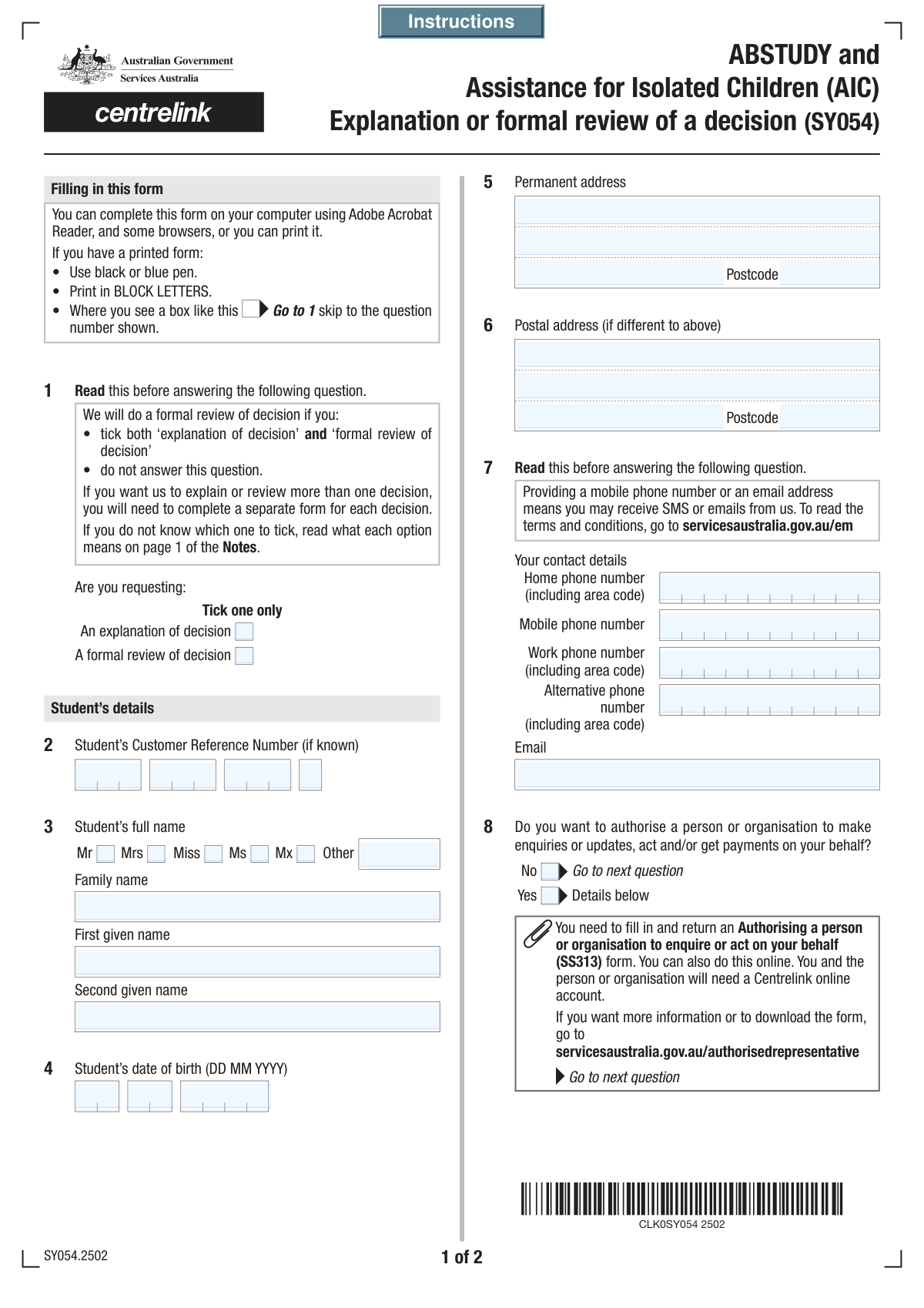
Yes! You can use AI to fill out Form SY033 - Review of Decision
Form SY033, the Review of Decision form, is an official document provided by Services Australia for individuals who wish to appeal or seek clarification on a decision related to their ABSTUDY or Assistance for Isolated Children (AIC) Scheme payments. This form provides a formal channel to question decisions about eligibility, payment amounts, or debt recovery, ensuring a fair review process. Today, this form can be filled out quickly and accurately using AI-powered services like Instafill.ai, which can also convert non-fillable PDF versions into interactive fillable forms.
Our AI automatically handles information lookup, data retrieval, formatting, and form filling.
It takes less than a minute to fill out SY033 using our AI form filling.
Securely upload your data. Information is encrypted in transit and deleted immediately after the form is filled out.
Form specifications
| Form name: | Form SY033 - Review of Decision |
| Number of fields: | 52 |
| Number of pages: | 4 |
| Filled form examples: | Form SY033 Examples |
| Language: | English |
Instafill Demo: How to fill out PDF forms in seconds with AI
How to Fill Out SY033 Online for Free in 2026
Are you looking to fill out a SY033 form online quickly and accurately? Instafill.ai offers the #1 AI-powered PDF filling software of 2026, allowing you to complete your SY033 form in just 37 seconds or less.
Follow these steps to fill out your SY033 form online using Instafill.ai:
- 1 Navigate to Instafill.ai and upload or select the Review of Decision (SY033) form.
- 2 Use the AI assistant to automatically fill in the student's personal details, including their Customer Reference Number (CRN), full name, date of birth, and contact information.
- 3 Select your request type: either an 'explanation of a decision' or a 'formal review of a decision'.
- 4 Specify the decision you want reviewed by indicating its type (e.g., ABSTUDY eligibility, overpayment), the date the decision was made, and other relevant details.
- 5 Clearly state the reasons why you are requesting a review or explanation in the provided section.
- 6 Review all the information pre-filled by the AI for accuracy and make any necessary corrections.
- 7 Complete the declaration section by electronically signing and dating the form to certify the information is correct.
Our AI-powered system ensures each field is filled out correctly, reducing errors and saving you time.
Why Choose Instafill.ai for Your Fillable SY033 Form?
Speed
Complete your SY033 in as little as 37 seconds.
Up-to-Date
Always use the latest 2026 SY033 form version.
Cost-effective
No need to hire expensive lawyers.
Accuracy
Our AI performs 10 compliance checks to ensure your form is error-free.
Security
Your personal information is protected with bank-level encryption.
Frequently Asked Questions About Form SY033
This form is used to request either an explanation of a decision or a formal review of a decision, typically related to student support like ABSTUDY or AIC. It allows you to seek clarification or officially challenge a decision you believe is incorrect.
Any student who has received a decision regarding their eligibility, payments, or a debt and wishes to have it explained or formally reviewed should complete this form.
Requesting an 'explanation' is for when you want to understand the reasons behind a decision. A 'formal review' is a request for an authorised officer to re-examine the decision because you believe it is wrong.
Your Customer Reference Number is a unique identifier that can be found on letters and other correspondence you have received from the agency. It is usually located near your name and address.
You must indicate the type of decision (e.g., ABSTUDY eligibility, overpayment), the date the decision was made, and provide a detailed reason why you are requesting the explanation or review.
This section is where you can give permission for another person or organization to act on your behalf regarding this matter. If you want to handle all communication yourself, you should select 'No'.
Only if your mailing address is different from your home address. Your permanent address is where you live, while the postal address is where you want to receive mail about this review.
Check any letters or notifications you received for the date. If you cannot find it, provide your best estimate and note that it is an approximation in the 'Reason for Review' section.
After completing the form, you must print it, sign the declaration, and then submit it by post or in person to the relevant office. Check the agency's official website for the correct submission address.
Yes, services like Instafill.ai use AI to help you accurately auto-fill form fields. This can save you time and help prevent common errors.
You can upload the form to the Instafill.ai platform, which will make the document interactive. You can then enter your information once and let the AI populate it into all the correct fields before you download and print it.
If you have a non-fillable or 'flat' PDF, you can use a service like Instafill.ai. It can convert the static document into an interactive, fillable form so you can easily type your answers.
If your decision is not about ABSTUDY/AIC eligibility or overpayment, check the 'Other' box. Then, use the space provided to clearly specify the type of decision you want reviewed.
Yes, you must sign and date the declaration to certify that the information you have provided is complete and correct. An unsigned form may be considered invalid and could delay the review process.
Compliance SY033
Validation Checks by Instafill.ai
1
Ensures a Request Type is Selected
This validation checks that either 'An explanation of decision' or 'A formal review of decision' is selected. This is a mandatory choice that defines the purpose of the entire submission and is required for routing the request correctly. If neither is selected, the form cannot be processed, and the user should be prompted to choose one option.
2
Validates Student Customer Reference Number Format
This check verifies that all four parts of the Student Customer Reference Number contain only numeric digits and conform to the expected length for each segment. This number is a primary identifier, and incorrect characters would lead to a failure in locating the student's record. Submissions with non-numeric or incorrectly formatted characters should be rejected with an error message.
3
Ensures Student's Core Name is Provided
This validation ensures that both the 'Family Name' and 'First Given Name' fields are filled out. A full name is essential for correctly identifying the student and for all official correspondence. If either of these mandatory fields is empty, the submission should be blocked until the required information is provided.
4
Requires at least one Contact Method
This check verifies that the user has provided at least one form of contact information, such as a phone number (Mobile, Home, or Work) or an email address. This is crucial for the processing office to communicate with the student regarding their request. If no contact information is provided, the form submission should be flagged, prompting the user to add a primary contact method.
5
Validates Email Address Format
This check ensures that if an email address is provided, it follows the standard format (e.g., [email protected]). An invalid email address would prevent the student from receiving important electronic notifications and updates about their case. The system should reject invalid formats and prompt the user to correct the entry before submission.
6
Ensures Student's Date of Birth is a Valid and Plausible Date
This validation combines the 'Day', 'Month', and 'Year' of birth fields to confirm they form a legitimate calendar date (e.g., not 31 February). It also checks that the date is in the past and represents a plausible age for a student, for example, older than 14. An invalid or illogical date of birth can cause significant issues with identity verification and eligibility checks.
7
Conditional Requirement for 'Other Decision Type'
This check enforces a conditional rule: if the 'Other' checkbox under 'Decision for Review' is selected, the 'Other Decision Type' text field must not be empty. This ensures that when a non-standard decision type is chosen, a specific description is provided for context. A failure to provide this detail would leave the request ambiguous and unprocessable.
8
Validates the 'Date of Decision'
This validation ensures that the 'Decision Day', 'Decision Month', and 'Decision Year' fields combine to form a valid calendar date. Furthermore, it checks that this date is not in the future, as a decision cannot have been made on a future date. This is critical for establishing the timeline of events and determining if the review request is within an allowed timeframe.
9
Verifies Logical Chronology of Dates
This check compares the 'Date of Decision' with the 'Declaration Date'. The date the form is declared and signed cannot be before the date the decision being reviewed was made. This logical consistency check helps prevent data entry errors and ensures the timeline of the request is valid.
10
Mandatory Declaration Agreement
This validation confirms that the 'I have read, understood and agree to the above' checkbox is checked. This is a critical legal requirement, confirming the student attests to the accuracy of the information and understands the consequences of providing false data. The form cannot be submitted without this explicit agreement.
11
Validates Postcode Format
This check ensures that the 'Postcode' fields for both the permanent and postal addresses contain only numbers and adhere to the expected length (e.g., 4 digits). Correctly formatted postcodes are essential for mail delivery and for regional data analysis. Invalid entries should be flagged for correction to prevent correspondence from being lost.
12
Ensures Authorisation Consent is Explicitly Stated
This validation requires the user to select either 'Yes' or 'No' for the 'Authorisation Consent' question. This choice is mandatory as it has legal implications regarding who can act on the student's behalf. Leaving this unanswered creates ambiguity, so the form submission should be blocked until a choice is made.
13
Ensures Permanent Address is Complete
This check verifies that the core components of the permanent address ('Address Line 1', 'Suburb/Town', and 'Postcode') are not empty. A complete address is necessary for identity verification and for sending critical legal or financial documents. An incomplete address could result in significant delays or failures in communication.
14
Validates Declaration Date
This validation ensures the 'Declaration Day', 'Declaration Month', and 'Declaration Year' fields form a valid calendar date that is not in the future. The declaration date marks the official submission time of the information provided. An invalid or future date would compromise the legal standing of the declaration.
Common Mistakes in Completing SY033
Applicants often fail to distinguish between requesting an 'explanation' and a 'formal review,' sometimes checking both or the wrong one. This can lead to the agency taking an undesired action, such as simply re-explaining a decision when the applicant wanted to challenge it, causing significant delays. To avoid this, carefully consider your goal: select 'explanation' if you need to understand the reasoning, and 'formal review' if you disagree and want the decision re-evaluated.
The Customer Reference Number is split into four parts, increasing the chance of data entry errors like transposing digits or entering segments in the wrong fields. An incorrect number makes it impossible for the agency to locate the student's file, leading to an immediate rejection or delay of the request. Always double-check the number against an official document and enter it carefully, part by part.
Students may enter a preferred nickname or omit a middle name, which can cause a mismatch with the official records held by the agency. This discrepancy complicates identity verification and can stall the entire review process. To prevent this, always use your full legal name exactly as it appears on official documents like your student ID or prior correspondence from the agency.
Applicants whose mailing address (e.g., a P.O. Box) differs from their residential address often forget to fill out the separate 'Postal Address' section. This results in critical documents, including the outcome of the review, being sent to the wrong location and potentially being missed. If your mail should be sent to a different address, you must complete the 'Postal Address' fields; otherwise, you risk missing important communications.
A simple typo in an email address (like '.con' instead of '.com') or an old phone number can render the contact details useless. If the agency needs to ask for clarification or provide an update, they will be unable to reach you, putting your application on hold indefinitely. Carefully proofread your email and phone numbers before submitting. AI-powered form fillers like Instafill.ai can help by auto-populating and validating contact information formats to reduce such errors.
The 'Authorisation Consent' question is often skimmed, leading applicants to either give unintended access to a third party or fail to grant access to a desired representative (like a parent or agent). An incorrect 'Yes' can have privacy implications, while an incorrect 'No' can create processing hurdles for your representative. Read the clause carefully to understand what you are agreeing to before checking either 'Yes' or 'No'.
When a case doesn't fit the standard categories, applicants may check the 'Other' box but neglect to provide a mandatory explanation in the subsequent text fields. This leaves the application incomplete, as the reviewer has no idea what decision is being contested. If you select 'Other', you must provide a clear and concise description of the decision in the space provided, otherwise your request cannot be processed.
In the 'Reason for Formal Review' section, many applicants write vague statements like 'The decision was unfair' or 'I need the money' without providing substantive detail. This fails to give the reviewer a factual basis for reconsidering the decision, significantly weakening the appeal. To be effective, state precisely why you believe the decision was incorrect, referencing specific facts, circumstances, or rules that apply to your case.
Forgetting to check the declaration box, sign the form, or enter the date is one of the most common and critical errors. An unsigned or undated form is legally invalid and will be rejected immediately, forcing you to restart the submission process and potentially miss a deadline. Before submitting, always perform a final check to ensure you have ticked the box, signed, and dated the declaration section. If the form is a non-fillable PDF, a tool like Instafill.ai can convert it to a fillable version, making it easier to complete all fields before printing for signature.
Applicants may guess the date of the decision or enter the current date by mistake, especially if they don't have the original letter handy. An incorrect decision date can prevent the agency from locating the specific ruling you want reviewed, as there may be multiple decisions on your file. Always refer to the original notification letter to find the exact date and enter it correctly into the separate Day, Month, and Year fields to avoid processing delays.
Saved over 80 hours a year
“I was never sure if my IRS forms like W-9 were filled correctly. Now, I can complete the forms accurately without any external help.”
Kevin Martin Green
Your data stays secure with advanced protection from Instafill and our subprocessors
Robust compliance program
Transparent business model
You’re not the product. You always know where your data is and what it is processed for.
ISO 27001, HIPAA, and GDPR
Our subprocesses adhere to multiple compliance standards, including but not limited to ISO 27001, HIPAA, and GDPR.
Security & privacy by design
We consider security and privacy from the initial design phase of any new service or functionality. It’s not an afterthought, it’s built-in, including support for two-factor authentication (2FA) to further protect your account.
Fill out SY033 with Instafill.ai
Worried about filling PDFs wrong? Instafill securely fills form-sy033-review-of-decision forms, ensuring each field is accurate.