
Yes! You can use AI to fill out Form SY042, Details of income for student payments
Don't type 108 fields by hand. Tell our AI about yourself, or upload a document you already have, and it fills every field in seconds. You check it, then download, print or sign.
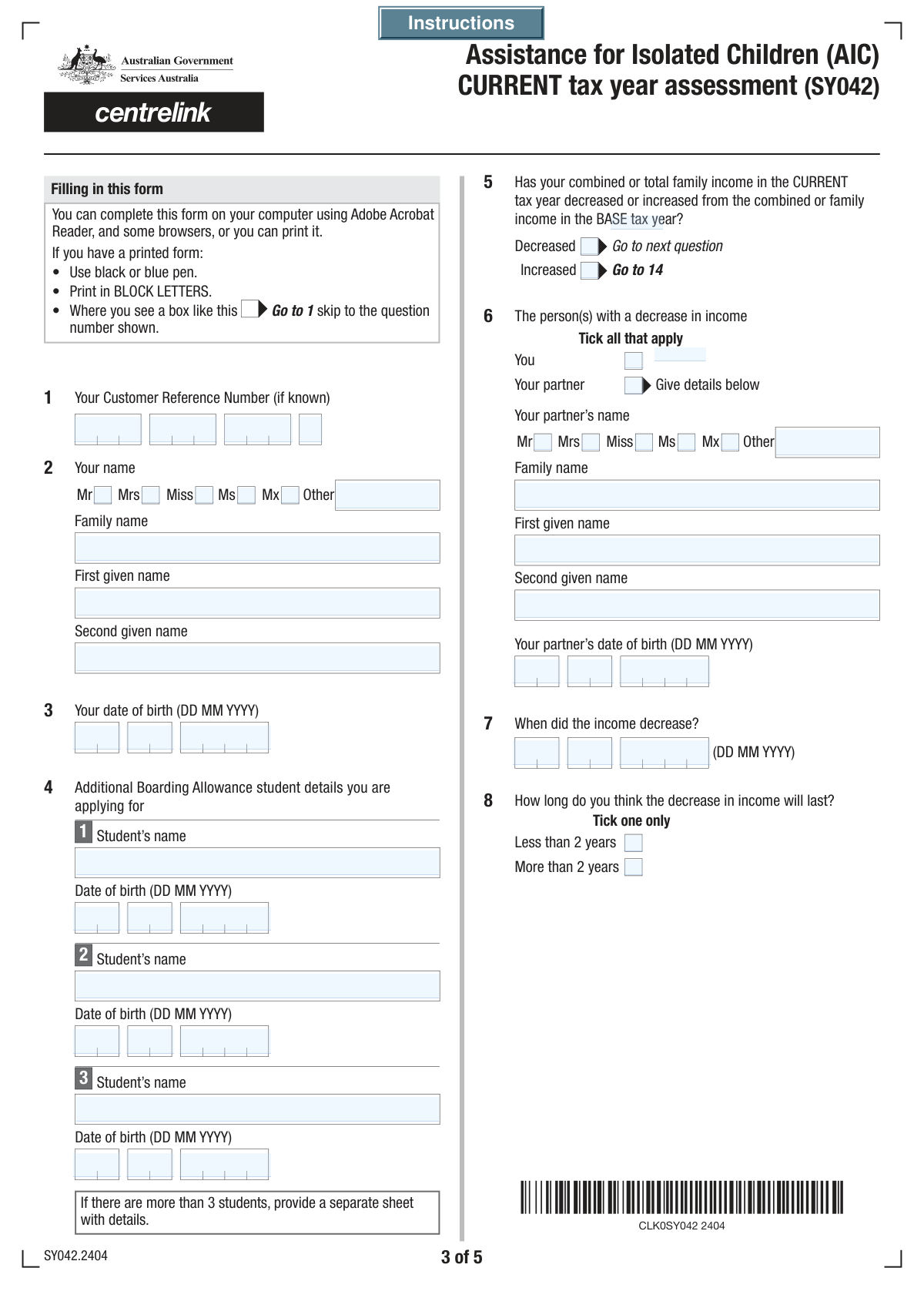
The AI does the filling. You just check it.
No typing into boxes, nothing to install.
What this form asks for
The AI fills all of it, from your answers or your documents.
The AI checks your answers before you download
14 checks built for this form, so a wrong date or a missing answer is caught before anyone else sees it.
This check ensures that all four segments of the Customer Reference Number are filled. A complete reference number is critical for uniquely identifying the customer's account and correctly processing the form. If any segment is missing, the system cannot link the submission to the correct record, and the submission should be rejected with a message prompting the user to fill all four parts.
This validation verifies that only one title checkbox (Mr, Mrs, Miss, Ms, Mx) is selected for the applicant. Since an individual can only have one primary title, selecting multiple would indicate an error. If more than one title is checked, the form should display an error message asking the user to select only one option.
This check validates that the applicant's Day, Month, and Year of birth combine to form a valid calendar date (e.g., not February 30). It also ensures the date is in the past and results in a reasonable age for an applicant, typically over 18. This prevents data entry errors and ensures the applicant is legally an adult, which is often a prerequisite for such forms.
This validation enforces that if the 'Your partner' checkbox is selected under 'Persons with Decreased Income', then the partner's core details (Family Name, First Given Name, and full Date of Birth) become mandatory. This ensures that when a partner's circumstances are cited, sufficient information is collected to verify their identity and relevance. If the box is checked but the details are missing, the submission should be blocked.
This check ensures that the user cannot select both 'Decreased' and 'Increased' for the 'Family Income Change Status'. These two states are logically contradictory. The system should enforce this with radio buttons or a backend check, preventing submission and prompting the user to select only one option to accurately reflect their income situation.
This validation ensures that if the 'Decreased' income status box is checked, the entire section related to the decrease becomes mandatory. This includes providing a reason for the decrease, the date it occurred, and details of the person whose income decreased. This is crucial for assessing eligibility for any related benefits or considerations.
And 8 more checks
- Student Details Consistency Check
- Valid and Timely Declaration Date
- Mandatory Declaration Agreement
- Foreign Income Currency Requirement
- Logical Date Sequence for Last Work Date
- Numeric Format for Financial Fields
- Conditional 'Other Title' Field Logic
- Conditional Partner Section Activation
Let AI fill out your SY042
No typing. Every field filled in seconds, checked, ready to sign.
How to Fill Out SY042 Online for Free in 2026
What the AI walks you through.
- Navigate to Instafill.ai and upload or select Form SY042.
- Provide your personal details, Customer Reference Number, and the details of the student(s) covered by the payment.
- Indicate whether your family income has increased or decreased compared to the base tax year.
- If your income has decreased, provide details about the reason, date, and expected duration of the change, including information about any lump sum payments received.
- Enter detailed estimates of the current tax year's income for both yourself and your partner, including taxable income, foreign income, investment losses, and fringe benefits.
- Carefully review all the information you have entered to ensure it is accurate and complete.
- Complete the declaration section by electronically signing and dating the form to certify the information provided.
Common Mistakes in Completing SY042
The ones the AI is built to catch.
Incorrect Customer Reference Number Entry
Inconsistent or Incorrect Date Formatting
Ignoring Conditional Logic for Income Changes
Incomplete Partner Information When Required
Misinterpreting Financial Terminology
Omitting Foreign Income Currency Type
Incomplete Lump Sum Payment Details
Mixing Up Multiple Student Details
Forgetting the Declaration Signature or Date
Confusing Name and Title Selections
Frequently Asked Questions About SY042
Is it really free for 7 days?
Can I fill other forms too?
How do I cancel?
How does the AI fill out SY042?
What happens to my information?
How complex is SY042 to fill out?
What is the purpose of this form?
Who needs to fill out this form?
Where can I find my Customer Reference Number?
What is the 'base tax year' I need to enter?
What should I do if I have more than three students to list?
My income has decreased. What information is required?
Do I need to provide my partner's financial details?
What should I enter for 'Australian taxable income' if I don't earn enough to pay tax?
What are 'reportable fringe benefits'?
What happens after I submit this form?
Can an AI tool help me fill out this form?
How can I fill out this form online using Instafill.ai?
The PDF I have isn't fillable. What can I do?
Get your SY042 filled out by AI
$0 today. Cancel before Nov 10 and you pay nothing.
Other forms like this one
income forms: Form SSA-44, Medicare Income-Related Monthly Adjustment Amount - Life-Changing Event, Form 1040-X, Amended U.S. Individual Income Tax Return, Form 1040-C, U.S. Departing Alien Income Tax Return, Form 4137, Social Security and Medicare Tax on Unreported Tip Income, Form 8960, Net Investment Income Tax, Form 1042-S, Foreign Person’s U.S. Income, Form 990-T, Exempt Org Business Income Tax Return, Form 945, Annual Return of Withheld Federal Income Tax, Form 568, LLC Income Return, Form FTB 3514, California Earned Income Tax Credit, Form 1099-INT, Interest Income, Form 1120-S, U.S. Income Tax Return for an S Corporation, Form 1065, U.S. Return of Partnership Income, Form 1040, U.S. Individual Income Tax Return, Form FL-150, Income and Expense Declaration, Form 122A-1, Chapter 7 Statement of Current Monthly Income, Arizona Form 285-I, Individual Income Tax Disclosure/Representation Authorization Form, Form SSA-8000-BK, Application for Supplemental Security Income (SSI), Judicial Council of California Form FL-150, Income and Expense Declaration, Form 1120-S (2025), U.S. Income Tax Return for an S Corporation
payment forms: Form 5405, Repayment of First-Time Homebuyer Credit, Form 1127, Application for Extension of Time for Payment of Tax Due to Undue Hardship, Form 1099-G, Certain Government Payments, Form 1099-K, Payment Card and Third Party Network Transactions, Form 1099-Q, Payments From Qualified Education Programs, Form SSA-8, Application for Lump-Sum Death Payment, Form 1845-0163, Borrower Defense to Repayment Application, application-and-contract-for-electric-facilities-w, Carer Payment and Carer Allowance – Medical Report (SA431) for a child under 16 years, Income-Driven Repayment (IDR) Plan Request (PAYE, IBR, and ICR) — William D. Ford Federal Direct Loan (Direct Loan) Program and Federal Family Education Loan (FFEL) Programs (OMB No. 1845-0102), Fidelity NetBenefits Distribution - Recurring Payments, Electronic Dividend and Interest Payment Authorization Form, Vanguard Super Apply for a financial hardship payment, Special Tax Notice Regarding Plan Payments, Empower Loan Payment Change Request Form, Empower Retirement Payment Request Form, Empower 401(k) Loan Prepayment Request Form, Special Tax Notice Regarding Plan Payments, Transamerica Automatic Payment Authorization, Excess Withdrawal Request and Form W-4R, Withholding Certificate for Nonperiodic Payments and Eligible Rollover Distributions
student forms: Form 1098-E, Student Loan Interest Statement, NSFAS Consent Form (National Student Financial Aid Scheme) – APP2026, International Student Application for Financial Aid 2026-2027 (International Student Application for Financial Assistance 2026-2027), Barber & Hairdresser Student/Apprentice Quarterly Report Form (Alaska Board of Barbers and Hairdressers) – Form 08-4315, ROTC Cadet Academic Plan / Degree and Credit Hour Worksheet (Student Identification, Term-by-Term Courses, GPA Summary, and Completion Certification), DNA Kingston Training Enrolment and Genuine Student Form for International Students, South Sydney College International Student Application Form, Darwin Institute of Trade International Student Application Form, 2026–27 FAFSA® Form, Free Application for Federal Student Aid, Free Application for Federal Student Aid (FAFSA), Student Change of Circumstances Form, Form SY022, Claim for ABSTUDY for students or Australian Apprentices in lawful custody, Student Claim for Essential Equipment Form, Tertiary Student Enrolment Declaration, Education Course Costs and Student Details Claim Form
ETA forms: ETA Form 9061, Work Opportunity Tax Credit Individual Characteristics Form (ICF), Form UD-100, Complaint—Unlawful Detainer, 2420 - Served by Publication/Posting Forcible Detainer - Notice by Posting (CCM 0086), Oregon Practitioner Credentialing Application (including Attachment A: Professional Liability Action Detail), Judicial Council of California Form UD-105, Answer—Unlawful Detainer, Murrieta Police Department Citizen Complaint Form (California Penal Code § 148.6 Advisory Statement), Judicial Council of California Form UD-150, Request/Counter-Request to Set Case for Trial—Unlawful Detainer, Judicial Council of California Form UD-105, Answer—Unlawful Detainer, Louisiana Secretary of State – Notice of Change of Registered Office and/or Change of Registered Agent (Domestic Limited Liability Company) (R.S. 12:1308) (Form SS983, Rev. 01/24), Judicial Council of California Form UD-150, Request/Counter-Request to Set Case for Trial—Unlawful Detainer, TIAA-CREF Funds IRA 60-Day Rollover Request (Retail Class Only), TIAA-CREF Funds IRA Distribution Form (Retail Class Only), TIAA-CREF Funds Beneficiary Designation Form (Retail Class Only), Vanguard Personal Investor – Unregulated Trust details – Account information update, Application Form: Individual Investor | Monthly Liquidity – Retail Hedge Fund, Application Form: Legal Entities | Retail Hedge Fund - Fundrock, Application Form: Individual Investor | Retail Hedge Fund, Fundrock Application Form: Legal Entities | Monthly Liquidity – Retail Hedge Fund, Form C8, Confidential contact details, Judicial Council of California Form UD-100, Complaint—Unlawful Detainer
Let AI fill out your SY042
Your trial starts once a card is added. You pay nothing before Nov 10.
Our AI already knows this form, all 108 fields of it. Skip the typing: tell it about yourself, or upload what you have, and it fills the whole form in seconds.
- AI fills every field on all 5 pages, tables and checkboxes included
- No typing into boxes: answer a few questions, or upload a document you already have, an old copy of this form, a photo of a document
- The AI checks the answers; you review and change anything before you download
- Download the finished PDF, print it, or sign it online
- Encrypted, and never used to train AI
Cancel before Nov 10 and you pay nothing.
A card is needed to start the trial. Cancel in two clicks from your account.
Terms · Privacy