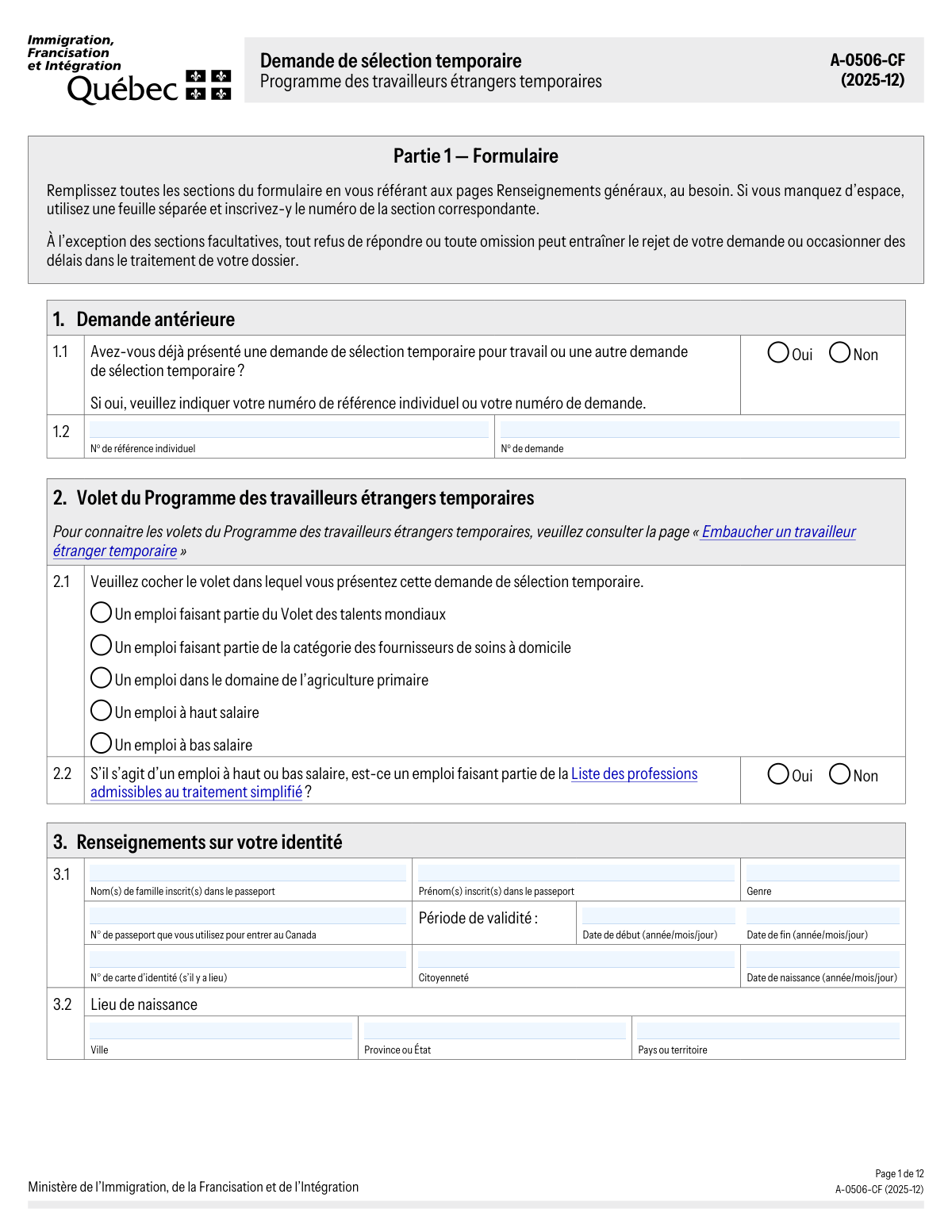
Yes! You can use AI to fill out Formulaire A-0506-CF, Demande de sélection temporaire – Programme des travailleurs étrangers temporaires

Form A-0506-CF, 'Demande de sélection temporaire – Programme des travailleurs étrangers temporaires,' is an official application submitted to Quebec's Ministry of Immigration (MIFI) by foreign nationals who have received a temporary job offer in the province. This application is a crucial step in obtaining a Quebec Acceptance Certificate (CAQ), which is often required before applying for a federal work permit. Today, this form can be filled out quickly and accurately using AI-powered services like Instafill.ai, which can also convert non-fillable PDF versions into interactive fillable forms.
Our AI automatically handles information lookup, data retrieval, formatting, and form filling.
It takes less than a minute to fill out A-0506-CF using our AI form filling.
Securely upload your data. Information is encrypted in transit and deleted immediately after the form is filled out.

Form specifications

Form name: Formulaire A-0506-CF, Demande de sélection temporaire – Programme des travailleurs étrangers temporaires
Number of fields: 274
Number of pages: 15
Language: English
main-image

Instafill Demo: How to fill out PDF forms in seconds with AI

How to Fill Out A-0506-CF Online for Free in 2026

Are you looking to fill out a A-0506-CF form online quickly and accurately? Instafill.ai offers the #1 AI-powered PDF filling software of 2026, allowing you to complete your A-0506-CF form in just 37 seconds or less.
Follow these steps to fill out your A-0506-CF form online using Instafill.ai:
  1. 1 Navigate to Instafill.ai and upload the A-0506-CF PDF or select it from their library of official forms.
  2. 2 Use the AI assistant to provide your personal identity details, passport information, and current contact address as required in Part 1.
  3. 3 Enter information about the Quebec employer and the specific job offer, including the job title, National Occupational Classification (NOC) code, and work location.
  4. 4 Detail your educational history and all relevant professional experiences from the past five years, including job duties and employment dates.
  5. 5 Declare any family members who will accompany you to Quebec and list any previous authorizations for stays in the province.
  6. 6 Carefully review all the auto-filled information for accuracy, then electronically sign the declarations and authorizations within the form.
  7. 7 Download the completed A-0506-CF and gather all supporting documents listed in Part 2 to submit your application package through the appropriate channel (Arrima or mail).

Our AI-powered system ensures each field is filled out correctly, reducing errors and saving you time.

Why Choose Instafill.ai for Your Fillable A-0506-CF Form?

Speed

Complete your A-0506-CF in as little as 37 seconds.

Up-to-Date

Always use the latest 2026 A-0506-CF form version.

Cost-effective

No need to hire expensive lawyers.

Accuracy

Our AI performs 10 compliance checks to ensure your form is error-free.

Security

Your personal information is protected with bank-level encryption.

Frequently Asked Questions About Form A-0506-CF

This form is the 'Demande de sélection temporaire' used to apply for temporary selection under Québec's Temporary Foreign Worker Program (TFWP). It is a required step for foreign nationals who have a job offer and need a Québec Acceptance Certificate (CAQ) before applying for a Canadian work permit.

You must fill out this form if you have received a full-time temporary job offer in Québec. It is not for jobs lasting 30 days or less, unpaid positions, or jobs in ineligible sectors like payday lending or the sex industry.

For high-wage, low-wage, or Global Talent Stream jobs, you apply online via the Arrima portal, where you also pay the fees. For agricultural or in-home caregiver jobs, you must submit a paper application by mail and include the 'Payment by Credit Card' form (A-0591-F0).

You must include photocopies of your valid passport, signed employment contract, detailed CV, and diplomas or transcripts. You also need attestations of employment for the work experience you declare, as listed in Part 2 of the form.

Your application must be complete to be processed. If it is missing required information, signatures, documents, or the correct payment, it may be rejected or returned to you without being processed, causing significant delays.

If your profession is regulated, you must provide proof of authorization to practice or a recognition of equivalence (full or partial) from the appropriate Québec regulatory body. This document must be included with your application.

Yes, but they must obtain their own authorizations to work or study. Your spouse may need their own work permit, and your children will need a Québec Acceptance Certificate (CAQ) and a study permit to attend school.

You must provide the original document along with a complete, certified translation into either French or English. The translation must be done by a recognized translator, and even seals in another language must be translated.

The ministry accepts original handwritten signatures, photocopied handwritten signatures, and handwritten signatures made with a stylus or mouse on a screen. Typed or digital font-based signatures are not accepted.

You must list all work experience from the last five years, as well as any other experience relevant to the job offer. For each position, provide the company name, job title, dates, hours per week, and a description of your main duties.

Yes, you can authorize your employer to represent you by filling out and signing Section 12, 'Autorisation donnée à l’employeur'. This is optional and refusing to grant this authorization will not negatively affect your application.

Yes, AI-powered services like Instafill.ai can help you fill out forms like this one accurately and efficiently. These tools can auto-fill your personal information, saving you time and reducing the risk of errors.

Simply upload the A-0506-CF form to Instafill.ai, and the platform will automatically detect the fields. You can then fill them in quickly using information saved in your profile, ensuring consistency and accuracy across your application.

You can use a service like Instafill.ai, which can convert flat, non-fillable PDFs into interactive forms. This allows you to type your information directly into the fields before printing the completed form for signature.

Compliance A-0506-CF
Validation Checks by Instafill.ai

1
Conditional Previous Application Number
This check verifies that if the applicant answers 'Oui' to having previously submitted an application (question 1.1), then at least one of the fields 'N° de référence individuel' or 'N° de demande' (question 1.2) must be filled. This is crucial for linking the new application to the applicant's existing file, ensuring continuity and accurate record-keeping. If the condition is met but the number is missing, the form processing should be paused pending clarification.
2
Passport Expiration Date Validity
This validation ensures that the passport's expiration date ('Date de fin' in section 3.1) is a future date. An expired or soon-to-expire passport can invalidate the application, as a valid travel document is required for the entire process and intended stay. If the passport is expired, the system should flag the entry and inform the applicant that a valid passport is required to proceed.
3
Conditional Quebec Immigration Status
This check validates that if an applicant indicates they currently reside in Quebec by checking 'Oui' in question 3.4, the 'statut d’immigration' field must be completed. This information is essential for the ministry to understand the applicant's current legal standing in the province. Failure to provide this status when required would render the application incomplete and require follow-up.
4
Quebec Enterprise Number (NEQ) Format
This validation verifies that the 'Numéro de l’entreprise au Registraire des entreprises du Québec' (section 6.1) follows the official 10-digit format. The NEQ is a unique identifier crucial for verifying the legitimacy and status of the employing company. An incorrectly formatted number would prevent automated verification and could indicate an error or a non-existent company, leading to processing delays or rejection.
5
Ineligibility Check for Applicant Control Over Company
This check flags any application where the applicant answers 'Oui' to question 6.3, which asks if they exercise control over the hiring company. The form instructions explicitly state that the job offer cannot be from a company the applicant controls. A 'Oui' answer indicates the applicant is ineligible under this program, and the application should be flagged for immediate review or potential refusal.
6
Mandatory Engagement to Reside in Quebec
This validation ensures the applicant has checked 'Oui' for question 7.7, 'Je m’engage à séjourner et à résider au Québec'. The form explicitly states that a 'Non' response or failure to respond will result in the refusal of the application. This is a critical declaration of intent, and its absence or negation is a definitive reason for rejection.
7
Conditional Regulated Profession Details
This check ensures that if the applicant answers 'Oui' to holding an authorization or equivalence for a regulated profession (any of the 'Oui' boxes in question 7.3), the name of the issuing body ('nom de l’organisme émetteur') must be provided. This is necessary to verify the applicant's credentials with the correct professional order or regulatory body in Quebec. An omission here would make verification impossible and halt the processing of this aspect of the application.
8
Full-Time Work Hours Consistency
This validation checks that the 'Nombre d’heures travaillées par semaine' provided in section 7.6 (if applicable) and section 9 is a number greater than or equal to 30. The form's definitions specify that full-time employment ('Emploi à temps plein') is a minimum of 30 hours per week. This check ensures the offered job meets a fundamental requirement of the program.
9
Chronological Validity of Employment and Education Dates
This check verifies that for all entries in the education history (section 8) and work experience (section 9), the start date ('De') is chronologically before the end date ('À'). This ensures the data is logical and represents a valid timeline. Inconsistent or impossible date ranges would indicate a data entry error and require correction before the applicant's history can be properly assessed.
10
Conditional Paid Representative Information
This validation enforces the logic in section 11. If the applicant answers 'Oui' to using a paid representative (11.1), they must then select a representative type in 11.2 and provide the corresponding details in 11.3 or 11.4. This is important for compliance and to ensure the representative is authorized. The application is incomplete if a representative is declared but their details are missing.
11
Signature Date Validity
This check ensures that the signature dates in sections 12 and 14 are present, in the correct format (YYYY/MM/DD), and are not set to a future date. The signature date legally attests to the accuracy of the information at the time of signing. A missing or future date invalidates the declaration, making the application legally unsound and subject to rejection.
12
Completeness of Accompanying Family Member Data
This validation ensures that for every row initiated in section 5.1 for an accompanying family member, all required fields (Name, Gender, Date of Birth, Place of Birth, and Relationship) are filled out. Partially completed entries are ambiguous and prevent proper processing for dependents. The system should require all fields in a row to be completed if any field in that row contains data.
13
NOC Code and Profession Title Cross-Validation
This check verifies that the National Occupational Classification code ('Code CNP' in section 7.2) is a valid, existing code and that it logically corresponds to the 'Nom de la profession' entered. This is critical for assessing the job offer against program criteria, such as the simplified processing list or wage requirements. A mismatch could indicate a misunderstanding of the role or an error, requiring clarification.
14
Document Checklist Consistency
This validation cross-references selections made in Part 1 with the document checklist in Part 2. For example, if the applicant indicates they are using a representative (11.1 is 'Oui'), the system should check if the box for the 'Mandat de représentation' (Part 2, item 2) is also checked. This ensures the applicant is reminded to include all necessary supporting documents, reducing the chance of an incomplete application being submitted.

Common Mistakes in Completing A-0506-CF

Mismatching Name with Passport

Applicants often enter their common name or a shortened version instead of the full legal name exactly as it appears on their passport. Section 3.1 specifically requires the name 'inscrit(s) dans le passeport'. This discrepancy can lead to identity verification failures, causing significant processing delays or even an outright rejection of the application. To avoid this, always double-check that every letter and name part matches your passport precisely.

Using Incorrect Date Formats

The form consistently requires the 'année/mois/jour' (YYYY/MM/DD) format for dates, such as in sections 3.1, 5.1, and throughout the work history. Many applicants default to their home country's standard format (e.g., DD/MM/YYYY or MM/DD/YYYY), which can cause data entry errors and confusion for processing agents. This can result in requests for clarification and slow down the application process. Using a tool like Instafill.ai can help prevent this by automatically formatting dates correctly according to the form's specific requirements.

Incomplete Declaration of Family Members

Section 5 requires the mandatory declaration of all accompanying family members, including spouse, common-law partner, and dependent children. A common mistake is omitting a family member, either by misunderstanding the definition or thinking they can be added later. This is a serious error that can be considered misrepresentation, leading to the refusal of the application and potentially impacting future applications for the entire family.

Incorrect National Occupational Classification (NOC/CNP) Code

In Section 7.2, applicants must provide the NOC code that corresponds to the job offer. A frequent error is selecting a code that does not accurately reflect the job duties described in Section 7.4. This often happens due to a poor understanding of the NOC system. An incorrect code can lead to refusal if the immigration officer determines the applicant's experience or the job offer does not align with the selected NOC's requirements.

Providing Vague or Incomplete Job Duty Descriptions

When completing the work experience in Section 9, applicants sometimes provide generic or overly brief descriptions of their 'Principales tâches accomplies' (main duties performed). They might assume the job title is self-explanatory. This prevents the officer from properly assessing whether the work experience is relevant and meets the requirements of the job offer and the stated NOC code, which is a critical factor for approval and can lead to a refusal.

Submitting an Incomplete Work History

Section 9.1 asks for all professional experience related to the job offer AND all other experiences from the last five years. A common mistake is to only list the single most relevant job, omitting other employment. This creates gaps in the timeline and may lead the processing officer to question the applicant's credibility or complete work history, potentially causing delays or a request for more information.

Using an Invalid Signature Type

The form's instructions explicitly state that typed or standard digital signatures (other than a handwritten signature made with a stylus or mouse) are not accepted. Many applicants, accustomed to modern e-signing, simply type their name or use an unsupported digital signature in the signature box in Section 14. This renders the application unsigned in the eyes of the ministry, leading to its immediate rejection as incomplete.

Forgetting to Submit the Completed Document Checklist

Part 2 of the form is a mandatory checklist of all documents being submitted. Applicants sometimes treat this as a personal guide and forget to check the boxes and include the signed checklist itself with their application package. The instructions clearly state this list must be included, and its omission can cause the entire application to be returned as incomplete, forcing the applicant to start over.

Submitting Documents Without Proper Translations

The instructions require that any document not in French or English must be accompanied by a full translation from a recognized translator. A common error is to submit documents without translation, or with a partial or unofficial translation. Applicants also frequently forget that even a seal or stamp in another language on an otherwise English or French document must be translated. This mistake will result in the application being deemed incomplete and returned, causing significant delays.

Leaving Mandatory Fields Blank

Throughout the form, there are mandatory fields and declarations, such as the commitment in Section 7.7 to reside in Quebec. Applicants sometimes overlook these checkboxes or fields, assuming they are not important. However, the form states that any omission can lead to rejection. This is especially true for government forms that are often only available as non-fillable PDFs, making it easy to miss a spot. AI-powered tools like Instafill.ai can convert these into fillable versions and help ensure all required fields are completed before submission.
Saved over 80 hours a year

“I was never sure if my IRS forms like W-9 were filled correctly. Now, I can complete the forms accurately without any external help.”

Kevin Martin Green

Your data stays secure with advanced protection from Instafill and our subprocessors

Robust compliance program

Transparent business model

You’re not the product. You always know where your data is and what it is processed for.

ISO 27001, HIPAA, and GDPR

Our subprocesses adhere to multiple compliance standards, including but not limited to ISO 27001, HIPAA, and GDPR.

Security & privacy by design

We consider security and privacy from the initial design phase of any new service or functionality. It’s not an afterthought, it’s built-in, including support for two-factor authentication (2FA) to further protect your account.

Fill out A-0506-CF with Instafill.ai

Worried about filling PDFs wrong? Instafill securely fills formulaire-a-0506-cf-demande-de-slection-temporaire-programme-des-travailleurs-trangers-temporaires forms, ensuring each field is accurate.