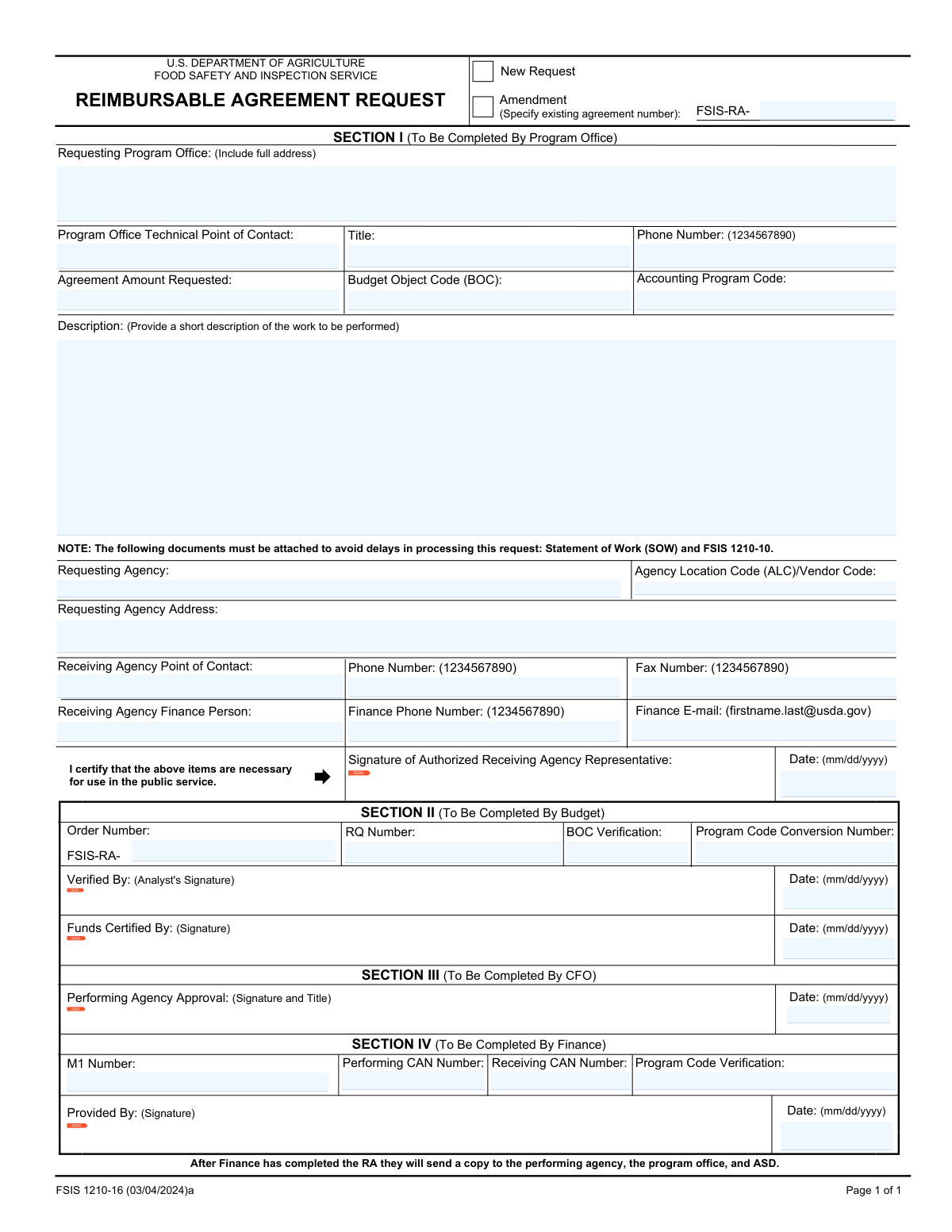
Yes! You can use AI to fill out FSIS Form 1210-16, Reimbursable Agreement Request
FSIS Form 1210-16 is a Reimbursable Agreement Request used by government program offices to establish or modify a financial agreement with the Food Safety and Inspection Service (FSIS). The form documents the scope of work, funding details, and contact information for both the requesting and receiving agencies, serving as the official record for inter-agency services. Today, this form can be filled out quickly and accurately using AI-powered services like Instafill.ai, which can also convert non-fillable PDF versions into interactive fillable forms.
Our AI automatically handles information lookup, data retrieval, formatting, and form filling.
It takes less than a minute to fill out FSIS 1210-16 using our AI form filling.
Securely upload your data. Information is encrypted in transit and deleted immediately after the form is filled out.
Form specifications
| Form name: | FSIS Form 1210-16, Reimbursable Agreement Request |
| Number of fields: | 38 |
| Number of pages: | 1 |
| Language: | English |
Instafill Demo: How to fill out PDF forms in seconds with AI
How to Fill Out FSIS 1210-16 Online for Free in 2026
Are you looking to fill out a FSIS 1210-16 form online quickly and accurately? Instafill.ai offers the #1 AI-powered PDF filling software of 2026, allowing you to complete your FSIS 1210-16 form in just 37 seconds or less.
Follow these steps to fill out your FSIS 1210-16 form online using Instafill.ai:
- 1 Navigate to Instafill.ai and upload or select the FSIS Form 1210-16.
- 2 Indicate if the submission is a 'New Request' or an 'Amendment' to an existing agreement, providing the agreement number if applicable.
- 3 Enter the complete details for the 'Requesting Program Office,' including the full address, technical contact, and financial information like the agreement amount and budget codes.
- 4 Provide the 'Requesting Agency' information, including its name, address, and Agency Location Code (ALC) or Vendor Code.
- 5 Fill in the details for the 'Receiving Agency,' specifying the points of contact, finance personnel, and their contact information.
- 6 Write a clear and concise 'Description of Work' to be performed under the agreement.
- 7 Review all sections for accuracy before routing the form to authorized representatives for signatures and internal processing in Sections II, III, and IV.
Our AI-powered system ensures each field is filled out correctly, reducing errors and saving you time.
Why Choose Instafill.ai for Your Fillable FSIS 1210-16 Form?
Speed
Complete your FSIS 1210-16 in as little as 37 seconds.
Up-to-Date
Always use the latest 2026 FSIS 1210-16 form version.
Cost-effective
No need to hire expensive lawyers.
Accuracy
Our AI performs 10 compliance checks to ensure your form is error-free.
Security
Your personal information is protected with bank-level encryption.
Frequently Asked Questions About Form FSIS 1210-16
This form is used to request or amend a reimbursable agreement with the Food Safety and Inspection Service (FSIS). It establishes the terms, scope of work, and financial details for services one agency provides to another on a cost-reimbursable basis.
This form is initiated by a program office or agency requiring services from another agency. Different sections are then completed by the requesting office, financial analysts, and authorized officials from both the requesting and receiving agencies.
Check 'New Request' if you are initiating a brand new agreement. Check 'Amendment' if you are making changes to an existing, active reimbursable agreement, such as modifying the scope of work or funding.
You only need to provide the FSIS-RA Agreement Number when you are submitting an 'Amendment' to an existing agreement. For a 'New Request,' this field should be left blank.
Provide a clear and concise summary of the services to be performed under the agreement. Be sure to include the main objectives, scope, and any key tasks or deliverables involved.
These are financial and agency identification codes used for government accounting. You should obtain the Budget Object Code (BOC), Agency Location Code (ALC), and Contract/Agreement Number (CAN) from your agency's financial or administrative office.
These sections are typically completed by internal FSIS staff after the initial request is submitted. They are for internal processing, including analyst verification, CFO approval, and final finance identifier assignment.
You should contact your program office's financial or administrative contact for assistance. This information is crucial for proper accounting and processing, so the form cannot be completed without it.
These distinct contacts ensure that questions can be directed to the correct person. The technical contact understands the work being done, while the finance contact handles billing and funding inquiries.
The total amount of funding being requested should be entered in the 'Agreement Amount Requested' field, located in the 'Requesting Program Office - Contact & Financial Info' section.
Submission instructions are typically provided by the receiving agency (FSIS). Refer to the guidance from the FSIS program office you are working with for specific submission procedures.
Yes, services like Instafill.ai use AI to help you accurately auto-fill form fields, which can save time and reduce errors. This is especially useful for repetitive information like names, addresses, and agency codes.
You can easily fill out this form online by uploading it to a service like Instafill.ai. The platform makes the form interactive, allowing you to fill fields, add signatures, and then download the completed document.
If you have a non-fillable or 'flat' PDF, you can use a tool like Instafill.ai to make it interactive. Simply upload the document, and the service will automatically detect the fields and allow you to type directly into them.
Compliance FSIS 1210-16
Validation Checks by Instafill.ai
1
Exclusive Request Type Selection
This check ensures that the user has selected either 'New Request' or 'Amendment', but not both. Selecting both creates ambiguity in how the form should be processed. If this validation fails, the user should be prompted to choose only one option to clarify whether this is a new agreement or a modification to an existing one.
2
Conditional Agreement Number for Amendments
This validation verifies that if the 'Amendment' checkbox is selected, the 'FSIS-RA Agreement Number' field is populated. This number is essential for locating and updating the correct existing agreement. If the box is checked and the number is missing, the submission cannot be processed, and the user must provide the existing agreement number.
3
Agreement Number Must Be Empty for New Requests
This check ensures that if 'New Request' is selected, the 'FSIS-RA Agreement Number' field is left blank. Providing a number for a new request is contradictory and could lead to processing errors or accidental modification of an unrelated agreement. If a number is present, the user should be instructed to clear the field for a new submission.
4
Valid Agreement Amount
This validation confirms that the 'Agreement Amount Requested' is a positive numerical value formatted as currency. This is critical for financial planning and allocation. A non-numeric or negative value would cause calculation and funding errors, so the system must reject entries that are not valid monetary amounts greater than zero.
5
Standard Phone Number Format
This check validates that all phone number fields (e.g., 'Phone Number', 'Receiving Agency Phone Number', 'Finance Phone Number') adhere to a standard format, such as a 10-digit number with an optional extension. This ensures that contact information is accurate and usable for communication. An invalid format would prevent successful contact and should trigger an error requiring the user to correct the entry.
6
Valid Finance E-mail Format
This validation ensures the 'Finance E-mail' field contains a structurally correct email address (e.g., '[email protected]'). This is crucial for official communication, sending notifications, and resolving financial queries. An invalid email address would result in failed communication, so the system must prompt the user for a correction.
7
Consistent Date Formatting
This check verifies that all date fields ('Authorized Receiving Agency Representative Signature Date', 'Analyst Verification Date', 'Funds Certified Date', etc.) are entered in a valid and consistent format (e.g., MM/DD/YYYY). Inconsistent or invalid dates can cause errors in record-keeping and timeline tracking. The system should enforce a standard format to maintain data integrity.
8
Logical Date Sequence
This validation checks that key dates are in a logical chronological order, for example, the 'Funds Certified Date' cannot be before the 'Authorized Receiving Agency Representative Signature Date'. This logic prevents impossible or erroneous timelines from being recorded, which is vital for auditing and process compliance. If a date is out of sequence, the user must review and correct the dates to reflect the actual order of events.
9
Completeness of Critical Information
This check ensures that essential fields such as 'Requesting Program Office (Full Address)', 'Description of Work', and 'Requesting Agency Name' are not left empty. This information is fundamental to understanding the purpose, origin, and scope of the agreement. A submission with missing critical information is incomplete and should be blocked until all required fields are populated.
10
BOC Code Consistency
This validation compares the 'Budget Object Code (BOC)' from the requesting office section with the 'BOC Verification' in Section II. These values must match to ensure the correct financial classification is used throughout the process. A mismatch could lead to misallocated funds, so the system should flag any discrepancy for immediate correction.
11
Program Code Consistency
This check verifies that the 'Program Code Verification' in Section IV is consistent with the 'Accounting Program Code' provided earlier in the form. Program codes are essential for tracking funds against specific projects or initiatives. Inconsistency can lead to significant accounting errors, so the system must ensure these codes align before processing.
12
Complete Address Structure
This validation examines address fields like 'Requesting Program Office (Full Address)' to ensure they contain essential components such as a street, city, state, and ZIP code. An incomplete address can lead to returned mail and significant delays in communication or payment. The system should prompt the user to provide a full, valid mailing address.
13
FSIS-RA Order Number Suffix Presence
This check ensures that the 'Order Number (FSIS-RA- suffix)' field is populated with the alphanumeric characters that complete the full order number. This suffix is a unique identifier for the agreement and is mandatory for tracking and reference. A missing suffix makes the order number incomplete and invalid, so the submission should be halted until it is provided.
14
Presence of CAN Financial Identifiers
This validation ensures that both the 'Performing CAN Number' and 'Receiving CAN Number' fields in Section IV are filled out. These Contract/Agreement Numbers are critical identifiers for the financial systems of both the performing and receiving agencies to correctly route funds. Missing CANs would prevent financial transactions, so their presence must be enforced.
Common Mistakes in Completing FSIS 1210-16
Users often check the wrong box or check both, causing immediate processing confusion. This typically happens when modifying an existing agreement but checking 'New Request' by mistake. This error leads to rejection or significant delays as the processing office must determine the request's true nature. Always verify if an FSIS-RA number already exists; if it does, select 'Amendment' and provide the number, otherwise, select 'New Request'.
This field is conditional and must only be filled out for an 'Amendment'. A common mistake is leaving it blank for an amendment or entering a number for a 'New Request'. This prevents the system from locating the existing agreement to be modified, causing the request to be returned. Double-check that this field is completed if and only if the 'Amendment' box is checked.
The form requires multiple specific codes like Budget Object Code (BOC), Agency Location Code (ALC), and various CAN numbers. Users frequently enter incorrect, outdated, or transposed codes, leading to financial rejection and misallocation of funds. To avoid this, consult your agency's financial office for the most current codes before submission. AI-powered tools like Instafill.ai can help by storing and auto-filling previously validated codes to ensure consistency.
Submitting a description that is too brief or lacks clear objectives, scope, and deliverables is a frequent error. This ambiguity forces the approving official to request clarification, delaying the entire process. A proper description should be concise yet comprehensive enough for someone unfamiliar with the project to understand the work being funded. Clearly outline the 'what, why, and how' of the services to be performed.
For both the 'Requesting Program Office' and 'Requesting Agency', users often omit crucial details like the full organization name, suite number, or correct ZIP+4 code. Incomplete addresses can delay official correspondence and the legal establishment of the agreement. Always enter the full, official mailing address as recognized by the postal service. Using a tool like Instafill.ai can help auto-complete and validate addresses to prevent these errors.
The form contains separate fields for a code and its verification, such as 'Budget Object Code (BOC)' and 'BOC Verification'. A common mistake is entering different values in these fields due to a typo or using different sources of information. This discrepancy flags the form for manual review and correction, halting automated processing. Ensure that any verification field is an exact match to its corresponding primary code field.
Signature and certification dates are often entered in an inconsistent format (e.g., MM-DD-YY instead of MM/DD/YYYY) or left blank. Incorrect date formatting can cause data import errors in financial systems, while missing dates invalidate the certification or signature. Always use the required format and ensure every signature has a corresponding date. If the form is a non-fillable PDF, a tool like Instafill.ai can convert it to a fillable version with formatted date fields to guide the user.
The form is divided into sections to be completed by different parties (e.g., Requesting Office, CFO, Analyst). A frequent process error is for the initial requester to fill out information in Section II, III, or IV, which are reserved for financial and approval personnel. This can invalidate the form and require it to be re-initiated from scratch. Only complete the sections designated for your role and then route the form to the next appropriate party.
The 'Order Number (FSIS-RA- suffix)' field specifically asks for the characters that *follow* the 'FSIS-RA-' prefix. A common error is to re-enter the entire number, including the prefix, resulting in a duplicated value like 'FSIS-RA-FSIS-RA-12345'. This causes data entry errors in the financial system. To avoid this, carefully read the field label and enter only the unique suffix portion of the order number.
The form requires separate entries for the 'Receiving Agency Point of Contact' and the 'Receiving Agency Finance Person'. People often list the same individual for both, even when a dedicated finance contact is required for billing and fund certification. This mistake can lead to financial notices being sent to the wrong person, causing payment delays. Always identify and provide the distinct contact information for the primary program contact and the specific finance/budget officer.
Saved over 80 hours a year
“I was never sure if my IRS forms like W-9 were filled correctly. Now, I can complete the forms accurately without any external help.”
Kevin Martin Green
Your data stays secure with advanced protection from Instafill and our subprocessors

Robust compliance program
Transparent business model
You’re not the product. You always know where your data is and what it is processed for.
ISO 27001, HIPAA, and GDPR
Our subprocesses adhere to multiple compliance standards, including but not limited to ISO 27001, HIPAA, and GDPR.
Security & privacy by design
We consider security and privacy from the initial design phase of any new service or functionality. It’s not an afterthought, it’s built-in, including support for two-factor authentication (2FA) to further protect your account.
Fill out FSIS 1210-16 with Instafill.ai
Worried about filling PDFs wrong? Instafill securely fills fsis-form-1210-16-reimbursable-agreement-request forms, ensuring each field is accurate.