
Yes! You can use AI to fill out Georgia Lottery Corporation Retailer Application
Don't type 276 fields by hand. Tell our AI about yourself, or upload a document you already have, and it fills every field in seconds. You check it, then download, print or sign.
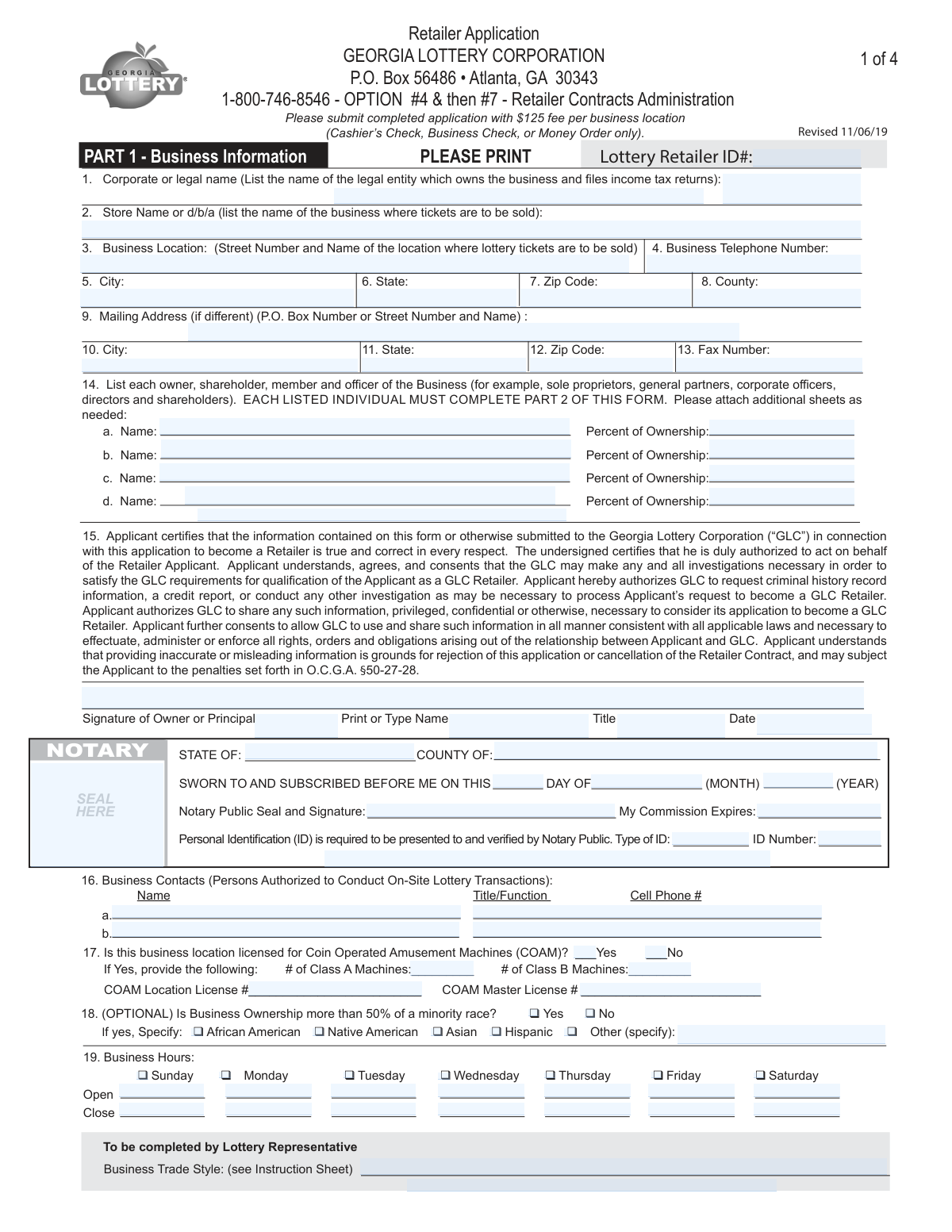
The AI does the filling. You just check it.
No typing into boxes, nothing to install.
What this form asks for
The AI fills all of it, from your answers or your documents.
The AI checks your answers before you download
14 checks built for this form, so a wrong date or a missing answer is caught before anyone else sees it.
This check sums the 'Percent of Ownership' values listed for all owners, shareholders, members, and officers in Part 1, Line 14. The total must equal 100% to ensure a complete and accurate declaration of the business's ownership structure. If the total is not 100%, the application is considered incomplete and cannot be processed, as it creates ambiguity about who legally controls the business.
This validation cross-references the 'Type of Ownership' selected in Part 2 with the ID number provided in Part 3, Line 5. If the business is a 'Sole Proprietor', a Social Security Number (SSN) must be used; for all other types like 'Corporation' or 'Partnership', a Federal Employers ID Number (FEIN) is required. This is critical for correct tax reporting and financial processing with the IRS and the state. An incorrect ID type will lead to rejection of the EFT authorization.
This check ensures the Social Security Number entered in Part 2, Line 13, follows the standard XXX-XX-XXXX format and contains exactly nine digits. The SSN is essential for mandatory background and credit checks on all principals. An invalid format would cause these checks to fail, halting the application process until a valid SSN is provided.
This validation is triggered by the answer to the 'Coin Operated Amusement Machines (COAM)' question in Part 1, Line 17. If the applicant checks 'Yes', the system must verify that the number of machines and both the COAM Location and Master License numbers are provided. Failure to provide these details for a licensed COAM location results in an incomplete application, as this information is required for regulatory compliance.
This check ensures that in Part 4, the applicant has selected either option 1 (uses E-Verify) or option 2 (has no employees), but not both. If option 1 is selected, it further validates that the 'Federal Work Authorization User Identification Number' and 'Date of Authorization' fields are filled. This is a mandatory legal requirement under Georgia law, and failure to complete this section correctly will result in immediate application rejection.
This check confirms that the 'Federal Work Authorization User Identification Number' in Part 4 is a numeric value of at least four digits and does not contain letters, as specified in the instructions. It also cross-references this number against the FEIN provided in Part 3 to ensure they are not the same. Submitting an incorrect number, such as the FEIN, is a common error that invalidates the E-Verify affidavit and stops the application process.
And 8 more checks
- Ensures All Required Notarizations are Complete
- Flags Requirement for Explanations on Adverse Disclosures
- Validates EFT Bank Account Name for Trust Language
- Ensures Consistency of Corporate/Legal Name Across All Parts
- Cross-Validates Submission of Part 2 for Each Listed Principal
- Verifies Owner's Age from Date of Birth
- Confirms Attachment of Required Identification Document
- Verifies Completion of Depository Institution Acknowledgment
Let AI fill out your GLC Retailer Application
No typing. Every field filled in seconds, checked, ready to sign.
How to Fill Out GLC Retailer Application Online for Free in 2026
What the AI walks you through.
- Navigate to Instafill.ai and upload or select the Georgia Lottery Corporation Retailer Application form.
- Use the AI assistant to populate Part 1 with your business information, including legal and store names, addresses, and contact details.
- Complete Part 2 for each owner or principal, providing all required personal information, answering background questions, and attaching a copy of a valid ID.
- Fill out Part 3, the Electronic Funds Transfer (EFT) Authorization, with your business's bank account information and obtain the required signature from your bank representative.
- Complete the E-Verify Affidavit in Part 4, providing your federal work authorization number or certifying that you have no employees.
- Review all sections, including the Retailer Contract in Part 5, and obtain the necessary signatures and notarizations for Parts 1, 2, and 4.
- Download the completed application packet, attach the required $125 fee per location, and submit it to the Georgia Lottery Corporation as instructed.
Common Mistakes in Completing GLC Retailer Application
The ones the AI is built to catch.
Confusing Legal Entity Name with DBA/Store Name
Failing to Notarize All Required Sections
Submitting an Incomplete EFT Bank Authorization
Submitting Only One Application for Multiple Principals
Entering the FEIN as the E-Verify Number
Forgetting to Attach Required Explanations or IDs
Submitting an Improper Application Fee Payment
Using White-Out or Making Uninitialed Corrections
Providing Incorrect or Mismatched Tax ID Numbers
Failing to Complete a Separate Retailer Contract for Each Partner/Member
Frequently Asked Questions About GLC Retailer Application
Is it really free for 7 days?
Can I fill other forms too?
How do I cancel?
How does the AI fill out GLC Retailer Application?
What happens to my information?
How complex is GLC Retailer Application to fill out?
What is this application packet for, and who needs to complete it?
How much is the application fee and what payment methods are accepted?
Who needs to fill out Part 2, the Personal Information form?
What documents do I need to submit with my application?
What are the requirements for the bank account in Part 3?
Do I have to complete the E-Verify Affidavit in Part 4?
Which parts of the application need to be notarized?
Can I still apply if I have a low credit score or a past criminal conviction?
What is a Financial Security Deposit (FSD)?
Where do I send the completed application packet?
What happens if I make a mistake on the application?
Can I use an AI tool to help fill out this application?
How can I use Instafill.ai to complete this form online?
The PDF I downloaded isn't fillable. What can I do?
Get your GLC Retailer Application filled out by AI
$0 today. Cancel before Nov 18 and you pay nothing.
Let AI fill out your GLC Retailer Application
Your trial starts once a card is added. You pay nothing before Nov 18.
Your bank declined that card, so the trial did not start and nothing was charged. Please try another card.
Our AI already knows this form, all 276 fields of it. Skip the typing: tell it about yourself, or upload what you have, and it fills the whole form in seconds.
- AI fills every field on all 11 pages, checkboxes included
- No typing into boxes: answer a few questions, or upload a document you already have, an old copy of this form, a photo of a document
- The AI checks the answers; you review and change anything before you download
- Download the finished PDF, print it, or sign it online
- Encrypted, and never used to train AI
Cancel before Nov 18 and you pay nothing.
A card is needed to start the trial. We check it with a $19.99 hold that is released right away. Cancel in two clicks from your account.
Terms · Privacy