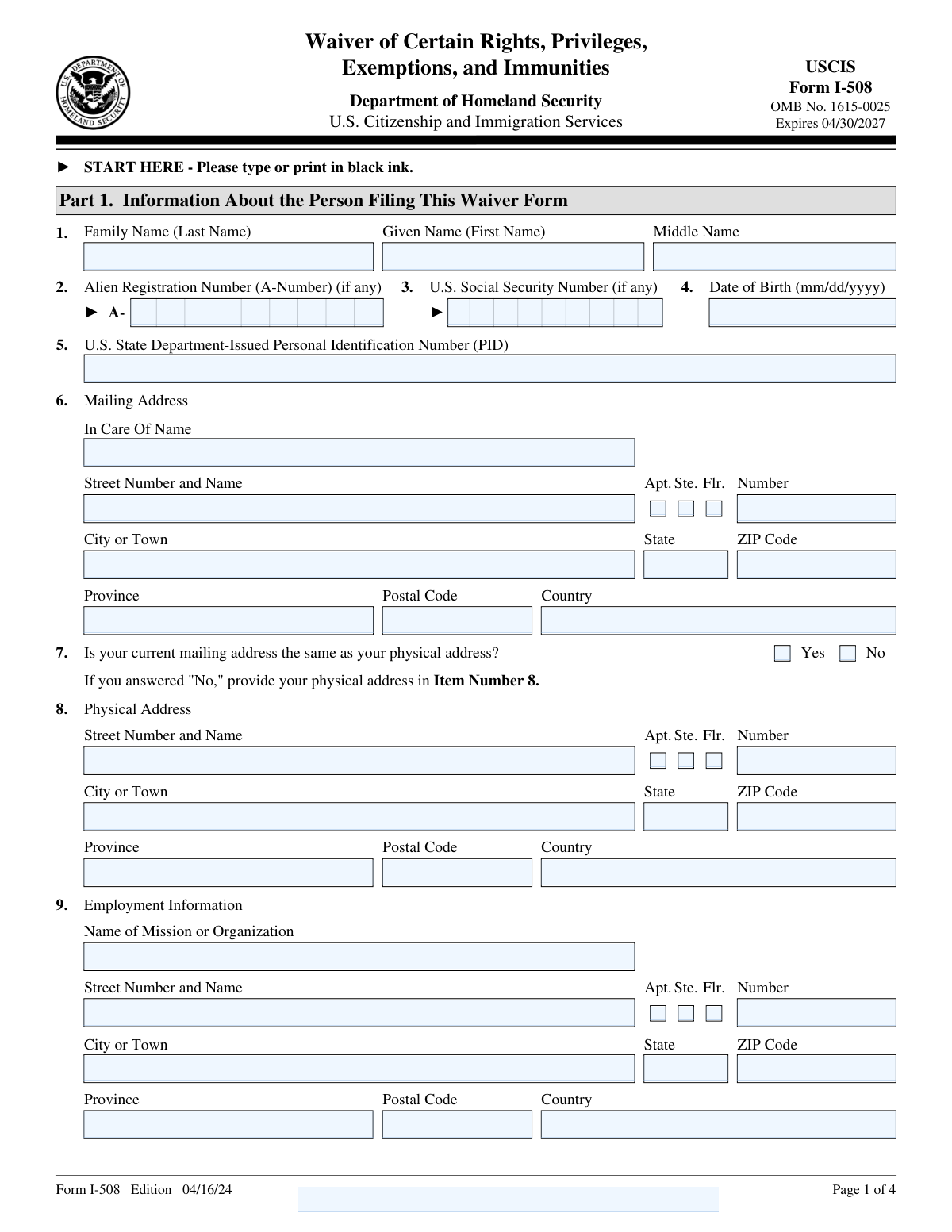
Fill out Form I-508, Waiver of Certain Rights with Instafill.ai
Worried about filling PDFs wrong? Instafill securely fills I-508 forms, ensuring each field is accurate.
#1 AI PDF Filling Software of 2025
3 out of 4 customers say they prepare their Form I-508 forms in 37 seconds or less
Secure platform for your PDF forms and personal information
| Form name: | Form I-508, Waiver of Certain Rights |
| Number of pages: | 4 |
| Download form: | https://www.uscis.gov/sites/default/files/document/forms/i-508.pdf |
Instafill Demo: filling out a legal form in seconds
Compliance Form I-508
Validation Checks by Instafill.ai
1
Verifies that all sections of the form are completed accurately and thoroughly.
Ensures that every section of Form I-508 is filled out with precision and completeness. Confirms that no mandatory fields are left blank and that all provided information is relevant and correct. Checks for consistency across different sections to avoid any discrepancies. Validates that the form is ready for submission without any missing or incorrect data.
2
Ensures that the Alien Registration Number (A-Number) is provided if applicable.
Confirms that the Alien Registration Number (A-Number) is included in the form when applicable. Verifies the format and length of the A-Number to ensure it meets the required standards. Checks that the A-Number is consistent with any other documentation provided. Ensures that this critical identifier is not omitted when it is necessary for the form's processing.
3
Confirms that the U.S. State Department-Issued Personal Identification Number (PID) and U.S. Social Security Number are entered if available.
Verifies the inclusion of the U.S. State Department-Issued Personal Identification Number (PID) and U.S. Social Security Number when they are available. Ensures that these numbers are entered correctly and match the expected format. Checks for any inconsistencies between these identifiers and other personal information on the form. Confirms that these numbers are provided to facilitate accurate identification and processing.
4
Checks that the full name, including given name, family name, and middle name, is filled in.
Ensures that the full name, comprising the given name, family name, and middle name, is accurately filled out on the form. Verifies that each component of the name is entered in the correct fields and that there are no typographical errors. Confirms that the name matches any other official documents provided. Validates that the full name is complete and correctly formatted to avoid any identification issues.
5
Validates that the date of birth is provided in the correct format (mm/dd/yyyy).
Checks that the date of birth is entered in the specified format of mm/dd/yyyy. Verifies that the date is valid and corresponds to a real calendar date. Ensures that the date of birth is consistent with any other documentation or information provided. Confirms that the date is correctly formatted to prevent any processing errors or misunderstandings.
6
Ensures that the waiver statement is read and understood, confirming the acknowledgment of waiving certain rights.
Ensures that the applicant has thoroughly read and comprehended the waiver statement, which is crucial for the legal process. Confirms that the applicant acknowledges the implications of waiving certain rights as part of the form submission. Verifies that the acknowledgment is clearly indicated, ensuring that the applicant is fully aware of the legal consequences. This check is vital to ensure that the applicant is making an informed decision.
7
Checks that the occupational status is confirmed for nonimmigrant status under the specified sections of the Immigration and Nationality Act.
Verifies that the applicant's occupational status aligns with the requirements for nonimmigrant status as outlined in the relevant sections of the Immigration and Nationality Act. Ensures that the information provided is accurate and corresponds to the legal criteria for the waiver. Confirms that the applicant's occupational details are consistent with the eligibility for the waiver. This check is essential to validate the applicant's qualification for the waiver under the specified legal framework.
8
Ensures that the mailing address is complete, including street number and name, apartment or suite number, city or town, state, ZIP code, and country.
Ensures that the mailing address provided by the applicant is complete and includes all necessary components such as street number, street name, apartment or suite number, city or town, state, ZIP code, and country. Verifies that the address is formatted correctly to prevent any issues with correspondence. Confirms that the address is valid and can be used for official communication. This check is crucial to ensure that all communications reach the applicant without any delays or errors.
9
Confirms whether the mailing address is the same as the physical address and verifies the physical address if different.
Confirms whether the applicant's mailing address is identical to their physical address, ensuring consistency in the provided information. If the addresses differ, verifies the accuracy and completeness of the physical address. Ensures that both addresses are correctly documented to avoid any discrepancies. This check is important to maintain accurate records and ensure that all official documents are sent to the correct location.
10
Verifies that employment information, including the name of the mission or organization and its address, is provided.
Verifies that the applicant has provided complete employment information, including the name of the mission or organization they are affiliated with and its address. Ensures that this information is accurate and corresponds to the applicant's current employment status. Confirms that the details are sufficient to establish the applicant's eligibility for the waiver. This check is essential to validate the applicant's employment status as part of the waiver process.
11
Confirms that the form is signed and dated by the person executing the waiver form.
Confirms that the form is signed and dated by the person executing the waiver form. This ensures the authenticity and intent of the individual submitting the waiver. It verifies that the individual has reviewed the information and agrees to the terms outlined in the form. The presence of a signature and date is crucial for the legal validity of the document.
12
Validates that contact information, including daytime telephone number, mobile telephone number, and email address, is provided.
Validates that contact information, including daytime telephone number, mobile telephone number, and email address, is provided. This ensures that the applicant can be reached for any follow-up questions or additional information. It confirms that all necessary communication channels are available for efficient processing. Accurate contact information is essential for maintaining a clear line of communication between the applicant and the processing agency.
13
Verifies that the interpreter's information, certification, and signature are provided if an interpreter assisted.
Verifies that the interpreter's information, certification, and signature are provided if an interpreter assisted. This ensures that the applicant fully understood the form's content and implications. It confirms that the interpreter has accurately conveyed the information to the applicant. The presence of the interpreter's details and signature is crucial for accountability and transparency in the application process.
14
Ensures that the preparer's information, certification, and signature are provided if someone else prepared the form.
Ensures that the preparer's information, certification, and signature are provided if someone else prepared the form. This validation confirms that the preparer has accurately completed the form on behalf of the applicant. It verifies the identity and accountability of the individual who assisted in the form's preparation. The preparer's signature and certification are essential for maintaining the integrity of the application process.
15
Checks that additional information sheets are signed, dated, and properly referenced with the name and A-Number.
Checks that additional information sheets are signed, dated, and properly referenced with the name and A-Number. This ensures that any supplementary information is correctly attributed to the applicant. It confirms that all additional documentation is complete and properly linked to the main form. Proper referencing and signatures on additional sheets are crucial for maintaining a comprehensive and organized application file.
Common Mistakes in Completing Form I-508
Applicants often forget to include their Alien Registration Number (A-Number) on Form I-508. This number is crucial for identifying the applicant's immigration records. To avoid this mistake, ensure that you have your A-Number readily available before starting the form. Double-check the form before submission to confirm that the A-Number is correctly entered in the designated field.
Entering the date of birth in the wrong format can lead to processing delays or rejections. It is essential to follow the specified format, typically MM/DD/YYYY, as instructed on the form. Carefully read the instructions regarding date format and verify that the date is entered correctly. Reviewing the form for accuracy before submission can help prevent this common error.
Incomplete address information can result in important correspondence being undeliverable. Ensure that both the mailing and physical addresses are filled out completely, including street number, city, state, and ZIP code. Double-check that all address fields are complete and accurate. Providing a complete address ensures that you receive all necessary communications regarding your application.
Failing to include employment information can lead to questions about the applicant's eligibility or status. It is important to provide current and accurate employment details as requested on the form. Gather all necessary employment information before starting the form to ensure completeness. Review the employment section carefully to confirm that all required fields are filled out.
Applicants sometimes overlook the importance of thoroughly reading and understanding the waiver statement. This section contains critical information about the rights being waived, and misunderstanding it can have significant implications. Take the time to read the waiver statement carefully and seek clarification if any part is unclear. Understanding the waiver ensures that you are fully aware of the rights you are relinquishing by signing the form.
Failing to sign and date Form I-508 is a critical error that can lead to processing delays or rejection. The signature confirms the applicant's consent and understanding of the waiver's terms. To avoid this mistake, double-check the form before submission to ensure all required signatures and dates are present. Consider setting a reminder to review the form thoroughly, focusing on the signature section, before sending it to the relevant authorities.
Applicants must certify that the information provided is true and accurate under penalty of perjury. Omitting this certification can invalidate the form and result in legal consequences. To prevent this, carefully read the certification section and ensure you understand its implications before signing. Always review the form's instructions to confirm that all necessary declarations are completed.
If an interpreter assists in completing Form I-508, their information must be included to ensure transparency and compliance with form requirements. Neglecting this can cause issues with the form's acceptance. To avoid this, make a checklist of all required sections, including interpreter details, if applicable. Verify that the interpreter's information is complete and accurate before submission.
If someone other than the applicant prepares the form, their signature and date are mandatory. Missing this information can lead to processing delays or rejection. To avoid this, ensure that the preparer reviews the form and signs it in the designated area. Establish a process where the preparer confirms their section is complete before the form is submitted.
Forms filled out in colors other than black ink may not be processed correctly, as black ink is typically required for clarity and legibility. To prevent this mistake, always use a black pen when completing the form. Keep a supply of black pens available and double-check the form's instructions regarding ink color before starting. This simple step can help ensure the form is processed without unnecessary complications.
Applicants often overlook the need to provide additional information on separate sheets when the space provided on the form is insufficient. This can lead to incomplete submissions, which may delay processing or result in the form being rejected. To avoid this mistake, carefully review each section of the form and ensure that all required information is included. If more space is needed, use separate sheets of paper, clearly label them with your name and the section number, and attach them securely to the form. Double-check that all additional sheets are included before submitting the form.
Saved over 80 hours a year
“I was never sure if my IRS forms like W-9 were filled correctly. Now, I can complete the forms accurately without any external help.”
Kevin Martin Green
Your data stays secure with advanced protection from Instafill and our subprocessors
Robust compliance program
Transparent business model
You’re not the product. You always know where your data is and what it is processed for.
ISO 27001, HIPAA, and GDPR
Our subprocesses adhere to multiple compliance standards, including but not limited to ISO 27001, HIPAA, and GDPR.
Security & privacy by design
We consider security and privacy from the initial design phase of any new service or functionality. It’s not an afterthought, it’s built-in, including support for two-factor authentication (2FA) to further protect your account.
Fill out Form I-508 with Instafill.ai
Worried about filling PDFs wrong? Instafill securely fills i-508 forms, ensuring each field is accurate.