
Instafill.ai
7 days free
AI form filling · 69 fields · 6 pages · done in seconds

Yes! You can use AI to fill out Incoming Rollover Request - IPPFA Benefits (Rev. 10/17)

Don't type 69 fields by hand. Tell our AI about yourself, or upload a document you already have, and it fills every field in seconds. You check it, then download, print or sign.
7 days free, then $19.99/month · Cancel anytime
AI fills it, no typingEncrypted, never used to train AICancel in two clicks
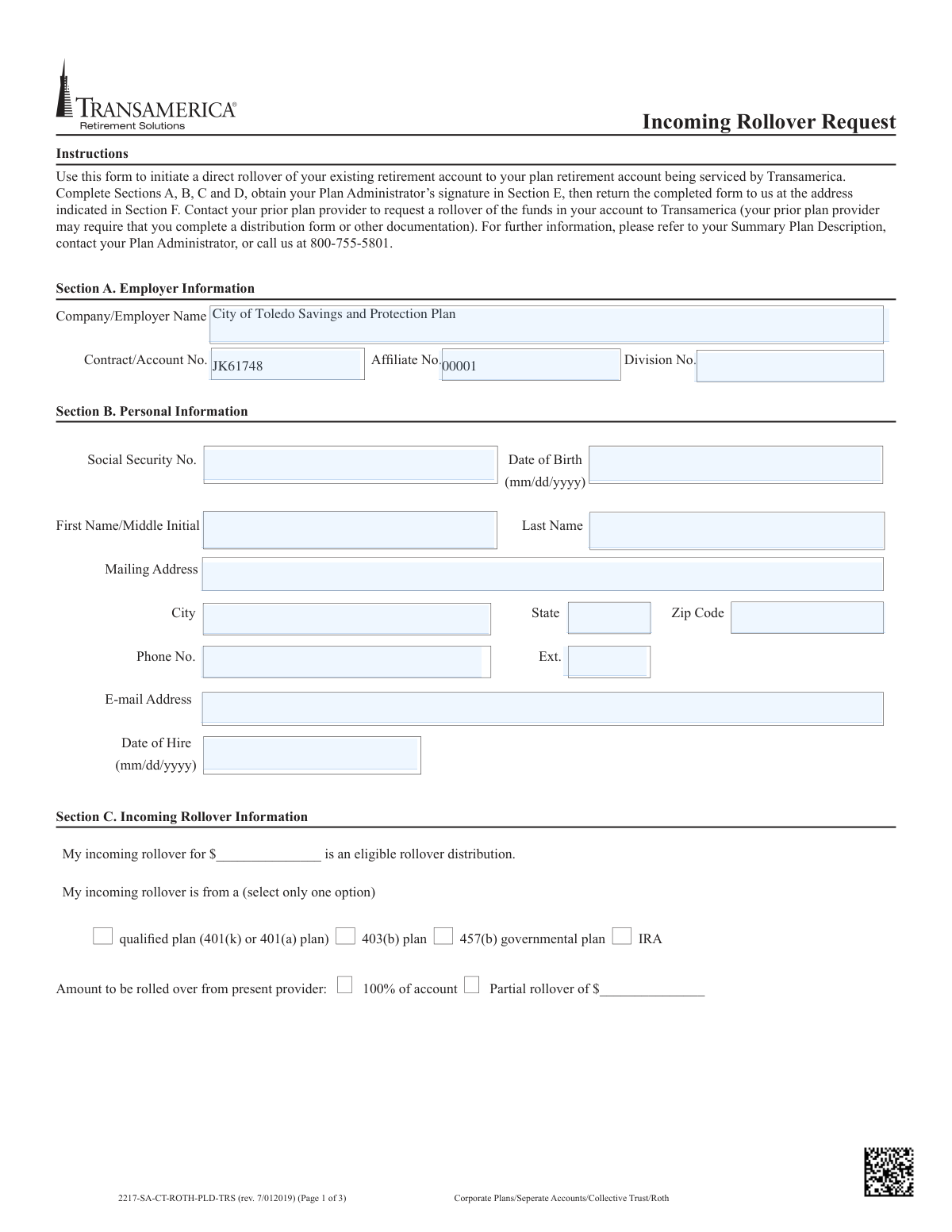
Incoming Rollover Request - IPPFA Benefits (Rev. 10/17), page 1
Moderate · 49/100Form Complexity Index

The AI does the filling. You just check it.

No typing into boxes, nothing to install.

Tell the AI about youAnswer a few questions in plain words, or upload a document you already have. That is all the typing there is.
AI fills every field in secondsIt puts each answer in the right box on every page, checkboxes included.
Check it and downloadReview every field, change anything, then download, print or sign the PDF.

What this form asks for

The AI fills all of it, from your answers or your documents.

This form allows an individual to transfer funds from a previous retirement account, such as a 401(k), 403(b), or IRA, into their current retirement plan administered by Transamerica. Completing this request is a crucial step for consolidating retirement savings and ensuring the funds are moved as a direct rollover, which avoids potential taxes and penalties. Today, this form can be filled out quickly and accurately using AI-powered services like Instafill.ai, which can also convert non-fillable PDF versions into interactive fillable forms.
Fillable fields69
Pages6
Form Complexity IndexModerate, 49/100

The AI checks your answers before you download

14 checks built for this form, so a wrong date or a missing answer is caught before anyone else sees it.

Validates Social Security Number Format and Consistency

This check ensures the Social Security Number in Section B is provided in a valid 9-digit format (e.g., XXX-XX-XXXX or XXXXXXXXX). It also cross-references this SSN with the one provided in the signature section (Section E) to ensure they match. This is critical for correctly identifying the participant's account and preventing fraud or processing errors. If the format is invalid or the numbers do not match, the form submission will be rejected for manual review.

Ensures Date of Birth and Date of Hire are Valid and Logical

This validation verifies that the 'Date of Birth' and 'Date of Hire' in Section B are in a valid 'mm/dd/yyyy' format and represent plausible dates. It also performs a logical check to ensure the 'Date of Hire' is after the 'Date of Birth' by a reasonable margin (e.g., at least 14 years). This prevents data entry errors and ensures the participant meets minimum age requirements for employment. An illogical or invalid date will flag the form for correction.

Verifies Completeness of Personal Information Section

This check confirms that all fields within Section B (Personal Information), including First Name, Last Name, SSN, Date of Birth, and full Mailing Address, are filled out. Complete and accurate personal data is essential for legal compliance, account setup, and future communications with the participant. An incomplete section will halt processing until the missing information is provided.

Validates Phone Number Format

This check ensures that the 'Phone No.' fields in both Section B (Personal Information) and Section D (Prior Plan Information) adhere to a standard 10-digit format, with or without common separators. Correctly formatted phone numbers are necessary for communication with the participant and the prior plan provider if issues arise with the rollover. An invalid format would trigger an error and require correction.

Ensures Exclusive Selection of Rollover Source

In Section C, the form asks for the source of the rollover funds (qualified plan, 403(b), 457(b), or IRA). This validation ensures that exactly one of these options is selected. Selecting multiple or no options creates ambiguity about the tax nature of the funds, which is critical for proper accounting. A failure in this check would require the user to clarify the single source of the rollover.

Validates Rollover Amount Specification

This check verifies that in Section C, the user has selected either '100% of account' or 'Partial rollover of $___', but not both. If 'Partial rollover' is chosen, it also ensures that a valid, positive dollar amount is entered in the corresponding field. This logic prevents contradictory instructions and ensures the exact amount to be rolled over is clearly defined. Ambiguous selections will cause the form to be rejected.

And 8 more checks
  • Conditional Validation for After-Tax Amounts
  • Conditional Validation for Roth Contributions
  • Validates Nonqualified Roth Distribution Details
  • Verifies Participant Signature and Date
  • Verifies Plan Administrator Signature and Date
  • Validates Email Address Format
  • Validates ZIP Code Format
  • Ensures Consistency of Rollover Amounts

Let AI fill out your 2217-SA-CT-ROTH-PLD-TRS

No typing. Every field filled in seconds, checked, ready to sign.

7 days free, then $19.99/month · Cancel anytime

How to Fill Out 2217-SA-CT-ROTH-PLD-TRS Online for Free in 2026

What the AI walks you through.

  1. Navigate to Instafill.ai and upload or select the Transamerica Incoming Rollover Request form.
  2. Provide your employer and personal information in Sections A and B, including your name, Social Security Number, and contact details.
  3. Complete Section C by specifying the details of your incoming rollover, such as the amount and the type of account it's coming from (e.g., 401(k), IRA).
  4. Enter the information for your prior retirement plan provider in Section D.
  5. Carefully review all the information you've entered, then sign and date the form in Section E.
  6. Obtain the required signature from your Plan Administrator in Section E.
  7. Download the completed form and submit it to Transamerica according to the mailing or wiring instructions in Section F, potentially along with a statement from your prior plan.

Common Mistakes in Completing 2217-SA-CT-ROTH-PLD-TRS

The ones the AI is built to catch.

Missing or Incorrect Plan Identification Numbers
In Section A, applicants often leave the 'Contract/Account No.', 'Affiliate No.', or 'Division No.' fields blank or enter incorrect information. This typically happens because they don't know where to find these numbers, which are specific to their employer's plan with Transamerica. An error here can lead to significant delays, rejection of the form, or the funds being misapplied to the wrong account. To avoid this, individuals should find these numbers on a recent account statement or in their plan's welcome packet before starting the form.
Forgetting the Plan Administrator's Signature
A very common and critical error is submitting the form without the 'Plan Administrator Signature' in Section E. Participants often overlook this requirement, assuming only their own signature is needed. Without the authorized signature from the new plan's administrator, Transamerica cannot process the rollover, leading to an automatic rejection and requiring the entire process to be restarted. Before submitting, you must identify your new employer's plan administrator and have them sign and date the form.
Confusion Over After-Tax and Roth Contribution Details
Section C is highly complex and a major source of errors, particularly distinguishing between standard after-tax and Roth contributions. People frequently fail to provide the required cost basis for after-tax amounts or the detailed breakdown and required statement for Roth rollovers. This mistake can have serious tax consequences, as the form states that without proper documentation, all funds will be treated as pre-tax, potentially leading to incorrect taxation. It is crucial to get this information from the prior plan provider before filling out this section.
Failing to Attach Required Documentation
The form explicitly states that for any Roth rollover, a copy of the rollover statement from the transferring plan must be attached, and that Transamerica will contact the prior provider about a delayed rollover only if a recent statement is attached. Many people forget to include these necessary attachments. This omission will halt the process, as Transamerica cannot accept Roth amounts or follow up on delayed funds without the required paperwork, causing significant delays.
Incomplete or Inaccurate Prior Plan Information
In Section D, individuals often provide incomplete or vague information about their prior plan provider. They may confuse the plan name with the provider's name (e.g., 'My Old Company 401k' vs. 'Fidelity Investments') or lack the specific account number and contact phone number. This incomplete data makes it difficult or impossible for Transamerica to coordinate the transfer or follow up if the funds are not received, placing the burden back on the applicant to resolve the issue.
Incorrectly Identifying the Source Plan Type
In Section C, applicants must select the type of plan the rollover is coming from (e.g., 401(k), 403(b), IRA). Many people are unsure of the exact classification of their old retirement account and may guess incorrectly. Selecting the wrong plan type can lead to compliance issues and potential tax penalties, as different rules apply to rollovers from different sources. It's essential to confirm the exact plan type with the prior institution before making a selection.
Personal Information Mismatches and Typos
Simple typos in critical fields like Social Security Number, Date of Birth, or name spelling in Section B are frequent mistakes. These errors cause an identity mismatch when Transamerica attempts to verify the applicant's information, leading to immediate rejection of the request for security reasons. Double-checking this information for accuracy is vital. AI-powered form-filling tools like Instafill.ai can help prevent these errors by securely storing and accurately populating personal data.
Using Incorrect Date Formats
The form specifies a `(mm/dd/yyyy)` format for the 'Date of Birth' and 'Date of Hire' fields. However, users often enter dates in other formats, such as `d/m/yyyy` or `yyyy-mm-dd`, which can cause data entry errors on the receiving end or require manual correction. This can slow down processing. Using the specified format ensures the information is captured correctly the first time. Tools like Instafill.ai can automatically format dates correctly based on the form's requirements.
Illegible Handwriting on a Printed Form
Since this form is a PDF, many users will print it and fill it out by hand. Rushed or unclear handwriting can make names, numbers, and addresses impossible to read, leading to data entry errors, misdirected communications, or outright rejection of the form. If a form is a non-fillable PDF, tools like Instafill.ai can convert it into a fillable version, allowing you to type directly into the fields for perfect legibility before printing for signatures.
Sending the Form or Check to the Wrong Address
Section F provides three different addresses: one for regular mail, one for overnight mail, and a third for submitting the form when funds are being wired. Applicants often get confused and send the check or the form to the wrong location. This mistake can cause the check to be lost or significantly delay the matching of the form to the wired funds, leaving the money in limbo. It is crucial to carefully read Section F and select the correct address based on the submission method.

Frequently Asked Questions About 2217-SA-CT-ROTH-PLD-TRS


Is it really free for 7 days?
Yes. You pay $0 today. Cancel before Nov 18 and you are never charged. Keep it, and it is $19.99 a month for 5 fills of your 2217-SA-CT-ROTH-PLD-TRS.
Can I fill other forms too?
This plan is for your 2217-SA-CT-ROTH-PLD-TRS: your own AI agent fills it as often as 5 times a month. To fill other forms and upload your own, choose a Professional plan from your account.
How do I cancel?
From your account, in two clicks, any time. No email, no call.
How does the AI fill out 2217-SA-CT-ROTH-PLD-TRS?
You answer a few questions in plain words, or upload a document you already have. The AI reads what you give it and puts each answer into the right field of 2217-SA-CT-ROTH-PLD-TRS, on every page, in seconds. It checks the answers against the form's own rules, and you review and change anything before you download, print or sign.
What happens to my information?
It is encrypted in transit and at rest, and it is never used to train AI.
How complex is 2217-SA-CT-ROTH-PLD-TRS to fill out?
2217-SA-CT-ROTH-PLD-TRS has a Form Complexity Index of 49 out of 100, in the moderate tier: 69 fillable fields across 6 pages. Instafill.ai's AI fills it in under a minute, with every field there for you to review before you download.
What is the purpose of this Incoming Rollover Request form?
This form is used to initiate a direct rollover of funds from an existing retirement account, like a 401(k) or IRA, into your plan retirement account that is serviced by Transamerica.
Who needs to fill out this form?
You should fill out this form if you are an employee with a Transamerica-serviced retirement plan and you want to move funds from a previous employer's plan or a personal IRA into your current plan.
What information do I need to complete this form?
You will need your personal information (SSN, DOB), your employer's plan details, and information about your prior retirement account provider. If rolling over Roth funds, you must also provide a statement from your prior plan.
Where do I find my 'Plan Administrator' to sign Section E?
Your Plan Administrator is typically someone in your company's Human Resources or benefits department. Contact them to review your form and provide the required signature.
I'm rolling over money that includes after-tax contributions. What do I need to do?
In Section C, you must check the box indicating your rollover includes after-tax amounts and provide the 'cost basis,' which is the total of your after-tax contributions. Transamerica cannot accept these funds if the cost basis is not provided.
What are the requirements for rolling over a Roth 401(k)?
Transamerica only accepts Roth funds via a direct rollover from another Roth plan. You must complete the Roth portion of Section C and attach a copy of the rollover statement from your previous provider, as the rollover cannot be processed without it.
Does submitting this form to Transamerica automatically move my money?
No, this form only notifies Transamerica to expect the funds. You must also contact your prior plan provider to complete their distribution paperwork and authorize the transfer of funds to Transamerica.
How will my rollover funds be invested once they arrive?
If you are already enrolled in the plan, the funds will be invested according to your existing allocation. If you are not yet enrolled, the money will be invested in the plan's default fund.
Where do I send the completed form and the check?
Section F provides the mailing addresses. Use the P.O. Box for regular mail or the Brooklyn, NY address for overnight mail; ensure you send both the form and the check together.
Can I roll over a hardship distribution or an outstanding loan from my old plan?
No, the form specifies that certain payments like hardship distributions and loans treated as deemed distributions are generally not eligible for rollover into your plan.
What happens if my rollover funds are not received in a timely manner?
The form states that if the funds are not received within 30 days, Transamerica will contact your prior provider, provided you attached a copy of your most recent statement from that account.
Can AI tools help me fill out this form?
Yes, services like Instafill.ai use AI to accurately auto-fill form fields with your information, which can save you time and help reduce errors.
How can I use Instafill.ai to fill this form out online?
You can upload the PDF of the Incoming Rollover Request to the Instafill.ai platform. The AI will make the fields fillable, allowing you to type your information directly and then download the completed form for signatures.
The PDF I downloaded isn't fillable. What can I do?
If you have a non-fillable or 'flat' PDF, you can use a service like Instafill.ai. It is designed to convert such documents into interactive, fillable forms that you can easily complete on your computer.
Encrypted in transit and at restNever used to train AIDelete your forms any time

Get your 2217-SA-CT-ROTH-PLD-TRS filled out by AI

$0 today. Cancel before Nov 18 and you pay nothing.

7 days free, then $19.99/month · Cancel anytime