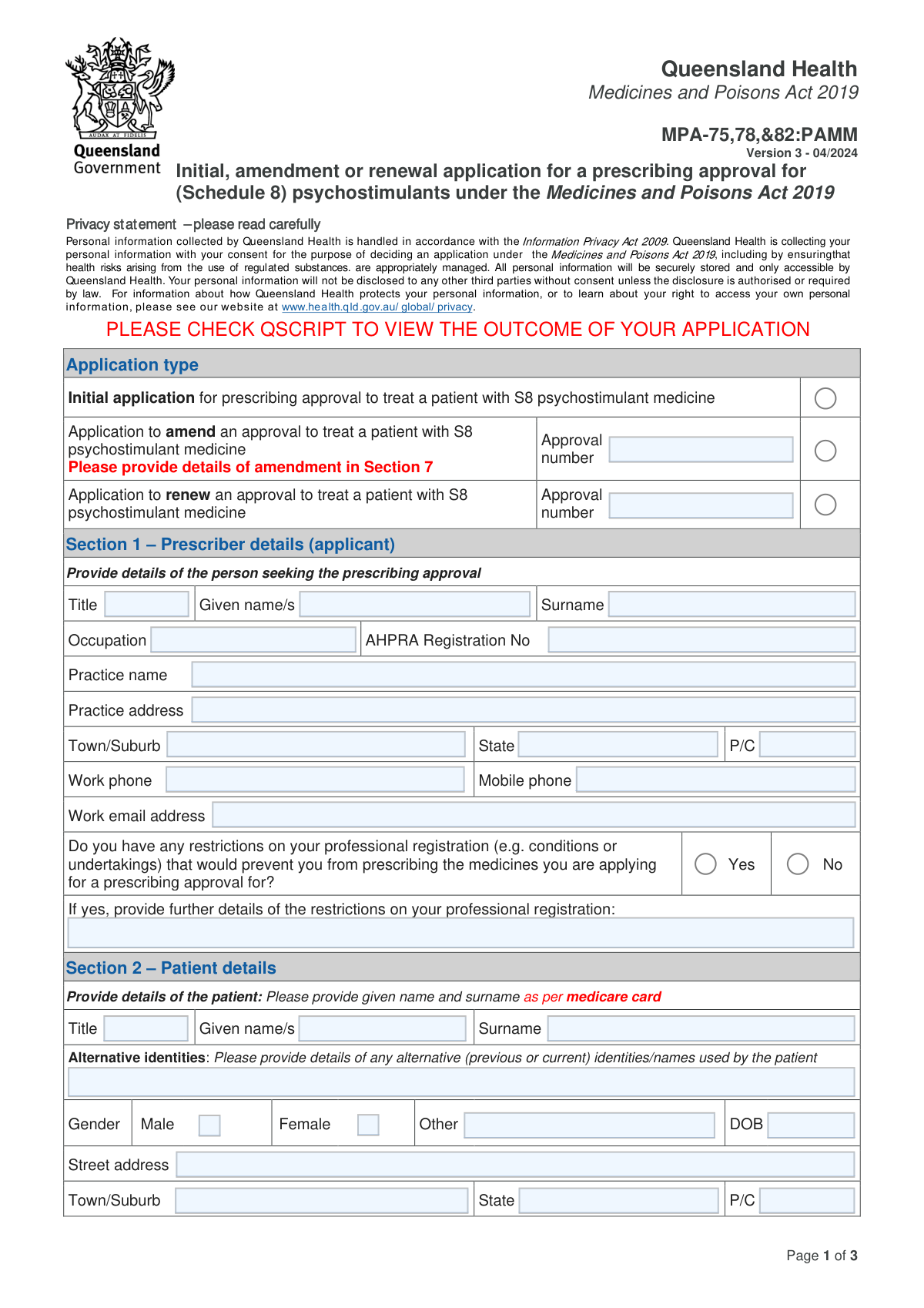
Yes! You can use AI to fill out Initial, amendment or renewal application for a prescribing approval for (Schedule 8) psychostimulants under the Medicines and Poisons Act 2019

Form MPA-75,78,&82:PAMM is an application for prescribers in Queensland seeking approval to prescribe Schedule 8 psychostimulant medicines as required by the Medicines and Poisons Act 2019. It covers initial applications, amendments, and renewals, ensuring that the prescription of these controlled substances is properly managed and monitored. Today, this form can be filled out quickly and accurately using AI-powered services like Instafill.ai, which can also convert non-fillable PDF versions into interactive fillable forms.
Our AI automatically handles information lookup, data retrieval, formatting, and form filling.
It takes less than a minute to fill out MPA-75,78,&82:PAMM using our AI form filling.
Securely upload your data. Information is encrypted in transit and deleted immediately after the form is filled out.

Form specifications

Form name: Initial, amendment or renewal application for a prescribing approval for (Schedule 8) psychostimulants under the Medicines and Poisons Act 2019
Number of fields: 73
Number of pages: 3
Language: English
main-image

Instafill Demo: How to fill out PDF forms in seconds with AI

How to Fill Out MPA-75,78,&82:PAMM Online for Free in 2026

Are you looking to fill out a MPA-75,78,&82:PAMM form online quickly and accurately? Instafill.ai offers the #1 AI-powered PDF filling software of 2026, allowing you to complete your MPA-75,78,&82:PAMM form in just 37 seconds or less.
Follow these steps to fill out your MPA-75,78,&82:PAMM form online using Instafill.ai:
  1. 1 Navigate to Instafill.ai and upload the MPA-75,78,&82:PAMM form or select it from the template library.
  2. 2 Complete Section 1 with your prescriber details, including your name, AHPRA number, and practice information.
  3. 3 Enter the patient's information in Section 2, ensuring the name matches their Medicare card.
  4. 4 In Sections 3 and 4, specify the patient's diagnosis and the proposed Schedule 8 psychostimulant medicine and dosage.
  5. 5 Provide the details of the supporting specialist in Section 5 and attach the required referral letter.
  6. 6 Indicate the requested duration for the approval in Section 6 and add any supplementary information in Section 7.
  7. 7 Carefully review all entered data, complete the declaration in Section 8 with your digital signature, and submit the completed form via the specified email address.

Our AI-powered system ensures each field is filled out correctly, reducing errors and saving you time.

Why Choose Instafill.ai for Your Fillable MPA-75,78,&82:PAMM Form?

Speed

Complete your MPA-75,78,&82:PAMM in as little as 37 seconds.

Up-to-Date

Always use the latest 2026 MPA-75,78,&82:PAMM form version.

Cost-effective

No need to hire expensive lawyers.

Accuracy

Our AI performs 10 compliance checks to ensure your form is error-free.

Security

Your personal information is protected with bank-level encryption.

Frequently Asked Questions About Form MPA-75,78,&82:PAMM

This form is used by prescribers in Queensland to apply for, amend, or renew a prescribing approval for Schedule 8 (S8) psychostimulant medicines for a specific patient.

Any prescriber, such as a General Practitioner or Nurse Practitioner, who intends to prescribe S8 psychostimulants like Dexamfetamine, Lisdexamfetamine, or Methylphenidate for conditions requiring Queensland Health approval must complete this form.

You will not receive a separate notification letter or email. You must check the patient's record in QScript to view the outcome of your application.

You must include a letter of referral from the relevant supporting specialist. This letter should confirm the patient's diagnosis and support the proposed treatment plan outlined in the application.

For adult patients (18 years and older) with ADHD, the specialist must be a psychiatrist. For children with ADHD, the specialist can be either a paediatrician or a psychiatrist.

The completed application and all necessary attachments should be emailed to the Medicines Approvals and Regulation Unit (MARU) at [email protected].

A prescribing approval will not usually be granted for more than two years. You can specify your requested term in Section 6 of the form.

You must submit an 'amendment' application. Check the box for 'Application to amend an approval', provide the existing approval number, and detail the requested changes in Section 7.

Enter the patient's legal name from their Medicare card in the main fields of Section 2. You can then list any previous or alternative names the patient uses in the 'Alternative identities' field.

You must declare any restrictions on your professional registration in Section 1. If the restrictions would prevent you from prescribing these medicines, your application may be affected.

Yes, services like Instafill.ai use AI to accurately auto-fill form fields from your records. This can save significant time and help reduce data entry errors.

You can upload the PDF to a platform like Instafill.ai. This will allow you to fill out all the fields digitally, sign electronically, and manage the document securely online.

If you have a non-fillable or 'flat' PDF, you can use a service like Instafill.ai. It can automatically convert the document into an interactive, fillable form for you.

Compliance MPA-75,78,&82:PAMM
Validation Checks by Instafill.ai

1
Exclusive Application Type Selection
This check ensures that the applicant has selected exactly one application type: 'Initial', 'Amendment', or 'Renewal'. Selecting multiple or no types creates ambiguity in how the application should be processed. If this validation fails, the form submission should be rejected with an error message prompting the user to select a single application type.
2
Conditional Approval Number for Amendment or Renewal
This validation verifies that if the application type is 'Amendment' or 'Renewal', the corresponding 'Approval number' field is not empty. This number is essential for locating the existing approval record that needs to be modified or renewed. A missing number would prevent the processing of the request, so the submission must be halted until the number is provided.
3
Prescriber AHPRA Number Format
This check validates that the 'AHPRA Registration No' in Section 1 follows the standard format for Australian Health Practitioner Regulation Agency numbers (e.g., 10 digits prefixed by a 3-letter code like 'MED'). Correct formatting is crucial for uniquely identifying the prescriber in national databases and verifying their registration status. An invalid format would lead to a lookup failure and rejection of the application.
4
Conditional Disclosure of Registration Restrictions
This validation ensures that if the prescriber answers 'Yes' to having restrictions on their professional registration, the subsequent text field for providing details is filled out. This information is critical for assessing the prescriber's authority and suitability to prescribe Schedule 8 medicines. Failure to provide these details when required will result in an incomplete application and prevent a proper risk assessment.
5
Patient Date of Birth Validity
This check verifies that the patient's 'DOB' in Section 2 is a valid date and is in the past. An invalid or future date would be a data entry error and would impact age-related clinical decisions, such as determining the correct specialist type. The system should reject submissions with invalid dates to ensure patient data integrity.
6
Diagnosis and Medicine Selection Completeness
This validation ensures that at least one diagnosis is selected in Section 3 and at least one S8 psychostimulant medicine is selected in Section 4. An application cannot be processed without knowing both the condition being treated and the medicine being requested for approval. If either section is left blank, the application is fundamentally incomplete and must be rejected.
7
Binge Eating Disorder and Lisdexamfetamine Consistency
This check enforces the rule that if 'Binge eating disorder (lisdexamfetamine only)' is selected in Section 3, then 'Lisdexamfetamine' must be the only medicine selected in Section 4. This is a critical clinical rule stated on the form to prevent off-label or inappropriate prescribing for this specific diagnosis. A mismatch would indicate a misunderstanding or error by the applicant and must be flagged for correction.
8
Conditional Maximum Daily Dose Entry
This validation ensures that for every S8 psychostimulant medicine selected in Section 4, the corresponding 'Maximum daily dose' field is filled with a positive numerical value. The dose is a key parameter of the prescribing approval and is required for the clinical review. An application with a selected medicine but no specified dose is incomplete and cannot be assessed.
9
Specialist Type and Patient Age Logic for ADD/ADHD
This check validates the 'Medical specialty' in Section 5 against the patient's age (calculated from DOB in Section 2) when the diagnosis is ADD/ADHD. The form specifies a psychiatrist for adults (≥ 18 years) and a paediatrician or psychiatrist for children. This rule ensures the diagnosis and treatment plan originate from the appropriate specialist, which is a core requirement for approval.
10
Specialist Details Completeness
This validation verifies that all fields within Section 5 (Supporting specialist details) are completed, including name, specialty, AHPRA number, contact details, and practice address. This information is essential for Queensland Health to verify the specialist's credentials and the legitimacy of the supporting treatment plan. An incomplete specialist section prevents due diligence and will cause the application to be rejected.
11
Specialist Review Date Validity
This check ensures the 'Date of last review by relevant specialist' in Section 5 is a valid date in DD/MM/YYYY format and is not in the future. This date confirms the currency of the specialist's assessment and treatment plan. An invalid or future date is a data entry error that undermines the credibility of the application's clinical basis.
12
Declaration and Signature Completion
This validation confirms that all checkboxes in the 'Consent and Declaration' section are checked and that the 'Signature' and 'Date' fields are filled. This declaration is a legal attestation of the accuracy of the information provided and consent for data exchange. An unsigned or undated application lacks legal standing and cannot be accepted for processing.
13
Prescriber Contact Information Format
This check validates that the 'Work phone', 'Mobile phone', and 'Work email address' fields in Section 1 are in a recognizable format. For example, the email must contain an '@' symbol and a domain, and phone numbers should contain a valid number of digits. Correct contact information is vital for communication regarding the application, and invalid formats could delay or prevent this.
14
Conditional 'Other' Diagnosis Description
This validation ensures that if the 'Other' checkbox is selected in Section 3 (Diagnosis), the corresponding description text field is filled out. The form requires evidence and a treatment plan for unlisted diagnoses. An empty description field makes it impossible to evaluate the clinical justification for the application, rendering it incomplete.

Common Mistakes in Completing MPA-75,78,&82:PAMM

Incorrect Application Type Selection

Applicants often select the wrong application type, such as choosing 'Initial' for a renewal, or they forget to enter the existing approval number when applying for an 'Amendment' or 'Renewal'. This mistake leads to processing delays as the regulatory unit must contact the applicant to clarify the application's intent and find the correct record. To avoid this, carefully review whether you are starting a new treatment, changing an existing one, or renewing an approval, and ensure the corresponding approval number is entered where required.

Patient Name Does Not Match Medicare Card

The form explicitly requires the patient's name to be entered exactly as it appears on their Medicare card, yet applicants frequently use preferred names, nicknames, or introduce typos. This discrepancy causes validation failures and delays as the patient cannot be accurately identified in official systems like QScript. Always have the patient's Medicare card on hand and transcribe the name precisely to ensure a smooth verification process.

Incomplete or Incorrect Specialist Details

Section 5 requires complete details for the supporting specialist, but applicants often leave fields like the AHPRA number, work phone, or full practice address blank. This happens when the applicant doesn't have the information readily available and forgets to look it up later. Incomplete specialist details make it impossible for the approving body to verify the specialist's credentials or the validity of the treatment plan, leading to application rejection or requests for information. It is crucial to gather all specialist information before starting the form.

Forgetting to Attach the Specialist Letter

The application requires a supporting letter from the relevant specialist that confirms the diagnosis and treatment plan, but this is one of the most commonly forgotten attachments. Submitting the form without this evidence will result in an immediate rejection or a significant delay as the application is considered incomplete. To prevent this, create a checklist of required documents before submission and ensure the specialist's letter is included with the application email.

Incorrect AHPRA Number Entry

Entering an inaccurate or incomplete Australian Health Practitioner Regulation Authority (AHPRA) number for either the prescriber (Section 1) or the specialist (Section 5) is a frequent error. A single wrong digit can prevent the system from verifying the practitioner's registration and specialty. This error often leads to automatic rejection or manual follow-up, delaying the approval. Double-checking the number against the official AHPRA register is essential before submission.

Failing to Disclose Registration Restrictions

Applicants may incorrectly check 'No' regarding restrictions on their professional registration, either through misunderstanding what constitutes a relevant restriction or by omission. This is a critical declaration, and providing false information can have serious consequences, including suspension or cancellation of any approval granted. It is vital to honestly and accurately declare any conditions or undertakings on your AHPRA registration that could impact your ability to prescribe.

Missing Maximum Daily Dose Information

In Section 4, applicants will select a psychostimulant medicine but then forget to fill in the corresponding 'Maximum daily dose' field. This information is mandatory for the approval, as it defines the upper limit of the prescribing authority being requested. An application without a specified dose is incomplete and cannot be processed, requiring the unit to contact the prescriber for clarification and delaying patient treatment.

Mismatched Specialist for Diagnosis

The form specifies the required medical specialty for certain diagnoses (e.g., a psychiatrist for adult ADHD). A common mistake is listing a specialist whose specialty does not align with these requirements. For example, listing a General Practitioner or a different type of specialist as the primary support for an adult ADHD diagnosis will lead to rejection. Applicants must ensure the specialist named in Section 5 meets the explicit criteria for the diagnosis in Section 3.

Omitting Patient's Alternative Identities

The field for 'Alternative identities' is often overlooked and left blank, even when a patient has used previous names (e.g., a maiden name) or aliases. This information is crucial for a comprehensive search in QScript and other systems to ensure patient safety and continuity of care. Failing to provide known aliases can result in an incomplete patient history, potentially compromising clinical decisions and causing delays if discovered later.

Submitting an Unsigned or Undated Declaration

An application is not legally valid without a signature and date in the declaration section (Section 8). Applicants sometimes forget to sign the form, especially when submitting a scanned PDF, or they leave the date field blank. This oversight invalidates the consent and declaration, forcing the processing unit to return the application and request a properly executed version. AI-powered form filling tools like Instafill.ai can help prevent many of these errors by validating data formats, ensuring required fields are completed, and even converting flat PDFs into fillable versions to streamline the process.
Saved over 80 hours a year

“I was never sure if my IRS forms like W-9 were filled correctly. Now, I can complete the forms accurately without any external help.”

Kevin Martin Green

Your data stays secure with advanced protection from Instafill and our subprocessors

Robust compliance program

Transparent business model

You’re not the product. You always know where your data is and what it is processed for.

ISO 27001, HIPAA, and GDPR

Our subprocesses adhere to multiple compliance standards, including but not limited to ISO 27001, HIPAA, and GDPR.

Security & privacy by design

We consider security and privacy from the initial design phase of any new service or functionality. It’s not an afterthought, it’s built-in, including support for two-factor authentication (2FA) to further protect your account.

Fill out MPA-75,78,&82:PAMM with Instafill.ai

Worried about filling PDFs wrong? Instafill securely fills initial-amendment-or-renewal-application-for-a-prescribing-approval-for-schedule-8-psychostimulants-under-the-medicines forms, ensuring each field is accurate.