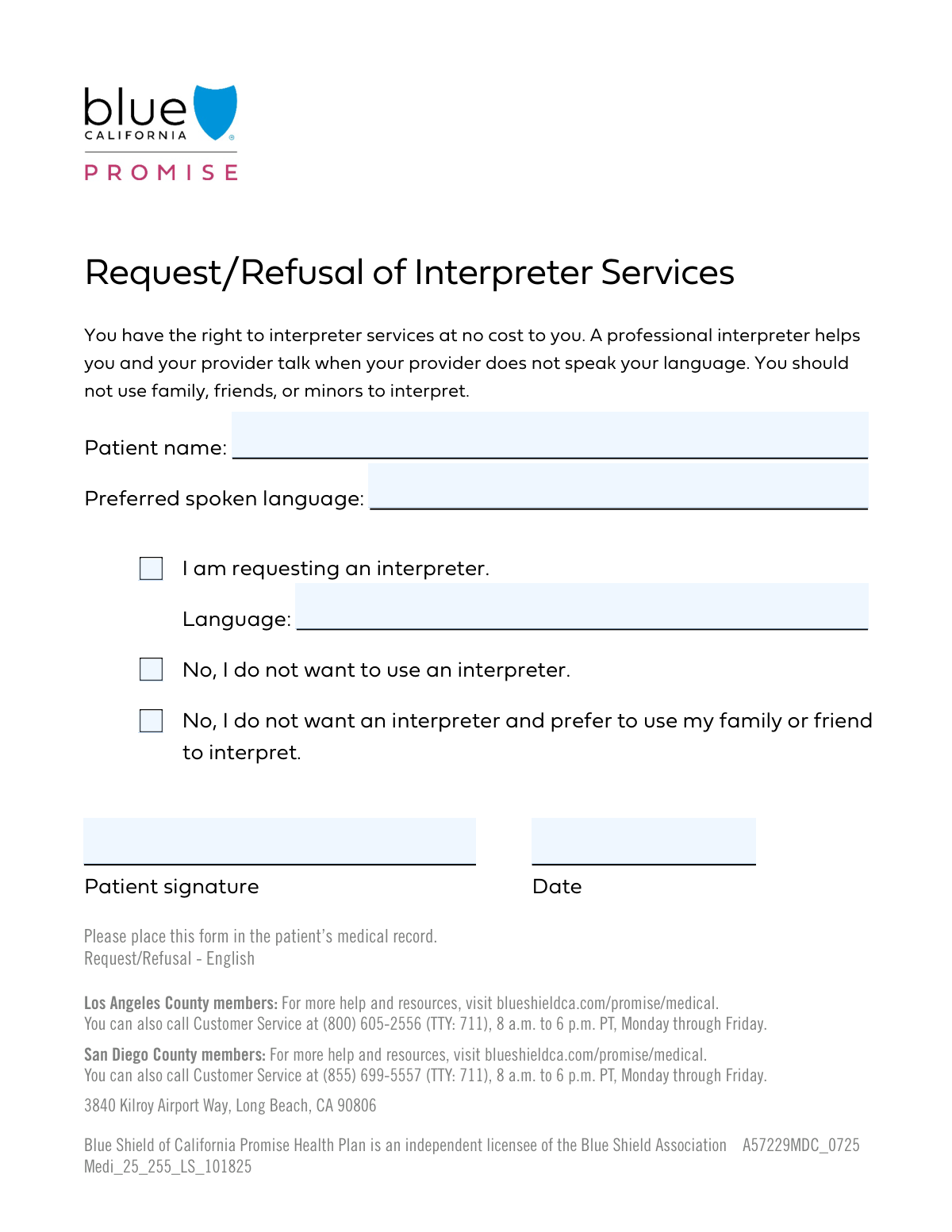
Yes! You can use AI to fill out Interpreter Services Request and Declination Form

The Interpreter Services Request and Declination Form is a crucial document used in healthcare settings for patients to formally state their language assistance preferences. It allows a patient to either request a professional interpreter for a specific language or to officially decline the service, ensuring their choice is clearly documented for quality care. Today, this form can be filled out quickly and accurately using AI-powered services like Instafill.ai, which can also convert non-fillable PDF versions into interactive fillable forms.
Our AI automatically handles information lookup, data retrieval, formatting, and form filling.
It takes less than a minute to fill out Interpreter Request Form using our AI form filling.
Securely upload your data. Information is encrypted in transit and deleted immediately after the form is filled out.

Form specifications

Form name: Interpreter Services Request and Declination Form
Number of fields: 8
Number of pages: 1
Language: English
main-image

Instafill Demo: How to fill out PDF forms in seconds with AI

How to Fill Out Interpreter Request Form Online for Free in 2026

Are you looking to fill out a INTERPRETER REQUEST FORM form online quickly and accurately? Instafill.ai offers the #1 AI-powered PDF filling software of 2026, allowing you to complete your INTERPRETER REQUEST FORM form in just 37 seconds or less.
Follow these steps to fill out your INTERPRETER REQUEST FORM form online using Instafill.ai:
  1. 1 Navigate to Instafill.ai and upload your Interpreter Services Request form or select it from a template library.
  2. 2 Enter the patient's full name and preferred spoken language in the 'Patient Information' section.
  3. 3 In the 'Interpreter Service Choice' section, check the box that reflects your decision: requesting an interpreter, declining an interpreter, or using a family member/friend.
  4. 4 If you are requesting an interpreter, be sure to specify the language needed in the 'Requested Language' field.
  5. 5 Carefully review all entered information to ensure it is correct and accurately reflects your preferences.
  6. 6 Electronically sign and date the form in the designated signature fields to certify your choice.
  7. 7 Download, print, or securely share your completed form directly with your healthcare provider.

Our AI-powered system ensures each field is filled out correctly, reducing errors and saving you time.

Why Choose Instafill.ai for Your Fillable Interpreter Request Form Form?

Speed

Complete your Interpreter Request Form in as little as 37 seconds.

Up-to-Date

Always use the latest 2026 Interpreter Request Form form version.

Cost-effective

No need to hire expensive lawyers.

Accuracy

Our AI performs 10 compliance checks to ensure your form is error-free.

Security

Your personal information is protected with bank-level encryption.

Frequently Asked Questions About Form Interpreter Request Form

This form is used to document your language preference and your choice regarding the use of a professional interpreter for your medical care. It helps us ensure you can communicate effectively with your healthcare providers.

Any patient who feels they would benefit from interpretation services should complete this form. It ensures your communication needs are officially recorded and addressed.

You have three choices: you can request a professional interpreter provided by us, you can decline an interpreter entirely, or you can decline a professional interpreter and choose to use a family member or friend instead.

Yes, you can choose to use a family member or friend by checking the box that says 'I do not want an interpreter and prefer to use my family or friend'. However, using a professional medical interpreter is often recommended for accuracy.

'Preferred Spoken Language' is the primary language you are most comfortable speaking. 'Requested Language' is the specific language you need an interpreter for, which you only need to fill out if you are requesting our interpreter services.

Please only check one box in this section to clearly indicate your choice. Checking multiple boxes may cause confusion and delay the processing of your request.

You can always change your mind and request an interpreter at any point during your care. Simply inform a staff member, and they will assist you in making a new request.

Your signature confirms that the information provided is accurate and that you have made a conscious choice about interpreter services. It serves as a formal record of your decision.

Your choice is recorded in your patient file. If you requested an interpreter, our staff will begin the process of arranging one for your appointments.

Yes, services like Instafill.ai use AI to accurately auto-fill form fields from your saved profile, which saves time and helps prevent errors. This is especially useful for filling out your name and other personal details.

You can upload the form to the Instafill.ai platform. The AI will identify the fields, allowing you to click to fill them with your saved information or type directly into the interactive fields before signing and saving.

You can use a service like Instafill.ai, which can convert flat, non-fillable PDFs into interactive, fillable forms. Just upload the document, and the platform will make it easy to complete and sign online.

Compliance Interpreter Request Form
Validation Checks by Instafill.ai

1
Patient Name Presence
This check ensures the 'Patient Name' field is not empty. The patient's full name is a fundamental piece of information for identification and record-keeping. If this validation fails, the form submission will be blocked, and the user will be prompted to enter the patient's name.
2
Preferred Spoken Language Completeness
This validation verifies that the 'Preferred Spoken Language' field has been filled out. This information is crucial for ensuring effective communication and providing appropriate care, regardless of whether an interpreter is requested. A failure would require the user to specify a language before the form can be submitted.
3
Exclusive Interpreter Choice Selection
This check ensures that only one of the three interpreter service options is selected. The choices ('I am requesting an interpreter', 'No, I do not want to use an interpreter', 'No, I do not want an interpreter and prefer to use my family or friend') are mutually exclusive. Selecting more than one creates a logical contradiction, so the system must flag this as an error and require the user to make a single choice.
4
Mandatory Interpreter Choice
This validation confirms that the user has selected at least one of the three available interpreter service options. A choice must be made to formally document the patient's decision regarding interpretation services for compliance and record-keeping. If no option is selected, the form submission will be blocked until a choice is made.
5
Conditional Requirement for Requested Language
This check validates that if the 'I am requesting an interpreter' box is checked, the 'Requested Language' field must be filled in. This is a critical dependency to ensure that when an interpreter is requested, the specific language needed is captured. A failed validation would prompt the user to specify the language before proceeding.
6
Conditional Emptiness of Requested Language
This validation ensures that if the 'I am requesting an interpreter' box is not checked, the 'Requested Language' field must be empty. This prevents inconsistent data where a language is specified without a formal request for an interpreter. If the user unchecks the request box, the system should ideally clear this field automatically or flag it as an error.
7
Patient Signature Presence
This check verifies that the 'Patient Signature' field contains a signature. A signature is required for legal consent and to confirm the patient's acknowledgment of the form's content. The form cannot be considered complete or legally binding without a signature, so a missing signature will prevent submission.
8
Signature Date Presence
This validation ensures the 'Signature Date' field is not left blank. The date is essential context for the signature, establishing precisely when the form was signed. A missing date can compromise the document's validity, so submission is blocked until it's provided.
9
Valid Signature Date Format
This check verifies that the 'Signature Date' is entered in a valid and standard format (e.g., MM/DD/YYYY). This maintains data consistency across records and prevents processing errors. An invalid format would trigger an error message asking the user to correct the date.
10
Signature Date Cannot Be in the Future
This validation ensures that the 'Signature Date' is not a date in the future. A signature attests to an action taken in the past or present, so a future date is logically invalid. The system should reject any date that is later than the current calendar date.
11
Language Consistency Check
This check compares the 'Preferred Spoken Language' with the 'Requested Language' when an interpreter is requested. If the languages do not match, the system should issue a warning to the user. While intentional mismatches are possible, this check helps catch potential user errors and ensures the correct interpreter is arranged.
12
Valid Patient Name Format
This validation ensures the 'Patient Name' field contains only alphabetic characters, spaces, hyphens, and apostrophes. This check improves data quality by preventing the entry of numbers or special symbols that are not part of a name. If invalid characters are detected, the user is notified to correct the entry.

Common Mistakes in Completing Interpreter Request Form

Making Conflicting Interpreter Choices

This occurs when a user selects multiple, mutually exclusive options, such as checking both 'I am requesting an interpreter' and 'No, I do not want to use an interpreter'. This mistake usually happens from rushing and not reading the choices carefully, creating confusion for administrative staff. To avoid this, read all options in a section before making a single, definitive choice that reflects your needs.

Incomplete Interpreter Request

A frequent error is checking the box for 'I am requesting an interpreter' but then failing to specify the language in the 'Requested Language' field. This oversight renders the request incomplete, as the staff cannot arrange for an interpreter without knowing which language is needed. Always double-check that you have filled out all related fields after making a selection; AI-powered tools like Instafill.ai can automatically highlight these dependent fields to ensure they aren't missed.

Using a Nickname or Incomplete Patient Name

Patients often enter a nickname, initials, or a partial name instead of their full legal name. This causes significant problems, as the name on the form will not match medical records or insurance information, leading to claim denials and delays in care. To prevent this, always enter your full name exactly as it appears on your government ID or insurance card.

Forgetting the Signature or Date

The signature and date fields are often the last items on a form and are easily overlooked. An unsigned or undated form is legally invalid and cannot be processed, which means your requests or consent will not be recorded, causing major delays. Always perform a final review of the entire form before submission, paying special attention to the signature block at the end.

Leaving the Interpreter Section Entirely Blank

Some users who speak English fluently will skip the entire interpreter choice section, assuming it doesn't apply to them. However, this creates ambiguity, as staff won't know if the section was missed by mistake or if no interpreter is needed. To avoid follow-up calls and delays, you must make an explicit choice, such as checking the 'No, I do not want to use an interpreter' box.

Misunderstanding the Risk of Using Family as Interpreters

Selecting the option to use a friend or family member for interpretation can seem convenient, but it carries significant risks. Untrained interpreters can miscommunicate critical medical terminology, omit information, or violate privacy, potentially leading to poor health outcomes. It is always recommended to use the professional, confidential interpreter services provided by the healthcare facility to ensure accurate communication.

Entering the Date in an Incorrect Format

Users frequently write the date in a format different from what is required (e.g., DD/MM/YYYY instead of MM/DD/YYYY), which can cause data entry and record-keeping errors. This is especially common for people accustomed to international date formats. To avoid this, look for formatting guides next to the field or use an unambiguous format like 'Jan 01, 2024'. Form-filling tools like Instafill.ai can automatically detect and apply the correct date format.

Illegible Handwriting on Key Fields

When filling out a paper form or a non-fillable PDF, illegible handwriting for the 'Patient Name' or 'Requested Language' is a common problem. This can lead to the patient's name being misspelled in the system or the wrong interpreter being scheduled. To prevent this, print information clearly in block letters. If you have a flat PDF, a tool like Instafill.ai can convert it into a digitally fillable form to eliminate handwriting issues entirely.

Not Specifying a Preferred Spoken Language

Bilingual patients sometimes leave the 'Preferred Spoken Language' field blank or write 'English', even if they are more comfortable discussing complex medical topics in another language. This can prevent healthcare providers from recognizing a potential communication barrier, leading to misunderstandings about care. Always state the language in which you can most clearly understand and express complex information to ensure the best possible care.
Saved over 80 hours a year

“I was never sure if my IRS forms like W-9 were filled correctly. Now, I can complete the forms accurately without any external help.”

Kevin Martin Green

Your data stays secure with advanced protection from Instafill and our subprocessors

Robust compliance program

Transparent business model

You’re not the product. You always know where your data is and what it is processed for.

ISO 27001, HIPAA, and GDPR

Our subprocesses adhere to multiple compliance standards, including but not limited to ISO 27001, HIPAA, and GDPR.

Security & privacy by design

We consider security and privacy from the initial design phase of any new service or functionality. It’s not an afterthought, it’s built-in, including support for two-factor authentication (2FA) to further protect your account.

Fill out Interpreter Request Form with Instafill.ai

Worried about filling PDFs wrong? Instafill securely fills interpreter-services-request-and-declination-form forms, ensuring each field is accurate.