
Yes! You can use AI to fill out Form 4562, Depreciation and Amortization
Don't type 261 fields by hand. Tell our AI about yourself, or upload your W-2 or last year's return, and it fills every field in seconds. You check it, then download, print or sign.
The AI does the filling. You just check it.
No typing into boxes, nothing to install.
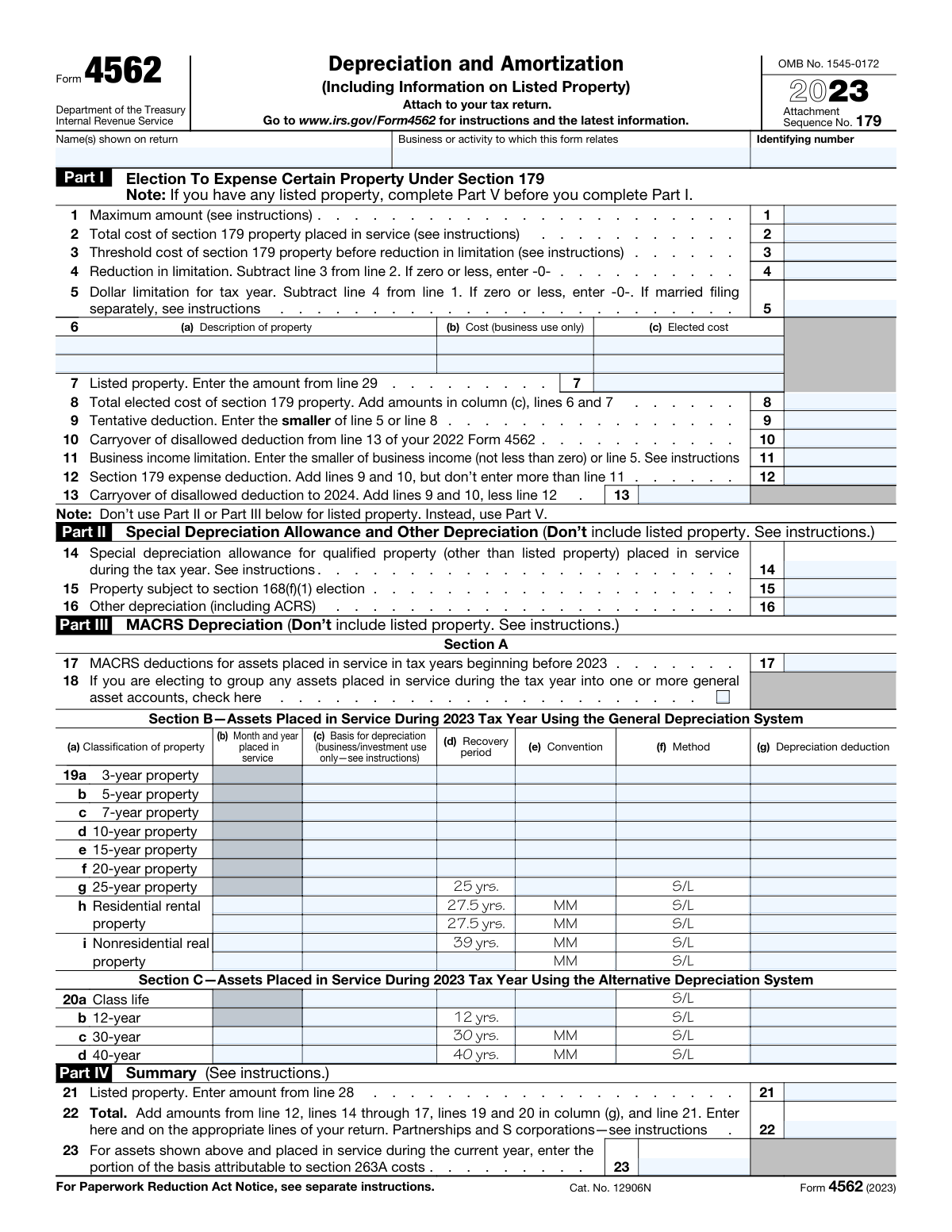
What this form asks for
The AI fills all of it, from your answers or your documents.
The AI checks your answers before you download
15 checks built for this form, so a wrong date or a missing answer is caught before anyone else sees it.
The AI software ensures that the name(s) entered on Form 4562 exactly matches the name(s) listed on the tax return. This is crucial for maintaining consistency across tax documents and avoiding discrepancies that could lead to processing delays. It cross-references the names with those on file to confirm accuracy. This step is vital for ensuring that the form is correctly associated with the taxpayer's records.
The AI software confirms that the business or activity name and identifying number are accurately provided on Form 4562. It checks for the presence of this information and verifies its accuracy against existing records. This ensures that the form is correctly attributed to the appropriate business entity or activity. Accurate identification is essential for the proper processing and tracking of the form.
The AI software verifies that Part V of Form 4562 is completed before Part I if listed property is involved. This ensures that the form is filled out in the correct sequence, which is necessary for accurately reporting depreciation and amortization. It checks for the presence of listed property and ensures that the corresponding sections are completed in the proper order. This validation helps prevent errors that could affect the calculation of depreciation and amortization expenses.
The AI software checks that the maximum amount for the election to expense certain property under Section 179 is correctly entered on Form 4562. It validates the amount against the current year's limits and ensures that it does not exceed the allowable maximum. This step is crucial for accurately calculating the taxpayer's deduction and avoiding potential issues with the IRS. It also ensures compliance with tax laws regarding the expensing of property.
The AI software validates the calculation of the reduction in limitation by subtracting the threshold cost from the total cost on Form 4562. It ensures that this calculation is performed accurately to determine the correct limitation amount. This validation is important for accurately reporting the taxpayer's depreciation and amortization expenses. It helps prevent errors that could lead to incorrect tax liabilities or refunds.
The AI software ensures that the dollar limitation for the tax year is accurately calculated by subtracting the reduction in limitation from the maximum amount. This calculation is crucial for determining the correct depreciation and amortization deductions. It verifies that the subtraction is performed correctly to avoid any discrepancies in the tax filing. This step is essential for compliance with tax regulations and for maximizing the allowable deductions.
And 9 more checks
- Confirms that the property description, cost (business use only), and elected cost are correctly entered in lines 6(a) through 6(c).
- Verifies that the amount from line 29 for listed property is correctly entered in line 7, if applicable.
- Checks the total elected cost of Section 179 property is accurately calculated by adding the amounts in column (c) of lines 6 and 7.
- Ensures the tentative deduction is correctly determined by entering the smaller of line 5 or line 8.
- Validates the inclusion of any carryover of disallowed deduction from the 2022 Form 4562.
- Confirms the accurate calculation of the business income limitation and the Section 179 expense deduction.
- Checks for the correct notation of any carryover of disallowed deduction to 2024.
- Ensures that Parts II and III correctly exclude listed property and accurately enter information on special depreciation allowance, other depreciation, and MACRS depreciation.
- Verifies that Part IV accurately summarizes the amounts from previous parts and correctly enters the total on the appropriate lines of the tax return.
Let AI fill out your Form 4562
No typing. Every field filled in seconds, checked, ready to sign.
How to Fill Out Form 4562 Online for Free in 2026
What the AI walks you through.
- Visit instafill.ai and select Form 4562.
- Enter business or activity details.
- Fill in property depreciation information.
- Complete listed property details if applicable.
- Sign and date the form electronically.
- Check for accuracy and submit the form.
Common Mistakes in Completing Form 4562
The ones the AI is built to catch.
Incorrectly calculating the Section 179 expense deduction
Failing to complete Part V for listed property before Part I
Not entering the correct maximum amount for Section 179 election
Miscalculating the reduction in limitation for Section 179 property
Omitting the carryover of disallowed deduction from previous years
Incorrectly describing property or its cost in Part I
Failing to include listed property amounts in line 7 when applicable
Not calculating the business income limitation correctly
Forgetting to note any carryover of disallowed deduction to the next year
Incorrectly entering information on special depreciation allowance
Omitting detailed information on depreciation and use of vehicles in Part V
Not providing complete details on amortization in Part VI
Failing to attach Form 4562 to the tax return
Not consulting the latest instructions for updates or additional guidance
Frequently Asked Questions About Form 4562
Is it really free for 7 days?
Can I fill other forms too?
How do I cancel?
How does the AI fill out Form 4562?
What happens to my information?
How complex is Form 4562 to fill out?
What is Form 4562 used for?
How do I determine the maximum amount I can expense under Section 179?
What is listed property and how does it affect my Form 4562?
Can I claim a special depreciation allowance on Form 4562?
How do I calculate the business income limitation for Section 179 expense deduction?
What is the difference between MACRS and ACRS depreciation methods?
How do I report depreciation for assets placed in service in previous years?
What information is required for vehicles used for business purposes on Form 4562?
How do I complete Part V for listed property?
What are the requirements for claiming depreciation on vehicles provided to employees?
How do I calculate the total depreciation and amortization to report on my tax return?
What is the significance of the business/investment use percentage for listed property?
How do I handle carryover of disallowed Section 179 deductions?
What are the instructions for completing Section B for vehicles used by more than 5% owners?
How do I determine if I meet an exception to completing Section B for vehicles used by employees?
What is the process for amortizing costs on Form 4562?
How do I report amortization of costs that began before the current tax year?
What are the specific instructions for reporting residential rental property depreciation?
How do I group assets into general asset accounts for depreciation purposes?
What are the implications of using the standard mileage rate for vehicle expenses on Form 4562?
Get your Form 4562 filled out by AI
$0 today. Cancel before Nov 8 and you pay nothing.
Let AI fill out your Form 4562
Your trial starts once a card is added. You pay nothing before Nov 8.
Our AI already knows this form, all 261 fields of it. Skip the typing: tell it about yourself, or upload what you have, and it fills the whole form in seconds.
- AI fills every field on both pages, checkboxes included
- No typing into boxes: answer a few questions, or upload your W-2 or last year's return, an old copy of this form, a photo of a document
- The AI checks the answers; you review and change anything before you download
- Download the finished PDF, print it, or sign it online
- Encrypted, and never used to train AI
Cancel before Nov 8 and you pay nothing.
A card is needed to start the trial. Cancel in two clicks from your account.
Terms · Privacy