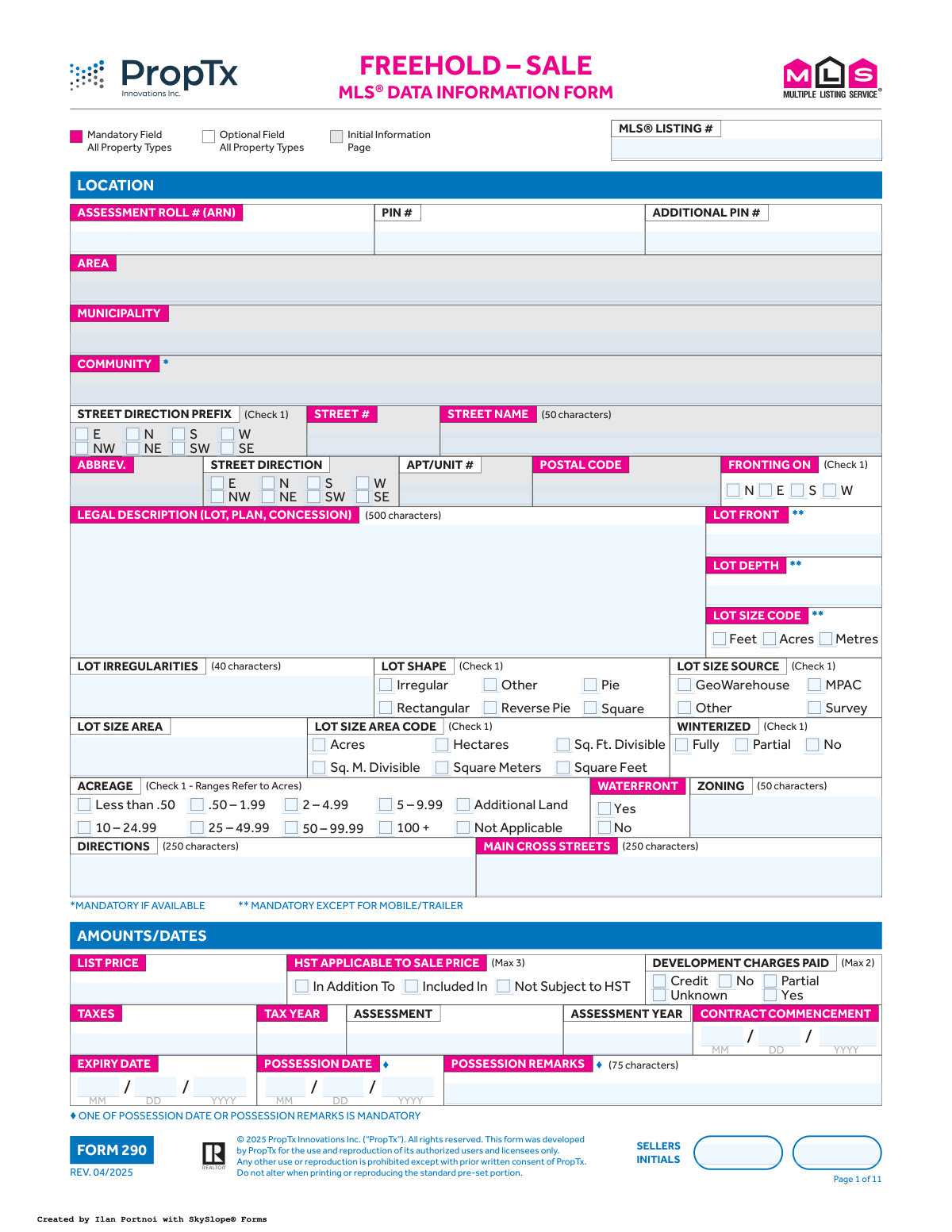
Yes! You can use AI to fill out MLS® Data Information Form - Freehold - Sale (Form 290)

The MLSÂź Data Information Form - Freehold - Sale, also known as Form 290, is a critical document for real estate agents to compile exhaustive details about a freehold property for sale. It covers everything from the property's legal description, physical attributes, and financial details to showing instructions and brokerage information, ensuring accuracy for the MLSÂź listing. Today, this form can be filled out quickly and accurately using AI-powered services like Instafill.ai, which can also convert non-fillable PDF versions into interactive fillable forms.
Our AI automatically handles information lookup, data retrieval, formatting, and form filling.
It takes less than a minute to fill out Form 290 using our AI form filling.
Securely upload your data. Information is encrypted in transit and deleted immediately after the form is filled out.

Form specifications

Form name: MLS® Data Information Form - Freehold - Sale (Form 290)
Number of fields: 1244
Number of pages: 11
Filled form examples: Form Form 290 Examples
Language: English
main-image

Instafill Demo: How to fill out PDF forms in seconds with AI

How to Fill Out Form 290 Online for Free in 2026

Are you looking to fill out a FORM 290 form online quickly and accurately? Instafill.ai offers the #1 AI-powered PDF filling software of 2026, allowing you to complete your FORM 290 form in just 37 seconds or less.
Follow these steps to fill out your FORM 290 form online using Instafill.ai:
  1. 1 Navigate to Instafill.ai and upload or select the MLS® Data Information Form (Form 290).
  2. 2 Use the AI assistant to automatically populate initial property details like address, legal description, and PIN from public records.
  3. 3 Systematically complete all sections, including Location, Property Type, Exterior/Interior features, and room details, by checking boxes and filling in text fields.
  4. 4 Enter all financial data, such as list price, taxes, and contract dates, allowing the AI to ensure correct formatting.
  5. 5 Provide brokerage, salesperson information, commission details, and specific showing instructions in the relevant sections.
  6. 6 Review all entered information across the multi-page form for accuracy, make any necessary edits, and have the seller(s) provide their digital initials on each page.
  7. 7 Securely sign the document electronically and download the completed Form 290, ready for submission to the MLS®.

Our AI-powered system ensures each field is filled out correctly, reducing errors and saving you time.

Why Choose Instafill.ai for Your Fillable Form 290 Form?

Speed

Complete your Form 290 in as little as 37 seconds.

Up-to-Date

Always use the latest 2026 Form 290 form version.

Cost-effective

No need to hire expensive lawyers.

Accuracy

Our AI performs 10 compliance checks to ensure your form is error-free.

Security

Your personal information is protected with bank-level encryption.

Frequently Asked Questions About Form Form 290

This form is used by real estate professionals to gather detailed information about a freehold property being listed for sale. The data collected is then entered into the Multiple Listing Service (MLSÂź) to create the official public listing.

The listing salesperson typically completes the form in collaboration with the property seller. The seller must provide accurate information and initial each page to verify the details before the property is listed.

These symbols highlight mandatory fields that must be completed for the listing to be accepted. Different symbols can indicate that a field is always mandatory, or only required for specific property types like detached homes or waterfront properties.

This information is typically found on your property tax bill, the original deed of sale, or through a property search on services like MPAC or GeoWarehouse. Your real estate agent can also help you locate these details.

Inclusions are items that are included with the sale of the property, such as appliances or specific light fixtures. Exclusions are items that the seller will remove and are not part of the sale, like a family heirloom chandelier.

A POTL is a freehold property that is also part of a common elements condominium corporation, which manages shared areas like private roads or parks. If your property is a POTL, you will likely pay a monthly fee for this maintenance.

You must provide either a specific calendar date for possession or use the 'Possession Remarks' field to describe the terms. For example, you could write '60 days after closing' or 'Flexible' in the remarks section if a fixed date isn't set.

No, you only need to complete the 'Waterfront / Rural' section if your property is waterfront or has specific rural characteristics. Most fields in this section are only mandatory if you have selected 'Yes' for the waterfront field.

This section is for confidential notes intended only for other real estate agents viewing the listing on the MLSÂź system. It often contains information about showing instructions, offer presentation times, or other professional-to-professional communication.

Yes, services like Instafill.ai use AI to accurately auto-fill many fields on complex forms like this one, saving significant time and reducing errors. The AI can pull data from various sources to complete property details, addresses, and other information.

You can use a service like Instafill.ai to easily complete this form online. Simply upload the PDF, and the platform will make it interactive, allowing you to type directly into the fields and use AI-powered suggestions.

If you have a non-fillable or 'flat' PDF, you can upload it to a platform like Instafill.ai. Their technology can convert it into an interactive, fillable form that you can complete and sign digitally.

A branded virtual tour can include the listing agent's or brokerage's name, logo, and contact information. An unbranded tour is a neutral version with no branding, which is required for certain MLSÂź distribution channels.

Providing accurate room dimensions is crucial for the MLSÂź listing as it gives potential buyers a clear and detailed understanding of the property's layout and size. This information helps buyers determine if the space meets their needs before they even visit.

Compliance Form 290
Validation Checks by Instafill.ai

1
Possession Information Completeness
Ensures that at least one of the 'Possession Date' or 'Possession Remarks' fields is completed, as specified by the form rule 'ONE OF POSSESSION DATE OR POSSESSION REMARKS IS MANDATORY'. This is crucial for legal clarity in the listing agreement, as it defines when the new owner can take possession. If neither field is provided, the form submission will fail, prompting the user to complete the required information.
2
Expiry Date Logical Consistency
This check validates that the 'Expiry Date' is chronologically later than the 'Contract Commencement Date'. A listing agreement cannot expire before it officially begins, so this rule prevents logical errors and ensures the contract term is valid. If the expiry date is on or before the commencement date, the system will display an error and require the user to correct the dates before proceeding.
3
Parking Space Totals Consistency
This validation confirms that the value entered in 'Total Parking Spaces' is greater than or equal to the sum of 'Garage Parking Spaces' and 'Drive Parking Spaces'. This check ensures data accuracy and prevents misleading information about the property's actual parking capacity. A discrepancy would trigger a warning, prompting the agent to review and correct the parking numbers to ensure consistency.
4
Conditional Waterfront Details Mandate
Based on the rule '*MANDATORY IF WATERFRONT YES/NO FIELD IS CHECKED “YES”', this check enforces that sections like 'Access to Property', 'Shoreline', and 'Body of Water Name' are filled out when the 'Waterfront' field is 'Yes'. Waterfront details are a major selling point and require specific disclosures for accuracy. If 'Waterfront' is 'Yes' and these dependent fields are empty, the submission will be blocked until the required information is provided.
5
Postal Code Format Validation
This validation ensures the 'Postal Code' field entry conforms to the standard Canadian format of Letter-Number-Letter-space-Number-Letter-Number (e.g., M5V 2L9). Correct formatting is essential for geolocation services, mail delivery, and data integrity across the MLSÂź system. An invalid format will result in a validation error, requiring the user to re-enter the postal code correctly.
6
POTL Fees Conditional Requirement
The form indicates that 'POTL MONTHLY FEES' is mandatory if the property is a 'Parcel of Tied Land (POTL)'. This check verifies that if 'Parcel of Tied Land (POTL)' is marked 'Yes', the 'POTL Monthly Fees' field must contain a valid monetary value. This is a critical financial detail for potential buyers, and its absence would be a significant omission. Failure to provide the fee when required will prevent form submission.
7
Year Built and Age Range Correlation
This check cross-references the entered 'Year Built' with the selected 'Approximate Age' checkbox (e.g., 0-5, 6-15). For instance, if the current year is 2024 and 'Year Built' is 2020, the 'Approximate Age' must be '0-5'. This prevents contradictory information on the listing. A mismatch would trigger a warning, prompting the user to align the two fields for accuracy.
8
Garage Details Dependency Logic
This validation ensures that if the 'Garage' field is marked 'No', then 'Garage Type' must be 'None' and 'Garage Parking Spaces' must be empty or zero. This prevents illogical data entry where details are provided for a non-existent feature. It maintains the integrity of the property description, and if a conflict is found, the system will flag the garage-related fields for correction.
9
URL Validity for Internet Distribution
This check verifies that any entry in a URL field (e.g., 'Unbranded Virtual Tour URL 1') is a valid web address format. It also confirms these fields are only fillable if 'Distribute to Internet' is 'Yes'. This ensures that links are functional and that data is not entered into fields that will not be used, maintaining data cleanliness. An invalid URL format would cause a validation failure.
10
Lot Dimension Mandate for Non-Mobile Homes
As per the form's '** MANDATORY EXCEPT FOR MOBILE/TRAILER' rule, this validation ensures the 'Lot Front' and 'Lot Depth' fields are filled for all property types other than 'Mobile/Trailer'. Lot dimensions are fundamental data for most freehold properties, impacting value and use. If the property type is not 'Mobile/Trailer' and these fields are empty, the submission will be rejected until they are completed.
11
Multi-Select Field Constraint Enforcement
The form specifies maximum selections for several fields, such as 'View (Max 10)' and 'Exterior (Max 2)'. This validation counts the number of checked boxes in each of these groups and ensures the count does not exceed the specified limit. This prevents users from overloading the listing with too many attributes, which can degrade searchability and display quality. If a user exceeds the maximum, an error message will indicate which field has too many selections.
12
Tax and Assessment Year Validity
This check ensures that the 'Tax Year' and 'Assessment Year' fields contain valid four-digit years (e.g., 2023). It also performs a logical check to ensure the years are not unreasonably far in the past or future. Accurate tax and assessment information is critical for financial calculations and due diligence by potential buyers. An invalid or illogical year would trigger an error, requiring correction.
13
Fireplace Details Conditional Logic
This validation enforces that if 'Fireplace / Stove' is marked 'Yes', the '# OF FIREPLACES' field must contain a number greater than zero. Conversely, if 'Fireplace / Stove' is 'No', the '# OF FIREPLACES' must be zero or empty and no 'Fireplace Features' can be selected. This maintains logical consistency in the data provided about the property's features. A mismatch will result in an error prompting the user to correct the fireplace information.
14
Conditional Display of Internet Options
This check ensures that options such as 'Display Address on Internet' and 'Distribute To DDF/IDX' are only available and can only be set if 'Distribute to Internet' is marked 'Yes'. This prevents contradictory instructions regarding online data distribution. If 'Distribute to Internet' is 'No' but a sub-option is 'Yes', the form will flag an error to resolve the conflict.

Common Mistakes in Completing Form 290

Inconsistent Parking and Garage Information

Users often create contradictions between related parking fields. For example, they might select 'No' for the 'Garage' field but then enter a number in the 'Garage Parking Spaces' field, or the sum of 'Garage Parking Spaces' and 'Drive Parking Spaces' does not equal the 'Total Parking Spaces'. This happens due to oversight when filling out the different sections. These inconsistencies confuse potential buyers and other agents, and can lead to misinterpretations about the property's features. To avoid this, carefully review all parking-related fields together to ensure they are logical and consistent.

Ignoring Conditional Mandatory Fields

The form contains numerous fields that are mandatory only under certain conditions, indicated by footnotes like '* MANDATORY IF WATERFRONT YES/NO FIELD IS CHECKED “YES”'. Users frequently overlook these footnotes on the dense form, leading to incomplete data for specific property types like waterfront, farms, or vacant land. This results in a less effective listing that may be filtered out of relevant searches and requires follow-up to correct. Always read the fine print associated with each section, especially when describing non-standard properties.

Incorrect or Inconsistent Lot Size and Acreage Data

The form has multiple ways to describe the property's size: 'Lot Front/Depth' in feet/metres, an 'Acreage' range checkbox, and a 'Lot Size Area' field. A common mistake is entering conflicting information, such as providing specific dimensions that don't align with the selected acreage range. This often stems from using different data sources (e.g., tax records vs. a survey) without reconciliation. Inaccurate lot size information can mislead buyers and potentially lead to legal issues. It is crucial to use a single, verified source for all lot dimensions and ensure consistency across all related fields.

Vague or Incomplete 'Inclusions' and 'Exclusions' Lists

The free-text fields for 'Inclusions' and 'Exclusions' are critical but often filled out with ambiguous terms like 'all appliances' or 'drapes'. Sellers may forget to exclude sentimental items like a specific chandelier, leading to disputes at closing. To prevent this, list each included or excluded item specifically, using model numbers for appliances when possible. Clearly distinguishing between items that are 'Lease To Own' or 'Under Contract' in their respective sections is also essential to avoid confusion and legal complications.

Errors in Legal Descriptions and Identification Numbers

Fields such as 'Assessment Roll # (ARN)', 'PIN #', and 'Legal Description' require perfect accuracy, as they are used for legal and tax purposes. Simple typos or transposing numbers when copying from a source document are common mistakes. Such errors can cause significant delays in the transaction, problems with title transfer, and issues with municipal records. Always double-check these numbers against official documents like a property tax bill or deed. AI-powered tools like Instafill.ai can help by validating formats and cross-referencing data to minimize these critical errors.

Improperly Filling Out the 'Rooms / Details' Grid

This detailed grid is prone to multiple errors, including mixing up length and width, using incorrect units (e.g., feet instead of the specified metres), or using room descriptions not found in the form's provided list. These mistakes occur due to the table's complexity and the need for precise data entry. The consequence is inaccurate room information and reduced searchability if non-standard terms are used. To avoid this, carefully follow the provided list of room names and descriptions and double-check all measurements and units before entry.

Exceeding Character Limits in Text Fields

Many descriptive fields, such as 'Directions' (250 characters) and 'Possession Remarks' (75 characters), have strict character limits. Users often type detailed explanations without regard for these limits, especially when working on a draft outside the system. When the data is entered, important details can be truncated, resulting in incomplete or nonsensical information on the final listing. Be mindful of the character counts indicated on the form and write concisely. If the form is a non-fillable PDF, tools like Instafill.ai can convert it to a fillable version with fields that enforce these limits.

Contradictory Square Footage Information

This form asks for square footage in multiple ways: an 'Approximate Square Footage' range, and specific 'Above Grade' and 'Below Grade' finished square footage values. A frequent error is selecting a range that contradicts the specific values entered (e.g., entering 2,200 sqft but checking the '1500-2000' box). Forgetting to indicate the 'Source' for the measurement (e.g., MPAC, Builder, Owner) is another common omission that reduces data credibility. Ensure all square footage figures are consistent and always cite the source to provide clarity and build trust.

Incorrect Date Formatting and Logic

The form requires several dates (Contract Commencement, Expiry, Possession) to be entered in a specific MM/DD/YYYY format. Users may default to their local format (like DD/MM/YYYY) or enter logically impossible dates, such as an expiry date that occurs before the commencement date. Additionally, the instruction 'ONE OF POSSESSION DATE OR POSSESSION REMARKS IS MANDATORY' is easily missed, leading to incomplete possession terms. Using a calendar picker or a tool like Instafill.ai can help auto-format dates correctly and prevent such errors.

Mismanaging Internet Distribution Permissions

The section for online marketing has several dependent options. A common mistake is selecting 'No' for 'Distribute to Internet' but then filling out the URL fields, which will not be used. Conversely, a user might select 'Yes' but then fail to make selections for crucial sub-options like 'Display Address on Internet' or 'Distribute to DDF/IDX', leading to a less effective online presence for the listing. It is vital to review this entire section as a whole, ensuring the permissions align with the seller's marketing wishes.
Saved over 80 hours a year

“I was never sure if my IRS forms like W-9 were filled correctly. Now, I can complete the forms accurately without any external help.”

Kevin Martin Green

Your data stays secure with advanced protection from Instafill and our subprocessors

Robust compliance program

Transparent business model

You’re not the product. You always know where your data is and what it is processed for.

ISO 27001, HIPAA, and GDPR

Our subprocesses adhere to multiple compliance standards, including but not limited to ISO 27001, HIPAA, and GDPR.

Security & privacy by design

We consider security and privacy from the initial design phase of any new service or functionality. It’s not an afterthought, it’s built-in, including support for two-factor authentication (2FA) to further protect your account.

Fill out Form 290 with Instafill.ai

Worried about filling PDFs wrong? Instafill securely fills mls-data-information-form-freehold-sale-form-290 forms, ensuring each field is accurate.