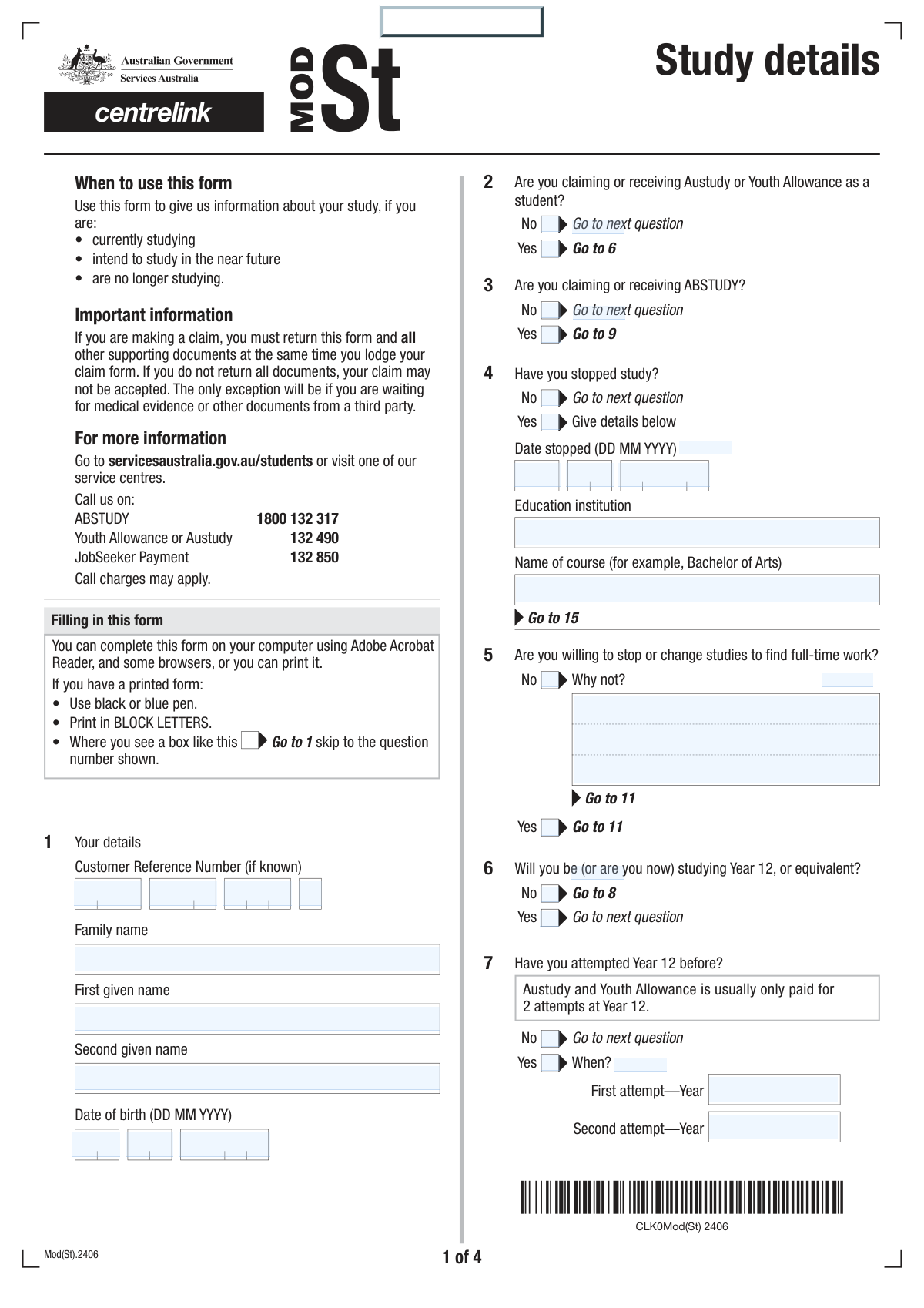
Yes! You can use AI to fill out MOD S, Details of study

The MOD S, Details of study form is an official Australian government document used by Centrelink to collect comprehensive information about a person's educational history and current enrolment. This information is essential for assessing eligibility for student payments such as Austudy, Youth Allowance, and ABSTUDY, by verifying study load, course details, and academic progress. Today, this form can be filled out quickly and accurately using AI-powered services like Instafill.ai, which can also convert non-fillable PDF versions into interactive fillable forms.
MOD S is part of the ETA forms category on Instafill.
Our AI automatically handles information lookup, data retrieval, formatting, and form filling.
It takes less than a minute to fill out MOD S using our AI form filling.
Securely upload your data. Information is encrypted in transit and deleted immediately after the form is filled out.

Form specifications

Form name: MOD S, Details of study
Number of fields: 218
Number of pages: 4
Filled form examples: Form MOD S Examples
Language: English
main-image

Instafill Demo: How to fill out PDF forms in seconds with AI

How to Fill Out MOD S Online for Free in 2026

Are you looking to fill out a MOD S form online quickly and accurately? Instafill.ai offers the #1 AI-powered PDF filling software of 2026, allowing you to complete your MOD S form in just 37 seconds or less.
Follow these steps to fill out your MOD S form online using Instafill.ai:
  1. 1 Navigate to Instafill.ai and upload or select the MOD S, Details of study form.
  2. 2 Use the AI assistant to fill in your personal information, including your name, date of birth, and Customer Reference Number (CRN).
  3. 3 Answer the questions regarding your claim status for Austudy, Youth Allowance, or ABSTUDY, letting the AI guide you through the form's logic.
  4. 4 Enter detailed information about your past and current studies, including institutions, course names, dates, and study load (full-time/part-time).
  5. 5 Indicate if you are requesting a Health Care Card and attach any required supporting documents mentioned in the form.
  6. 6 Carefully review all the entered information for accuracy, then complete the declaration section by signing and dating the form electronically.
  7. 7 Securely download or print your completed MOD S form for submission to Centrelink.

Our AI-powered system ensures each field is filled out correctly, reducing errors and saving you time.

Why Choose Instafill.ai for Your Fillable MOD S Form?

Speed

Complete your MOD S in as little as 37 seconds.

Up-to-Date

Always use the latest 2026 MOD S form version.

Cost-effective

No need to hire expensive lawyers.

Accuracy

Our AI performs 10 compliance checks to ensure your form is error-free.

Security

Your personal information is protected with bank-level encryption.

Frequently Asked Questions About Form MOD S

This form is used to gather detailed information about your study history and current enrollment. It is likely used to assess or review your eligibility for student support payments like Austudy, Youth Allowance, or ABSTUDY.

Your Customer Reference Number (CRN) is your unique identifier for government services and can be found on letters sent to you by Centrelink or on your concession card.

You should report the date you officially stopped your previous course in the 'Study Cessation Details' section. You can then provide information about your new course in the 'Current Course Details' section.

Your complete academic history is needed to assess your eligibility for student payments, as there are rules regarding academic progress and previous study. You must provide details for every tertiary course you have attempted, whether completed or not.

No, this field is for your scheduled contact hours only. You should enter the number of hours per week you attend formal coursework, lectures, or tutorials, not including private study time.

If you are unsure about your enrollment status, you should check the 'Not sure' box in question 12. You will also be required to provide details of your course subjects so your study load can be officially assessed.

You may need to provide supporting documents, such as a statement explaining reasons for unsuccessful study or details of your course subjects if you are unsure of your full-time status. The 'Provided Documents' section helps you indicate what you are submitting.

By ticking 'Yes' to the Health Care Card request, you are asking for your eligibility to be automatically assessed. If you meet the criteria based on the information provided, a card will be issued to you.

The form provides fields to enter the year for your first and second attempts at Year 12. If you have more attempts, you should include them on a separate sheet of paper and attach it to your form.

If you have attempted more than nine tertiary courses, you should fill in the details for the first nine on the form. For any additional courses, list the required details on a separate sheet and submit it with your form.

To sign the form electronically, you are instructed to type your full name in the signature field. This, along with checking the declaration box and dating the form, serves as your legally binding signature.

Yes, services like Instafill.ai use AI to auto-fill form fields accurately, which can save you time and help prevent errors. This is particularly helpful for long and detailed forms like this one.

You can upload the PDF of the form to the Instafill.ai website. The platform will make the form interactive, allowing you to type your answers directly into the fields and use AI-powered features to complete it faster.

If you have a non-fillable or 'flat' PDF, you can use a tool like Instafill.ai. It can convert the static PDF into an interactive, fillable form that you can easily complete and save on your device.

Compliance MOD S
Validation Checks by Instafill.ai

1
Valid and Logical Date of Birth
This check ensures that the combined 'Date of Birth' fields (Day, Month, Year) form a valid calendar date. It also verifies that the date is in the past and represents a plausible age for a student, for example, older than 14 and younger than 100. This is critical for identity verification and eligibility assessment, and failure would prevent form submission until a valid date is entered.
2
Mutually Exclusive Selection for Binary Questions
This validation applies to all questions with 'Yes' and 'No' checkbox options, such as 'Austudy/Youth Allowance Claim Status' and 'Study Cessation Status'. It ensures that a user can select either 'Yes' or 'No', but not both simultaneously. This prevents ambiguous or contradictory data, which would require manual clarification and delay processing.
3
Conditional Requirement for Study Cessation Details
This check verifies that if the user selects 'Yes' for 'Study Cessation Status', then all related fields ('Day Study Stopped', 'Month Study Stopped', 'Year Study Stopped', 'Education Institution', 'Name of Course') are mandatory. Conversely, if 'No' is selected, these fields must be empty. This ensures that detailed information is only collected when relevant, preventing incomplete records and unnecessary data entry.
4
Chronological Consistency of Study Cessation Date
This validation ensures that the 'Date Study Stopped' is chronologically after the applicant's 'Date of Birth'. It also checks that the date is not in the future. This maintains logical data integrity, as one cannot stop studying before they are born or on a future date. An error would prompt the user to correct the dates.
5
Conditional Requirement for 'Reason for Not Changing Studies'
This check ensures that if a user selects 'No' for 'Willingness to Change Studies for Work', the 'Why Not Summary' and 'Detailed Reason' fields must be filled. If 'Yes' is selected, these fields should be disabled or cleared. This is important for understanding the applicant's circumstances and eligibility for certain benefits, and failure to provide the reason would halt progress.
6
Logical Validation of Year 12 Attempt Years
This validation checks that any year entered in 'First Attempt Year' or 'Second Attempt Year' is a valid 4-digit year. It also ensures the year is not in the future and occurs at a plausible age for the applicant (e.g., at least 16 years after their birth year). This prevents data entry errors and ensures the educational history is chronologically sound.
7
Conditional Display and Requirement for 'Highest Level of Education'
This check ensures that the entire 'Highest Level of Education Completed' section is only active and requires a selection if the user answers 'No' to the 'Year 12 Study Plan' question. This implements correct form logic, guiding the user through a relevant path and preventing them from providing conflicting information about their education level.
8
Data Integrity for Completed Tertiary Courses
This validation confirms that if a user checks 'Yes' for the 'Completed Tertiary Course Question', they must provide details for at least the first completed course ('Course Years', 'Institution Name', 'Course Name'). This ensures that an affirmative answer is supported by the necessary details for verification. A failure would result in a prompt to enter the required course information.
9
Chronological Order of Course Attendance Dates
For both the first and second current courses, this check validates that the 'Attendance From' date is before or the same as the 'Attendance To' date. This ensures the date range for course attendance is logical and correctly represents the study period. An invalid range would trigger an error message requiring the user to correct the dates.
10
Chronological Order of Full Course Period Dates
This validation ensures that the 'Official Start Date' for a full course is before or the same as the 'Official End Date'. This logic applies to all current course entries and is crucial for accurately calculating study periods and entitlements. Submitting an inverted date range would be blocked until corrected.
11
Completeness of Customer Reference Number
This check verifies that all four parts of the 'Customer Reference Number' are filled out. Since the number is segmented into multiple fields, this ensures the complete identifier is captured before submission. An incomplete number would prevent successful record matching and processing, so the form would prompt the user to complete all parts.
12
Conditional Requirement for 'Not Sure' Enrollment Document
This validation ensures that if the user selects 'Not sure' for their 'Enrollment Status', the checkbox for 'Details of course subjects (Not sure)' in the 'Provided Documents' section is automatically checked or required. This is important for ensuring the processing team receives the necessary documents to manually determine the applicant's study load. Failure to flag this would result in an incomplete application.
13
Declaration and Signature Mandate
This check confirms that the 'I have read, understood and agree...' checkbox is ticked, the 'Signature' field is not empty, and the 'Declaration Date' is a valid, recent date. This is a critical legal requirement for the form to be considered valid and binding. The form cannot be submitted unless all parts of the declaration are completed correctly.
14
Data Integrity of Attempted Course Entries
This validation ensures that if a user begins to fill out details for an attempted course (e.g., 'First Course Attempted'), all core fields for that entry (Year, Institution, Course Name) must be completed. This prevents submission of partial or incomplete course history records. The system should flag any incomplete course entries and require the user to either complete or clear them.

Common Mistakes in Completing MOD S

Ignoring or Misinterpreting Conditional Logic

This form uses many 'Yes/No' questions to direct applicants to skip or answer specific sections (e.g., 'If No, go to Question 6'). A frequent error is failing to follow these instructions on a paper or flat PDF form, leading to either answering irrelevant questions or skipping required ones. This results in an incomplete application that is immediately rejected or requires follow-up, significantly delaying the assessment. To avoid this, carefully read all instructions, or use an AI-powered tool like Instafill.ai which can make the form interactive and automatically hide or show the correct questions based on your answers.

Incorrectly Segmenting the Customer Reference Number

The form requires the Customer Reference Number to be entered across four separate fields, which is an unusual format. Users often make mistakes by transposing digits, entering the wrong segments in the wrong boxes, or trying to fit the whole number in the first box. An incorrect reference number will prevent the system from identifying the applicant, leading to immediate processing failure. Always double-check the number against your official documentation and enter each part exactly as it appears in the corresponding box.

Incorrect Date Formatting and Splitting

The form breaks dates into separate Day, Month, and Year fields, and in one case, splits the year into two separate two-digit fields ('Year Study Stopped'). Users often enter the full year in one box, use text for the month (e.g., 'July' instead of '07'), or get the two-digit year split wrong. These formatting errors can make the data unreadable for automated systems and cause processing to fail. To prevent this, enter only the requested numeric value in each box (e.g., 'DD', 'MM', 'YYYY'), and pay close attention to unusual splits.

Providing Incomplete or Inconsistent Study History

The form asks for extensive details on up to nine attempted and five completed courses, which can be difficult to recall accurately. Common mistakes include forgetting courses, guessing dates, using inconsistent institution names (e.g., 'UniMelb' vs. 'University of Melbourne'), and misremembering study loads. These inaccuracies can be flagged as misrepresentations and may lead to rejection or a request for official transcripts, causing major delays. It's crucial to gather all academic records before starting the form to ensure every detail is accurate and consistent.

Misinterpreting 'Weekly Contact Hours'

The form specifically asks for formal coursework or lecture hours, 'excluding time spent in private study or completing assignments.' Many applicants mistakenly include all their study-related time, which inflates the hours and misrepresents their study load. This can affect their eligibility for benefits that are dependent on a specific full-time or part-time status. To avoid this, refer to your official course timetable for the exact number of scheduled contact hours per week.

Omitting Required Explanations or Documents

Several sections require a detailed written explanation or a separate document if a certain box is checked (e.g., explaining reasons for unsuccessful study). Applicants often check the box but forget to provide the corresponding narrative or attachment. This is considered an incomplete submission and will halt the application process until the missing information is provided. Always review your answers to see if any trigger the need for additional information and ensure all required documents are attached before submission.

Swapping Family Name and Given Name

The form separates 'Family Name' and 'First Given Name.' Due to cultural differences or simple haste, applicants frequently enter their names in the wrong fields (e.g., putting their first name in the 'Family Name' box). This creates a data mismatch with official records, which can cause significant identity verification issues and delays. To avoid this, always double-check that your family name (surname) and given name (first name) are in the correct, designated fields.

Answering Skippable Questions

The 'Highest Level of Education Completed' section contains over 15 checkboxes and is only meant to be answered if the applicant is NOT studying Year 12. A common error is for a user to answer this question when they should have skipped it, creating contradictions with other information on the form. This creates confusion for the processor and may require a clarifying follow-up. If the form is a non-fillable PDF, tools like Instafill.ai can convert it into a smart, fillable version that helps prevent such errors by guiding you through the correct question flow.

Providing Ambiguous 'Course Year/Stage' Information

The form repeatedly asks for 'Course Year/Stage,' which is an ambiguous term that applicants interpret differently. Some enter the calendar year (e.g., '2023'), while others enter their academic standing (e.g., '2nd year' or 'Stage 3'). This inconsistency makes it difficult for assessors to accurately determine the applicant's academic progression. To avoid this, be as specific as possible, for example, '2nd year (2023),' or check for any supplementary guidance on how to fill this field.

Forgetting to Complete the Declaration Section

The final declaration is a critical legal step, but it's often rushed. Applicants may forget to check the 'I have read, understood and agree' box, enter the current date, or provide their full name as a signature. An incomplete or unsigned declaration invalidates the entire application, meaning it cannot be legally processed. Before submitting, always perform a final check of the declaration section to ensure every part is filled out correctly.
Saved over 80 hours a year

“I was never sure if my IRS forms like W-9 were filled correctly. Now, I can complete the forms accurately without any external help.”

Kevin Martin Green

Your data stays secure with advanced protection from Instafill and our subprocessors

Robust compliance program

Transparent business model

You’re not the product. You always know where your data is and what it is processed for.

ISO 27001, HIPAA, and GDPR

Our subprocesses adhere to multiple compliance standards, including but not limited to ISO 27001, HIPAA, and GDPR.

Security & privacy by design

We consider security and privacy from the initial design phase of any new service or functionality. It’s not an afterthought, it’s built-in, including support for two-factor authentication (2FA) to further protect your account.

Fill out MOD S with Instafill.ai

Worried about filling PDFs wrong? Instafill securely fills mod-s-details-of-study forms, ensuring each field is accurate.