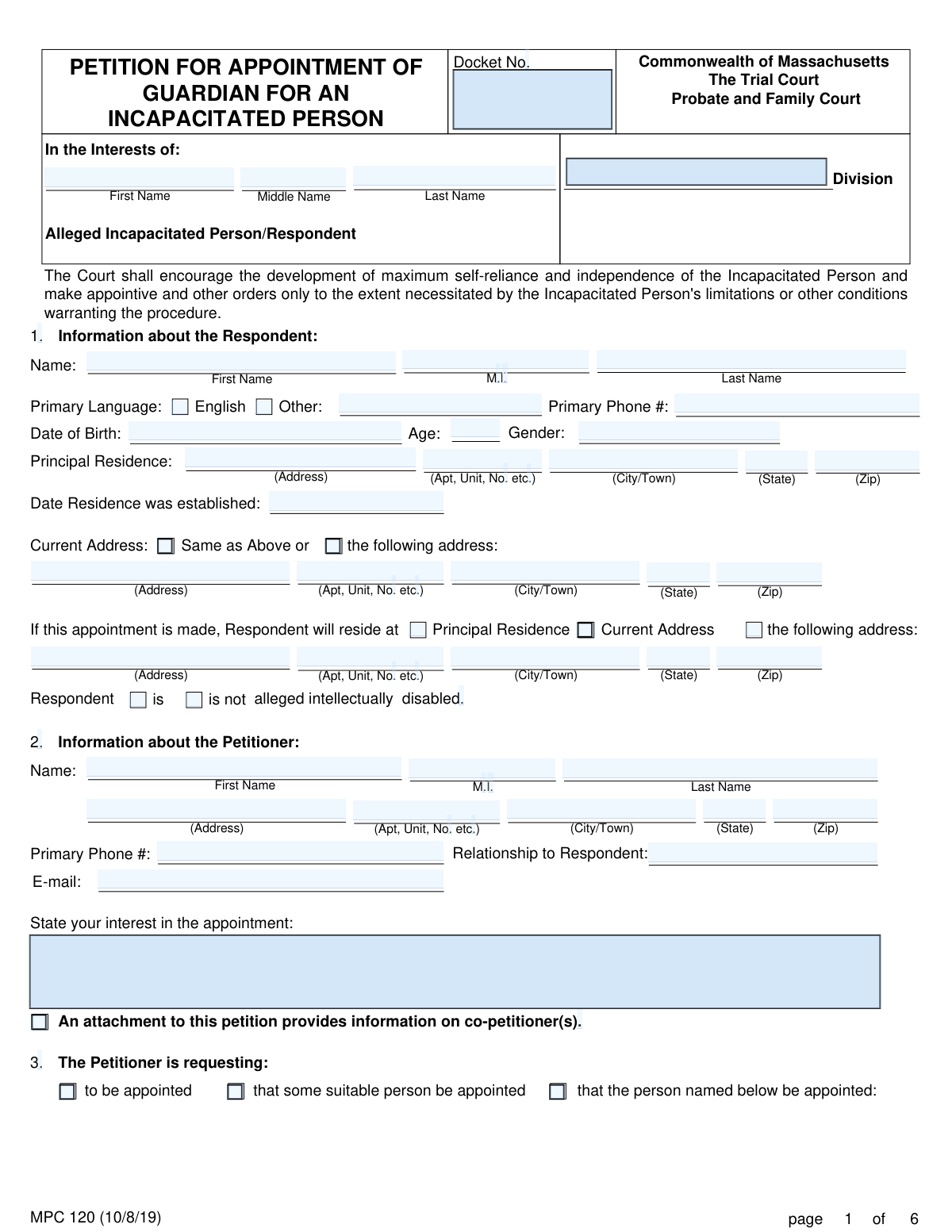
Yes! You can use AI to fill out MPC 120, Petition for Appointment of Guardian for an Incapacitated Person

Form MPC 120, the Petition for Appointment of Guardian for an Incapacitated Person, is a legal document used in the Commonwealth of Massachusetts to request that a court appoint a guardian for someone who is unable to make personal or medical decisions for themselves. This petition initiates a legal process to ensure the well-being and protection of an individual with diminished capacity. Today, this form can be filled out quickly and accurately using AI-powered services like Instafill.ai, which can also convert non-fillable PDF versions into interactive fillable forms.
Our AI automatically handles information lookup, data retrieval, formatting, and form filling.
It takes less than a minute to fill out MPC 120 using our AI form filling.
Securely upload your data. Information is encrypted in transit and deleted immediately after the form is filled out.

Form specifications

Form name: MPC 120, Petition for Appointment of Guardian for an Incapacitated Person
Number of fields: 313
Number of pages: 6
Language: English
main-image

Instafill Demo: How to fill out PDF forms in seconds with AI

How to Fill Out MPC 120 Online for Free in 2026

Are you looking to fill out a MPC 120 form online quickly and accurately? Instafill.ai offers the #1 AI-powered PDF filling software of 2026, allowing you to complete your MPC 120 form in just 37 seconds or less.
Follow these steps to fill out your MPC 120 form online using Instafill.ai:
  1. 1 Navigate to Instafill.ai and upload your MPC 120 form or select it from the template library.
  2. 2 Provide your information as the petitioner, including your name, address, and relationship to the person needing a guardian.
  3. 3 Enter the personal details of the respondent (the alleged incapacitated person), such as their name, address, date of birth, and any known disabilities.
  4. 4 Specify whether you are requesting a limited or general guardianship and detail the specific powers being sought or the reasons a limited guardianship is inappropriate.
  5. 5 List all interested parties, including the respondent's spouse, children, parents, and any existing agents under a power of attorney or health care proxy.
  6. 6 Use the AI assistant to accurately document the respondent's assets and income, if any, as required by the form.
  7. 7 Review all the information populated by the AI for accuracy, then e-sign the petition and download the completed document for filing with the Massachusetts Probate and Family Court.

Our AI-powered system ensures each field is filled out correctly, reducing errors and saving you time.

Why Choose Instafill.ai for Your Fillable MPC 120 Form?

Speed

Complete your MPC 120 in as little as 37 seconds.

Up-to-Date

Always use the latest 2026 MPC 120 form version.

Cost-effective

No need to hire expensive lawyers.

Accuracy

Our AI performs 10 compliance checks to ensure your form is error-free.

Security

Your personal information is protected with bank-level encryption.

Frequently Asked Questions About Form MPC 120

This form is a petition to a Massachusetts Probate and Family Court to appoint a guardian for an adult who is legally determined to be an 'incapacitated person' and cannot make decisions for themselves.

The 'Petitioner' is the person filing the form to request the guardianship. The 'Respondent' is the person who is alleged to be incapacitated and for whom the guardian is being sought.

A Limited Guardian has only the specific powers granted by the court, while a General Guardian has broader authority. The court prefers the least restrictive option, so you must explain why a limited guardianship is inappropriate if you are requesting a general one.

Yes, a Medical Certificate from an examination within the last 30 days (or a Clinical Team Report from within 180 days for intellectual disability) must be filed with the petition. If you cannot obtain one in time, you must file a separate motion explaining why.

If you cannot file the Medical Certificate with the petition, you must immediately file a motion with the court explaining why it's impossible. This motion asks the court for permission to file it late or to waive the requirement.

You must list the Respondent's spouse, children, parents, and other close relatives because they are legally considered interested parties. They have a right to be notified about the guardianship proceedings.

No, the form explicitly states not to include names of financial institutions or account numbers. You should only provide a general description of assets, like 'savings bonds' or 'bank accounts,' and their estimated value.

This section is for requesting court permission for major decisions, such as admitting the Respondent to a nursing facility, authorizing treatment with antipsychotic medication, or revoking a Health Care Proxy.

The completed petition must be filed at the appropriate division of the Massachusetts Probate and Family Court, which is typically determined by the county where the Respondent lives.

Yes, services like Instafill.ai use AI to accurately auto-fill form fields, which can save you time and help prevent common errors on complex legal documents.

You can use a service like Instafill.ai to upload the form and fill it out on your computer. The platform guides you through the required fields, making the process simpler and more efficient than filling it out by hand.

If you have a non-fillable or 'flat' PDF, you can upload it to a platform like Instafill.ai. Their technology can convert the document into an interactive, fillable form that you can complete and save online.

Signing under the penalties of perjury is a legal oath confirming that all information you have provided in the petition is true and correct to the best of your knowledge. Providing false information can have serious legal consequences.

Compliance MPC 120
Validation Checks by Instafill.ai

1
Validates Respondent's Age Against Date of Birth
This check ensures the value entered in the 'Respondent Age' field is consistent with the age calculated from the 'Respondent Date of Birth' field. This is important for verifying the accuracy of basic identifying information and preventing data entry errors. If the age and date of birth do not align, the system should flag the discrepancy and require the user to correct one of the fields before submission.
2
Requires Justification for General Guardianship
This validation confirms that if the 'General Guardian' checkbox is selected in Section 5, the corresponding text field 'State the reasons why a Limited Guardianship is inappropriate' must be filled. Massachusetts law favors the least restrictive form of guardianship, so a request for general authority requires a specific justification. A failure to provide this reason would result in an incomplete petition that is likely to be rejected or delayed by the court.
3
Ensures Specification of Powers for Limited Guardianship
This check verifies that if 'Limited Guardian' is selected in Section 5, at least one of the checkboxes for specific powers is selected or the 'Other' text field is completed. A limited guardianship is defined by its enumerated powers, so failing to specify them makes the request legally meaningless. The petition would be considered incomplete as the court would not know what authority is being sought.
4
Verifies Medical Certificate Timeliness
This validation checks the date of the Medical Certificate or Clinical Team Report referenced in Section 6. The form requires the examination to have occurred within 30 days of filing (or 180 days for an alleged intellectual disability). This rule ensures the medical evidence supporting the claim of incapacity is current and relevant. A petition filed with an outdated report would be invalid and require a new medical evaluation.
5
Validates Consistency Between Existing Appointments (Q10) and Interested Parties (Q9)
This check ensures that if 'Yes and the person’s information is listed at Q.9' is checked for any role in Section 10 (e.g., Current Guardian, Health Care Agent), then at least one person listed in Section 9 has the corresponding role checkbox marked. This cross-reference is critical for ensuring all legally recognized interested parties are properly identified and notified. A mismatch indicates a critical omission that could lead to legal challenges and invalidate the proceedings.
6
Requires Asset/Income Details When 'Yes' is Selected
This validation ensures that if 'Yes' is selected for 'Does Respondent have any assets?' (Section 13) or 'Does Respondent have any anticipated income?' (Section 14), then at least one corresponding description and value/amount field is filled out. This financial information is vital for the court to understand the scope of the proposed guardianship and to set a bond if necessary. Submitting the form without these details would render the financial disclosure incomplete.
7
Ensures Future Residence Address is Complete When Specified
This check validates that if the checkbox 'the following address' is selected in Section 1 for where the Respondent will reside after the appointment, all corresponding address fields (Street, City/Town, State, Zip) are filled. This information is crucial for the court to assess the suitability of the proposed living arrangement. Failure to provide a complete address would make the petition incomplete and could delay the appointment process.
8
Validates Standard Phone Number Format
This check ensures that all phone number fields, such as 'Petitioner Primary Phone Number' and the respondent's 'Primary Phone #', adhere to a standard 10-digit format (e.g., (XXX) XXX-XXXX or XXXXXXXXXX). Correct formatting is essential for data integrity and ensures the court and other parties can successfully contact individuals listed on the petition. An invalid format could lead to communication failures and delays in the case.
9
Validates Petitioner's Email Address Format
This validation confirms that the value entered in the 'Petitioner Email Address' field is a valid email format (e.g., [email protected]). As courts increasingly use electronic communication for notices and updates, a valid email is essential for the petitioner to receive timely information. An invalid address could cause the petitioner to miss critical deadlines or hearing dates.
10
Requires Docket Number for Pre-filed Medical Certificate
This check validates that if the box 'is filed with this Petition or is on file with the Court' is checked in Section 6, the adjacent 'Docket No.' field must be filled. This allows the court clerk to efficiently locate the existing medical report in the court's system. Failure to provide the docket number would force a manual search, significantly slowing down the processing of the petition.
11
Ensures Heirs are Listed if No Spouse or Children Exist
This validation enforces the rule in Section 9.B, which requires listing the Respondent's parents and siblings if no spouse or children are listed. This is a critical legal requirement to ensure all next-of-kin (heirs apparent) are properly notified of the guardianship proceedings. The system should flag if Section 9.B is left empty when no spouse or children are identified, as this would be a procedural defect.
12
Requires Language Specification When 'Other' is Checked
This validation ensures that if the 'Other' checkbox for the Respondent's primary language is selected in Section 1, the corresponding text field must be filled in. This information is crucial for the court to determine if an interpreter is needed to protect the Respondent's due process rights. An empty field would leave the court unprepared to meet language access requirements, potentially causing hearing delays.
13
Validates Petitioner Identity Consistency
This check compares the petitioner's name entered in Section 2 with the printed name in the signature block on page 6. This ensures the person identified as the petitioner is the same individual who is signing and swearing to the accuracy of the petition's contents. A discrepancy could raise questions about the petition's authenticity and could invalidate the sworn statement.
14
Ensures Signature Date is Provided
This check verifies that the 'Date' field next to the 'Signature of Petitioner' on page 6 is filled out. The signature date is a critical component of the sworn statement, establishing when the petitioner affirmed the document's contents under the penalties of perjury. A missing date can render the legal declaration invalid and lead to the rejection of the petition.

Common Mistakes in Completing MPC 120

Incomplete List of Interested Parties

In Section 9, petitioners often fail to list all legally required interested parties, such as children, parents, siblings, or other heirs apparent. This happens because they may not understand the legal definition of 'heirs' or may overlook distant relatives. Failing to list and notify all required parties is a critical error that can lead to the petition being delayed or dismissed for lack of jurisdiction.

Failing to Justify a General Guardianship

Petitioners often select 'General Guardian' in Section 5 without providing a compelling reason why a 'Limited Guardianship' is inappropriate. Courts prefer the least restrictive option, and a failure to justify the need for broad authority can result in the court questioning the petition or appointing a limited guardian instead. To avoid this, clearly articulate why the respondent's specific limitations necessitate a general guardianship over more tailored, limited powers.

Missing or Outdated Medical Certificate

A frequent mistake is failing to file the required Medical Certificate or Clinical Team Report with the petition, as noted in Section 6. Petitioners may also submit a report where the examination date is outside the required window (30 days for a Medical Certificate, 180 for a Clinical Team Report). This will halt the entire process, as the court cannot proceed without this timely medical evidence of incapacity.

Disclosing Confidential Financial Information

In Sections 13 and 14, the form explicitly warns not to include names of financial institutions or account numbers when listing assets and income. Many people overlook this instruction and enter sensitive data, creating a privacy risk within a public court filing. To prevent this, only provide general descriptions like 'Savings Account' or 'Social Security' and the estimated value or amount as requested.

Vague Statement of Petitioner's Interest

In Section 2, the field 'State your interest in the appointment' is often filled with vague answers like 'to help' or 'it's necessary'. This fails to establish the petitioner's specific relationship and motivation for seeking guardianship, which is important for the court's assessment. A strong petition clearly states the relationship (e.g., 'I am the respondent's only child and primary caregiver') and the reason for filing.

Inconsistent Information Across Sections

Petitioners may provide conflicting information, such as checking 'Yes' in Section 10 that a Health Care Agent exists but failing to list that person in the table in Section 9. These inconsistencies suggest a lack of thoroughness and can confuse the court, leading to requests for clarification and delays. Carefully cross-referencing answers between sections is crucial for a coherent and credible petition.

Confusing the Different Address Fields

Section 1 asks for the Respondent's 'Principal Residence,' 'Current Address,' and where they 'will reside' after the appointment, which can be confusing. People often fill out the wrong section or provide incomplete information, especially when an address is the same as a previous one. This can cause issues with court jurisdiction and proper notice, so it's vital to read each address question carefully and check the correct boxes.

Missing Signatures and Dates

A petition is legally invalid without the petitioner's signature and date on the final page, affirming the contents under the penalties of perjury. It is also common to miss signatures from co-petitioners or other parties who are assenting to the petition. An unsigned or undated form will be immediately rejected by the court clerk, forcing the petitioner to refile.

Requesting Vague or Overly Broad Limited Powers

When petitioning for a 'Limited Guardian' in Section 5, filers sometimes list unclear powers or fail to specify any powers at all. The purpose of a limited guardianship is to grant only the specific authority necessary, so a request for 'financial decisions' is too broad. To avoid rejection, petitioners should list concrete, specific powers, such as the examples provided on the form or others like 'ability to choose doctors and make medical appointments'.

Incorrectly Calculating the Respondent's Age

A simple but common data entry error is miscalculating the Respondent's age based on their date of birth in Section 1. This can happen due to a simple math error or not accounting for whether their birthday has passed in the current year. While a minor error, it reflects a lack of attention to detail on a critical legal document. AI-powered form filling tools like Instafill.ai can prevent this by automatically calculating age from the date of birth, ensuring accuracy.
Saved over 80 hours a year

“I was never sure if my IRS forms like W-9 were filled correctly. Now, I can complete the forms accurately without any external help.”

Kevin Martin Green

Your data stays secure with advanced protection from Instafill and our subprocessors

Robust compliance program

Transparent business model

You’re not the product. You always know where your data is and what it is processed for.

ISO 27001, HIPAA, and GDPR

Our subprocesses adhere to multiple compliance standards, including but not limited to ISO 27001, HIPAA, and GDPR.

Security & privacy by design

We consider security and privacy from the initial design phase of any new service or functionality. It’s not an afterthought, it’s built-in, including support for two-factor authentication (2FA) to further protect your account.

Fill out MPC 120 with Instafill.ai

Worried about filling PDFs wrong? Instafill securely fills mpc-120-petition-for-appointment-of-guardian-for-an-incapacitated-person forms, ensuring each field is accurate.