Yes! You can use AI to fill out MPC 801, Bond
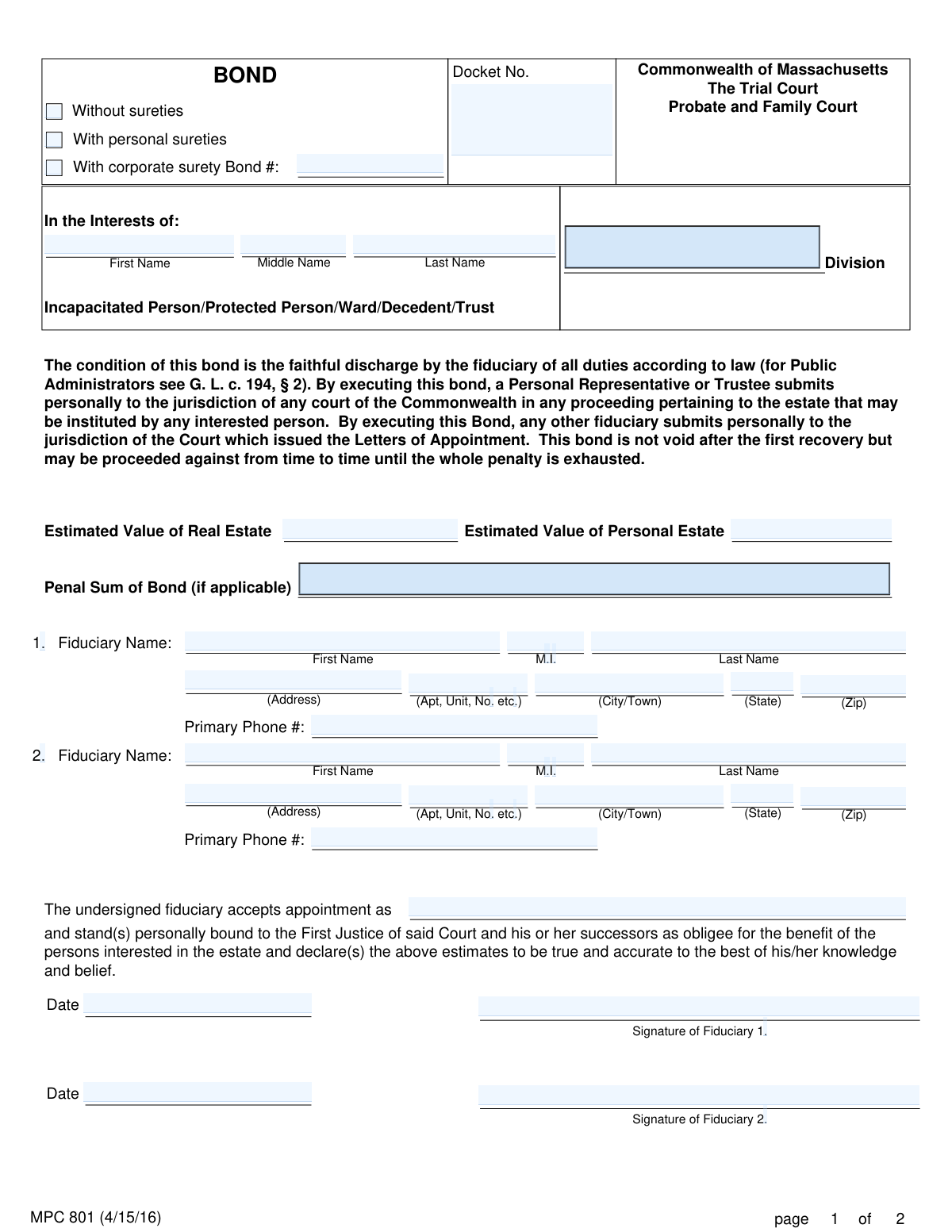
The MPC 801, Bond form is a legal document used in the Commonwealth of Massachusetts Probate and Family Court. It serves as a promise by a fiduciary (such as a Personal Representative, Trustee, or Guardian) to faithfully discharge their duties according to law for the benefit of an estate, trust, or protected person. This bond ensures financial accountability and protects the assets involved. Today, this form can be filled out quickly and accurately using AI-powered services like Instafill.ai, which can also convert non-fillable PDF versions into interactive fillable forms.
Our AI automatically handles information lookup, data retrieval, formatting, and form filling.
It takes less than a minute to fill out MPC 801 using our AI form filling.
Securely upload your data. Information is encrypted in transit and deleted immediately after the form is filled out.
Form specifications
| Form name: | MPC 801, Bond |
| Number of fields: | 88 |
| Number of pages: | 2 |
| Language: | English |
Instafill Demo: How to fill out PDF forms in seconds with AI
How to Fill Out MPC 801 Online for Free in 2026
Are you looking to fill out a MPC 801 form online quickly and accurately? Instafill.ai offers the #1 AI-powered PDF filling software of 2026, allowing you to complete your MPC 801 form in just 37 seconds or less.
Follow these steps to fill out your MPC 801 form online using Instafill.ai:
- 1 Navigate to Instafill.ai and upload or select the MPC 801 Bond form.
- 2 Provide the case details, including the Docket Number and the name of the person or estate the bond is for.
- 3 Enter the personal information for the fiduciary (or fiduciaries), including name, address, and contact details.
- 4 Input the estimated value of the real estate and personal estate, and determine the penal sum of the bond if applicable.
- 5 Select the type of bond (without sureties, with personal sureties, or with corporate surety) and provide the required information for any sureties.
- 6 Review all the information populated by the AI for accuracy, then have the fiduciary and any sureties sign and date the document.
- 7 Submit the completed and signed bond to the appropriate Massachusetts Probate and Family Court division for approval.
Our AI-powered system ensures each field is filled out correctly, reducing errors and saving you time.
Why Choose Instafill.ai for Your Fillable MPC 801 Form?
Speed
Complete your MPC 801 in as little as 37 seconds.
Up-to-Date
Always use the latest 2026 MPC 801 form version.
Cost-effective
No need to hire expensive lawyers.
Accuracy
Our AI performs 10 compliance checks to ensure your form is error-free.
Security
Your personal information is protected with bank-level encryption.
Frequently Asked Questions About Form MPC 801
This form is a legal promise, or bond, required by the Massachusetts Probate and Family Court. It ensures that a fiduciary, such as a Personal Representative or Guardian, will faithfully perform their duties according to law.
A person or persons appointed as a fiduciary by the court must complete this form. This includes roles like Personal Representative, Trustee, Guardian, or Conservator for an estate, trust, or protected person.
A bond 'without sureties' means the fiduciary is personally liable without a third-party guarantor. A bond 'with sureties' requires one or more persons (personal sureties) or a company (corporate surety) to guarantee the fiduciary's actions and cover potential losses.
The Penal Sum is the maximum amount of money the bond covers, often based on the value of the estate's personal property. If the fiduciary causes a financial loss, the sureties may be liable up to this amount.
You must provide a good-faith estimate of the fair market value of all property. This includes real property (land and buildings) and personal property (cash, stocks, vehicles, etc.) belonging to the estate or person you are representing.
You will need the court docket number, the full name of the person or estate, estimated values of real and personal property, and the full contact information for all fiduciaries and any sureties.
Yes, the MPC 801 form has sections for up to two fiduciaries to be listed, accept their appointment, and sign the bond.
By signing as a personal surety, you certify that you are a Massachusetts resident with sufficient assets to cover the bond's penal sum. You are agreeing to be financially liable for losses if the fiduciary improperly manages the estate.
In this field, you should write the official title of your role as granted by the court, such as 'Personal Representative,' 'Trustee,' 'Guardian,' or 'Conservator'.
This form must be filed with the specific division of the Massachusetts Probate and Family Court that is handling your case, as identified by the Docket Number.
Yes, services like Instafill.ai use AI to accurately auto-fill form fields from your saved information, which can save time and help reduce errors.
You can use a service like Instafill.ai to upload the form. Its AI will help you fill in the required fields interactively from any device, making the process faster and more convenient.
You can upload the non-fillable PDF to Instafill.ai. The platform can convert it into an interactive, fillable form for you to complete and sign online.
Compliance MPC 801
Validation Checks by Instafill.ai
1
Exclusive Surety Type Selection
Validates that only one of the three surety type checkboxes ('Without sureties', 'With personal sureties', 'With corporate surety') is selected. This is crucial for determining which sections of the form are applicable and what financial backing is provided for the bond. If more than one or none are selected, the submission should be rejected as the nature of the bond is ambiguous.
2
Docket Number Format Validation
Ensures the 'Docket No.' field conforms to the court's required format (e.g., two letters followed by a sequence of numbers and letters like 'XX12P3456EA'). The docket number is the primary identifier for the case within the court system, and an incorrect format can lead to misfiling or processing delays. A failed validation should prompt the user to correct the entry based on the format specified on their court documents.
3
Estate Value Numeric Format
Checks that the 'Estimated Value of Real Estate' and 'Estimated Value of Personal Estate' fields contain only valid, non-negative numeric or currency values. These values are fundamental to determining the scope of the fiduciary's responsibility and the required penal sum of the bond. Non-numeric characters or negative values would make these fields unusable and must be corrected.
4
Conditional Penal Sum Requirement
This check ensures the 'Penal Sum of Bond' field is filled with a positive numeric value if either 'With personal sureties' or 'With corporate surety' is selected. The penal sum represents the maximum liability of the sureties and is a mandatory component of a surety bond. If this condition is not met, the form is incomplete and the bond cannot be approved.
5
Fiduciary 1 Information Completeness
Verifies that all contact information for the first fiduciary is complete, including First Name, Last Name, full address (Address, City/Town, State, Zip), and Primary Phone #. As the primary appointee, this information is essential for the court and interested parties to be able to contact them. An incomplete submission for Fiduciary 1 would render the bond invalid.
6
Standard Phone Number Format
Validates that all phone number fields on the form (for fiduciaries and sureties) adhere to a standard 10-digit US format (e.g., XXX-XXX-XXXX or (XXX) XXX-XXXX). This ensures the contact information is valid and usable for communication purposes. An invalid format would trigger an error message requiring the user to re-enter the number correctly.
7
Standard ZIP Code Format
Ensures all ZIP code fields are entered in a valid 5-digit or 9-digit (ZIP+4) format. Correct ZIP codes are critical for mail delivery and address verification for all parties involved (fiduciaries and sureties). The validation prevents data entry errors that could lead to returned mail or incorrect location data.
8
Conditional Personal Surety Section Completion
If the 'With personal sureties' checkbox is selected, this rule validates that the information for at least one personal surety is fully completed on page 2. This includes their name, full address, phone number, signature, and date. Failure to provide complete surety information when required makes the bond unsecured and legally deficient.
9
Personal Surety Massachusetts Residency Verification
Checks that the address provided for any personal surety is located in Massachusetts, as per the sworn statement on the form. This is a legal requirement for personal sureties on this bond. The validation can cross-reference the entered City/Town against a list of Massachusetts municipalities to ensure compliance, and failure would invalidate the surety's eligibility.
10
Conditional Corporate Surety Section Completion
If the 'With corporate surety' checkbox is selected, this rule verifies that all related fields are completed, including 'Corporate Surety Name', 'State of Incorporation', Massachusetts business address, and the 'Corporate Surety Bond #'. This information is necessary to identify and confirm the corporate guarantor. An incomplete section would prevent the court from verifying the surety's standing and approving the bond.
11
Valid and Chronological Date Fields
Validates that all date fields (e.g., 'Fiduciary 1 Acceptance Date', 'First Personal Surety Date') contain a real, properly formatted date that is not in the future. An invalid or future date would call into question the timing and validity of the signatures and acceptances. The system should reject submissions with invalid dates to maintain the legal integrity of the document.
12
Appointment Capacity Completeness
Ensures the field specifying the fiduciary's role ('accepts appointment as...') is not left blank. This text defines the legal capacity of the appointee (e.g., Personal Representative, Trustee, Guardian), which is a core component of the appointment. Without this information, the fiduciary's duties and powers are undefined, and the form must be considered incomplete.
13
Fiduciary 2 Information Consistency
If any information for 'Fiduciary 2' (e.g., First Name) is entered, this rule enforces the completion of all other Fiduciary 2 fields, including Last Name, full address, phone number, signature, and date. This prevents partial, unusable data for a co-fiduciary. If a user starts filling out the section, they must complete it entirely or clear it.
14
State Abbreviation Validation
Checks that all 'State' fields contain a valid two-letter US state or territory abbreviation. This ensures data consistency and accuracy for all addresses on the form. An invalid entry like 'Mass' instead of 'MA' would be flagged for correction, preventing potential mail delivery issues and ensuring data standardization.
Common Mistakes in Completing MPC 801
Users often fill out the 'In the Interests of' name and 'Docket No.' on the first page but forget to repeat this information on the top of page two. This happens because it's a repetitive task and easily overlooked. If the pages are separated, the second page becomes unidentifiable, leading to court rejection and processing delays. To avoid this, double-check that all header fields on all pages are completed before submission.
The form requires selecting one of three options: 'Without sureties,' 'With personal sureties,' or 'With corporate surety.' People often check the wrong box, multiple boxes, or none at all due to misunderstanding the court's order for their specific case. An incorrect selection makes the bond invalid and will cause the court to reject the filing, delaying the fiduciary's appointment. Always confirm the required bond type from the court order or a legal advisor before filling out this section.
There is a blank line where the fiduciary must state the capacity in which they are accepting the appointment (e.g., 'Personal Representative,' 'Trustee,' 'Guardian'). Many people leave this blank because they are unsure of the correct legal term. Leaving this field empty makes the bond legally ambiguous and will result in its rejection, halting the entire probate or guardianship process. This information is critical and must be filled in accurately.
When entering the 'Estimated Value of Real Estate' and 'Personal Estate,' users frequently include dollar signs ($), commas, or cents, which can cause data entry issues for the court. The fields are intended for numerical digits only. This mistake can lead to misinterpretation of the estate's value, which is used to determine the penal sum of the bond. Ensure you enter only whole dollar amounts without any special characters or punctuation.
The form has separate, detailed sections for 'personal surety' and 'corporate surety' on page 2. A very common error is for a user with a personal surety to start filling out the corporate surety section, or vice versa. This happens from not reading the section headers carefully. Completing the wrong section guarantees the form will be rejected, as the legally binding information for the correct surety type will be missing.
The name of the 'Incapacitated Person/Protected Person/Ward/Decedent/Trust' must be entered precisely and consistently, including the full first, middle, and last name. Users may use nicknames, omit middle names, or enter variations that do not match other court documents. This inconsistency can create confusion and legal challenges regarding the identity of the estate or person in question, causing significant delays. Always use the full legal name as it appears on the petition and other official records.
If the bond is 'With personal sureties' or 'With corporate surety,' the 'Penal Sum of Bond' field must be filled. People often leave this blank, not understanding its importance or how to calculate it (it is often related to the value of the personal estate). An absent penal sum invalidates the surety's obligation and makes the bond defective, leading to immediate rejection by the court. This value must be determined and entered for the bond to be considered.
The personal surety section includes a certification that the surety is a 'Massachusetts resident' with sufficient assets in the state. People may ask an out-of-state friend or relative to act as a surety, not realizing this specific requirement. Having a non-resident sign as a personal surety invalidates the bond and can be considered a false statement under the penalties of perjury. Ensure any personal surety is a verified Massachusetts resident before they sign.
The box at the bottom right of page 2 is clearly marked 'FOR COURT USE ONLY,' but applicants sometimes mistakenly write in it, attempting to enter a bond number or date. This section is exclusively for court officials to record their examination and approval. Writing in this area can disrupt the court's workflow and may require the applicant to submit a fresh, clean form, causing unnecessary delays. AI-powered form-filling tools like Instafill.ai can lock these sections to prevent users from accidentally entering data in restricted areas.
The Docket Number is the primary identifier for the case and is required on both pages. Applicants may forget to enter it, transcribe it incorrectly from other documents, or only fill it in on the first page. An incorrect or missing docket number can lead to the form being misfiled or rejected, as the court cannot link it to the correct case file. Using a tool like Instafill.ai can help by auto-populating the docket number across all relevant fields after a single entry, ensuring consistency and accuracy.
Saved over 80 hours a year
“I was never sure if my IRS forms like W-9 were filled correctly. Now, I can complete the forms accurately without any external help.”
Kevin Martin Green
Your data stays secure with advanced protection from Instafill and our subprocessors

Robust compliance program
Transparent business model
You’re not the product. You always know where your data is and what it is processed for.
ISO 27001, HIPAA, and GDPR
Our subprocesses adhere to multiple compliance standards, including but not limited to ISO 27001, HIPAA, and GDPR.
Security & privacy by design
We consider security and privacy from the initial design phase of any new service or functionality. It’s not an afterthought, it’s built-in, including support for two-factor authentication (2FA) to further protect your account.
Fill out MPC 801 with Instafill.ai
Worried about filling PDFs wrong? Instafill securely fills mpc-801-bond forms, ensuring each field is accurate.