Yes! You can use AI to fill out Norman Class Member Certification Form

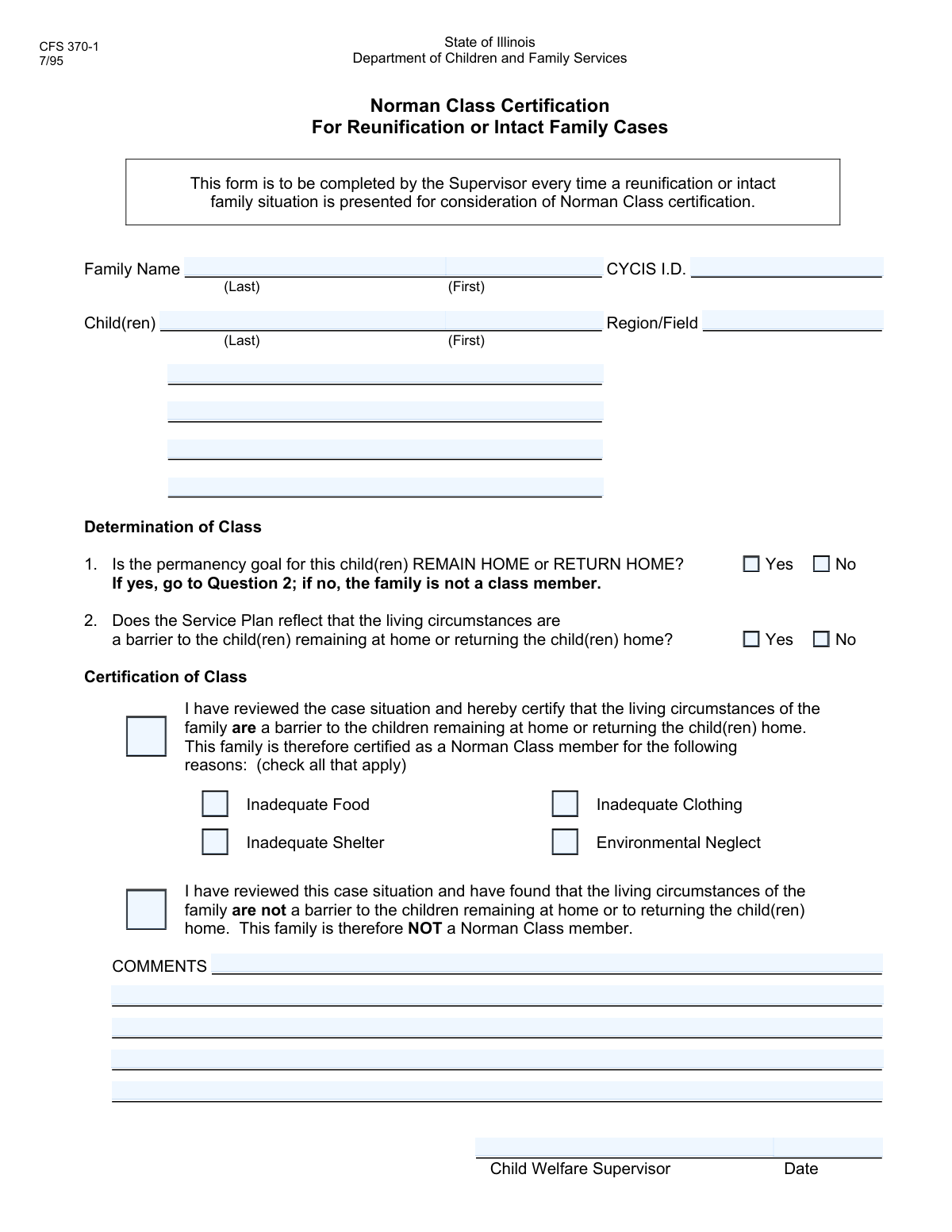
This form is an official document used by child welfare agencies to certify a family as a 'Norman Class Member'. This certification is critical as it identifies families whose poverty or inadequate housing is the primary reason their children are at risk of entering or remaining in foster care, making them eligible for specific housing and support services. Today, this form can be filled out quickly and accurately using AI-powered services like Instafill.ai, which can also convert non-fillable PDF versions into interactive fillable forms.
Norman Certification is part of the certification forms category on Instafill.
Our AI automatically handles information lookup, data retrieval, formatting, and form filling.
It takes less than a minute to fill out Norman Certification using our AI form filling.
Securely upload your data. Information is encrypted in transit and deleted immediately after the form is filled out.

Form specifications

Form name: Norman Class Member Certification Form
Number of fields: 28
Number of pages: 1
Filled form examples: Form Norman Certification Examples
Language: English
main-image

Instafill Demo: How to fill out PDF forms in seconds with AI

How to Fill Out Norman Certification Online for Free in 2026

Are you looking to fill out a NORMAN CERTIFICATION form online quickly and accurately? Instafill.ai offers the #1 AI-powered PDF filling software of 2026, allowing you to complete your NORMAN CERTIFICATION form in just 37 seconds or less.
Follow these steps to fill out your NORMAN CERTIFICATION form online using Instafill.ai:
  1. 1 Navigate to Instafill.ai and upload the Norman Class Member Certification Form or select it from a template library.
  2. 2 Enter the family's last name, first name, and the unique CYCIS I.D. in the designated fields.
  3. 3 List the names of all children in the family who are subjects of the certification.
  4. 4 Answer the questions regarding the permanency goal and whether the service plan identifies living circumstances as a barrier to the child remaining at home.
  5. 5 If certifying the family, check the specific reasons, such as environmental neglect, inadequate food, shelter, or clothing.
  6. 6 Provide the Child Welfare Supervisor's name, the date, and any additional comments in the appropriate sections.
  7. 7 Use the AI tool to review the completed form for accuracy and completeness before downloading or submitting it.

Our AI-powered system ensures each field is filled out correctly, reducing errors and saving you time.

Why Choose Instafill.ai for Your Fillable Norman Certification Form?

Speed

Complete your Norman Certification in as little as 37 seconds.

Up-to-Date

Always use the latest 2026 Norman Certification form version.

Cost-effective

No need to hire expensive lawyers.

Accuracy

Our AI performs 10 compliance checks to ensure your form is error-free.

Security

Your personal information is protected with bank-level encryption.

Frequently Asked Questions About Form Norman Certification

This form is used to certify whether a family qualifies as a 'Norman Class member' based on their living circumstances and the child's permanency plan. It is an official record used in child welfare cases.

A Child Welfare Supervisor or an assigned caseworker is responsible for reviewing the case file and completing this certification form. The supervisor's name and the date are required to validate the assessment.

A 'Norman Class member' refers to a family where a child cannot remain at or return home primarily because of poverty-related issues like inadequate food, shelter, or clothing, which are classified as environmental neglect.

The CYCIS I.D. is a unique identification number assigned to the family or child within the Child and Youth Centered Information System (CYCIS). This number should be available in the official case file.

Before starting, you will need the family's full name, the children's full names, the CYCIS I.D., and access to the case service plan. The service plan is essential for determining the permanency goal and any barriers.

The form has fields for up to five children. If there are more children involved in the case, you should note their information in the 'Comments' section or attach a separate, clearly labeled addendum.

Check 'Yes' if the official permanency goal for the child is to remain in or return to the family home. If the goal is adoption, long-term foster care, or another plan, you should check 'No'.

You should only check the 'Environmental Neglect' boxes if the service plan confirms that living circumstances are a direct barrier to the child remaining at or returning home. You can then specify the exact reasons, such as inadequate food, shelter, or clothing.

Check this box if you have reviewed the case and determined that the family's living circumstances are not a barrier to the child's permanency goal. This explicitly confirms the family does not qualify for this certification.

Use the 'Comments' section to provide any additional context or clarifying details that are relevant to the certification but not captured elsewhere on the form. This can include specific circumstances or justifications for your decision.

Yes, services like Instafill.ai use AI to accurately auto-fill form fields from your existing records. This can save significant time and help reduce data entry errors, especially for recurring information like names and ID numbers.

To fill this form online, upload the document to the Instafill.ai platform. The AI will make all the fields interactive, allowing you to quickly enter the information or connect a data source to auto-fill the form.

If your PDF is not fillable, you can use a tool like Instafill.ai. It can convert flat, non-interactive PDFs into intelligent, fillable forms that you can easily complete and sign digitally.

Compliance Norman Certification
Validation Checks by Instafill.ai

1
Required Fields Completion
This check ensures that all mandatory fields, such as 'Family Last Name', 'Child's First Name', 'CYCIS I.D.', 'Child Welfare Supervisor Name', and 'Date', are not left blank. This is critical for creating a complete and legally sufficient record. If a required field is empty, the form submission will be blocked, and the user will be prompted to fill in the missing information.
2
CYCIS I.D. Format Validation
This validation verifies that the 'CYCIS I.D.' field conforms to its expected format, which might include being a specific length, numeric-only, or having a certain prefix. Correct formatting is essential for uniquely identifying the case and linking it to other records in the system. An invalid format will trigger an error message explaining the correct structure.
3
Date Format and Plausibility
This check validates that the 'Date' field is entered in a valid format (e.g., MM/DD/YYYY) and represents a plausible date. It prevents entries of non-existent dates, dates in the future, or dates too far in the past, ensuring the chronological accuracy of the record. A failed validation would prompt the user to correct the date.
4
Mutually Exclusive Permanency Goal
This validation ensures that the user selects either the 'Yes' or the 'No' checkbox for the permanency goal, but not both. These options are mutually exclusive, as the goal cannot simultaneously be and not be to remain home. If both are checked, an error will be displayed, forcing the user to make a single, clear choice.
5
Conditional Logic for 'No (Q2 Service Plan)'
This check enforces the rule that the 'No (Q2 Service Plan)' checkbox can only be selected if the 'Yes' checkbox for the permanency goal is also checked. This maintains the logical flow of the form, as this question is only relevant for families whose goal is to remain or return home. Attempting to check this box without its prerequisite will result in an error or the control being disabled.
6
Conditional Logic for 'Environmental Neglect'
This validation ensures that the 'Environmental Neglect' checkbox can only be checked if 'Check Box13' is also checked. This enforces a specific procedural dependency within the form's logic. This prevents users from indicating neglect as a reason without satisfying the prerequisite condition, ensuring data integrity.
7
Conditional Logic for Neglect Sub-types
This check verifies that the 'Inadequate Food', 'Inadequate Shelter', or 'Inadequate Clothing' checkboxes are only selected if the parent 'Environmental Neglect' checkbox is also checked. These sub-types provide specific details for the general neglect category and are meaningless without it. This prevents orphaned data points and ensures a clear hierarchy of information.
8
Completeness of Neglect Justification
This validation requires that if the 'Environmental Neglect' checkbox is selected, at least one of its sub-types ('Inadequate Food', 'Inadequate Shelter', 'Inadequate Clothing') must also be selected. This ensures that a general claim of neglect is substantiated with specific details, which is crucial for reporting and service planning. A submission with only the general neglect box checked would be flagged as incomplete.
9
Conditional Logic for 'Not a Norman Class Member'
This check enforces the rule that the 'Not a Norman Class Member' checkbox can only be selected if the 'No (Q2 Service Plan)' checkbox is also checked. This maintains the specified logical pathway for determining non-member status. An attempt to check this box out of sequence will be blocked, guiding the user through the correct evaluation process.
10
Contradictory Class Member Status
This validation prevents the user from submitting the form with conflicting information about the family's Norman Class member status. For example, it would flag an error if 'Environmental Neglect' (a reason for being a member) is checked while 'Not a Norman Class Member' is also checked. This is crucial for preventing logically inconsistent records that would be ambiguous and unusable.
11
Name Field Character Validation
This check ensures that all name fields, including 'Family Name', 'Child's Name', and 'Supervisor Name', contain only valid characters (e.g., letters, spaces, hyphens, apostrophes). It prevents the entry of numbers or special symbols that are not part of a name. This maintains data quality and prevents errors in reporting and record matching.
12
Full Name Structure Validation
This validation applies to fields like 'Third Child's Full Name' and checks that the input contains at least two distinct words, suggesting a first and last name. This helps ensure that a full name is provided rather than a single name or initial. If the validation fails, it prompts the user to enter the child's complete name.

Common Mistakes in Completing Norman Certification

Ignoring or Misunderstanding Conditional Logic

The form contains numerous fields with conditional requirements, such as "Fill only if 'Environmental Neglect' is 'Yes'". Users frequently miss these instructions and either fill out sections they should skip or omit required information, leading to an invalid submission. This error can result in the form being rejected and requiring a time-consuming re-submission. To prevent this, it's essential to read all instructions carefully, or use AI-powered tools like Instafill.ai that can automate this process by showing or hiding relevant fields based on your answers.

Misinterpreting Illogically Labeled Fields

Several checkboxes, like "Inadequate Shelter," are confusingly associated with unrelated labels like "(Second Child's Name)". This can lead users to mistakenly believe the condition applies only to that specific child, resulting in incomplete or inaccurate reporting for the entire family. This error stems from poor form design and can have serious consequences for the case assessment. If the form is a non-fillable PDF, a tool like Instafill.ai can convert it into an interactive version, which can help clarify field purposes.

Entering an Incorrect or Incomplete CYCIS I.D.

The CYCIS I.D. is a critical unique identifier required for linking the form to the correct case file. Mistakes like typos, transposing numbers, or omitting parts of the ID are common and will prevent the form from being processed correctly. This can cause significant delays in receiving services or benefits. Always double-check the number against the source document, and consider using a tool like Instafill.ai which can help prevent typos by validating the format of the ID number.

Inconsistent Child Name Formatting

The form asks for child names in different formats: separate first and last name fields for one child, but a single "Full Name" field for others. Users often provide inconsistent information, such as only a first name or using a nickname, which can cause data matching issues and processing delays. To avoid this, carefully read the label for each field and provide the full legal name as requested. AI-powered form fillers can help by prompting for consistent data entry across related fields.

Incorrectly Selecting the 'Permanency Goal' Checkbox

The 'Yes/No' checkboxes determining if the family is a 'class member' are based on the specific term 'permanency goal.' Users unfamiliar with this jargon may select the wrong option, which could incorrectly exclude them from eligibility for certain programs or services. This is a critical error with significant consequences for the family. It is vital to understand the definition of this term before making a selection.

Making Contradictory Selections

The form's complex logic creates opportunities for contradictory answers, such as indicating a family is a class member in one section but then checking a box that states they are not. These logical conflicts render the form invalid and require manual follow-up to resolve the discrepancy, delaying the entire process. AI-powered form fillers like Instafill.ai can prevent these errors by flagging contradictions in real-time, ensuring the final submission is accurate and consistent.

Providing Ambiguous 'Region or Field' Information

The 'Region or Field' prompt is vague and lacks specific instructions on the required format, such as whether to enter a code, a number, or a location name. This ambiguity leads to inconsistent and often unusable data, which can cause routing errors or processing delays. To avoid this, use the officially designated regional identifier if known; otherwise, enter the full name of the service region or office to be as clear as possible.

Skipping Fields with Generic or Unclear Labels

The form includes poorly labeled fields like 'Text7' and 'Check Box13'. Users may overlook these fields, assuming they are unimportant or technical placeholders, while they are actually required for capturing critical data like a second child's name. This omission leads to an incomplete record and requires follow-up. It's crucial to examine the smaller descriptive text next to these fields to understand their true purpose.

Using an Ambiguous Date Format

The form requests a date but does not specify the format (e.g., MM/DD/YYYY vs. DD/MM/YYYY). This can lead to confusion and incorrect data entry, especially when the day is 12 or less. An incorrect date can affect eligibility or create record-keeping conflicts. To prevent this, always use the standard four-digit year (YYYY) for clarity. Form-filling software like Instafill.ai often standardizes dates into the required format automatically.

Incomplete Selection of Dependent Checkboxes

After checking a primary box like 'Environmental Neglect,' users are required to also select the specific reasons, such as 'Inadequate Food' or 'Inadequate Shelter.' It is common for people to check the main category but forget to select the required sub-categories. This results in an incomplete picture of the family's situation and may delay or deny the provision of necessary services. An intelligent form filler can enforce these rules, prompting the user to make a selection in the sub-category if the parent category is checked.
Saved over 80 hours a year

“I was never sure if my IRS forms like W-9 were filled correctly. Now, I can complete the forms accurately without any external help.”

Kevin Martin Green

Your data stays secure with advanced protection from Instafill and our subprocessors

Robust compliance program

Transparent business model

You’re not the product. You always know where your data is and what it is processed for.

ISO 27001, HIPAA, and GDPR

Our subprocesses adhere to multiple compliance standards, including but not limited to ISO 27001, HIPAA, and GDPR.

Security & privacy by design

We consider security and privacy from the initial design phase of any new service or functionality. It’s not an afterthought, it’s built-in, including support for two-factor authentication (2FA) to further protect your account.

Fill out Norman Certification with Instafill.ai

Worried about filling PDFs wrong? Instafill securely fills norman-class-member-certification-form forms, ensuring each field is accurate.