Yes! You can use AI to fill out Notice of Action - CalWORKs Disqualification

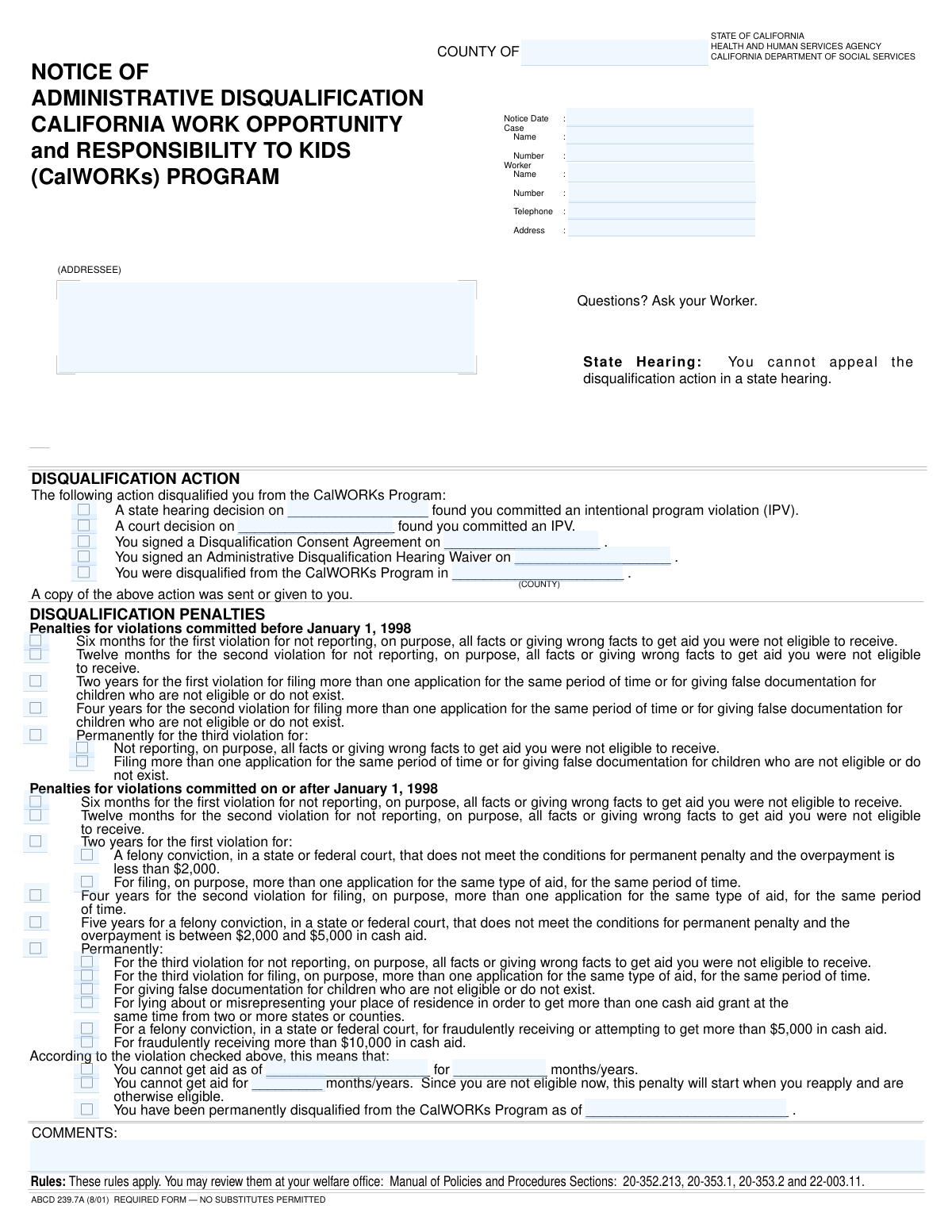
The Notice of Action for CalWORKs Disqualification is a legal document issued by a California county welfare department to an individual found to have committed an Intentional Program Violation (IPV). This form is crucial as it formally communicates the penalty, such as a temporary suspension or permanent ban from receiving CalWORKs benefits, and outlines the specific violation and decision source. Today, this form can be filled out quickly and accurately using AI-powered services like Instafill.ai, which can also convert non-fillable PDF versions into interactive fillable forms.
Our AI automatically handles information lookup, data retrieval, formatting, and form filling.
It takes less than a minute to fill out CalWORKs Disqualification Notice using our AI form filling.
Securely upload your data. Information is encrypted in transit and deleted immediately after the form is filled out.

Form specifications

Form name: Notice of Action - CalWORKs Disqualification
Number of fields: 48
Number of pages: 1
Language: English
main-image

Instafill Demo: How to fill out PDF forms in seconds with AI

How to Fill Out CalWORKs Disqualification Notice Online for Free in 2026

Are you looking to fill out a CALWORKS DISQUALIFICATION NOTICE form online quickly and accurately? Instafill.ai offers the #1 AI-powered PDF filling software of 2026, allowing you to complete your CALWORKS DISQUALIFICATION NOTICE form in just 37 seconds or less.
Follow these steps to fill out your CALWORKS DISQUALIFICATION NOTICE form online using Instafill.ai:
  1. 1 Navigate to Instafill.ai and upload or select the Notice of Action - CalWORKs Disqualification form.
  2. 2 Enter the addressee's information and all relevant case and worker details, including names, numbers, and contact information.
  3. 3 In the 'Disqualification Action' section, check the box corresponding to the decision source (e.g., State Hearing, Court Decision) and enter the date.
  4. 4 Select the appropriate penalty based on the violation date and specific offense, choosing from the options for violations before or after January 1, 1998.
  5. 5 Clearly define the 'Consequence of Violation' by specifying the aid suspension start date and duration, or indicating a permanent disqualification.
  6. 6 Add any additional relevant information or clarifications in the 'Comments' section.
  7. 7 Review all entered data with the AI assistant to ensure accuracy before finalizing and issuing the notice.

Our AI-powered system ensures each field is filled out correctly, reducing errors and saving you time.

Why Choose Instafill.ai for Your Fillable CalWORKs Disqualification Notice Form?

Speed

Complete your CalWORKs Disqualification Notice in as little as 37 seconds.

Up-to-Date

Always use the latest 2026 CalWORKs Disqualification Notice form version.

Cost-effective

No need to hire expensive lawyers.

Accuracy

Our AI performs 10 compliance checks to ensure your form is error-free.

Security

Your personal information is protected with bank-level encryption.

Frequently Asked Questions About Form CalWORKs Disqualification Notice

This form is an official notice to inform you that you have been disqualified from receiving aid from a program, likely CalWORKs, due to an Intentional Program Violation (IPV). It explains the reason for the disqualification and the duration of the penalty.

A county caseworker completes this form to notify you of a disqualification. You are the recipient and do not need to fill it out, but you should review it carefully to understand the details of your case.

An IPV is when someone intentionally provides false information, withholds facts, or breaks program rules to receive benefits they are not eligible for. The form will specify the violation that led to your disqualification.

You should contact the caseworker whose name, phone number, and address are listed in the 'Case and Worker Information' section at the top of the form. Be sure to have your Case Number ready when you call.

A 'State Hearing Decision' means the disqualification was determined by an administrative judge, while a 'Court Decision' means it was ordered by a judge in a court of law. The form indicates the legal basis for your disqualification.

The laws and regulations governing penalties for program violations changed on that date. The form separates the penalties to ensure the correct rules are applied based on when the violation occurred.

Permanent disqualification means you are barred from ever receiving aid from the CalWORKs program again. This is the most severe penalty, typically for repeated or very serious violations.

This means you previously agreed to the disqualification penalty by signing a specific agreement. By signing it, you waived your right to a state hearing on the matter.

If you need to add personal notes or manage the document digitally, you can use a service like Instafill.ai. It can convert non-fillable PDFs into interactive forms that you can type into, save, and print.

Yes, services like Instafill.ai use AI to help you manage your documents. You can use it to convert the notice into a fillable format for adding notes or to securely store a digital copy for your records.

Simply upload the PDF of your notice to the Instafill.ai platform. It will make the document interactive, allowing you to add your own notes in the comments section, save a digital copy, or share it securely if needed.

If your aid is suspended from a specific date, the penalty period begins immediately. If it begins upon reapplication, the penalty period will only start after you reapply for aid and are found otherwise eligible.

This section contains all the key details about your case, including the Case Name, Case Number, and Notice Date. It also provides the name, ID number, phone number, and address of the caseworker assigned to you.

Compliance CalWORKs Disqualification Notice
Validation Checks by Instafill.ai

1
Notice Date Validity
Ensures the 'Notice Date' is a validly formatted date and is not set in the future. This check prevents the creation of post-dated notices, which could cause legal and administrative issues. If the date is invalid or in the future, the form submission should be rejected with an error prompting the user to enter a current or past date.
2
Case Number Format Validation
Verifies that the 'Case Number' field adheres to a predefined format (e.g., a specific combination of letters, numbers, and length). This is crucial for ensuring data integrity and allowing the notice to be correctly linked to the case file in the system. A failed validation would prevent submission and require the user to correct the case number.
3
Worker Telephone Number Format
Checks if the 'Telephone' number for the worker is in a valid format, such as (XXX) XXX-XXXX or a 10-digit number. This ensures that the contact information is usable and standardized across records. An invalid format would trigger an error message asking the user to re-enter the phone number correctly.
4
Exclusive Disqualification Action Selection
Validates that only one checkbox is selected among 'State Hearing Decision', 'Court Decision', 'Signed Disqualification Consent Agreement', and 'Signed Administrative Disqualification Hearing Waiver'. A disqualification typically originates from a single source. Selecting multiple options would create a logical conflict, so the system should enforce a single choice.
5
Conditional Requirement for Decision/Agreement Dates
Ensures that if a disqualification action checkbox (e.g., 'State Hearing Decision') is checked, its corresponding date field (e.g., 'State Hearing Decision Date') must be filled. This check guarantees that the official record includes the date of the action. If the date is missing, the form is considered incomplete and cannot be processed.
6
Decision Date Cannot Exceed Notice Date
Verifies that any provided decision, agreement, or waiver date is on or before the 'Notice Date'. The notice is issued as a result of a past event, so the date of that event cannot be after the notice is created. This logical check prevents chronological errors in the case timeline.
7
Exclusive Penalty Era Selection
Confirms that penalty checkboxes are selected from either the 'Penalties for Violations Before Jan 1, 1998' section OR the 'Penalties for Violations On or After Jan 1, 1998' section, but not from both. The violation date determines the applicable set of rules. This validation prevents contradictory penalty applications and ensures the correct legal framework is applied.
8
Single Penalty Rule Selection
Ensures that within the applicable penalty section (either pre- or post-1998), only one penalty checkbox is selected. A single notice should correspond to a single, specific violation and its associated penalty. Allowing multiple selections would create ambiguity about the penalty being enforced.
9
Exclusive Consequence of Violation Selection
Validates that only one of the primary consequence checkboxes ('Cannot Get Aid From Date', 'Cannot Get Aid For Period', 'Permanently Disqualified') is selected. These options represent mutually exclusive outcomes for the individual. The system must enforce a single choice to clearly define the consequence of the violation.
10
Conditional Requirement for Aid Suspension Details
If the 'Cannot Get Aid From Date' checkbox is selected, this check ensures that both the 'Aid Suspension Start Date' and 'Aid Suspension Duration' fields are completed. These details are essential for defining the terms of the suspension. A failure to provide this information would leave the consequence undefined and make the notice invalid.
11
Consistency Between Penalty and Consequence Duration
Verifies that the duration specified in the selected penalty (e.g., 'Six months - first violation') matches the value entered in the 'Aid Suspension Duration' or 'Reapplication Penalty Duration' field. This cross-field validation ensures the consequence described to the recipient accurately reflects the penalty being applied. A mismatch would indicate a data entry error and must be corrected.
12
Consistency Between Permanent Penalty and Consequence
Ensures that if any 'Permanent penalty' checkbox is selected in the penalty sections, the 'Permanently Disqualified' checkbox is also selected in the 'Consequence of Violation' section. This check links the reason for the penalty to its ultimate outcome. If a permanent penalty is chosen, the consequence must also be permanent, and the form should be rejected if this logic is violated.

Common Mistakes in Completing CalWORKs Disqualification Notice

Forgetting to Enter Conditional Dates

Users often check a box indicating a specific disqualification action, such as 'State Hearing Decision' or 'Signed Disqualification Consent Agreement', but then forget to fill in the corresponding date field. This leaves the record incomplete and makes it difficult to verify the timeline of the action. To avoid this, always double-check that for every box you tick in the 'Disqualification Action' section, you have also entered the required date in the adjacent field.

Selecting Penalties from the Wrong Time Period

The form has two distinct sections for penalties: 'Before Jan 1, 1998' and 'On or After Jan 1, 1998'. A frequent error is selecting a penalty from the incorrect section, which misrepresents the legal basis for the disqualification. This can lead to legal challenges and incorrect penalty enforcement. Always verify the date of the violation before selecting a penalty to ensure it aligns with the correct historical section.

Incomplete Addressee or Worker Address

People frequently omit crucial parts of an address, such as an apartment number, suite, or a correct ZIP code, in both the 'Addressee Information' and 'Worker Address' fields. This oversight can result in the notice being returned as undeliverable, causing significant delays and communication failures. Carefully proofread all address components to ensure the information is complete and accurate for successful delivery.

Transposing Digits in Case or Worker Numbers

Entering the 'Case Number' or 'Worker Number' incorrectly, often by transposing digits, is a common data entry error. This can lead to the notice being associated with the wrong case file, causing confusion, privacy breaches, and administrative rework. To prevent this, slowly re-read the numbers after typing them, comparing them directly against the source document.

Leaving Conditional Consequence Fields Blank

In the 'Consequence of Violation' section, users may check a box like 'Cannot Get Aid From Date' but fail to enter the 'Aid Suspension Start Date' and 'Aid Suspension Duration'. This makes the notice ambiguous and unenforceable as the terms of the penalty are not clearly defined. Ensure that whenever a consequence checkbox is selected, all associated fields describing the start date and duration of the penalty are filled out completely.

Omitting the Disqualification County

When checking the box for 'Disqualified from CalWORKS Program in County', it is easy to overlook the required 'Disqualification County' field. This omission makes the record incomplete, as it doesn't specify the jurisdiction where the disqualification is active. Always ensure that if you indicate a county-specific disqualification, you also provide the name of that county.

Misinterpreting Complex Penalty Checkboxes

The penalty sections contain very specific and similarly worded options, such as distinguishing between violations for 'not reporting/wrong facts' and 'filing multiple applications'. Users under pressure may quickly scan and select the wrong checkbox, applying an incorrect penalty. It is crucial to read each penalty description carefully to ensure it precisely matches the violation in question. AI-powered form filling tools like Instafill.ai can help by highlighting keywords and ensuring logical consistency.

Inconsistent Date Formatting

Users may enter dates in various formats (e.g., MM/DD/YY, M/D/YYYY, Month Day, YYYY) across different fields like 'Notice Date' and 'Court Decision Date'. This inconsistency can cause data processing errors and confusion when the form is archived or reviewed. To avoid this, use a consistent MM/DD/YYYY format for all date entries on the form.

Selecting Contradictory Disqualification Actions

A person might mistakenly check multiple boxes in the 'Disqualification Action' section that are mutually exclusive, such as both 'Court Decision' and 'Signed Disqualification Consent Agreement'. This creates a conflicting record of why the disqualification occurred, requiring clarification later. You should only select the single, final action that led to the disqualification to maintain a clear and accurate record.

Choosing Multiple, Mutually Exclusive Penalties

Within a single violation period, a user might erroneously check boxes for multiple penalties, such as a 'Six months' penalty and a 'Two years' penalty. A single violation should only correspond to one specific penalty. This error complicates the case file and makes the intended consequence unclear. Ensure only one penalty box is checked that accurately reflects the single outcome for the violation. If the form is a non-fillable PDF, a tool like Instafill.ai can convert it to a smart, fillable version with validation rules to prevent such errors.
Saved over 80 hours a year

“I was never sure if my IRS forms like W-9 were filled correctly. Now, I can complete the forms accurately without any external help.”

Kevin Martin Green

Your data stays secure with advanced protection from Instafill and our subprocessors

Robust compliance program

Transparent business model

You’re not the product. You always know where your data is and what it is processed for.

ISO 27001, HIPAA, and GDPR

Our subprocesses adhere to multiple compliance standards, including but not limited to ISO 27001, HIPAA, and GDPR.

Security & privacy by design

We consider security and privacy from the initial design phase of any new service or functionality. It’s not an afterthought, it’s built-in, including support for two-factor authentication (2FA) to further protect your account.

Fill out CalWORKs Disqualification Notice with Instafill.ai

Worried about filling PDFs wrong? Instafill securely fills notice-of-action-calworks-disqualification forms, ensuring each field is accurate.