Yes! You can use AI to fill out Notice of Placement Change and Request for Clinical Placement Review
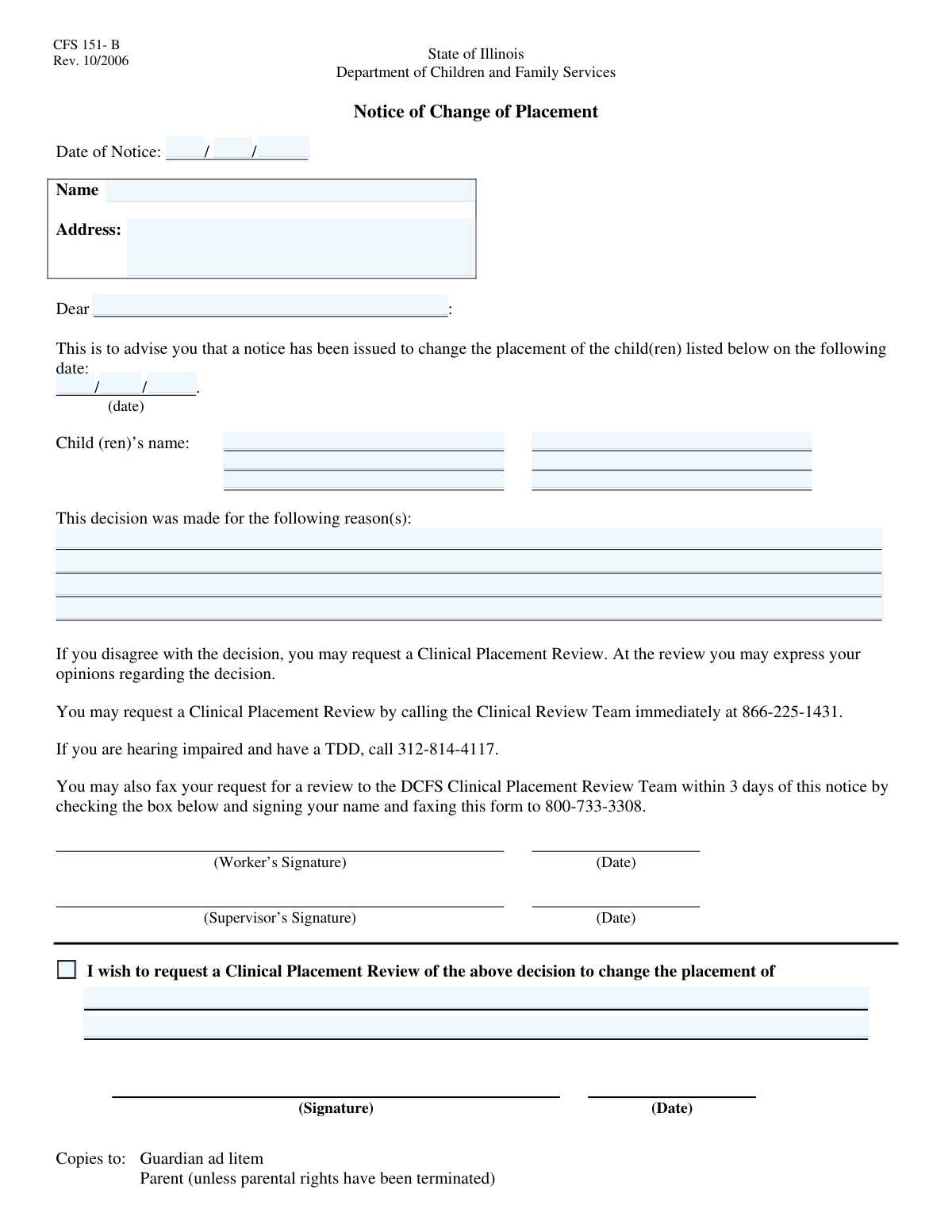
The Notice of Placement Change is a formal document used by agencies to communicate a decision to alter a child's living situation to their guardian or parent. It details the reasons for the placement change and officially provides the recipient with the means to request a 'Clinical Placement Review' if they disagree with the decision. Today, this form can be filled out quickly and accurately using AI-powered services like Instafill.ai, which can also convert non-fillable PDF versions into interactive fillable forms.
Notice of Placement Change is part of the
clinical forms category on Instafill.
Our AI automatically handles information lookup, data retrieval, formatting, and form filling.
It takes less than a minute to fill out Notice of Placement Change using our AI form filling.
Securely upload your data. Information is encrypted in transit and deleted immediately after the form is filled out.
Form specifications
| Form name: | Notice of Placement Change and Request for Clinical Placement Review |
| Number of fields: | 24 |
| Number of pages: | 1 |
| Filled form examples: | Form Notice of Placement Change Examples |
| Language: | English |
Instafill Demo: How to fill out PDF forms in seconds with AI
How to Fill Out Notice of Placement Change Online for Free in 2026
Are you looking to fill out a NOTICE OF PLACEMENT CHANGE form online quickly and accurately? Instafill.ai offers the #1 AI-powered PDF filling software of 2026, allowing you to complete your NOTICE OF PLACEMENT CHANGE form in just 37 seconds or less.
Follow these steps to fill out your NOTICE OF PLACEMENT CHANGE form online using Instafill.ai:
- 1 Navigate to Instafill.ai and upload or select the Notice of Placement Change form.
- 2 Enter the date of the notice and the full name and address of the recipient in the appropriate sections.
- 3 Provide the details of the placement change, including the effective date and the full names of the child or children affected.
- 4 Clearly state the detailed 'Reason for Decision' in the provided text field, explaining the justification for the change.
- 5 If the recipient is requesting a review, check the 'Request Clinical Placement Review' box and provide the required signature.
- 6 Carefully review all the information you've entered for accuracy, including dates, names, and the justification text.
- 7 Securely download, print, or share the completed notice as needed directly from the platform.
Our AI-powered system ensures each field is filled out correctly, reducing errors and saving you time.
Why Choose Instafill.ai for Your Fillable Notice of Placement Change Form?
Speed
Complete your Notice of Placement Change in as little as 37 seconds.
Up-to-Date
Always use the latest 2026 Notice of Placement Change form version.
Cost-effective
No need to hire expensive lawyers.
Accuracy
Our AI performs 10 compliance checks to ensure your form is error-free.
Security
Your personal information is protected with bank-level encryption.
Frequently Asked Questions About Form Notice of Placement Change
This form serves as an official notice to inform a recipient about a change in a child's placement. It outlines the details of the change and the reasons behind the decision.
This notice is typically sent to the child's parents, legal guardians, or other parties directly involved in the child's care and legal proceedings.
The form will contain the date of the notice, the child's name, the effective date of the placement change, and a detailed explanation for the decision in the 'Reason for Decision' section.
The 'Placement Change Date' is the exact date on which the child is scheduled to be moved from their current placement to a new one.
If you disagree with the decision, you can formally request an appeal by checking the 'Request Clinical Placement Review' box and signing the form in the designated signature field.
The specific reasons for the placement change are provided in the section titled 'Reason for Decision'. This section should offer a detailed explanation.
Yes, if multiple children are listed by name, the placement change notice applies to all of them. Review the form carefully for any details specific to each child.
You only need to sign the form if you intend to formally request a Clinical Placement Review. If you agree with the change or do not wish to appeal, no signature is required from you.
After signing the review request, you must return the form to the issuing agency or department. Follow any specific submission instructions included with the notice to ensure your request is processed correctly.
Yes, services like Instafill.ai use AI to help you accurately auto-fill form fields, which can save time and help prevent errors when completing your review request.
You can upload a digital copy of the form to the Instafill.ai platform. The AI will make the fields interactive, allowing you to easily type your information before printing the completed form for signature.
If you have a non-fillable PDF, you can use a tool like Instafill.ai to convert it into an interactive, fillable form. Simply upload the file, and the platform will make the fields editable.
The 'Date of Notice' is the official date the notification was sent. This date is crucial as it typically starts the clock on any deadlines for requesting a review or appeal.
Compliance Notice of Placement Change
Validation Checks by Instafill.ai
1
Valid Date of Notice
This check ensures that the provided Notice Month, Day, and Year combine to form a valid calendar date. It prevents impossible dates, such as February 30th or April 31st, from being entered. This is crucial for data integrity, as the notice date is a key legal data point that must be accurate and unambiguous.
2
Chronological Date Consistency
This validation verifies that the 'Placement Change Date' is on or after the 'Date of Notice'. It is logically impossible for a placement change to be scheduled before the notice about it is issued. This check maintains the integrity of the timeline and prevents the creation of a legally flawed document.
3
Required Recipient Name
This check confirms that the 'Recipient Name' field is not empty. The recipient's full name is essential for identifying the correct individual to whom the notice is addressed. A missing name makes the document legally insufficient and undeliverable, defeating its entire purpose.
4
Salutation and Recipient Name Consistency
This validation checks that the 'Salutation Recipient' name is consistent with the full 'Recipient Name' (e.g., it is a subset or a formal version). This ensures professionalism and proper personalization in the communication. An inconsistent salutation can appear careless and undermine the formality of the notice.
5
Required First Child's Full Name
This check verifies that both the 'First Name' and 'Last Name' for the first child are provided. Since the form's purpose is to communicate a change in a child's placement, identifying at least one child is mandatory. Failure to provide a complete name for the primary child makes the form's subject unknown and the notice invalid.
6
Complete Second Child Information
This validation ensures that if either the 'Second Child's First Name' or 'Second Child's Last Name' is filled, the other corresponding field is also filled. This rule prevents the submission of partial or incomplete information for additional children. A complete name is required for accurate record-keeping and to avoid ambiguity.
7
Complete Third Child Information
This check validates that if a 'Third Child's First Name' is entered, the 'Third Child's Last Name' is also provided, and vice-versa. This maintains data integrity for all children listed on the form. Submitting a partial name for a third child would create an incomplete record, requiring manual follow-up and potentially causing errors.
8
Required Reason for Decision
This validation ensures the 'Reason for Decision' text field is not left blank. This field provides the legal and procedural justification for the placement change, and its absence can render the notice invalid or open to legal challenges. This is critical for transparency and due process.
9
Conditional Signature Requirement
This check confirms that the 'Requesting Party Signature' field is filled if, and only if, the 'Request Clinical Placement Review' checkbox is checked. This enforces the correct logical workflow for making a formal request. A request for review is not valid without a signature, and a signature is not needed if no review is requested.
10
Complete Date of Notice Components
This validation ensures that all three components (Month, Day, Year) for the 'Date of Notice' are provided. A partial date is ambiguous and cannot be used for official record-keeping or legal purposes. This check guarantees the document has a complete and non-disputable issuance date.
11
Complete Placement Change Date Components
This check ensures that if a placement change date is being specified, all three fields (Month, Day, Year) are filled out. An incomplete date for the placement change creates uncertainty for the recipient and makes the notice ineffective. This check guarantees that the scheduled event date is fully defined.
12
Recipient Address Completeness
This validation performs a basic check on the 'Recipient Address' to ensure it is not empty and contains characters, suggesting a full address has been entered. This is critical because the notice is a formal document that must be delivered to the recipient. An empty or clearly incomplete address will result in a failed delivery.
13
Sequential Child Data Entry
This validation verifies that information for a second or third child is only entered if the information for the first child is complete. It prevents a user from entering a 'Second Child's Name' while leaving the 'First Child's Name' fields blank. This enforces a logical data entry order and prevents orphaned data records.
Common Mistakes in Completing Notice of Placement Change
Users often mistakenly enter the same date for both the 'Date of Notice' and the 'Placement Change Date'. The notice date is the day the form is completed, while the placement change date is a future date when the change will actually occur. This error can invalidate the notice, as legal guidelines typically require a specific period of advance warning, leading to procedural violations and delays.
A frequent mistake is omitting key address components like an apartment number, street suffix (e.g., Dr, Ave), or ZIP code. This happens due to haste or not having the complete information on hand. An incomplete address will result in the notice being returned as undeliverable, preventing the recipient from being informed of a critical placement change in a timely manner.
In the 'Reason for Decision' field, many people provide generic, unhelpful explanations such as 'in the child's best interest' or 'a more suitable environment'. This lacks the necessary detail for the recipient to understand the justification, which can lead to confusion, appeals, and legal challenges. To avoid this, provide specific, objective facts and circumstances that led to the decision, referencing documented events where appropriate.
A common oversight is checking the 'Request Clinical Placement Review' box but failing to sign in the corresponding 'Requesting Party Signature' field. The form's logic requires a signature to validate the request. Without the signature, the request for a review is considered incomplete and will be denied, causing the user to miss the opportunity to appeal the decision.
Users sometimes enter the recipient's formal legal name in the 'Recipient Name' field but use a different name or a nickname in the 'Salutation Recipient' field. While seemingly minor, this inconsistency appears unprofessional and can cause confusion in a formal notice. To prevent this, ensure the name in the salutation directly corresponds to the full name provided in the recipient information section.
People may enter a child's nickname (e.g., 'Danny') instead of their full legal name ('Daniel') in the child information fields. As this is a formal or legal document, using an informal name creates a discrepancy with official records like birth certificates or court orders. This can cause administrative processing delays or challenges to the validity of the notice, so always use the child's full legal name.
Fields cryptically named 'Text16', 'Text17', etc., are often ignored because their purpose isn't clear from the name alone. These fields usually correspond to essential information on the original document, such as 'Case Worker Name' or 'Contact Phone Number'. Leaving them blank results in an incomplete submission, making it difficult for the agency to process or for the recipient to follow up. If the form is a non-fillable PDF, tools like Instafill.ai can convert it to an interactive version, helping to clarify the purpose of each field.
When a notice applies to multiple siblings, it's easy to mix up their information, such as entering one child's first name with another's last name. This error can render the notice legally invalid for the incorrectly listed children, requiring a corrected form to be re-issued. Carefully review each child's first and last name to ensure they are entered correctly in their respective sections.
When fields are separated for month, day, and year, users may still try to enter a full date (e.g., '05/15/2024') into a single field, or use text for the month ('May') when a number is expected. This causes data entry errors and can lead to form rejection by automated systems. To avoid this, enter only the requested numerical value in each distinct field. AI-powered tools like Instafill.ai can automatically parse and format dates correctly across separate fields.
Saved over 80 hours a year
“I was never sure if my IRS forms like W-9 were filled correctly. Now, I can complete the forms accurately without any external help.”
Kevin Martin Green
Your data stays secure with advanced protection from Instafill and our subprocessors
Robust compliance program
Transparent business model
You’re not the product. You always know where your data is and what it is processed for.
ISO 27001, HIPAA, and GDPR
Our subprocesses adhere to multiple compliance standards, including but not limited to ISO 27001, HIPAA, and GDPR.
Security & privacy by design
We consider security and privacy from the initial design phase of any new service or functionality. It’s not an afterthought, it’s built-in, including support for two-factor authentication (2FA) to further protect your account.
Fill out Notice of Placement Change with Instafill.ai
Worried about filling PDFs wrong? Instafill securely fills notice-of-placement-change-and-request-for-clinical-placement-review forms, ensuring each field is accurate.