
Instafill.ai
7 days free
AI form filling · 225 fields · 8 pages · done in seconds

Yes! You can use AI to fill out Official Form 101, Voluntary Petition for Individuals Filing for Bankruptcy

Don't type 225 fields by hand. Tell our AI about yourself, or upload a document you already have, and it fills every field in seconds. You check it, then download, print or sign.
7 days free, then $19.99/month · Cancel anytime
AI fills it, no typingEncrypted, never used to train AICancel in two clicks
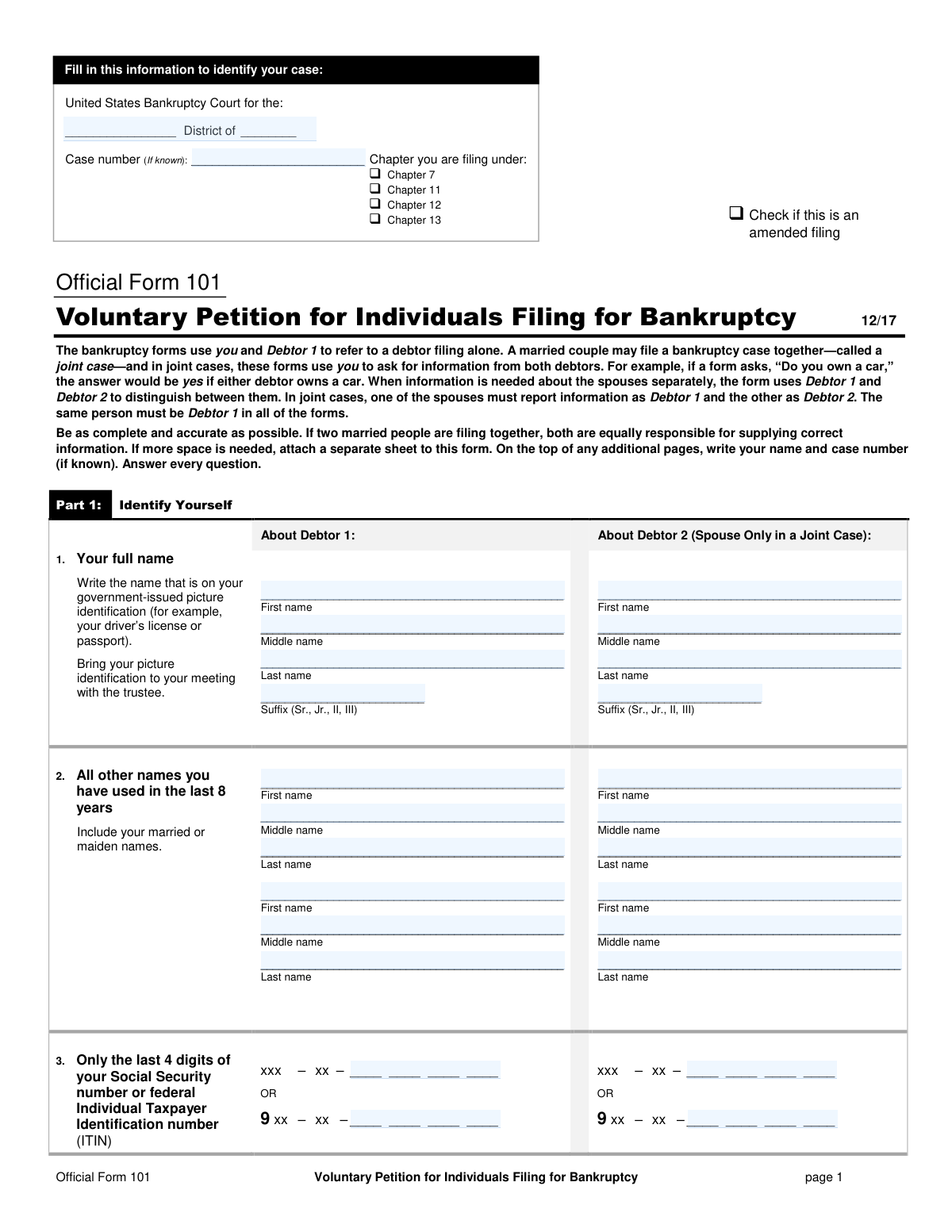
Official Form 101, Voluntary Petition for Individuals Filing for Bankruptcy, page 1
Very Complex · 87/100Form Complexity Index

The AI does the filling. You just check it.

No typing into boxes, nothing to install.

Tell the AI about youAnswer a few questions in plain words, or upload a document you already have. That is all the typing there is.
AI fills every field in secondsIt puts each answer in the right box on every page, tables and checkboxes included.
Check it and downloadReview every field, change anything, then download, print or sign the PDF.

What this form asks for

The AI fills all of it, from your answers or your documents.

Official Form 101, Voluntary Petition for Individuals Filing for Bankruptcy, is the legal document used to commence a personal bankruptcy case in the United States. It provides the court with fundamental information about the debtor(s), including their identity, the bankruptcy chapter they are filing under, and a summary of their financial situation. Filing this form correctly is the critical first step in obtaining debt relief through the bankruptcy system, and today this form can be filled out quickly and accurately using AI-powered services like Instafill.ai, which can also convert non-fillable PDF versions into interactive fillable forms.
Fillable fields225
Pages8
Sections54
Tables and lists11
Questions that depend on earlier answers104
Form Complexity IndexVery Complex, 87/100

The AI checks your answers before you download

12 checks built for this form, so a wrong date or a missing answer is caught before anyone else sees it.

Ensures SSN/ITIN Last Four Digits Format

This check validates that the value entered for the last 4 digits of the Social Security Number or Individual Taxpayer Identification Number in question 3 is exactly four numeric digits. This is critical for correct debtor identification by the court and the trustee. A failure in this validation would prevent submission, as an incorrect or incomplete identifier can lead to case processing errors or rejection.

Verifies Bankruptcy Chapter Consistency

This validation ensures that the bankruptcy chapter selected in the header of page 1 matches the chapter selected in Part 2, Question 7. Inconsistent selections can create legal ambiguity about the type of relief the debtor is seeking. If the chapters do not match, the system should flag the error and require the user to make the selections consistent before filing.

Validates Joint Filer (Debtor 2) Data Completeness

If any data is entered in the fields for 'Debtor 2' (e.g., name in question 1), this check confirms that all mandatory Debtor 2 fields (full name, SSN/ITIN, address, credit counseling status) are also filled. A joint petition requires complete information for both parties to be legally valid. An incomplete Debtor 2 profile on a joint filing will result in a validation failure and prevent submission until all required information is provided.

Conditional Requirement for Prior Bankruptcy Details

This check is triggered by the answer to Question 9, 'Have you filed for bankruptcy within the last 8 years?'. If the user selects 'Yes', the system must verify that the District, Date, and Case Number for at least one prior case are provided. This information is legally required for determining eligibility for discharge, and failure to provide it will halt the submission process.

Restricts Fee Waiver Option to Chapter 7 Filings

This validation enforces the rule in Question 8 that the 'request that my fee be waived' option is only available to debtors filing under Chapter 7. The system should disable or reject the selection of this option if the chosen chapter is 11, 12, or 13. This prevents filers from making an invalid request that would be automatically denied by the court.

Enforces Logic for Small Business Debtor Status

This check validates the answers in Question 13 based on the selected bankruptcy chapter. If the filing is not under Chapter 11, the only valid option is 'I am not filing under Chapter 11.' If the filing is under Chapter 11, the user must select one of the other two options. This ensures the debtor is correctly classified under Chapter 11 rules, which affects deadlines and requirements for the case.

And 6 more checks
  • Mandatory Credit Counseling Status Selection
  • Validates EIN Format
  • Conditional Requirement for Sole Proprietor Details
  • Conditional Requirement for Hazardous Property Details
  • Verifies Logical Flow of Debt Classification
  • Validates Pro Se Filer Acknowledgements

Let AI fill out your Official Form 101

No typing. Every field filled in seconds, checked, ready to sign.

7 days free, then $19.99/month · Cancel anytime

How to Fill Out Official Form 101 Online for Free in 2026

What the AI walks you through.

  1. Navigate to Instafill.ai and upload your copy of Official Form 101 or select it from the platform's library of official documents.
  2. Allow the AI to process the form, accurately identifying all sections, including debtor identification, case information, and financial declarations.
  3. Follow the guided, interactive prompts to provide personal details for Debtor 1 and Debtor 2 (if filing jointly), such as full names, addresses, and the last four digits of your SSN or ITIN.
  4. Select the bankruptcy chapter you are filing under (e.g., Chapter 7, 11, 12, or 13) and answer questions regarding prior filings, business operations, and credit counseling.
  5. Provide estimates for your assets, liabilities, and the number of creditors you owe, as requested in Part 6 of the form.
  6. Review the entire petition, with the AI highlighting any potentially incomplete fields to ensure all required information is present before finalization.
  7. Securely download the completed and ready-to-sign Official Form 101 for filing with the appropriate U.S. Bankruptcy Court.

Common Mistakes in Completing Official Form 101

The ones the AI is built to catch.

Using an Incorrect or Inconsistent Name
Filers often use a nickname, an abbreviated name, or a version of their name that does not exactly match their government-issued photo ID as required in Question 1. This discrepancy can cause significant delays, trigger identity verification issues with the court and the trustee, and may require filing amended documents to correct. To avoid this, always use your full legal name exactly as it appears on your driver's license or passport, including any middle names or suffixes.
Omitting Prior Names or Aliases
In Question 2, individuals frequently forget to list all names used in the last 8 years, including maiden names, former married names, or personal names used in a business context (DBAs). This omission can hinder the bankruptcy trustee's ability to identify all assets and notify all creditors, potentially jeopardizing the discharge of certain debts. It is crucial to conduct a thorough review of your personal and financial history to ensure every name used in the specified period is disclosed.
Providing the Full Social Security Number
The form explicitly asks for only the last 4 digits of the Social Security Number (SSN) or Individual Taxpayer Identification Number (ITIN) in Question 3 for privacy and security. A very common mistake is entering the full nine-digit number, which exposes sensitive personal information on a public-facing document. This error can lead to identity theft risks and may require the document to be amended or redacted. Always read the instructions for each field carefully to ensure you are providing information in the correct format.
Failing to Attach Required Supplementary Forms
Several questions on the petition require an additional form to be attached, such as Form 103A for installment payments (Question 8), Form 101A for eviction judgments (Question 11), or the credit counseling certificate (Question 15). Filers often check a box indicating their situation but forget to include the corresponding document with their petition. This failure results in an incomplete filing, which can lead to automatic dismissal of the case by the court clerk.
Non-Compliance with Credit Counseling Requirements
Question 15 addresses the mandatory pre-bankruptcy credit counseling. Common mistakes include completing the counseling more than 180 days before filing, using an unapproved agency, or failing to attach the completion certificate. Any error related to this requirement is grounds for immediate case dismissal, forcing the filer to pay another fee and start the process over. Ensure your counseling is recent, from an approved provider, and that the certificate is filed with your petition or within 14 days if necessary.
Filing in the Wrong Bankruptcy District
In Question 6, a filer must establish proper venue, which is typically where they have lived for the majority of the last 180 days. People sometimes file in the district where they work or where a primary creditor is located, which is incorrect. Filing in the wrong district can lead to the case being dismissed or transferred, causing significant delays and potentially additional legal fees. It is essential to correctly identify your proper judicial district before filing.
Misclassifying or Omitting Sole Proprietor Business Activity
Individuals with side-gigs, freelance income, or who operate as independent contractors often don't think of themselves as 'sole proprietors' and incorrectly check 'No' in Question 12. This leads to a failure to disclose business names, assets, and debts, which can be considered a false statement under penalty of perjury. Any activity where you are self-employed and not operating as a formal legal entity like a corporation or LLC must be reported here.
Inconsistent Information for Debtor 1 and Debtor 2
In a joint filing, the form requires one spouse to be consistently identified as Debtor 1 and the other as Debtor 2 throughout all bankruptcy documents. A frequent error is accidentally swapping these roles on different pages or schedules. This creates confusion and can lead to processing delays or rejection of the forms, as the court cannot accurately track the information for each individual. Couples should decide roles beforehand and double-check every page for consistency.
Missing Signatures or Dates
The petition is a legal declaration made under penalty of perjury and is invalid without a signature. Filers, especially those filing without an attorney (pro se), often miss one of the multiple signature blocks in Part 7 and on page 8. Forgetting to sign, date, or having only one spouse sign a joint petition will result in the court rejecting the filing. AI-powered tools like Instafill.ai can help prevent this by highlighting all required signature fields before submission.
Confusing Physical and Mailing Addresses
Question 5 asks for both a physical address and a separate mailing address if different. A common mistake is to list a P.O. Box as a physical address or to provide an incorrect mailing address. The court sends all official notices to the mailing address on file; an error here means you could miss crucial deadlines, hearings, or requests for information, potentially leading to the dismissal of your case. If the form is a non-fillable PDF, a tool like Instafill.ai can convert it to a fillable version, making it easier to enter and review address details accurately.

Frequently Asked Questions About Official Form 101


Is it really free for 7 days?
Yes. You pay $0 today. Cancel before Nov 12 and you are never charged. Keep it, and it is $19.99 a month for 5 fills of your Official Form 101.
Can I fill other forms too?
This plan is for your Official Form 101: your own AI agent fills it as often as 5 times a month. To fill other forms and upload your own, choose a Professional plan from your account.
How do I cancel?
From your account, in two clicks, any time. No email, no call.
How does the AI fill out Official Form 101?
You answer a few questions in plain words, or upload a document you already have. The AI reads what you give it and puts each answer into the right field of Official Form 101, on every page, in seconds. It checks the answers against the form's own rules, and you review and change anything before you download, print or sign.
What happens to my information?
It is encrypted in transit and at rest, and it is never used to train AI.
How complex is Official Form 101 to fill out?
Official Form 101 has a Form Complexity Index of 87 out of 100, in the very complex tier: 225 fillable fields across 8 pages. Instafill.ai's AI fills it in under a minute, with every field there for you to review before you download.
What is the purpose of Official Form 101?
Official Form 101, the Voluntary Petition for Individuals Filing for Bankruptcy, is the document used to begin a personal bankruptcy case. It provides the court with essential information about your identity, financial situation, and the type of bankruptcy relief you are seeking.
Can my spouse and I file for bankruptcy together using this form?
Yes, a married couple can file a joint case using a single Form 101. In a joint filing, one spouse must be designated as Debtor 1 and the other as Debtor 2 consistently across all bankruptcy documents.
What is the difference between Debtor 1 and Debtor 2?
Debtor 1 refers to an individual filing alone or one of the spouses in a joint case, while Debtor 2 is used exclusively for the other spouse in a joint case. The designation is for organizational purposes, and the same person must remain Debtor 1 throughout all forms.
Do I have to complete the credit counseling mentioned in Part 5 before filing?
Yes, the law requires you to receive a briefing about credit counseling from an approved agency within the 180 days before you file for bankruptcy. You must attach the certificate of completion to your petition or file it within 14 days, with very limited exceptions.
What if I cannot afford the bankruptcy filing fee?
The form outlines several options in Part 2. You can apply to pay the fee in installments using Form 103A, or if you are filing for Chapter 7 and meet specific low-income requirements, you can apply to have the fee waived completely using Form 103B.
How do I know which bankruptcy chapter (7, 11, 12, or 13) to choose?
Each chapter has different eligibility rules and provides different types of debt relief, and the form requires you to choose one. Because this is a critical legal decision, you should consult with a qualified bankruptcy attorney to determine which chapter is right for your circumstances.
I own a small side business. Do I need to report it in Part 3?
Yes, if you operate any full- or part-time business as a sole proprietor (a business that is not a separate legal entity like an LLC or corporation), you must provide its details in Part 3 of the form.
What should I do if my landlord has an eviction judgment against me?
If you are renting and an eviction judgment has been issued against you, you must indicate this in question 11. You are also required to complete and attach the 'Initial Statement About an Eviction Judgment Against You' (Form 101A) with your petition.
Why do I only provide the last 4 digits of my Social Security Number on the form?
For your privacy and to protect against identity theft, the public-facing petition only requires the last four digits of your SSN or ITIN. You will be required to provide your full number to the court through a separate, non-public document.
What are the risks of filing this form without an attorney?
As stated on the form, bankruptcy law is very technical, and mistakes can cause your case to be dismissed, which could result in you losing property or the right to file again. It is strongly recommended to hire a qualified attorney to ensure your rights are protected.
Can I use an AI tool to help me fill out this bankruptcy petition?
Yes, services like Instafill.ai use AI to help you accurately auto-fill form fields, which can save time and help avoid errors. However, these tools provide technological assistance and not legal advice, which should always be sought from a qualified attorney.
How can I fill out Form 101 online using Instafill.ai?
You can upload the PDF of Form 101 to the Instafill.ai platform. Its AI will make the document interactive, allowing you to easily type your information into the correct fields before downloading the completed form for filing.
The PDF of Form 101 that I downloaded is not fillable. What can I do?
If you have a non-fillable or 'flat' PDF, you can use a service like Instafill.ai to convert it into an interactive, fillable form. This allows you to complete the petition on your computer rather than printing it and filling it out by hand.
Encrypted in transit and at restNever used to train AIDelete your forms any time

Get your Official Form 101 filled out by AI

$0 today. Cancel before Nov 12 and you pay nothing.

7 days free, then $19.99/month · Cancel anytime