
Yes! You can use AI to fill out Personal History Statement
Don't type 54 fields by hand. Tell our AI about yourself, or upload a document you already have, and it fills every field in seconds. You check it, then download, print or sign.
The AI does the filling. You just check it.
No typing into boxes, nothing to install.
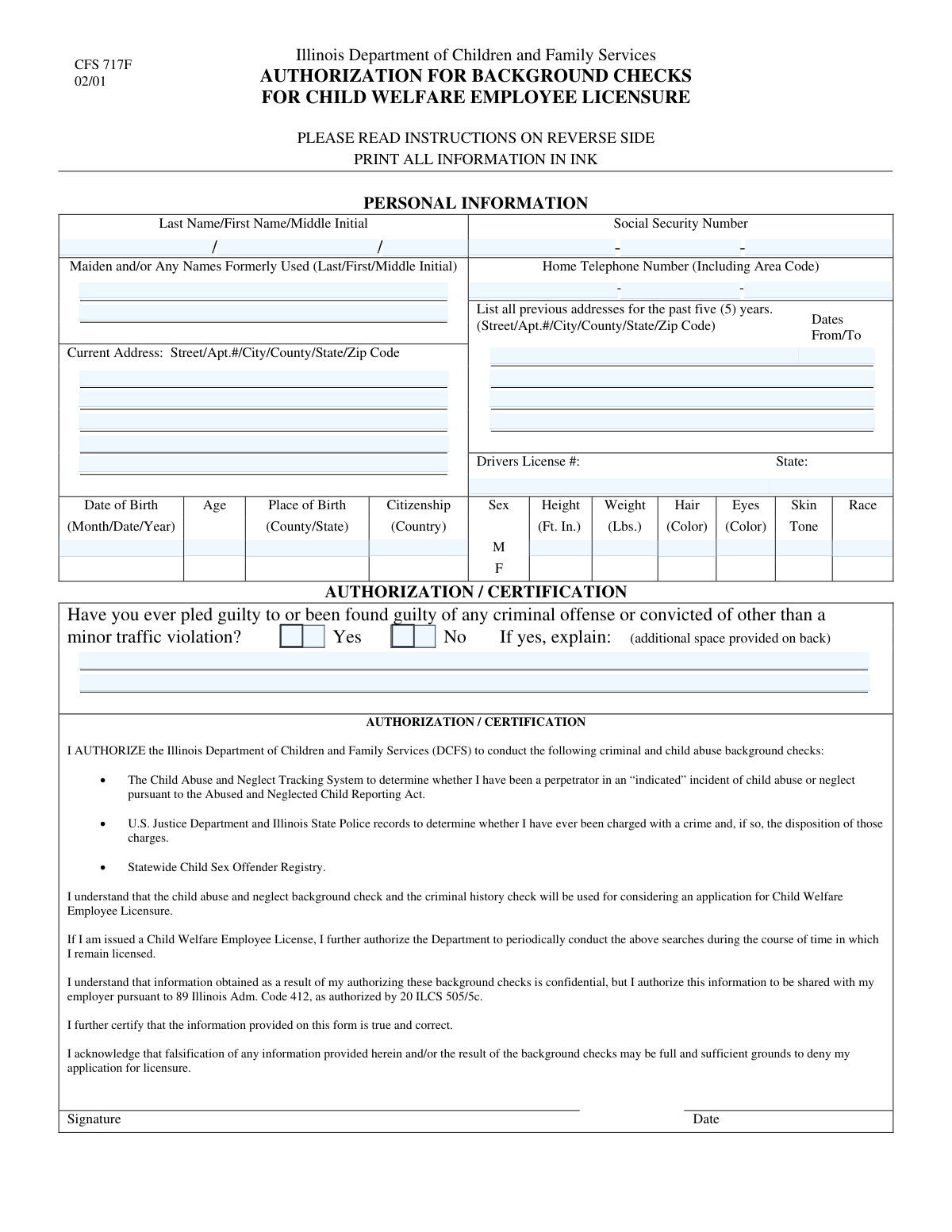
What this form asks for
The AI fills all of it, from your answers or your documents.
The AI checks your answers before you download
13 checks built for this form, so a wrong date or a missing answer is caught before anyone else sees it.
This validation calculates the user's age based on the provided 'Date of Birth' and compares it to the value entered in the 'Age' field. This is a crucial logical consistency check to catch data entry errors and ensure the applicant's personal details are accurate. A mismatch would trigger an error, asking the user to review and correct either their date of birth or their age.
This rule checks if the 'Guilty of Criminal Offense - Yes' box is checked. If it is, the 'Criminal Offense Explanation' field must not be empty. This is important for compliance and background checks, as an affirmative answer requires a detailed explanation. Failure to provide an explanation will prevent form submission and prompt the user to fill in the required details.
This check ensures that the three separate fields for the Social Security Number contain only numeric digits and adhere to the required lengths (3, 2, and 4 digits respectively). It prevents the submission of incomplete or incorrectly formatted SSNs, which are critical for identity verification. If validation fails, the user will be prompted to correct the numeric entries in the SSN fields.
This check ensures that the user has selected either the 'Yes' or the 'No' option for the criminal offense question, but not both. It prevents ambiguous or contradictory answers to a critical binary question. If both options are selected, or neither is selected, the form will display an error and require the user to choose exactly one.
This validation confirms that the 'First Name' and 'Last Name' fields are not left blank and contain only alphabetic characters. These fields are fundamental for identifying the applicant and are considered mandatory for any application. Submitting the form without this information would result in an error message highlighting the required fields.
This check verifies that the 'Current Zip Code' field contains either a 5-digit or a 9-digit (ZIP+4) numeric value. Correctly formatted zip codes are essential for mail delivery and address verification services. An invalid format will trigger an error, instructing the user to enter a valid 5 or 9-digit zip code.
And 7 more checks
- Validates Chronological Order of Previous Address Dates
- Checks for Gaps or Overlaps in Address History
- Ensures All Parts of the Home Telephone Number are Provided
- Validates Driver's License Issuing State
- Ensures Date of Birth is a Valid Past Date
- Validates Middle Initial Format
- Validates Completeness of Previous Address Entries
Let AI fill out your PHS
No typing. Every field filled in seconds, checked, ready to sign.
How to Fill Out PHS Online for Free in 2026
What the AI walks you through.
- Navigate to Instafill.ai and upload your Personal History Statement form or select it from a template library.
- Enter your personal identification details, including your full name, any formerly used names, Social Security Number, and date of birth.
- Provide your complete current address and a detailed history of your previous residences as required by the form.
- Fill in your physical description, including height, weight, hair color, eye color, and other distinguishing features.
- Answer the questions regarding your criminal history truthfully. If applicable, provide a thorough explanation in the designated section.
- Use the AI-powered review feature to check the entire form for accuracy, completeness, and consistency before finalizing.
- Securely download the completed Personal History Statement, ready for submission to the requesting agency or employer.
Common Mistakes in Completing PHS
The ones the AI is built to catch.
Incorrect Social Security Number Entry
Creating Gaps in Address History
Forgetting Formerly Used Names
Failure to Adequately Explain Criminal History
Omitting Apartment or Unit Numbers
Inconsistent Date of Birth and Age
Using Nicknames or Unofficial Abbreviations
Misinterpreting 'Place of Birth'
Transposing Phone Number Components
Incorrect Date Formatting
Frequently Asked Questions About PHS
Is it really free for 7 days?
Can I fill other forms too?
How do I cancel?
How does the AI fill out PHS?
What happens to my information?
How complex is PHS to fill out?
What is the purpose of this form?
Who needs to fill out this form?
What should I list under 'Formerly Used Names'?
How many previous addresses do I need to provide?
What is considered a 'criminal offense' that I must disclose?
What information is needed if I have a criminal offense to report?
What if I don't remember the exact dates for my previous addresses?
Why is my physical description required on this form?
Do I need to attach any other documents with this form?
Can I use an AI tool to help fill out this form?
How can I use Instafill.ai to complete this form online?
What should I do if my PDF form is not fillable?
What if I need more space to explain my criminal history?
Get your PHS filled out by AI
$0 today. Cancel before Nov 10 and you pay nothing.
Other forms like this one
PA state forms: Form 1095-A, Health Insurance Marketplace Statement, Form W-2, Wage and Tax Statement, Form 593, Real Estate Withholding, Form 8938, Statement of Specified Foreign Financial Assets, Form CMS-2567, Statement of Deficiencies, Form 1098, Mortgage Interest Statement, Form 1098-T, Tuition Statement, Form 1099-S, Proceeds From Real Estate Transactions, Form 1098-E, Student Loan Interest Statement, Form DS-3053, Statement of Consent, Form DS-86, Statement of Non-Receipt of a U.S. Passport, Form DS-86, Statement of Non-Receipt of a U.S. Passport, Form 108, Statement of Intention, Form 107, Statement of Financial Affairs, Form 121, Statement About Your SSNs, Form 122A-1, Chapter 7 Statement of Current Monthly Income, Center for Infertility & Reproductive Surgery – New Patient Questionnaire and Patient/Guarantor Statement (Brigham and Women’s Hospital, Department of Obstetrics and Gynecology), Adult Travel Document Application for Stateless and Protected Persons in Canada (16 years of age or over) (PPTC 190), Form W-8IMY (Rev. October 2021), Certificate of Foreign Intermediary, Foreign Flow-Through Entity, or Certain U.S. Branches for United States Tax Withholding and Reporting, Form W-2, Wage and Tax Statement (2025)
NJ state forms: Form 1095-A, Health Insurance Marketplace Statement, Form W-2, Wage and Tax Statement, Form 593, Real Estate Withholding, Form 8938, Statement of Specified Foreign Financial Assets, Form CMS-2567, Statement of Deficiencies, Form 1098, Mortgage Interest Statement, Form 1098-T, Tuition Statement, Form 1099-S, Proceeds From Real Estate Transactions, Form 1098-E, Student Loan Interest Statement, Form DS-3053, Statement of Consent, Form DS-86, Statement of Non-Receipt of a U.S. Passport, Form DS-86, Statement of Non-Receipt of a U.S. Passport, Form 108, Statement of Intention, Form 107, Statement of Financial Affairs, Form 121, Statement About Your SSNs, Form 122A-1, Chapter 7 Statement of Current Monthly Income, Center for Infertility & Reproductive Surgery – New Patient Questionnaire and Patient/Guarantor Statement (Brigham and Women’s Hospital, Department of Obstetrics and Gynecology), Adult Travel Document Application for Stateless and Protected Persons in Canada (16 years of age or over) (PPTC 190), Form W-8IMY (Rev. October 2021), Certificate of Foreign Intermediary, Foreign Flow-Through Entity, or Certain U.S. Branches for United States Tax Withholding and Reporting, Form W-2, Wage and Tax Statement (2025)
state ID forms: Application for Renewal or Duplicate of Alabama Driver License or ID card, Form 1095-A, Health Insurance Marketplace Statement, Form W-2, Wage and Tax Statement, Form 593, Real Estate Withholding, Form 8938, Statement of Specified Foreign Financial Assets, Form CMS-2567, Statement of Deficiencies, Form 1098, Mortgage Interest Statement, Form 1098-T, Tuition Statement, Form 1099-S, Proceeds From Real Estate Transactions, Form 1098-E, Student Loan Interest Statement, Form DS-3053, Statement of Consent, Form DS-86, Statement of Non-Receipt of a U.S. Passport, Form 108, Statement of Intention, Form 107, Statement of Financial Affairs, Form 121, Statement About Your SSNs, Form 122A-1, Chapter 7 Statement of Current Monthly Income, Center for Infertility & Reproductive Surgery – New Patient Questionnaire and Patient/Guarantor Statement (Brigham and Women’s Hospital, Department of Obstetrics and Gynecology), Adult Travel Document Application for Stateless and Protected Persons in Canada (16 years of age or over) (PPTC 190), Form W-8IMY (Rev. October 2021), Certificate of Foreign Intermediary, Foreign Flow-Through Entity, or Certain U.S. Branches for United States Tax Withholding and Reporting, Form W-2, Wage and Tax Statement (2025)
Let AI fill out your PHS
Your trial starts once a card is added. You pay nothing before Nov 10.
Our AI already knows this form, all 54 fields of it. Skip the typing: tell it about yourself, or upload what you have, and it fills the whole form in seconds.
- AI fills every field on both pages, tables and checkboxes included
- No typing into boxes: answer a few questions, or upload a document you already have, an old copy of this form, a photo of a document
- The AI checks the answers; you review and change anything before you download
- Download the finished PDF, print it, or sign it online
- Encrypted, and never used to train AI
Cancel before Nov 10 and you pay nothing.
A card is needed to start the trial. Cancel in two clicks from your account.
Terms · Privacy