Yes! You can use AI to fill out Personal History Statement and Background Check Authorization
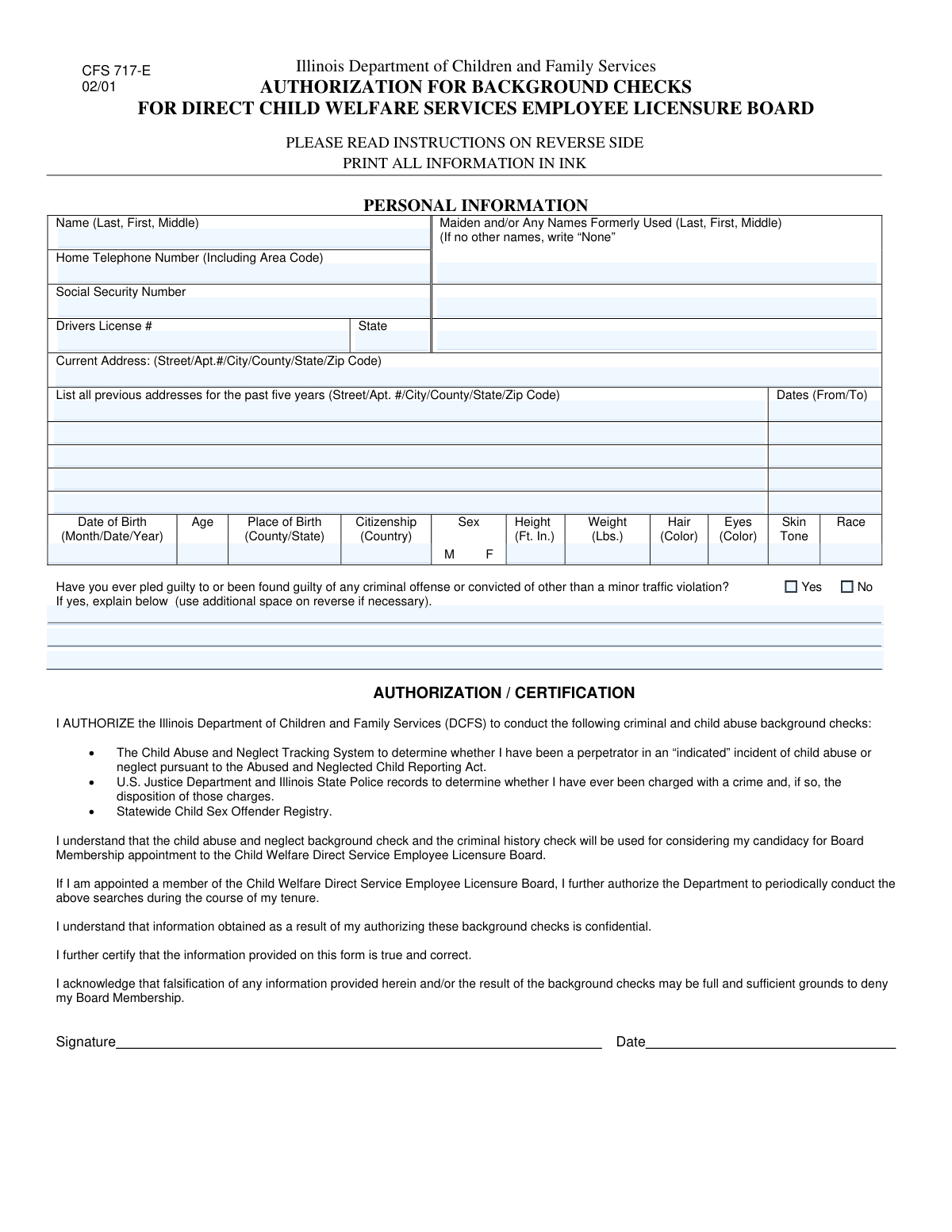
A Personal History Statement is a detailed questionnaire used by employers, government agencies, and licensing bodies to conduct a thorough background investigation on an applicant. It gathers extensive information including identity, address history, personal characteristics, and criminal records to assess an individual's suitability and character. Today, this form can be filled out quickly and accurately using AI-powered services like Instafill.ai, which can also convert non-fillable PDF versions into interactive fillable forms.
Personal History Statement is part of the
authorization forms, NJ state forms, PA state forms and state ID forms categories on Instafill.
Our AI automatically handles information lookup, data retrieval, formatting, and form filling.
It takes less than a minute to fill out Personal History Statement using our AI form filling.
Securely upload your data. Information is encrypted in transit and deleted immediately after the form is filled out.
Form specifications
| Form name: | Personal History Statement and Background Check Authorization |
| Number of fields: | 48 |
| Number of pages: | 2 |
| Filled form examples: | Form Personal History Statement Examples |
| Language: | English |
More forms in Authorization forms
Instafill Demo: How to fill out PDF forms in seconds with AI
How to Fill Out Personal History Statement Online for Free in 2026
Are you looking to fill out a PERSONAL HISTORY STATEMENT form online quickly and accurately? Instafill.ai offers the #1 AI-powered PDF filling software of 2026, allowing you to complete your PERSONAL HISTORY STATEMENT form in just 37 seconds or less.
Follow these steps to fill out your PERSONAL HISTORY STATEMENT form online using Instafill.ai:
- 1 Navigate to Instafill.ai and upload or select the Personal History Statement form.
- 2 Provide your full name, any former names, Social Security Number, and contact information in the initial applicant section.
- 3 Enter your current and complete previous residential addresses, including the dates you lived at each location, for the required period.
- 4 Fill in your personal characteristics, such as date of birth, place of birth, citizenship, and physical descriptors like height, weight, and eye color.
- 5 Disclose any criminal history as requested, providing detailed explanations for any affirmative answers in the designated fields.
- 6 Review all the information auto-filled by the AI for accuracy, make any necessary corrections, and then digitally sign and submit the completed form.
Our AI-powered system ensures each field is filled out correctly, reducing errors and saving you time.
Why Choose Instafill.ai for Your Fillable Personal History Statement Form?
Speed
Complete your Personal History Statement in as little as 37 seconds.
Up-to-Date
Always use the latest 2026 Personal History Statement form version.
Cost-effective
No need to hire expensive lawyers.
Accuracy
Our AI performs 10 compliance checks to ensure your form is error-free.
Security
Your personal information is protected with bank-level encryption.
Frequently Asked Questions About Form Personal History Statement
This form is designed to collect detailed personal information for a background check. It is typically used for employment screening, professional licensing, or other situations requiring identity and history verification.
Before you begin, gather your Social Security Number, driver's license or state ID card, and a complete history of your addresses. You will also need details of any criminal offenses, if applicable.
The form has fields for up to five previous addresses. You should provide as many as are necessary to cover the time period specified by the requesting organization, starting with your most recent previous address.
If you have never used a different name, simply write 'None' in the space provided for maiden or former names.
Minor traffic violations typically include common infractions like speeding tickets or parking citations. More serious offenses such as a DUI or reckless driving must be disclosed.
If you have been found guilty of a criminal offense, check the 'Yes' box and provide a complete, detailed explanation in the 'Criminal Offense Explanation' section and the additional lines provided.
Re-entering your Social Security Number is a verification step to ensure accuracy. This helps prevent typos that could cause significant delays in processing your application.
If you do not have a driver's license, you can typically use a state-issued photo ID card instead. If you have neither, contact the agency that gave you the form for instructions.
Use the 'Additional Authorization/Certification Details' lines to continue your explanation. If you still need more room, you may attach a separate signed and dated sheet, referencing your full name.
Yes, services like Instafill.ai use AI to help you accurately auto-fill forms with your saved information. This can save you time and help avoid mistakes.
To use Instafill.ai, upload the form to their platform. The AI will make the fields fillable, and you can use your saved profile to populate your information, review it, and download the completed document.
If you have a non-fillable PDF, you can use a tool like Instafill.ai. It can convert flat PDFs into interactive, fillable forms that you can easily complete and save online.
You should enter your height in feet and inches. For example, if you are five feet and nine inches tall, you would write '5 ft 9 in'.
Compliance Personal History Statement
Validation Checks by Instafill.ai
1
Social Security Number Consistency
This check verifies that the value entered in the 'Social Security Number' field exactly matches the value in the 'Social Security Number Re-entry' field. This is crucial for preventing typographical errors in a critical identifier, ensuring data accuracy for background checks and identity verification. If the numbers do not match, the user will be prompted to correct the entries before submission.
2
Social Security Number Format
Validates that the 'Social Security Number' is in the correct 9-digit format, accepting either XXXXXXXXX or XXX-XX-XXXX. This ensures the integrity and usability of the SSN for processing with government and financial systems. A failure in this validation would prevent form submission and require the user to enter a correctly formatted number.
3
Age and Date of Birth Consistency
This validation cross-references the 'Date of Birth' with the entered 'Age'. The system calculates the age based on the date of birth and the current date, then compares it to the value provided by the applicant in the 'Age' field. This check identifies potential data entry errors in either field, which is important for verifying eligibility and identity. A mismatch will trigger an error asking the user to review both fields.
4
Driver's License Expiration Status
Checks that the 'Expiration Date' of the driver's license is a future date. Submitting a license that is already expired may not be permissible for identification or driving authorization purposes. If the date entered is in the past, the system will flag it as an error and require the user to either update the date or confirm they are providing an expired document if allowed.
5
Conditional Criminal Offense Explanation
This rule ensures that if the applicant checks the box indicating a history of criminal offenses ('Check Box1'), the 'Criminal Offense Explanation' text area must not be left empty. This is a critical conditional requirement for legal and compliance purposes, as a simple 'Yes' is insufficient for review. Failure to provide an explanation will block submission and prompt the user to provide the necessary details.
6
Home Telephone Number Format
Verifies that the 'Home Telephone Number' follows a standard 10-digit North American format, with or without parentheses, spaces, or hyphens. This ensures the contact information is valid and can be used to reach the applicant if necessary. An invalid format will result in an error message, guiding the user to correct the phone number.
7
Address History Chronology
This logical check validates the date ranges for the previous addresses to ensure they are sequential and do not overlap. For instance, the 'To' date of the 'Second Previous Address' must be earlier than the 'From' date of the 'First Previous Address'. This ensures a coherent and accurate timeline of residency, which is vital for background screening. An illogical sequence will prompt the user to correct the dates.
8
Applicant Full Name Completeness
Ensures the 'Applicant Full Name' field is not empty and contains at least two separate words, representing a first and last name. This basic check prevents incomplete or junk data from being submitted for a primary identifier. If the validation fails, the user will be required to enter their full name to proceed.
9
Date of Birth Plausibility
This check confirms that the 'Date of Birth' is a realistic date; it must not be in the future and should result in an age that meets a minimum requirement (e.g., 18 years old). This is essential for verifying legal age for employment, contracts, or other services. An implausible date will prevent submission and ask the user to enter a valid date of birth.
10
Previous Address Date Range Logic
For each previous address entry, this validation ensures that the 'From' date is chronologically before the 'To' date. It is impossible for a residency period to end before it begins, so this check catches common data entry mistakes. An invalid range will trigger an error, requiring the user to fix the dates for that specific address.
11
Maiden Name Field Requirement
This validation checks the 'Maiden or Former Names' field to ensure it is not left blank. The user must either enter a former name or type the specific word 'None' as instructed. This guarantees an explicit confirmation from the applicant regarding previous names, which is critical for a comprehensive background check.
12
Previous Address Block Completeness
If any field within a previous address block (e.g., 'First Previous Address' street) is filled out, this validation ensures all other fields in that same block (city, state, zip, and dates) are also completed. This prevents partial address entries that are unusable for verification purposes. The system will highlight the incomplete address block and require the user to provide all the necessary information.
13
Physical Characteristic Range
This check validates that the numeric values entered for 'Height' and 'Weight' are positive numbers and fall within a reasonable range for a human being. For example, height should not be 1 foot and weight should not be 1000 pounds. This helps filter out obvious typographical errors or nonsensical data, improving overall data quality.
14
Driver's License and Issuing State Co-dependency
This rule ensures that if a 'Driver's License Number' is provided, the 'Issuing State' field must also be filled out, and vice versa. A license number is meaningless for verification without knowing the issuing authority. If one field is entered without the other, the system will prompt the user to complete the related information.
Common Mistakes in Completing Personal History Statement
Applicants often make a typographical error when entering their Social Security Number in either the initial field or the re-entry verification field. This mismatch is a common cause for immediate application rejection or processing freezes due to failed validation. To avoid this, applicants should double-check both entries for accuracy before submission. AI-powered tools like Instafill.ai can help by validating the format and consistency between the two fields automatically.
This form requires a complete address history, including street, apartment number, city, county, state, and zip code for multiple previous residences. A frequent mistake is omitting details like an apartment number or, most commonly, the county. This incomplete data can stall background checks, which often rely on county-level record searches, leading to significant processing delays.
Applicants struggle to recall exact move-in and move-out dates, often resulting in gaps between residency periods or overlapping dates. This creates a fragmented timeline that flags the application for manual review and requires clarification, delaying the verification process. It is crucial to ensure the 'From' and 'To' dates for all listed addresses create a continuous and logical history.
The form explicitly instructs applicants to write 'None' if they have no other names, but many people leave the field blank instead. This ambiguity forces reviewers to guess whether the information is not applicable or was simply missed, causing delays. It is essential to follow the instructions precisely and either list all former names or write 'None'.
Fields for Date of Birth, Driver's License Expiration, and residency periods are highly susceptible to formatting errors, such as using DD/MM/YYYY instead of MM/DD/YYYY or using a two-digit year. These inconsistencies can lead to data entry errors and misinterpretation by the system or reviewer. Using an AI form-filler like Instafill.ai can prevent this by standardizing all date entries into the required format.
When disclosing a criminal offense, applicants may provide vague, emotional, or incomplete details, which can lead to automatic disqualification or require lengthy follow-up. The explanation should be factual, concise, and directly address the offense, its resolution, and any rehabilitation, without omitting key details. It's also common to misinterpret what constitutes a 'minor traffic violation,' leading to either over- or under-disclosure.
A simple but common error is entering a correct Date of Birth but then miscalculating the corresponding 'Age' field, creating a direct contradiction on the form. This discrepancy, while minor, raises questions about the applicant's attention to detail and can trigger a request for clarification. This highlights the importance of reviewing all related fields to ensure they are consistent with each other.
The 'Applicant Full Name' field requires the last, first, and middle names in full, but applicants often use a middle initial or omit the middle name entirely. For official purposes and background checks, the full legal name is required to ensure accurate record matching. Failing to provide it can lead to failed verifications or the inability to distinguish between individuals with similar names.
When filling out the Driver's License section, people may accidentally transpose digits in the license number or mix up the expiration date with the issue date. Such errors will cause an immediate failure when the information is verified against DMV records. If the form is a non-fillable PDF, a tool like Instafill.ai can convert it into a smart, fillable version that helps validate data formats to reduce these errors.
Saved over 80 hours a year
“I was never sure if my IRS forms like W-9 were filled correctly. Now, I can complete the forms accurately without any external help.”
Kevin Martin Green
Your data stays secure with advanced protection from Instafill and our subprocessors
Robust compliance program
Transparent business model
You’re not the product. You always know where your data is and what it is processed for.
ISO 27001, HIPAA, and GDPR
Our subprocesses adhere to multiple compliance standards, including but not limited to ISO 27001, HIPAA, and GDPR.
Security & privacy by design
We consider security and privacy from the initial design phase of any new service or functionality. It’s not an afterthought, it’s built-in, including support for two-factor authentication (2FA) to further protect your account.
Fill out Personal History Statement with Instafill.ai
Worried about filling PDFs wrong? Instafill securely fills personal-history-statement-and-background-check-authorization forms, ensuring each field is accurate.