Yes! You can use AI to fill out Personal Reference Questionnaire for Prospective Parents
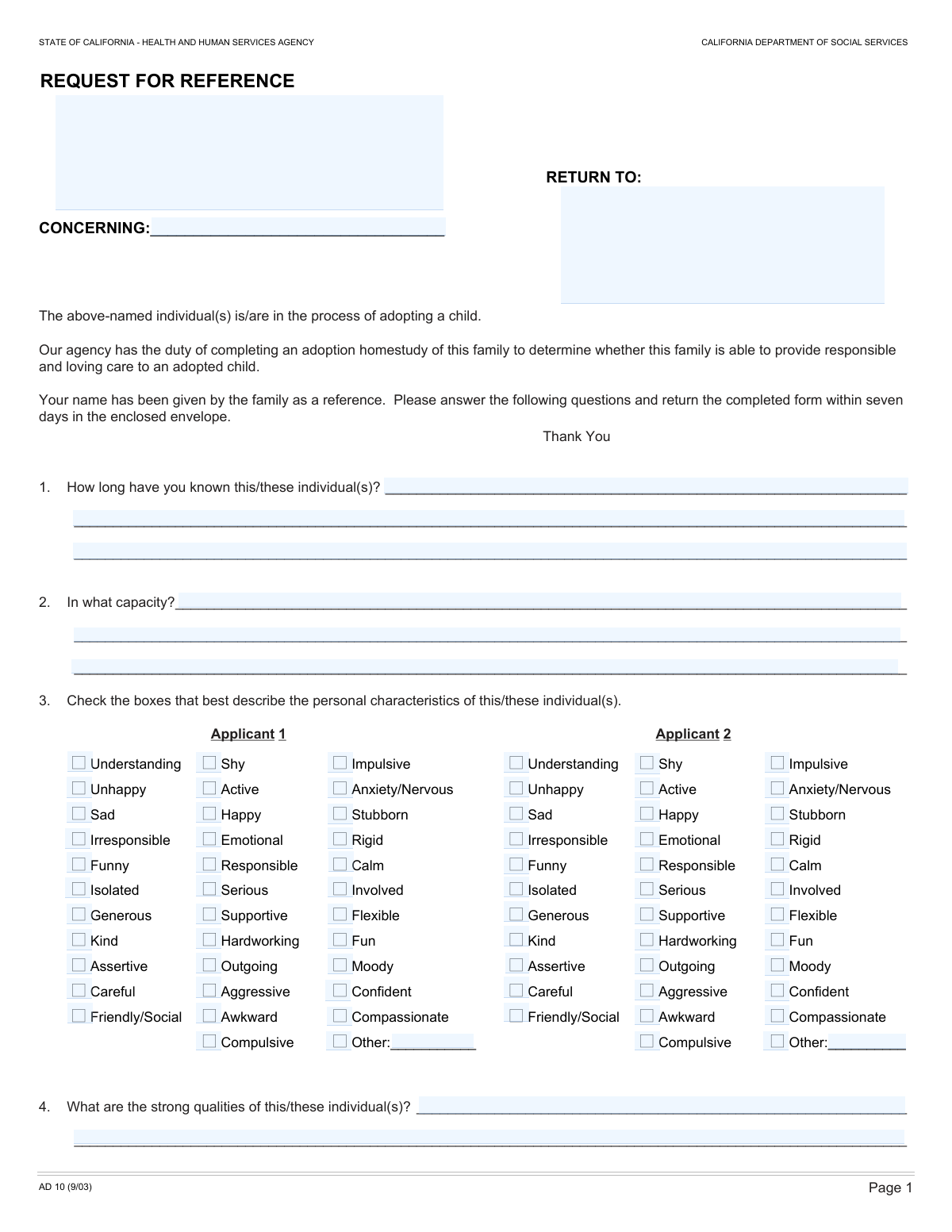
The Personal Reference Questionnaire for Prospective Parents is a comprehensive document used by adoption and foster care agencies to evaluate the suitability of applicants. It requires a personal reference to provide an in-depth assessment of the applicants' character, relationship dynamics, experience with children, and overall fitness for parenting, which is a critical component of the home study process. Today this form can be filled out quickly and accurately using AI-powered services like Instafill.ai, which can also convert non-fillable PDF versions into interactive fillable forms.
Our AI automatically handles information lookup, data retrieval, formatting, and form filling.
It takes less than a minute to fill out Personal Reference Questionnaire using our AI form filling.
Securely upload your data. Information is encrypted in transit and deleted immediately after the form is filled out.
Form specifications
| Form name: | Personal Reference Questionnaire for Prospective Parents |
| Number of fields: | 186 |
| Number of pages: | 3 |
| Language: | English |
Instafill Demo: How to fill out PDF forms in seconds with AI
How to Fill Out Personal Reference Questionnaire Online for Free in 2026
Are you looking to fill out a PERSONAL REFERENCE QUESTIONNAIRE form online quickly and accurately? Instafill.ai offers the #1 AI-powered PDF filling software of 2026, allowing you to complete your PERSONAL REFERENCE QUESTIONNAIRE form in just 37 seconds or less.
Follow these steps to fill out your PERSONAL REFERENCE QUESTIONNAIRE form online using Instafill.ai:
- 1 Navigate to Instafill.ai and upload the Personal Reference Questionnaire or select it from the template library.
- 2 Enter your contact details as the reference provider and the names of the applicants you are providing the reference for.
- 3 Detail your relationship with the applicants, including how long you have known them and in what capacity (e.g., friend, colleague, neighbor).
- 4 Complete the detailed checklists to assess each applicant's personal characteristics, capabilities, and any potential problem behaviors using the intuitive interface.
- 5 Provide written descriptions of the applicants' strengths, limitations, experiences with children, and relationship stability in the designated text fields.
- 6 Indicate your comfort level with the applicants caring for a child and provide your contact information for any follow-up questions.
- 7 Review the entire completed form for accuracy, then add your digital signature and the date to finalize and submit your reference to the requesting agency.
Our AI-powered system ensures each field is filled out correctly, reducing errors and saving you time.
Why Choose Instafill.ai for Your Fillable Personal Reference Questionnaire Form?
Speed
Complete your Personal Reference Questionnaire in as little as 37 seconds.
Up-to-Date
Always use the latest 2026 Personal Reference Questionnaire form version.
Cost-effective
No need to hire expensive lawyers.
Accuracy
Our AI performs 10 compliance checks to ensure your form is error-free.
Security
Your personal information is protected with bank-level encryption.
Frequently Asked Questions About Form Personal Reference Questionnaire
This form is a personal reference questionnaire used to gather information about an applicant's character, stability, and suitability for a significant responsibility, such as adoption or foster care. Your honest assessment helps the requesting organization make an informed decision.
This form should be completed by a person who has been asked to provide a personal reference for the individual(s) named as the 'Subject of Reference'. You should know the applicant(s) well enough to answer detailed questions about their personality and lifestyle.
If you are providing a reference for a single applicant, you only need to complete the sections pertaining to 'Applicant 1'. You can leave the sections for 'Applicant 2' blank or mark them as not applicable (N/A).
This field requires you to describe your relationship to the applicant(s). Examples include 'long-time friend,' 'co-worker,' 'neighbor,' or 'family member'.
Yes, you should check all the boxes for the traits that you believe accurately describe the applicant. The goal is to provide a comprehensive and honest picture of their personality.
Providing a balanced view is crucial for the integrity of the reference. You can frame limitations constructively, focusing on areas for growth rather than just negative traits, to give a fair and honest assessment.
If you check a box in the 'Problem Behaviors' section, use the elaboration field to provide context. It is important to explain how the applicant has addressed or resolved the issue and the changes you have observed.
The form asks if you plan to discuss your reply with the applicants, which suggests it may be confidential. However, you should confirm the specific confidentiality policy with the agency that requested the reference.
After submission, your reference becomes part of the applicant's file for review. The agency may contact you for further discussion if you provided permission and contact information.
This is a hypothetical question designed to gauge your ultimate level of trust in the applicants' ability to be responsible and nurturing caregivers. If you do not have children or feel it's irrelevant, you can select 'N/A'.
Yes, services like Instafill.ai use AI to help auto-fill forms accurately and save time. While AI can assist with basic information, your personal knowledge and honest judgment are essential for answering the subjective questions about the applicants.
You can easily fill out this form online by uploading it to a service like Instafill.ai. The platform makes the document interactive, allowing you to type your answers directly into the fields and then save or print the completed form.
If you have a non-fillable PDF, you can use a tool like Instafill.ai to instantly convert it into an interactive, fillable form. This allows you to complete it digitally without needing to print and write by hand.
Compliance Personal Reference Questionnaire
Validation Checks by Instafill.ai
1
Contradictory Personal Characteristics Check
This validation checks for logically contradictory characteristics being selected for the same applicant. For example, it flags an error if both 'Happy' and 'Unhappy', or 'Responsible' and 'Irresponsible' are checked for Applicant 1. This is important for ensuring the reference provider has submitted a coherent and meaningful assessment. A failure would prompt the user to review their selections for the specific applicant and resolve the contradiction.
2
Mutually Exclusive Problem Behaviors with N/A
This check ensures that if the 'N/A' (Not Applicable) checkbox is selected for an applicant's 'Problem Behaviors', no other problem behavior checkboxes for that same applicant are selected. This prevents ambiguous data where a user indicates no problems exist while also indicating a specific problem. If this validation fails, the system should alert the user that 'N/A' cannot be selected alongside specific problem behaviors.
3
Conditional Problem Behavior Elaboration
This validation ensures that if any problem behavior checkbox (e.g., 'Excessive use of alcohol', 'Violent behavior', 'Other') is checked for either applicant, the 'Problem Behavior Elaboration' text fields must contain an explanation. This is critical for understanding the context and severity of any reported issues. If a problem is noted but no explanation is provided, the form submission should be blocked until the elaboration is completed.
4
Conditional 'Other' Field Population
This check verifies that if an 'Other' checkbox is selected in sections like 'Personal Characteristics' or 'Problem Behaviors', the corresponding text field for specifying the 'Other' detail is not empty. Conversely, it could also check that if the text field is filled, the 'Other' box is checked. This ensures that selections are complete and prevents orphaned data. A failure would require the user to either provide the detail or uncheck the 'Other' box.
5
Conditional Cult Affiliation Elaboration
This validation rule enforces that if the user selects 'Yes' for the 'Cult/Group Affiliation' question, the 'Affiliated Group Name' text field must be filled out. This is a required follow-up to a critical question and ensures necessary details are captured. If 'Yes' is checked and the name is missing, the form cannot be submitted, and the user will be prompted to provide the group name.
6
Exclusive Selection for Likert Scale Questions
This check applies to all Likert scale questions, such as 'Applicant Capability' and 'Couple Relationship Assessment'. It ensures that for each question group, exactly one option (e.g., 'Strongly agree', 'Agree', 'Disagree', etc.) is selected. This prevents both non-responses and multiple conflicting responses within a single assessment scale. A validation failure would highlight the question and require the user to select a single answer.
7
Exclusive Selection within Community Involvement Categories
This validation ensures that for each category within the 'Community Involvement' section (e.g., 'Close Friends', 'Religious Services', 'Social Contacts'), only one of the available options is selected. For instance, a user cannot select both 'Many close friends' and 'Few or no close friends'. This maintains the logical integrity of the response. If more than one option in a category is selected, an error should be displayed.
8
Reference Provider Information Completeness
This validation ensures that the 'Reference Return Information' field, which includes the reference provider's name and address, is not left empty. This information is fundamental for identifying the source of the reference and for any potential follow-up correspondence. A failure on this check would prevent form submission and prompt the user to provide their complete return information.
9
Subject of Reference Name Completeness
This check verifies that the 'Subject's Name' field is filled out. The entire reference is meaningless without knowing who it pertains to, making this a critical, required field. If this field is empty upon submission, the process should be halted with a clear error message indicating that the subject's name must be provided.
10
Date Format and Plausibility
This validation checks that the value entered in the 'Date' field is in a valid format (e.g., MM/DD/YYYY) and represents a plausible date. It should also verify that the date is not in the future, as the reference is being completed in the present. This ensures data consistency and accuracy for record-keeping. An invalid format or future date would trigger an error message.
11
Conditional Phone Number Requirement
This rule validates that if a user checks 'Yes - Day phone #' or 'Yes, Call Me' to indicate a willingness to be contacted, the corresponding phone number field ('Discussion Day Phone Number' or 'Day Phone Number') must be filled. This prevents a user from offering to talk but failing to provide the means for contact. If the box is checked and the number is missing, the user should be prompted to enter it.
12
Phone Number Format Validation
This check ensures that any phone number entered into the 'Discussion Day Phone Number' or 'Day Phone Number' fields conforms to a standard phone number format (e.g., allowing digits, hyphens, parentheses, and checking for a reasonable length like 10 digits). This improves data quality and ensures the number is usable if a follow-up call is needed. An invalid format would result in an error message asking the user to correct the number.
Common Mistakes in Completing Personal Reference Questionnaire
This form contains identical, lengthy sections for two different applicants. A frequent and critical error is losing track and entering details for Applicant 1 into the section for Applicant 2, or vice versa. This mistake completely invalidates the assessment and can cause significant processing delays or rejection. To avoid this, complete all sections for Applicant 1 before starting on Applicant 2, and double-check the section headers ('Personal Characteristics of Applicant 1', 'Personal Characteristics of Applicant 2') as you fill them out.
Many sections, such as 'Problem Behaviors' or 'Personal Characteristics', have an 'Other' checkbox that requires a written explanation in a separate field. A common mistake is checking the box but forgetting to provide the explanation, or writing an explanation without checking the corresponding box. This leaves the response incomplete and requires a follow-up. To prevent this, carefully review each 'Yes' or 'Other' selection to ensure the required narrative is provided. AI-powered form fillers like Instafill.ai can help by flagging these dependent fields and ensuring they are completed together.
When filling out a reference, especially for a sensitive application like this, people are often reluctant to check boxes for negative traits or 'Problem Behaviors'. They may leave the 'Limitations' section blank to avoid saying anything negative. This can be misleading and may be discovered later, which could damage the credibility of both the reference and the applicant. It is crucial to provide a balanced and honest assessment; if negative behaviors are noted, use the elaboration fields to provide context and explain how the issues were resolved.
Several sections, including 'Problem Behaviors' and 'Couple Relationship Assessment', offer a 'Not Applicable' (N/A) option. Users often leave these sections entirely blank if they don't have an answer, which creates ambiguity for the reviewer: is the information missing, or does it truly not apply? This can cause the form to be flagged as incomplete. To ensure clarity, always select the 'N/A' checkbox when a question or entire section is not relevant to the applicant(s).
In free-text fields like 'Strong Qualities Description' or 'Experiences with Children', it is tempting to use vague, positive statements such as 'They are good people' or 'They like kids'. These comments lack substance and do not provide the specific insight the form is designed to gather. A strong reference provides concrete anecdotes and examples that demonstrate the qualities being described (e.g., 'I saw them patiently teach a child to tie their shoes'). To avoid this, think of specific memories or observations that support your statements.
The form presents a long checklist of personal traits, and it's easy to make contradictory selections without realizing it, such as checking both 'Shy' and 'Outgoing', or 'Rigid' and 'Flexible' for the same person. This suggests a lack of attention to detail and can undermine the credibility of the entire reference. Before submitting, carefully review all checked characteristics for each applicant to ensure they present a coherent and non-contradictory picture.
The form asks for both 'Reference Return Information' (for the person filling out the form) and 'Subject's Name' (the person the reference is about). A common error is to mix these up, for instance, by putting the applicant's address in the 'Return Address' field. This can lead to correspondence being sent to the wrong person and cause significant processing delays. Always double-check that your own information is in the 'Reference Provider' fields and the applicant's information is in the 'Subject' fields.
The 'Community Involvement' section is structured with graded, mutually exclusive options (e.g., 'Many close friends', 'Several close friends', 'Few or no close friends'). Users sometimes mistakenly check more than one option within the same category, creating an invalid response. This requires clarification and slows down the review process. To avoid this, read each category's options carefully and select only the single best description for the applicant(s).
The fields 'Length of Acquaintance' and 'Capacity of Acquaintance' are crucial for establishing the context of the reference. Simply writing 'a long time' or 'friend' is insufficient and weakens the reference's value. This mistake happens when users don't realize the need for specificity. To avoid this, provide precise details, such as '12 years' for the length and 'We were neighbors for 5 years and have been close family friends since' for the capacity. If the form is a non-fillable PDF, tools like Instafill.ai can convert it into an interactive format with clearly defined fields, preventing information from being cut off.
Saved over 80 hours a year
“I was never sure if my IRS forms like W-9 were filled correctly. Now, I can complete the forms accurately without any external help.”
Kevin Martin Green
Your data stays secure with advanced protection from Instafill and our subprocessors

Robust compliance program
Transparent business model
You’re not the product. You always know where your data is and what it is processed for.
ISO 27001, HIPAA, and GDPR
Our subprocesses adhere to multiple compliance standards, including but not limited to ISO 27001, HIPAA, and GDPR.
Security & privacy by design
We consider security and privacy from the initial design phase of any new service or functionality. It’s not an afterthought, it’s built-in, including support for two-factor authentication (2FA) to further protect your account.
Fill out Personal Reference Questionnaire with Instafill.ai
Worried about filling PDFs wrong? Instafill securely fills personal-reference-questionnaire-for-prospective-parents forms, ensuring each field is accurate.