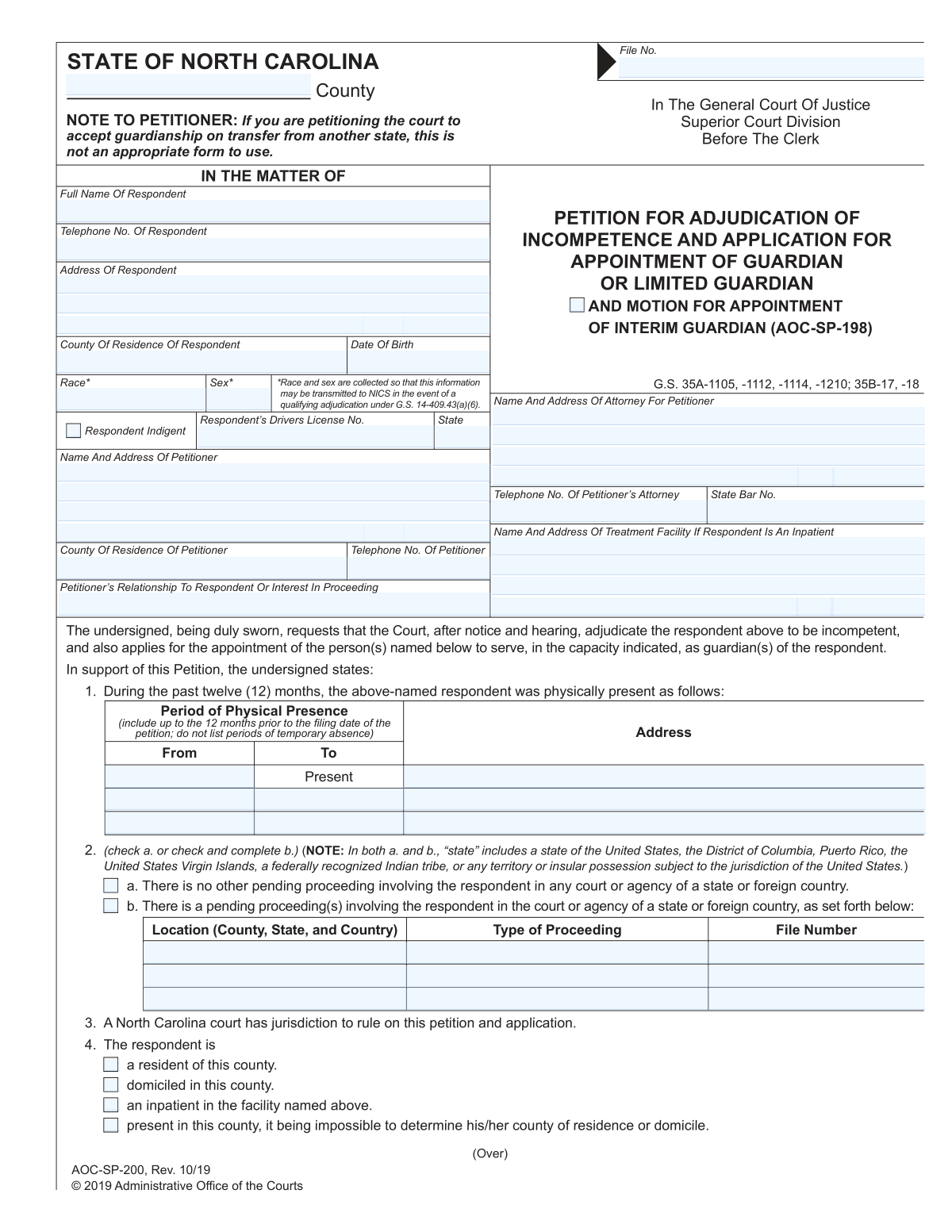
Yes! You can use AI to fill out Petition for Adjudication of Incompetence and Application for Appointment of Guardian
This form is a comprehensive legal petition filed with a court to initiate proceedings to have an individual (the respondent) declared legally incompetent and to appoint a guardian for their person, estate, or both. It requires detailed information about the respondent's personal and financial status, facts demonstrating their incapacity, and a thorough assessment of their functional abilities. This petition is a critical first step in establishing a legal framework to protect vulnerable adults who can no longer make decisions for themselves. Today, this form can be filled out quickly and accurately using AI-powered services like Instafill.ai, which can also convert non-fillable PDF versions into interactive fillable forms.
Our AI automatically handles information lookup, data retrieval, formatting, and form filling.
It takes less than a minute to fill out Petition for Incompetence and Guardianship using our AI form filling.
Securely upload your data. Information is encrypted in transit and deleted immediately after the form is filled out.
Form specifications
| Form name: | Petition for Adjudication of Incompetence and Application for Appointment of Guardian |
| Number of fields: | 199 |
| Number of pages: | 4 |
| Language: | English |
Instafill Demo: How to fill out PDF forms in seconds with AI
How to Fill Out Petition for Incompetence and Guardianship Online for Free in 2026
Are you looking to fill out a PETITION FOR INCOMPETENCE AND GUARDIANSHIP form online quickly and accurately? Instafill.ai offers the #1 AI-powered PDF filling software of 2026, allowing you to complete your PETITION FOR INCOMPETENCE AND GUARDIANSHIP form in just 37 seconds or less.
Follow these steps to fill out your PETITION FOR INCOMPETENCE AND GUARDIANSHIP form online using Instafill.ai:
- 1 Navigate to Instafill.ai and upload your Petition for Incompetence and Guardianship form or select it from our template library.
- 2 Use the AI assistant to accurately fill in the case information, petitioner details, and respondent's personal and demographic information.
- 3 Carefully document the specific facts demonstrating incompetence and complete the detailed capacity assessment for areas like personal safety, health care, and financial management.
- 4 Input the respondent's complete financial profile, including all assets, liabilities, and sources of income, and disclose any existing powers of attorney or trusts.
- 5 List all interested persons, such as family members, and provide the full details of the person(s) you are recommending for appointment as guardian.
- 6 Review all entered information for accuracy, then proceed to the signature and notarization section to finalize the document for filing with the court.
Our AI-powered system ensures each field is filled out correctly, reducing errors and saving you time.
Why Choose Instafill.ai for Your Fillable Petition for Incompetence and Guardianship Form?
Speed
Complete your Petition for Incompetence and Guardianship in as little as 37 seconds.
Up-to-Date
Always use the latest 2026 Petition for Incompetence and Guardianship form version.
Cost-effective
No need to hire expensive lawyers.
Accuracy
Our AI performs 10 compliance checks to ensure your form is error-free.
Security
Your personal information is protected with bank-level encryption.
Frequently Asked Questions About Form Petition for Incompetence and Guardianship
This form is a legal petition filed with a court to request the appointment of a guardian for an adult, referred to as the 'respondent,' who is believed to be incompetent and unable to manage their own affairs.
The 'petitioner' is the person filling out and filing the form to request the guardianship. The 'respondent' is the individual for whom the guardian is being requested.
You will need the respondent's personal details, information about their assets and income, and contact information for other 'interested persons' like close family. You must also provide specific facts demonstrating why you believe the respondent is incompetent.
Checking this box indicates that the respondent does not have the financial means to afford their own legal representation. The court may then appoint an attorney for them at public expense.
You must provide specific, factual examples of the respondent's inability to manage their personal or financial affairs. This can include details about their condition, such as mental illness or injury, and how it affects their decision-making.
An interested person is typically a close relative like a spouse, parent, or adult child, or anyone else with a significant interest in the respondent's welfare or estate. The court requires these individuals to be notified of the proceeding.
A guardian 'Of The Person' makes personal and healthcare decisions, while a guardian 'Of The Estate' manages financial matters and property. A 'General Guardian' is responsible for both.
Provide your best estimate for all financial information requested. The court understands that the petitioner may not have access to precise financial details.
You must disclose any other pending legal proceedings in the 'Pending Proceedings Status' section. Provide as much detail as you can, including the location, type of case, and file number.
This detailed assessment helps the court understand the specific areas where the respondent needs assistance, ensuring that any guardianship granted is tailored to their actual needs and is not overly restrictive.
After the form is completed and notarized, it must be filed with the Clerk of Superior Court in the appropriate county. This action formally initiates the legal process for the appointment of a guardian.
Yes, services like Instafill.ai use AI to help you fill out complex forms accurately and efficiently. These tools can auto-fill information, saving you time and reducing the chance of errors.
Simply upload the form's PDF to the Instafill.ai platform. It will become an interactive, fillable document that you can complete, save, and download directly from your browser.
You can use a service like Instafill.ai, which can convert flat, non-fillable PDFs into interactive forms. Just upload your scanned document, and the AI will identify the fields for you to fill out online.
Compliance Petition for Incompetence and Guardianship
Validation Checks by Instafill.ai
1
Respondent Data Consistency Check
This validation ensures that the respondent's 'Date Of Birth' and 'County Of Residence' fields are consistent across all sections where they appear. Inconsistent data can lead to legal complications and processing errors. If the values do not match, the system should flag the discrepancy and require the user to correct the information before submission.
2
Conditional Inpatient Facility Information
This check verifies that if the 'Inpatient in facility named above' box is checked, then the 'Treatment Facility Name' and its full address fields are mandatory and must be completed. This information is critical for locating the respondent and verifying their status. A failure in this validation would prevent submission until the required facility details are provided.
3
Mutually Exclusive Pending Proceedings Status
This validation ensures that the user selects either 'No Other Pending Proceeding' or 'Pending Proceeding Exists', but not both. These options are mutually exclusive and selecting both creates a logical contradiction. The form should enforce this by using radio buttons or a similar control, and if both are checked, an error message should prompt the user to choose only one.
4
Conditional Pending Proceeding Details
This check is triggered if the 'Pending Proceeding Exists' box is checked. It validates that the details for at least the 'First Pending Proceeding' (Location, Type, and File Number) are filled out. This ensures that an assertion of other proceedings is substantiated with the necessary information for verification. If the box is checked but no details are provided, the submission should be blocked.
5
Physical Presence Date Chronology
For any 'Period of Physical Presence' section that includes both a start and end date, this validation ensures the 'To Date' is on or after the 'From Date'. An end date that precedes a start date is a logical impossibility and indicates a data entry error. The system should display an error and require correction to ensure the timeline is accurate.
6
Mandatory 'Facts Demonstrating Incompetence' Field
This check ensures that the 'Facts Demonstrating Incompetence' text area is not empty. This field provides the core justification for the legal proceeding and is essential evidence for the court. A submission with this field left blank would lack the fundamental basis for the petition and must be rejected.
7
Conditional Notary Details Requirement
This validation verifies that if the 'Notary' box is checked in the notarization section, the 'Notary Commission Expiration Date' and 'County Notarized' fields are mandatory. These details are required to validate the authority of the notary. If the 'Notary' box is checked but these fields are empty, the form is incomplete and cannot be accepted.
8
Notary Commission Expiration Date Validity
This check ensures the 'Notary Commission Expiration Date' is a valid future date. A notarization is legally invalid if the notary's commission has expired at the time of signing. The system should compare this date to the 'Notarization Date' or the current date to ensure the commission is active, preventing the submission of a legally deficient document.
9
Financial Data Type Validation
This validation ensures that all monetary value fields, such as 'Real Property Value', 'Mortgage Loans Amount', and 'Wages and Salaries', contain only valid numeric data. Non-numeric characters in these fields would prevent accurate calculation of the respondent's financial status. The system should reject any non-numeric input to maintain data integrity for financial assessments.
10
Conditional Capacity Assessment Logic
This check validates that if the 'Coma/Non-Responsive Condition' box is checked, the subsequent detailed capacity assessment sections (e.g., 'Language and Communication Assessment', 'Nutrition', 'Personal Hygiene') are disabled or cleared. The form logic specifies these assessments are only for responsive individuals. This prevents contradictory information from being entered and ensures the form's internal logic is respected.
11
Conditional Guardian Recommendation
This validation ensures that if any 'Lacks Capacity' box related to financial or personal well-being is checked (e.g., 'Lacks capacity - manage assets'), then the information for at least the 'First Recommended Guardian' is provided. A declaration of incapacity necessitates a proposed solution. If incapacity is claimed without a recommended guardian, the petition is incomplete and should be flagged.
12
Attorney Data Consistency Check
This validation ensures that the 'Attorney's Telephone Number' and 'Attorney's State Bar Number' are identical in all sections where they are requested. Redundant data entry points can lead to typos and inconsistencies. This check prevents confusion and ensures the attorney's contact and credential information is reliable and consistent throughout the document.
13
Date of Birth Validity
This check validates that the respondent's 'Date Of Birth' is a valid date and is in the past. An invalid date format or a future date of birth would be a critical data error, invalidating a key piece of the respondent's identity. The system must reject such entries to ensure the legal accuracy of the document.
14
State and Zip Code Format Validation
This validation ensures that all state fields are populated with a valid two-letter abbreviation and all zip code fields follow a standard 5-digit or 9-digit format. Correctly formatted address components are crucial for official correspondence and legal notices. The system should enforce these formats to prevent mail delivery failures and ensure all parties can be properly contacted.
Common Mistakes in Completing Petition for Incompetence and Guardianship
The form asks for the same information in multiple sections, such as the 'Petitioner's County of Residence' and 'Petitioner's Telephone Number'. Filers often enter the information in one location but forget the other, or worse, enter conflicting information. This can cause processing delays and raise questions about data accuracy. To avoid this, carefully review the entire form after completion or use a tool like Instafill.ai, which can intelligently populate all instances of a field once the data is entered a single time.
Many sections are conditional, such as providing 'Treatment Facility' details only if the respondent is an inpatient, or 'Pending Proceeding' details only if that box is checked. People frequently make two types of errors: they either fill in sections that should be left blank, creating confusion, or they check a box like 'Pending Proceeding Exists' but fail to provide the mandatory details. This results in an incomplete filing that will likely be rejected. AI-powered tools can help by dynamically showing or hiding relevant fields based on user selections.
The 'Facts Demonstrating Incompetence' section requires specific, objective facts to support the petition, but filers often provide vague, emotional, or conclusory statements like 'He can't take care of himself.' This is insufficient for a court. A proper entry would include concrete examples, such as 'The respondent has not paid his rent for three months despite having sufficient funds, and has received an eviction notice.' Lacking specific facts is a primary reason for petitions to be challenged or dismissed.
The form uses inconsistent structures for addresses; some sections use three generic 'Address Lines', while others have dedicated fields for 'City', 'State', and 'Zip Code'. This leads to users cramming entire addresses onto one line or misplacing information. For example, a user might put the city and state in 'Address Line 2' when 'Address Line 3' is intended for it. This can cause critical legal notices to be returned as undeliverable. Using a form-filling tool that standardizes and correctly distributes address components can prevent these errors.
In the detailed capacity assessment sections, filers must choose between 'Has Capacity' and 'Lacks Capacity' for various activities. A common mistake is to either check both boxes for a single item or forget to check either one, leaving the question unanswered. These contradictory or incomplete answers make the assessment invalid and require clarification, delaying the legal process. A well-designed digital form or a tool like Instafill.ai can enforce rules to prevent such mutually exclusive selections.
A notarized signature is required for this petition to be legally valid, but this section is often handled incorrectly. The petitioner may sign the document but forget to have it notarized, or the notary may forget to include their commission expiration date, which is required. An improperly notarized document is invalid and will be immediately rejected by the court clerk, forcing the petitioner to start the signing process over. It is crucial to complete the notarization step correctly before filing.
Throughout the capacity assessment, the form instructs the user to provide comments or details if they select 'Lacks Capacity' for an item. Filers frequently check the 'Lacks Capacity' box but then fail to provide the required written explanation in the corresponding comment field. Without this justification, the assessment is incomplete and lacks the necessary evidence for the court to make a determination, leading to requests for more information and significant delays.
The form asks for the 'County' of filing, the respondent's 'County Of Residence', and the petitioner's 'County Of Residence'. These can all be different, and filers often mistakenly enter the same county for all three or confuse the county of residence with the county where the court is located. Filing in the wrong jurisdiction is a serious error that can lead to the case being dismissed, forcing the petitioner to refile in the correct court and start the process from the beginning.
The 'Assets', 'Liabilities', and 'Income' sections require precise monetary values. Common errors include providing rough estimates instead of exact figures, using ranges (e.g., '$10,000 - $15,000'), or omitting sources of income like 'SSI/SSDI' which the form specifically mentions. Inaccurate financial reporting can undermine the petitioner's credibility and lead to legal challenges regarding the need for a guardian to manage the respondent's finances.
The 'File Number' and 'Attorney State Bar Number' are unique identifiers that must be perfectly accurate. A single-digit typo in the case file number can cause the document to be misfiled with the court or rejected entirely, as it won't match an existing case. Similarly, an incorrect bar number can prevent the court from verifying the attorney's credentials. These data entry errors are common but can be mitigated by using tools like Instafill.ai that can save and accurately reuse such critical information across multiple documents for the same case.
Saved over 80 hours a year
“I was never sure if my IRS forms like W-9 were filled correctly. Now, I can complete the forms accurately without any external help.”
Kevin Martin Green
Your data stays secure with advanced protection from Instafill and our subprocessors

Robust compliance program
Transparent business model
You’re not the product. You always know where your data is and what it is processed for.
ISO 27001, HIPAA, and GDPR
Our subprocesses adhere to multiple compliance standards, including but not limited to ISO 27001, HIPAA, and GDPR.
Security & privacy by design
We consider security and privacy from the initial design phase of any new service or functionality. It’s not an afterthought, it’s built-in, including support for two-factor authentication (2FA) to further protect your account.
Fill out Petition for Incompetence and Guardianship with Instafill.ai
Worried about filling PDFs wrong? Instafill securely fills petition-for-adjudication-of-incompetence-and-application-for-appointment-of-guardian forms, ensuring each field is accurate.