Yes! You can use AI to fill out Petition to Determine Parental Relationship (Uniform Parentage)

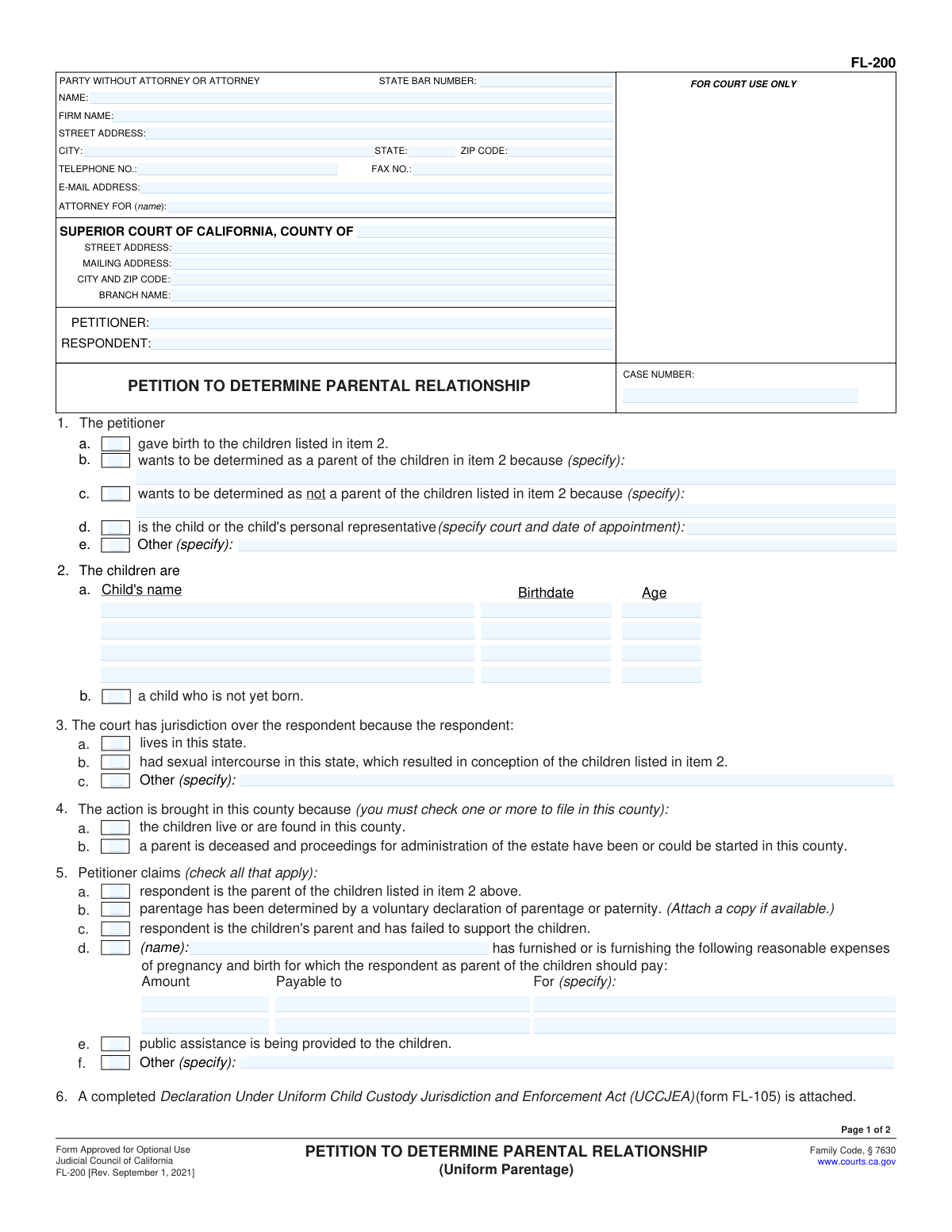
The FL-200 is a crucial legal document filed in California Superior Courts to formally request a determination of parental relationship. It is used when parentage is uncertain or disputed, and the court needs to make official orders regarding parentage, custody, support, and related matters. Today, this form can be filled out quickly and accurately using AI-powered services like Instafill.ai, which can also convert non-fillable PDF versions into interactive fillable forms.
FL-200 has a very complex Form Complexity Index of 100/100 — 777 fillable fields across 13 pages. Instafill’s AI completes it accurately in under a minute.

Form specifications

Form name: Petition to Determine Parental Relationship (Uniform Parentage)
Number of fields: 777
Number of pages: 13
FCI: Very Complex (100/100)
Language: English
Our AI automatically handles information lookup, data retrieval, formatting, and form filling.
It takes less than a minute to fill out FL-200 using our AI form filling.
Securely upload your data. Information is encrypted in transit and deleted immediately after the form is filled out.
Preview of Petition to Determine Parental Relationship (Uniform Parentage)

Instafill Demo: How to fill out PDF forms in seconds with AI

How to Fill Out FL-200 Online for Free in 2026

Are you looking to fill out a FL-200 form online quickly and accurately? Instafill.ai offers the #1 AI-powered PDF filling software of 2026, allowing you to complete your FL-200 form in just 37 seconds or less.
Follow these steps to fill out your FL-200 form online using Instafill.ai:
  1. 1 Navigate to Instafill.ai and upload or select the FL-200 form.
  2. 2 Provide basic case information such as court, county, case number, petitioner, and respondent names.
  3. 3 Answer questions regarding the children involved, including names and birthdates, and specify the petitioner's relationship to them.
  4. 4 Detail the basis for the court's jurisdiction and the reasons for filing in the specific county.
  5. 5 Specify the requested orders regarding parentage, child support, custody, visitation, and any other relevant matters.
  6. 6 Review all entered information for accuracy and completeness.
  7. 7 Sign and submit the completed form through Instafill.ai or download it for manual filing.

Our AI-powered system ensures each field is filled out correctly, reducing errors and saving you time.

Why Choose Instafill.ai for Your Fillable FL-200 Form?

Speed

Complete your FL-200 in as little as 37 seconds.

Up-to-Date

Always use the latest 2026 FL-200 form version.

Cost-effective

No need to hire expensive lawyers.

Accuracy

Our AI performs 10 compliance checks to ensure your form is error-free.

Security

Your personal information is protected with bank-level encryption.

Frequently Asked Questions About FL-200

FL-200 has a Form Complexity Index of 100 out of 100, placing it in the very complex complexity tier. This score is calculated deterministically from the form’s own structure using Instafill’s published Form Complexity Index methodology, so it can be reproduced and independently verified — it is not a subjective estimate.

For FL-200 specifically, the score reflects 777 fillable fields across 13 pages, grouped into 125 sections, and 358 conditional fields that only apply depending on earlier answers, 13 tables or repeating lists. The number of fields is the largest factor in the base score (weighted 36%), followed by how difficult those fields are to complete based on their type, where free-text and signature fields count for more than simple checkboxes (26%). The number of pages that actually contain fields (15%), the amount of conditional “fill-only-if” logic (16%), and how many sections the form is divided into (7%) account for the rest of the base. On top of that base, the index adds points for tables and repeating lists, bundled instruction pages, and dense page layouts — capturing difficulty the base alone can miss.

In practical terms, a very complex score means the form is exceptionally demanding — a very large number of fields, often combined with tables, dense pages or extensive conditional logic. Instafill removes that effort entirely: our AI reads your information, maps each value to the correct field — including the conditional ones — and completes FL-200 accurately in under a minute, with every field available for you to review before you download. See exactly how the Form Complexity Index is calculated.

This form is used to ask the court to legally determine who the parent(s) of a child are. It can be used to establish parentage, disestablish parentage, or determine parental rights and responsibilities.

This form is filled out by a person who wants the court to make a legal determination about parentage. This could be a person who believes they are a parent, believes they are not a parent, or is acting on behalf of a child.

You will need to provide information about yourself (the petitioner), the respondent, and the child(ren) involved, including names, birthdates, and current addresses. You'll also need to state the legal basis for your request.

This form provides the court with information about the child's residence history and any previous or ongoing custody proceedings. This helps the court determine if it has jurisdiction to make custody orders.

The UCCJEA declaration is required if you are asking the court to make orders about child custody or visitation as part of your petition to determine parental relationship.

Form FL-300 is used to ask the court to make specific orders regarding child custody, visitation, child support, spousal support, property control, or attorney's fees. It is filed after a case has already started.

These are urgent orders that can be requested without prior notice to the other party in specific situations, such as to prevent immediate harm to a child or property. They are temporary and expire on the date of the hearing set on the Request for Order (FL-300).

This form is used to inform the court and other parties about any other existing court cases that are related to the current case. This helps the court manage related cases efficiently.

Processing times can vary significantly depending on the court's caseload and the complexity of your case. After filing, the respondent will have an opportunity to respond, and a hearing may be scheduled.

Yes, you can use services like Instafill.ai to help you fill out these forms online. AI tools can accurately auto-fill form fields, saving you time and reducing errors.

If you have a PDF form that you cannot type into, Instafill.ai can convert it into an interactive, fillable form, making it easier to complete accurately.

After filing, you must properly serve the respondent with a copy of the petition and a blank Response form (FL-220). The respondent then has a set amount of time to file and serve their response.

The Petitioner is the person who starts the court case by filing the initial petition. The Respondent is the person against whom the petition is filed.

Yes, you must attach a blank Response to Petition to Determine Parental Relationship (Form FL-220) to be served on the respondent. You may also need to attach a UCCJEA Declaration (Form FL-105/GC-120) if requesting custody orders.

Compliance FL-200
Validation Checks by Instafill.ai

1
Attorney Information Completeness
Validates that all required fields for attorney information (State Bar Number, Name, Firm Name, Street Address, City, State, Zip Code, Telephone No., Fax No., E-mail Address) are completed. Incomplete attorney information can lead to miscommunication or inability to contact the legal representative.
2
Party Name Format and Completeness
Ensures that the Petitioner and Respondent names are provided in a full, legal format (First, Middle Initial, Last Name) and are not abbreviated. This is crucial for accurate case identification and legal proceedings.
3
Child Information Completeness
Verifies that for each child listed, the Full Name and Date of Birth are provided. Missing or incorrect child information can lead to errors in legal orders concerning custody, support, and parentage.
4
Child Birthdate Format
Checks that the birthdate for each child is entered in a valid date format (e.g., MM/DD/YYYY). Incorrect date formats can cause issues with age calculations and legal record-keeping.
5
Petitioner's Role Validation
Ensures that at least one of the options in Item 1 (Petitioner's role) is selected. This clarifies the petitioner's standing and basis for filing the petition, preventing incomplete or ambiguous filings.
6
Jurisdiction Basis Selection
Validates that at least one basis for court jurisdiction over the respondent (Item 3a or 3b) is selected. Without a valid jurisdictional basis, the court cannot proceed with the case.
7
Venue Basis Selection
Confirms that at least one reason for bringing the action in the specified county (Item 4a or 4b) is selected. This ensures the case is filed in the correct geographical location according to legal requirements.
8
Parental Claim Consistency
Checks for logical consistency between Item 1 (Petitioner's role) and Item 5 (Petitioner claims). For example, if the petitioner claims parentage in Item 5a, it should align with their stated role in Item 1.
9
Reasonable Expenses Detail Completeness
If Item 5d is checked, this validates that the 'Amount', 'Payable to', and 'For' fields are completed. Incomplete details for requested expenses can lead to disputes and unenforceable orders.
10
UCCJEA Declaration Attachment Check
Verifies that if custody or visitation orders are being requested (as implied by the form's purpose and related forms), the Declaration Under Uniform Child Custody Jurisdiction and Enforcement Act (UCCJEA) is either attached or the relevant information is provided. This is critical for determining which state has jurisdiction over child custody matters.
11
Child Custody/Visitation Request Clarity
Ensures that if child custody or visitation orders are requested in Item 8, the specific details (e.g., who gets legal/physical custody, visitation schedule) are clearly specified or that the appropriate attachment is referenced. Ambiguous requests can lead to confusion and delays.
12
Child Support Guideline or Amount
Validates that for child support requests (Item 12 or in FL-300), either the request is based on the child support guideline, or a specific monthly amount is provided. This ensures a basis for calculating child support obligations.
13
Declaration Under Penalty of Perjury Signature and Date
Confirms that the petitioner has signed and dated the declaration under penalty of perjury. This is a legal requirement for all court filings, attesting to the truthfulness of the information provided.
14
Related Case Information Completeness
If the 'Notice of Related Case' form (CM-015) is filed, this validates that all required fields for each related case (Title, Case Number, Court, Filing Date, Relationship) are completed. This helps the court manage related legal actions efficiently and avoid conflicting orders.
15
Domestic Violence Restraining Order Disclosure
Checks that if any domestic violence restraining/protective orders are in effect (as indicated in FL-300 and FL-305), the relevant court, case number, and expiration date are provided. This is crucial for ensuring the safety of parties and children involved.
16
Child Support Information for Guideline Calculation
If child support is requested, this validates that the necessary financial information (e.g., Income and Expense Declaration or Financial Statement) has been provided as required. Accurate financial data is essential for calculating appropriate child support amounts.

Common Mistakes in Completing FL-200

Incomplete or Incorrect Party Information

Failing to provide full legal names, correct addresses, or contact details for the Petitioner, Respondent, or other parties involved. This can lead to delays in service, miscommunication, and procedural errors. Always double-check that all names are spelled correctly and that addresses and phone numbers are current and accurate. AI-powered form filling tools can help by auto-populating known information and flagging missing fields.

Missing or Incorrect Case Number

Omitting the case number or entering it incorrectly is a frequent error. This prevents the court from properly associating the document with the correct legal proceeding, potentially causing it to be rejected or misfiled. Ensure the case number is copied exactly as it appears on previous court documents. AI tools can help by remembering and accurately inserting case numbers for recurring filings.

Failure to Specify Reasons or Details

Many fields require specific explanations or reasons (e.g., why a party wants to be determined as a parent, or the facts supporting custody orders). Leaving these blank or providing vague answers can lead to the court not having sufficient information to make a decision, potentially resulting in unfavorable orders or delays. Always provide clear, concise, and specific details as requested by the form prompts. AI can assist by prompting for necessary details based on the form's requirements.

Incorrectly Checking Boxes or Selecting Options

Selecting the wrong checkbox or option can fundamentally alter the request being made (e.g., requesting custody for the wrong party, or incorrectly stating parentage). This is a critical data entry error with significant legal consequences. Carefully read each question and ensure the box selected accurately reflects the intended request. AI tools can help by providing context or warnings when a selection might be inconsistent with other information provided.

Forgetting to Attach Required Documents

Forms like the UCCJEA Declaration (FL-105/GC-120) often require attachments (e.g., previous court orders, additional child information). Failing to attach these documents can lead to the form being incomplete and potentially rejected. Always review the form instructions for a list of required attachments and ensure they are included with the filing. AI tools can help by reminding users of required attachments based on the form type.

Inaccurate or Incomplete Child Information

Mistakes in listing children's names, birthdates, or ages can cause confusion and errors in legal orders. This is particularly problematic in custody and support matters. Ensure all children involved are listed accurately with their full legal names and correct birthdates. AI can help by standardizing date formats and ensuring all required child details are entered.

Improper Service Information

Failing to correctly fill out or understand the service requirements (e.g., who must be served, deadlines for service, proof of service) can invalidate the filing. For instance, the Notice of Related Case (CM-015) has specific service requirements. Always consult the instructions for each form regarding service. AI tools can help track deadlines and ensure all necessary parties are listed for service.

Overlooking or Misinterpreting Court Instructions and Notices

Forms often contain important notices or instructions (e.g., warnings about ex parte orders, child support implications, or the need for a Responsive Declaration). Ignoring these can lead to missed deadlines or misunderstandings of legal obligations. Read all notices and instructions carefully before completing and filing the form. AI can highlight critical notices and provide summaries of their implications.

Inconsistent Information Across Forms

Providing conflicting information between related forms (e.g., different dates of birth for a child on the Petition and the UCCJEA, or inconsistent requests on the Petition and the Request for Order) can cause confusion and rejection. Ensure all information is consistent across all documents submitted for the same case. AI can cross-reference information between forms to identify inconsistencies.

Failure to Specify 'Other' Fields

When an 'Other (specify)' option is provided, it means the pre-listed options do not cover the situation. Leaving the 'specify' field blank after checking 'Other' renders the selection incomplete and unhelpful. Always provide the requested specific details when this option is chosen. AI can prompt users to fill in the 'specify' field when 'Other' is selected.
Saved over 80 hours a year

“I was never sure if my IRS forms like W-9 were filled correctly. Now, I can complete the forms accurately without any external help.”

Kevin Martin Green

Your data stays secure with advanced protection from Instafill and our subprocessors

Robust compliance program

Transparent business model

You’re not the product. You always know where your data is and what it is processed for.

ISO 27001, HIPAA, and GDPR

Our subprocesses adhere to multiple compliance standards, including but not limited to ISO 27001, HIPAA, and GDPR.

Security & privacy by design

We consider security and privacy from the initial design phase of any new service or functionality. It’s not an afterthought, it’s built-in, including support for two-factor authentication (2FA) to further protect your account.

Fill out FL-200 with Instafill.ai

Worried about filling PDFs wrong? Instafill securely fills petition-to-determine-parental-relationship-uniform-parentage forms, ensuring each field is accurate.