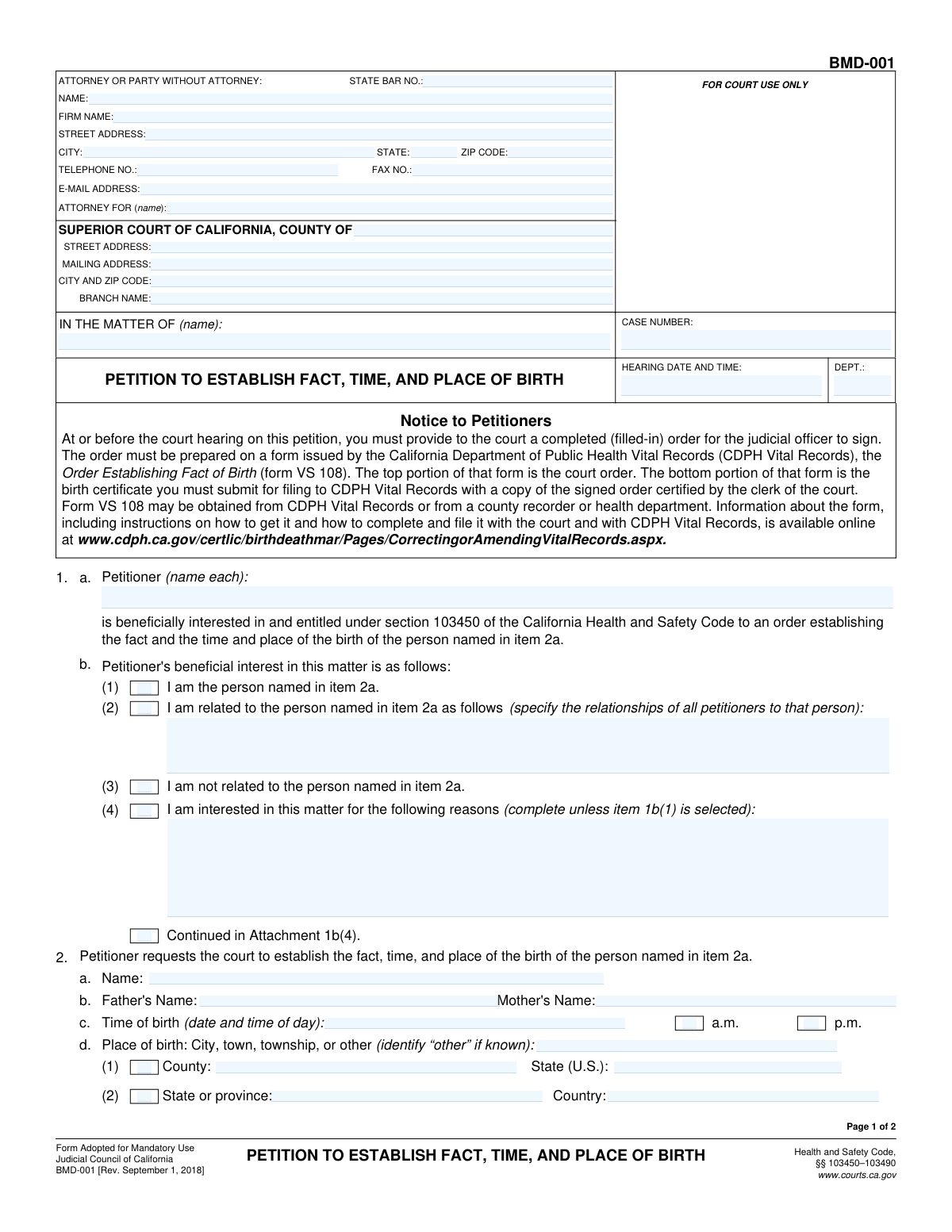
Yes! You can use AI to fill out Petition to Establish Fact, Time, and Place of Birth (NC-300)

Form NC-300 is a legal document filed with the Superior Court of California to obtain a court order that officially establishes a person's birth details (fact, time, and place). This process is essential when a birth certificate was never created, has been lost or destroyed, or a certified copy cannot be obtained, as the resulting court order serves as a legal substitute for official purposes. Today, this form can be filled out quickly and accurately using AI-powered services like Instafill.ai, which can also convert non-fillable PDF versions into interactive fillable forms.
Our AI automatically handles information lookup, data retrieval, formatting, and form filling.
It takes less than a minute to fill out NC-300 using our AI form filling.
Securely upload your data. Information is encrypted in transit and deleted immediately after the form is filled out.

Form specifications

Form name: Petition to Establish Fact, Time, and Place of Birth (NC-300)
Number of fields: 62
Number of pages: 2
Language: English
main-image

Instafill Demo: How to fill out PDF forms in seconds with AI

How to Fill Out NC-300 Online for Free in 2026

Are you looking to fill out a NC-300 form online quickly and accurately? Instafill.ai offers the #1 AI-powered PDF filling software of 2026, allowing you to complete your NC-300 form in just 37 seconds or less.
Follow these steps to fill out your NC-300 form online using Instafill.ai:
  1. 1 Navigate to Instafill.ai and upload your NC-300 form or select it from the template library.
  2. 2 Use the AI assistant to automatically fill in the court information, case details, and the attorney or self-represented party's contact information.
  3. 3 Provide the petitioner's details and specify their beneficial interest in establishing the birth record.
  4. 4 Enter the full name of the person whose birth is being established, along with their parents' names, and the exact time, date, and location of their birth.
  5. 5 State the reason for the petition, explaining why an official birth record does not exist or cannot be obtained.
  6. 6 Carefully review all entered information for accuracy, then have the petitioner(s) and attorney (if applicable) electronically sign and date the document.
  7. 7 Download the completed and signed NC-300 form, ready for filing with the appropriate California Superior Court.

Our AI-powered system ensures each field is filled out correctly, reducing errors and saving you time.

Why Choose Instafill.ai for Your Fillable NC-300 Form?

Speed

Complete your NC-300 in as little as 37 seconds.

Up-to-Date

Always use the latest 2026 NC-300 form version.

Cost-effective

No need to hire expensive lawyers.

Accuracy

Our AI performs 10 compliance checks to ensure your form is error-free.

Security

Your personal information is protected with bank-level encryption.

Frequently Asked Questions About Form NC-300

This form is a petition filed with the Superior Court of California to legally establish the facts of a person's birth (such as their name, time, and place of birth) when an official record is missing or cannot be obtained.

This petition should be filled out by the person whose birth is being established, a relative of that person, or another individual who has a direct, beneficial interest in legally establishing the birth facts.

The 'Petitioner' is the person filing the form with the court. The 'Subject Person' (referred to as 'the person named in item 2a') is the individual whose birth details the petition seeks to establish; these can be the same person.

No, you can file this form yourself as a 'party without an attorney' and fill in your own contact information. However, consulting with an attorney is often recommended for court proceedings to ensure everything is handled correctly.

This section requires you to explain your legal standing to file the petition. You must check the box indicating whether you are the subject person, a relative (and specify the relationship), or another interested party (and explain your reasons).

The court clerk typically assigns the Case Number and Hearing Date when you first file the petition. You can usually leave these fields blank on your initial submission, and the clerk will add them.

You must either state that no official record of the birth exists or provide a detailed explanation for why a certified copy cannot be obtained. This could include reasons like the destruction of records by fire or flood, or issues with the recording agency in a foreign country.

You should attach any available evidence that supports the facts of birth, such as sworn statements (affidavits) from family members or witnesses, early school or medical records, or baptismal certificates. Be sure to enter the total number of attached pages on the form.

Yes, services like Instafill.ai use AI to accurately auto-fill form fields, which can save you time and help prevent errors. The AI can pull your saved information to populate fields for your name, address, and other details.

To fill this form online, upload the PDF to Instafill.ai. The platform will make the document interactive, allowing you to type your information directly into the fields, use auto-fill features, and then download the completed form for printing and submission.

If you have a flat, non-fillable PDF, you can use a service like Instafill.ai to instantly convert it into an interactive, fillable form. This allows you to easily type your information instead of having to print and fill it out by hand.

You should provide the most accurate information you have. If the exact time is unknown and cannot be verified, you may need to note that in an attachment and consult with the court clerk or an attorney for guidance.

Yes, the form provides signature blocks for up to three petitioners. This allows multiple people who share a common interest in establishing the birth facts to file the petition jointly.

Compliance NC-300
Validation Checks by Instafill.ai

1
Ensures Hearing Date is a Future Date
This check validates that the 'Hearing Date and Time' field is set to a date and time after the current submission time. Scheduling a hearing in the past is a logical impossibility and would cause significant administrative and legal issues. If the entered date is in the past, the form submission will be blocked, and an error message will instruct the user to provide a valid future date.
2
Enforces Single Selection for Petitioner's Interest
This validation ensures that only one of the checkboxes under 'Petitioner's Beneficial Interest' (e.g., 'I am the person named...', 'I am related...', 'I am not related...') is selected. These options are mutually exclusive, and selecting more than one creates a logical contradiction regarding the petitioner's legal standing. The system will prevent submission and highlight the conflicting selections until the user chooses only one option.
3
Requires Relationship Details When 'Related' is Checked
This check confirms that if the 'I am related to the person named in item 2a as follows' checkbox is selected, the 'Petitioner's Relationship' text field must be filled out. This information is crucial for the court to establish the petitioner's legal standing to file the petition. Failure to provide the specific relationship will result in a validation error, preventing form submission until the required detail is entered.
4
Enforces Single Selection for Reason for Petition
This validation ensures that only one of the two primary reasons for the petition ('No Official Record of Birth' or 'Certified Copy Cannot Be Obtained') is selected. These two conditions are legally distinct and mutually exclusive. Selecting both would create an ambiguous basis for the petition, so the system will flag this as an error and require the user to choose only one.
5
Requires Detailed Reason if Certified Copy is Unobtainable
This rule validates that if the 'Certified Copy Cannot Be Obtained' checkbox is marked, the 'Detailed Reason for Petition' text area must contain an explanation. This detail is legally required to justify to the court why a standard certified copy is not available. The form will be considered incomplete and rejected if this reason is missing when the corresponding box is checked.
6
Ensures Exclusive AM/PM Selection for Time of Birth
This check validates that for the 'Time of Birth', exactly one of the 'a.m.' or 'p.m.' checkboxes is selected. The time of birth is a critical fact being established, and ambiguity is not permissible. If neither or both checkboxes are selected, the form submission will fail, and the user will be prompted to make a single, valid selection.
7
Validates State Bar Number Format
This validation ensures the 'State Bar Number' field, if provided, conforms to the expected format for the specified jurisdiction (e.g., a specific number of digits). This is crucial for correctly identifying the attorney of record for communication and verification purposes. An invalid format could lead to misidentification or rejection by the court's e-filing system.
8
Validates Zip Code Format
This check verifies that all zip code fields ('Zip Code', 'Court City and Zip Code') contain a valid 5-digit or 9-digit (ZIP+4) format. Correct zip codes are essential for mail delivery and proper jurisdiction assignment. An invalid format will trigger an error, requiring the user to correct the entry before proceeding.
9
Ensures Two-Letter State Abbreviation
This validation confirms that all 'State' fields contain a valid two-letter postal abbreviation (e.g., 'CA', 'NY'). Using a standardized format is critical for address validation systems and ensures accurate mail delivery and record-keeping. The form should reject any entry that does not match the two-letter format, and may offer a dropdown list to prevent errors.
10
Verifies Petitioner and Subject Name Consistency
This check ensures that if the box 'I am the person named in item 2a' is checked, the 'Petitioner Name' matches the 'Subject Person's Name'. This maintains logical integrity within the petition, confirming the petitioner is the subject of the birth record establishment. A mismatch would indicate a data entry error and prevent submission until the names are consistent or the checkbox is corrected.
11
Validates Signature Dates are Not in the Future
This validation checks all signature date fields to ensure they are not set to a future date. A post-dated signature is legally invalid on a court document as it attests to the truthfulness of the information on the date of signing. The system will reject the form if any signature date is in the future, prompting the user to enter the current or a past date.
12
Ensures Completeness of Attorney Information
This check verifies that if a 'State Bar Number' is entered, then the attorney's 'Name', 'Street Address', 'City', 'State', 'Zip Code', and 'Attorney For (Name)' fields are also completed. This ensures that when an attorney is involved, all necessary contact and identification information is provided for the court record. An incomplete attorney section would halt submission and highlight the missing required fields.
13
Validates 'Number of Pages Attached' is a Valid Number
This check ensures the 'Number of Pages Attached' field contains a valid, non-negative integer (0 or greater). This count is critical for the court clerk to verify that the entire document, including all attachments, has been received and processed correctly. Any non-numeric or negative value will result in a validation error, requiring the user to input a valid page count.
14
Validates Email Address Format
This check ensures the 'Email Address' field contains a string that conforms to a standard email format (e.g., '[email protected]'). A valid email is essential for electronic service and communication from the court and other parties. An improperly formatted email address would cause communication failures, so the system will flag it as an error and require correction.

Common Mistakes in Completing NC-300

Contradictory Selections for Petitioner's Interest

Users often mistakenly check multiple, mutually exclusive boxes in the 'Petitioner's Beneficial Interest' section, such as selecting both 'I am the person named' and 'I am related to the person'. This creates logical contradictions that make the petitioner's standing unclear, leading to form rejection or requests for clarification. To avoid this, carefully read each option and select only the single most accurate choice that describes your relationship to the matter.

Missing Required Explanations for Checkbox Selections

A frequent error is checking a box that requires a subsequent explanation, but then failing to provide the necessary details. For example, a user might check 'Certified Copy Cannot Be Obtained' but leave the detailed reason blank. This renders the petition incomplete and legally insufficient, causing guaranteed processing delays. Always double-check that any selected option requiring more information has a corresponding detailed entry.

Using Incorrect or Incomplete Court Address Information

Filers often enter a generic court address instead of the specific street address for the correct branch or department, or they may confuse the physical address with the mailing address. This critical error can cause the legal documents to be sent to the wrong location, resulting in missed filing deadlines and potential dismissal of the petition. It is crucial to verify the exact and complete address for the specific court branch handling the case.

Omitting AM/PM for the Time of Birth

When filling out the 'Time of Birth', individuals frequently enter the time but forget to check either the 'a.m.' or 'p.m.' box. Since the purpose of the form is to legally establish a fact, this ambiguity makes the stated time invalid and incomplete. This will require an amendment to the filing, delaying the establishment of the birth record. Always ensure one of the two boxes is checked to specify the time of day.

Incorrectly Identifying the Represented Party

When a person is representing themselves (pro se), they often get confused by the 'Attorney For (Name)' field. They may incorrectly write 'Self' or leave it blank, when the field requires their own full name as the party being represented. This can cause data entry errors in the court's case management system and confusion about the parties involved. If you are self-represented, you should enter your own name in this field.

Entering an Invalid or Missing Case Number

Users may enter the 'Case Number' with typos, incorrect formatting, or omit it entirely if the petition is being added to an existing case. An incorrect or missing case number is a serious error that prevents the clerk from associating the document with the correct court file. This leads to significant delays as the filing cannot be docketed until the number is corrected. AI-powered tools like Instafill.ai can help validate such formats to prevent these errors.

Incorrectly Stating the Number of Attached Pages

Filers often miscount or forget to update the 'Number of Pages Attached' field after adding or removing attachments. An incorrect page count can cause the court clerk to assume documents are missing, leading to a rejection of the filing or a delay while the discrepancy is investigated. It is vital to count all attached pages just before filing and enter the final, accurate number.

Missing Signatures or Signature Dates

Forgetting to sign the form or provide the date of signature is one of the most common and critical mistakes. An unsigned or undated petition is legally invalid and will be rejected outright by the court, forcing the filer to restart the entire process. It is essential to ensure all required petitioners have signed and dated the document in the appropriate sections before submission.

Inconsistent Naming Conventions for Individuals

The name of the petitioner or the subject person is sometimes entered inconsistently across different fields (e.g., 'John Fitzgerald Doe' in one field and 'John F. Doe' in another). This lack of uniformity can create legal ambiguity and issues with official record-keeping, potentially requiring a corrected filing. To avoid this, use the person's full, complete legal name consistently throughout the entire document.

Failing to Use Conditional Checkboxes Correctly

The form contains several sections, like 'Place of Birth', where a user must check a box (e.g., 'County') before filling in the corresponding text field. People often write in the text field but neglect to check the associated box. This can cause automated data capture systems to miss the information and may lead clerks to overlook the entry, resulting in an incomplete record. If the form is a non-fillable PDF, a tool like Instafill.ai can convert it to a smart, fillable version to help guide users through these conditional fields.
Saved over 80 hours a year

“I was never sure if my IRS forms like W-9 were filled correctly. Now, I can complete the forms accurately without any external help.”

Kevin Martin Green

Your data stays secure with advanced protection from Instafill and our subprocessors

Robust compliance program

Transparent business model

You’re not the product. You always know where your data is and what it is processed for.

ISO 27001, HIPAA, and GDPR

Our subprocesses adhere to multiple compliance standards, including but not limited to ISO 27001, HIPAA, and GDPR.

Security & privacy by design

We consider security and privacy from the initial design phase of any new service or functionality. It’s not an afterthought, it’s built-in, including support for two-factor authentication (2FA) to further protect your account.

Fill out NC-300 with Instafill.ai

Worried about filling PDFs wrong? Instafill securely fills petition-to-establish-fact-time-and-place-of-birth-nc-300 forms, ensuring each field is accurate.