Yes! You can use AI to fill out Placement Review Staffing Report

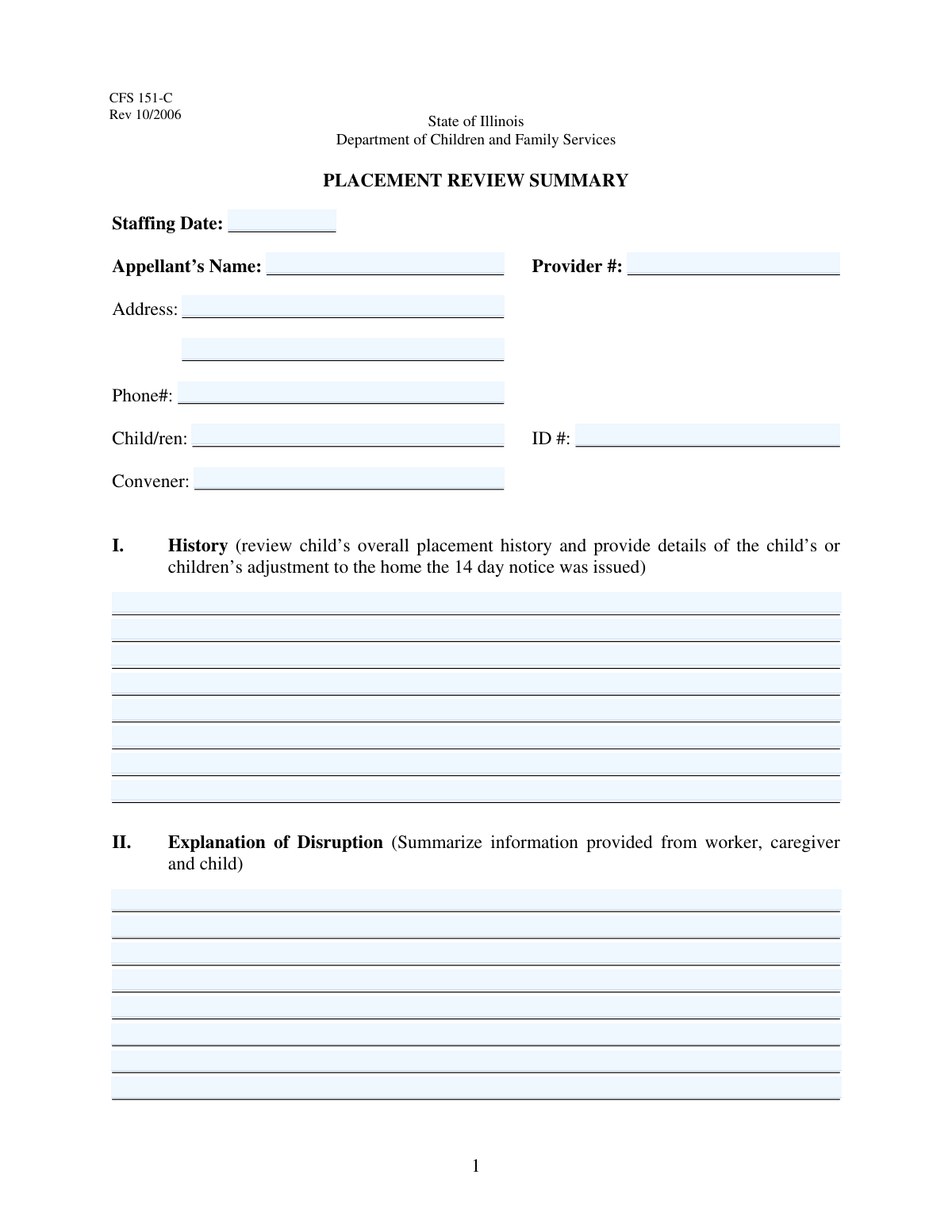
The Placement Review Staffing Report is a comprehensive form used by child welfare agencies to document and analyze a child's placement situation, particularly when a disruption occurs. It serves as a formal record for a 'staffing' or review meeting, gathering details on the child's history, the reasons for the disruption, and any efforts made to preserve the placement, ensuring that decisions about the child's future are well-informed and documented. Today, this form can be filled out quickly and accurately using AI-powered services like Instafill.ai, which can also convert non-fillable PDF versions into interactive fillable forms.
Our AI automatically handles information lookup, data retrieval, formatting, and form filling.
It takes less than a minute to fill out Placement Review Report using our AI form filling.
Securely upload your data. Information is encrypted in transit and deleted immediately after the form is filled out.

Form specifications

Form name: Placement Review Staffing Report
Number of fields: 90
Number of pages: 3
Filled form examples: Form Placement Review Report Examples
Language: English
main-image

Instafill Demo: How to fill out PDF forms in seconds with AI

How to Fill Out Placement Review Report Online for Free in 2026

Are you looking to fill out a PLACEMENT REVIEW REPORT form online quickly and accurately? Instafill.ai offers the #1 AI-powered PDF filling software of 2026, allowing you to complete your PLACEMENT REVIEW REPORT form in just 37 seconds or less.
Follow these steps to fill out your PLACEMENT REVIEW REPORT form online using Instafill.ai:
  1. 1 Navigate to Instafill.ai and upload or select the Placement Review Staffing Report form.
  2. 2 Use the AI assistant to accurately fill in the initial information, including the staffing date, appellant and provider details, and the child's identification information.
  3. 3 Complete the narrative sections by providing a comprehensive review of the child's placement history and a summary of the information regarding the disruption.
  4. 4 Detail all efforts that were made to preserve the placement in the designated section.
  5. 5 Enter the convener's impression of the disruption and provide a detailed rationale for the recommendations being made.
  6. 6 Address the 'Child's Strengths / Needs' section by listing each item and checking the corresponding 'Agree' or 'Disagree' box.
  7. 7 Carefully review all the information you've entered for accuracy and completeness before saving, printing, or submitting the finalized report.

Our AI-powered system ensures each field is filled out correctly, reducing errors and saving you time.

Why Choose Instafill.ai for Your Fillable Placement Review Report Form?

Speed

Complete your Placement Review Report in as little as 37 seconds.

Up-to-Date

Always use the latest 2026 Placement Review Report form version.

Cost-effective

No need to hire expensive lawyers.

Accuracy

Our AI performs 10 compliance checks to ensure your form is error-free.

Security

Your personal information is protected with bank-level encryption.

Frequently Asked Questions About Form Placement Review Report

This form is used to document a formal review of a child's placement, detailing the reasons for a potential disruption, efforts made to preserve the placement, and official recommendations.

The appellant is the individual, typically a caregiver or foster parent, who is formally appealing a decision related to the child's placement, such as a notice of removal.

You will need the appellant's and child's personal details, the provider number, a comprehensive history of the child's placements, and detailed notes regarding the disruption and efforts to prevent it.

The convener is the person leading the placement review. They are responsible for providing their professional impression of the disruption and the rationale for the final recommendations.

In this section, you should provide a neutral summary of the information collected from all parties involved, including the social worker, the caregiver, and the child, regarding the placement disruption.

Describe all specific actions and services that were offered or provided to support the family and child in an attempt to maintain the placement, such as counseling, respite care, or additional training.

Placement History provides a broad overview of all of the child's past living situations, while the Explanation of Disruption focuses only on the specific events and reasons leading to the current placement crisis.

Prioritize the ten most critical strengths and needs for the provided fields. If you need to document more, you can attach an addendum and make a note of it in one of the larger text fields.

Yes, this section requires the appellant to indicate whether they agree or disagree with each of the assessed strengths and needs presented for the child.

The Provider Number is a key identifier for the agency or provider. If you do not know it, you should contact the case worker or the agency that initiated the review for the correct number before submitting the form.

Yes, services like Instafill.ai use AI to accurately auto-fill form fields from your existing data, which can save time and help ensure the information is entered correctly.

Upload the form to the Instafill.ai platform. The AI will make all the fields fillable online, allowing you to type in your information, save your progress, and download the completed PDF.

You can use a tool like Instafill.ai to solve this problem. Upload the non-fillable PDF, and the platform will automatically convert it into an interactive, fillable form you can complete on your device.

Compliance Placement Review Report
Validation Checks by Instafill.ai

1
Staffing Date Format and Range
This check ensures the 'Staffing Date' is entered in a valid format (e.g., MM/DD/YYYY) and represents a logical date. The date should not be in the future or unreasonably far in the past. This is important for accurate record-keeping and timeline analysis, and failure would prevent the form from being processed with a valid event date.
2
Required Appellant Information
This validation verifies that the 'Appellant's Name' and 'Address Line 1' fields are not empty. This information is critical for identifying the primary individual involved in the appeal. If this information is missing, the form is incomplete and cannot be correctly filed or acted upon.
3
Phone Number Format Validation
This check ensures the 'Phone Number' field conforms to a standard format, such as (XXX) XXX-XXXX or XXX-XXX-XXXX. Proper formatting is essential for ensuring the contact information is usable and can be parsed by communication systems. An invalid format could lead to failed attempts to contact the appellant.
4
Required Child Information
This validation ensures that both 'Child Name' and 'Child ID Number' are provided. This information is fundamental to the purpose of the form, as it identifies the child whose placement is under review. Without this data, the report is meaningless as it cannot be linked to a specific case.
5
Provider Number Completeness
This check verifies that the 'Provider Number' field is filled. The provider number is a key identifier for linking the case to the correct service provider or agency. Failure to include it can cause significant delays and administrative overhead in processing the review.
6
Narrative Fields Minimum Length
This validation checks that major text fields like 'Placement History Details' and 'Explanation of Disruption Details' contain a minimum number of characters (e.g., 50). This ensures that the user provides a 'comprehensive review' or 'detailed description' as requested, rather than a brief or useless entry. A failed check would prompt the user to provide more substantive information.
7
Appellant Name Consistency
The form contains two fields for 'Appellant's Name'. This check verifies that if both fields are filled, their values are identical. This is crucial for preventing data entry errors and ensuring data consistency across the document, avoiding confusion about the identity of the appellant.
8
Conditional Logic for Strengths/Needs Section
This validation ensures that the entire 'Child's Strengths / Needs Present' section is only active and can be filled if the primary 'Appellant's Name' field has been completed. This enforces the form's dependency rules, preventing users from filling out a conditional section without meeting the prerequisite. If the prerequisite is not met, this section should be disabled.
9
Strength/Need Item Response Completeness
For each of the 10 'Strength/Need' items, this check verifies that if the text field is filled, either the 'Agree' or 'Disagree' checkbox is selected. This ensures that a response is provided for every listed item, preventing incomplete data. A failed validation would require the user to select 'Agree' or 'Disagree' for the entered item.
10
Mutually Exclusive Agreement Checkboxes
For each 'Strength/Need' item, this validation ensures that the 'Agree' and 'Disagree' checkboxes cannot be selected at the same time. These options are mutually exclusive, and allowing both to be checked would result in contradictory data. If a user checks one, the other should be unchecked or uncheckable.
11
Dependent Checkbox Validation
This check ensures that for each item, the 'Agree' or 'Disagree' checkboxes can only be selected if the corresponding 'Strength/Need' text field is not empty. This prevents orphaned responses where an agreement is registered for a non-existent item. If the text field is empty, the checkboxes should be disabled.
12
Required Convener Name
This validation confirms that the 'Convener Name' field is not left blank. The convener is a key participant in the placement review, and their identity is essential for the report's validity and for any follow-up actions. A missing name would render the report incomplete and potentially invalid.
13
Child ID Number Format
This check validates that the 'Child ID Number' conforms to a predefined system format (e.g., is numeric, has a specific length). This is critical for data integrity and ensuring the form can be correctly matched with the child's electronic record in other systems. An incorrectly formatted ID could lead to data being lost or misfiled.
14
Recommendation Rationale Completeness
This validation ensures the 'Recommendation Rationale' text area is not empty and meets a minimum character count. This section explains the final recommendation, which is a primary output of the review process. An empty or brief rationale undermines the purpose of the form, and a failed check should prompt the user to provide a detailed explanation.

Common Mistakes in Completing Placement Review Report

Improperly Splitting Address Information

The form's structure for 'Address Line 2' is unusual, asking for the apartment number, city, state, and zip code all in one field. Users frequently misunderstand this, putting the city and state on Line 1 or omitting the apartment number, which can lead to returned mail and significant processing delays. To avoid this, carefully place only the primary street address on Line 1 and all other address components on Line 2 as instructed.

Providing Incomplete or Informal Names

The form explicitly requests the 'full legal name' for both the appellant and the child, but users often enter nicknames, initials, or shortened names out of habit. This creates a mismatch with official records, complicating verification and potentially causing the form to be rejected. Always use the complete legal name as it appears on official documents like birth certificates or government ID.

Entering Incorrect or Missing ID Numbers

The 'Provider Number' and 'Child ID Number' are critical for linking the form to the correct case file. A common mistake is transposing digits, entering an outdated number, or leaving the field blank. An error here can result in the form being associated with the wrong case or being discarded entirely, halting the entire review process. Always verify these numbers from an official source before entry.

Providing Vague or Subjective Narrative Descriptions

For long-text sections like 'Placement History Details' and 'Explanation of Disruption,' users often provide brief, emotionally charged, or subjective summaries. These responses lack the specific, factual details (like dates, names, and direct quotes) that reviewers need, weakening the submission's credibility and effectiveness. To avoid this, focus on writing a clear, objective, and chronological account of events.

Failing to Address All Parts of a Multi-Part Prompt

Prompts like 'Placement History Details' ask for multiple pieces of information (e.g., 'overall placement history' AND 'child's adjustment'). A frequent error is to focus on only one part of the question, leading to an incomplete answer. This can force reviewers to make assumptions or request additional information, delaying a decision. Read each prompt carefully and structure your response to explicitly address every component.

Making Contradictory or Ambiguous Checkbox Selections

In the 'Child's Strengths / Needs' section, users must select either 'Agree' or 'Disagree' for each item. People sometimes check both boxes, or neither box, for a single item. This creates ambiguity and can invalidate that portion of the form, as the reviewer cannot determine the intended response. Ensure that for each listed item, one and only one box is checked.

Using an Ambiguous or Incorrect Date Format

The 'Staffing Date' field is prone to errors if users enter dates in various formats (e.g., 05/06/24, Jun 5, 2024). This ambiguity can lead to misinterpretation, especially between MM/DD/YY and DD/MM/YY formats, potentially causing scheduling conflicts or record-keeping errors. To prevent this, always use a full, four-digit year (YYYY) and a consistent format like MM/DD/YYYY. AI-powered form filling tools like Instafill.ai can help by automatically validating and formatting dates correctly.

Providing Inconsistent Information Across the Form

The 'Appellant's Name' is requested in two different sections of the form. A common data entry error is to introduce a typo or use a slightly different name variation in one of the fields. Such inconsistencies can raise red flags during automated or manual review, causing delays while the information is verified. Carefully review the entire form before submission to ensure all repeated information is identical.

Omitting Crucial Context in Explanations

When filling out narrative sections like 'Efforts to Preserve Placement,' users may assume the reviewer is already familiar with the case and omit critical background information. This results in a confusing or unpersuasive narrative that fails to justify the actions taken or recommendations made. Always write these sections as if the reader has no prior knowledge, clearly explaining the situation, the people involved, and the rationale for each step.

Misinterpreting the 'Strength/Need' Field Content

The 'Strength/Need' fields are intended for concise, descriptive phrases, but users may enter full sentences or vague comments. This makes it difficult for the appellant to clearly 'Agree' or 'Disagree' and for the reviewer to understand the core issue. Each entry should be a specific, observable trait (e.g., 'Excels in math,' 'Anxiety in new situations') to ensure clarity. If the form is a non-fillable PDF, a tool like Instafill.ai can convert it into a fillable version, making it easier to enter data into the correct fields.
Saved over 80 hours a year

“I was never sure if my IRS forms like W-9 were filled correctly. Now, I can complete the forms accurately without any external help.”

Kevin Martin Green

Your data stays secure with advanced protection from Instafill and our subprocessors

Robust compliance program

Transparent business model

You’re not the product. You always know where your data is and what it is processed for.

ISO 27001, HIPAA, and GDPR

Our subprocesses adhere to multiple compliance standards, including but not limited to ISO 27001, HIPAA, and GDPR.

Security & privacy by design

We consider security and privacy from the initial design phase of any new service or functionality. It’s not an afterthought, it’s built-in, including support for two-factor authentication (2FA) to further protect your account.

Fill out Placement Review Report with Instafill.ai

Worried about filling PDFs wrong? Instafill securely fills placement-review-staffing-report forms, ensuring each field is accurate.