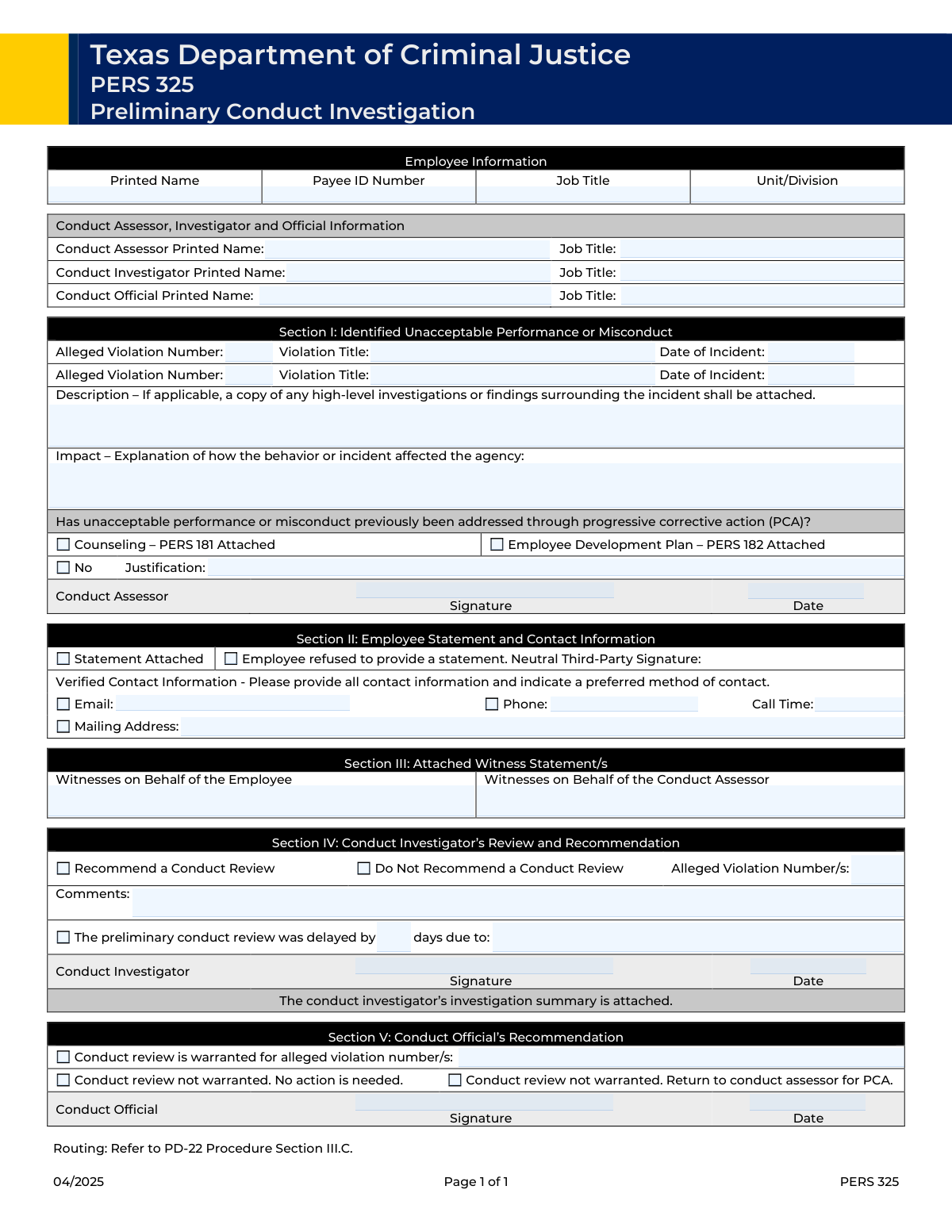
Yes! You can use AI to fill out Preliminary Conduct Review Form

The Preliminary Conduct Review Form is a crucial internal document for organizations to formally record the findings of an initial investigation into employee misconduct. It provides a structured way for conduct assessors and investigators to detail alleged violations, describe the incident's impact, and recommend whether a full conduct review is warranted, ensuring fairness and consistency. Today, this form can be filled out quickly and accurately using AI-powered services like Instafill.ai, which can also convert non-fillable PDF versions into interactive fillable forms.
Our AI automatically handles information lookup, data retrieval, formatting, and form filling.
It takes less than a minute to fill out Preliminary Conduct Review using our AI form filling.
Securely upload your data. Information is encrypted in transit and deleted immediately after the form is filled out.

Form specifications

Form name: Preliminary Conduct Review Form
Number of fields: 50
Number of pages: 1
Filled form examples: Form Preliminary Conduct Review Examples
Language: English
main-image

Instafill Demo: How to fill out PDF forms in seconds with AI

How to Fill Out Preliminary Conduct Review Online for Free in 2026

Are you looking to fill out a PRELIMINARY CONDUCT REVIEW form online quickly and accurately? Instafill.ai offers the #1 AI-powered PDF filling software of 2026, allowing you to complete your PRELIMINARY CONDUCT REVIEW form in just 37 seconds or less.
Follow these steps to fill out your PRELIMINARY CONDUCT REVIEW form online using Instafill.ai:
  1. 1 Navigate to Instafill.ai and upload or select the Preliminary Conduct Review Form.
  2. 2 Enter the employee's information, including their name, ID number, and job title in the 'Employee Information' section.
  3. 3 Provide the names and job titles for the Conduct Assessor, Investigator, and Official in their respective fields.
  4. 4 Detail the alleged violation(s), including the incident date, a full description of the incident, and an explanation of its impact on the agency.
  5. 5 Document any previous corrective actions, checking the appropriate boxes for attached forms like PERS 181 or providing justification if no prior action was taken.
  6. 6 Complete the investigator's and official's recommendation sections, indicating whether a formal conduct review is warranted, and provide signatures and dates.
  7. 7 Review all entered information for accuracy and completeness before downloading, printing, or submitting the final document.

Our AI-powered system ensures each field is filled out correctly, reducing errors and saving you time.

Why Choose Instafill.ai for Your Fillable Preliminary Conduct Review Form?

Speed

Complete your Preliminary Conduct Review in as little as 37 seconds.

Up-to-Date

Always use the latest 2026 Preliminary Conduct Review form version.

Cost-effective

No need to hire expensive lawyers.

Accuracy

Our AI performs 10 compliance checks to ensure your form is error-free.

Security

Your personal information is protected with bank-level encryption.

Frequently Asked Questions About Form Preliminary Conduct Review

This form is used to document the findings of a preliminary conduct investigation into an employee's alleged misconduct. It helps determine whether a formal conduct review is necessary and is completed by agency officials.

The Conduct Assessor initiates the process, the Conduct Investigator performs the preliminary investigation and makes a recommendation, and the Conduct Official makes the final decision on how to proceed.

You will need the employee's full name and ID number, job title, and details of the alleged violation(s), including the date of the incident and a thorough description.

PCA refers to prior disciplinary steps like counseling. If no PCA was taken, you must check the 'No' box and provide a justification explaining why the misconduct was not previously addressed.

If the employee declines to give a statement, check the box indicating their refusal. A neutral third-party must then sign that section to verify the employee's refusal.

You should attach any relevant documents, such as investigative reports, witness statements, the employee's statement, and any previous corrective action forms like PERS 181 or PERS 182.

This form has fields for two alleged violations. If you need to document more, you may need to use an additional form or an addendum as per your agency's specific procedures.

Provide a clear and detailed narrative of the incident, including what occurred, who was involved, and where it happened. Remember to attach any related investigative reports for full context.

The Conduct Investigator must fill out the delay section if the preliminary review was not completed in a timely manner. You will need to enter the number of days delayed and the reason for it.

Yes, services like Instafill.ai use AI to accurately auto-fill form fields from your records, which can save you time and help prevent errors.

You can use a service like Instafill.ai to solve this problem. It can convert flat, non-fillable PDFs into interactive forms that you can easily fill out and sign on your computer.

The Conduct Official can determine that a formal conduct review is warranted, that no further action is needed, or that the issue should be returned to the conduct assessor for progressive corrective action (PCA).

Providing verified contact details like email, phone, and mailing address ensures the investigator has reliable means to communicate with the employee during the investigation process.

Compliance Preliminary Conduct Review
Validation Checks by Instafill.ai

1
Required Employee Information Fields
Verifies that 'Employee Printed Name', 'Payee ID Number', 'Job Title', and 'Unit/Division' are all completed. This information is fundamental for identifying the subject of the report and ensuring it is correctly filed and routed. A submission will be rejected if any of these core identifying fields are missing.
2
Valid and Logical Incident Date
Ensures that the 'Date of Incident' for each alleged violation is a valid date and is not in the future. This check maintains data integrity and logical consistency, as an incident cannot have occurred on a future date. The form will display an error and require correction if the date is invalid or in the future.
3
Conditional Requirement for PCA Justification
Validates that if the 'No (Previous PCA not addressed)' checkbox is selected, the 'PCA Justification' text field must be filled. This is critical for accountability and understanding why standard progressive corrective action procedures were not followed. Failure to provide the justification when required will prevent form submission.
4
Mutually Exclusive PCA Selections
Ensures that the 'No (Previous PCA not addressed)' checkbox is not selected at the same time as either the 'Counseling – PERS 181 Attached' or 'Employee Development Plan – PERS 182 Attached' checkboxes. This prevents contradictory information regarding prior corrective actions. The system will display an error if conflicting options are chosen.
5
Chronological Signature Date Sequence
Checks that the signature dates follow a logical chronological order: 'Conduct Assessor Signature Date' must be on or before the 'Investigator Signature Date', which must be on or before the 'Conduct Official Recommendation Date'. This validation upholds the integrity of the review process by ensuring steps are documented in the correct sequence. An out-of-order date will block submission and require the user to correct the dates.
6
Conditional Requirement for Contact Information
Verifies that if a contact method checkbox ('Email', 'Phone', 'Mailing Address') is checked, the corresponding data field ('Email Address', 'Phone Number', 'Mailing Address') is filled. This ensures that a selected contact method is actually usable and contains the necessary information. The form will not submit if a checkbox is ticked but the associated information is missing.
7
Valid Email Address Format
When the 'Email Address' field is filled, this check validates that the entry conforms to a standard email format (e.g., [email protected]). This is important for ensuring that official communications can be successfully delivered to the employee. An invalid format will result in an error message prompting the user for correction.
8
Mutually Exclusive Investigator Recommendation
Ensures that the conduct investigator selects either 'Recommend a Conduct Review' or 'Do Not Recommend a Conduct Review', but not both. This prevents ambiguity in the investigator's final recommendation, which is a critical step in the process. The user will be prompted to select only one option if both are checked.
9
Conditional Violation Numbers for Investigator Recommendation
Validates that if 'Recommend a Conduct Review' is checked by the investigator, the corresponding 'Alleged Violation Number(s)' field in that section is not empty. This links the recommendation directly to specific allegations, which is crucial for clarity in subsequent review stages. The form will be considered incomplete if the numbers are missing.
10
Mutually Exclusive Conduct Official Recommendation
Confirms that only one of the three recommendation checkboxes ('Conduct review is warranted', 'Conduct review not warranted. No action...', 'Conduct review not warranted. Return to...') in the Conduct Official's section is selected. This provides a clear and final decision from the conduct official. Selecting multiple options will result in a validation error.
11
Conditional Requirement for Delay Justification
Checks that if the 'The preliminary conduct review was delayed by' checkbox is selected, both the 'Delay Duration (days)' and 'Reason for Delay' fields are completed. This provides necessary documentation and transparency for any procedural delays. The submission will fail if the delay is indicated but the details are not provided.
12
Separation of Duties Among Key Roles
Verifies that the printed names for the 'Conduct Assessor', 'Conduct Investigator', and 'Conduct Official' are not all identical. This check helps enforce the principle of separation of duties, which is key to a fair and unbiased investigation process. A warning or error will be triggered if the same individual is listed in all three key roles.
13
Completeness of Alleged Violation Entry
Ensures that if either 'Violation Title' or 'Date of Incident' is filled for an alleged violation row, then the corresponding 'Alleged Violation Number' for that row is also filled. This guarantees that every documented incident has a unique identifier for tracking and reference. An incomplete violation entry will prevent submission until the number is provided.
14
Minimum Length for Narrative Fields
Validates that the 'Description of Incident' and 'Impact Explanation' fields contain more than a trivial number of characters (e.g., >50 characters). This encourages detailed and useful narratives rather than brief, unhelpful entries that would hinder the review. A submission with insufficient detail in these critical fields will be flagged for revision.
15
Conditional Violation Numbers for Official's Recommendation
Validates that if the 'Conduct review is warranted for alleged violation number/s' checkbox is selected by the Conduct Official, the associated 'Alleged Violation Number(s)' field must be filled. This ensures the official's decision is explicitly tied to specific violations. The form will not be accepted if the checkbox is selected without the corresponding violation numbers.

Common Mistakes in Completing Preliminary Conduct Review

Role Confusion in Assessor, Investigator, and Official Fields

Users often enter the wrong person's name or title in the sections designated for the Conduct Assessor, Investigator, and Official. This mistake occurs when one person holds multiple roles or when the form is passed between individuals without clear instructions, leading to invalid sections that require correction and re-signing. To avoid this, carefully read the title of each section and ensure the person named corresponds to that specific role in the investigation process.

Forgetting to Attach Referenced Documents

A frequent error is checking boxes like 'PERS 181 Attached' or 'Statement Attached' without actually including the physical or digital documents with the submission. This makes the report incomplete and halts the review process until the missing documents are provided. Before submitting, create a checklist of all items you've indicated are attached and verify their inclusion to ensure a complete and processable report.

Mishandling Conditional Logic Fields

The form contains many fields that depend on a checkbox being selected, such as providing a 'Phone Number' only after checking the 'Phone' box. Users often complete only one part of the pair—either checking the box but forgetting the data, or vice-versa—which can cause the information to be missed or create confusion. To prevent this, treat the checkbox and its related field as a single unit, completing both before moving on. AI-powered tools like Instafill.ai can prevent this by automatically showing or requiring fields based on your selections.

Incomplete or Subjective Incident Description

The 'Description of Incident' is often filled with personal opinions or lacks crucial objective facts like specific times, locations, and all individuals involved. A vague or biased narrative makes it difficult for a reviewer to understand what happened and can weaken the validity of the report. To avoid this, provide a clear, factual, and chronological account of the event, focusing on who, what, when, where, and how, while omitting emotional language.

Missing Justification for No Previous Corrective Action

When checking the box for 'No (Previous PCA not addressed)', users frequently forget to provide the mandatory explanation in the 'PCA Justification' field. This omission leaves a critical procedural question unanswered and can lead to the form being rejected for incompleteness. Always provide a clear, factual reason in the justification field to explain why progressive corrective action was not previously taken.

Contradictory Selections in Recommendation Sections

In the recommendation sections, a user might accidentally check conflicting options, such as both 'Recommend a Conduct Review' and 'Do Not Recommend a Conduct Review'. This logical error makes the final recommendation unclear and invalidates that section of the form, requiring it to be returned for correction. Carefully review your final selections to ensure they are not contradictory and accurately reflect the single, intended outcome.

Failure to Obtain a Neutral Third-Party Signature

If an employee refuses to provide a statement, the form requires a neutral third party's signature to witness the refusal. This crucial step is often overlooked, which invalidates the attestation and can create procedural challenges later. If the 'Employee refused to provide a statement' box is checked, it is essential to immediately secure the signature of an eligible neutral witness.

Using Incorrect or Inconsistent Violation Numbers

Users may enter an internal tracking number for a violation in one section but reference a different number or format in the recommendation section. This inconsistency creates ambiguity and risks having the wrong violation reviewed or dismissed. To ensure clarity, use the official and consistent agency-assigned violation identifier throughout the entire document, from the initial entry to the final recommendation.

Entering the Wrong Date for the Incident

A common data entry error is putting the current date (the day the form is being filled out) in the 'Date of Incident' field instead of the actual date the event occurred. This can have serious consequences for the investigation's timeline and procedural compliance. Always double-check that you are entering the specific date of the alleged incident and use a clear, unambiguous format like MM/DD/YYYY.

Vague Agency Impact Explanation

In the 'Impact Explanation' field, filers often describe interpersonal conflicts rather than the required impact on the agency, its services, or operations. This fails to provide the necessary context for assessing the organizational severity of the misconduct. To complete this correctly, focus on specific, tangible consequences like disruption to workflow, negative effects on client services, misuse of resources, or damage to the agency's reputation.

Using Informal Job Titles or Department Names

People may enter outdated or informal job titles and department names that do not match official personnel records. This can cause delays and difficulties in routing the form or verifying employee data within the HR system. Always use the official, full job title and current unit/division name as they appear in the agency's records. AI-powered form filling tools like Instafill.ai can help prevent this by populating data from a verified source.

Forgetting to Fill Dependent 'Delay' Fields

When the 'The preliminary conduct review was delayed by' box is checked, users often forget to fill in the two dependent fields: 'Delay Duration (days)' and 'Reason for Delay'. Leaving these blank makes the initial checkbox meaningless and the report incomplete. If you indicate a delay, you must provide both the length and the reason to create a complete record. If the form is a flat PDF, a tool like Instafill.ai can convert it to a smart, fillable version that helps enforce these rules.
Saved over 80 hours a year

“I was never sure if my IRS forms like W-9 were filled correctly. Now, I can complete the forms accurately without any external help.”

Kevin Martin Green

Your data stays secure with advanced protection from Instafill and our subprocessors

Robust compliance program

Transparent business model

You’re not the product. You always know where your data is and what it is processed for.

ISO 27001, HIPAA, and GDPR

Our subprocesses adhere to multiple compliance standards, including but not limited to ISO 27001, HIPAA, and GDPR.

Security & privacy by design

We consider security and privacy from the initial design phase of any new service or functionality. It’s not an afterthought, it’s built-in, including support for two-factor authentication (2FA) to further protect your account.

Fill out Preliminary Conduct Review with Instafill.ai

Worried about filling PDFs wrong? Instafill securely fills preliminary-conduct-review-form forms, ensuring each field is accurate.