Yes! You can use AI to fill out RBT Initial Competency Assessment

The RBT Initial Competency Assessment is a standardized evaluation tool from the Behavior Analyst Certification Board (BACB) used to verify the practical skills of a candidate applying for the Registered Behavior Technician (RBT) credential. A certified assessor (BCBA, BCaBA, or FL-CBA) uses this form to observe and confirm the applicant's proficiency across a range of essential tasks, from data collection to implementing behavior-analytic procedures. Completing this assessment is a mandatory step before an individual can be certified as an RBT, ensuring they meet the high standards of the profession. Today, this form can be filled out quickly and accurately using AI-powered services like Instafill.ai, which can also convert non-fillable PDF versions into interactive fillable forms.
Our AI automatically handles information lookup, data retrieval, formatting, and form filling.
It takes less than a minute to fill out RBT Competency Assessment using our AI form filling.
Securely upload your data. Information is encrypted in transit and deleted immediately after the form is filled out.

Form specifications

Form name: RBT Initial Competency Assessment
Number of fields: 88
Number of pages: 5
Language: English
main-image

Instafill Demo: How to fill out PDF forms in seconds with AI

How to Fill Out RBT Competency Assessment Online for Free in 2026

Are you looking to fill out a RBT COMPETENCY ASSESSMENT form online quickly and accurately? Instafill.ai offers the #1 AI-powered PDF filling software of 2026, allowing you to complete your RBT COMPETENCY ASSESSMENT form in just 37 seconds or less.
Follow these steps to fill out your RBT COMPETENCY ASSESSMENT form online using Instafill.ai:
  1. 1 Navigate to Instafill.ai and upload or select the RBT Initial Competency Assessment form.
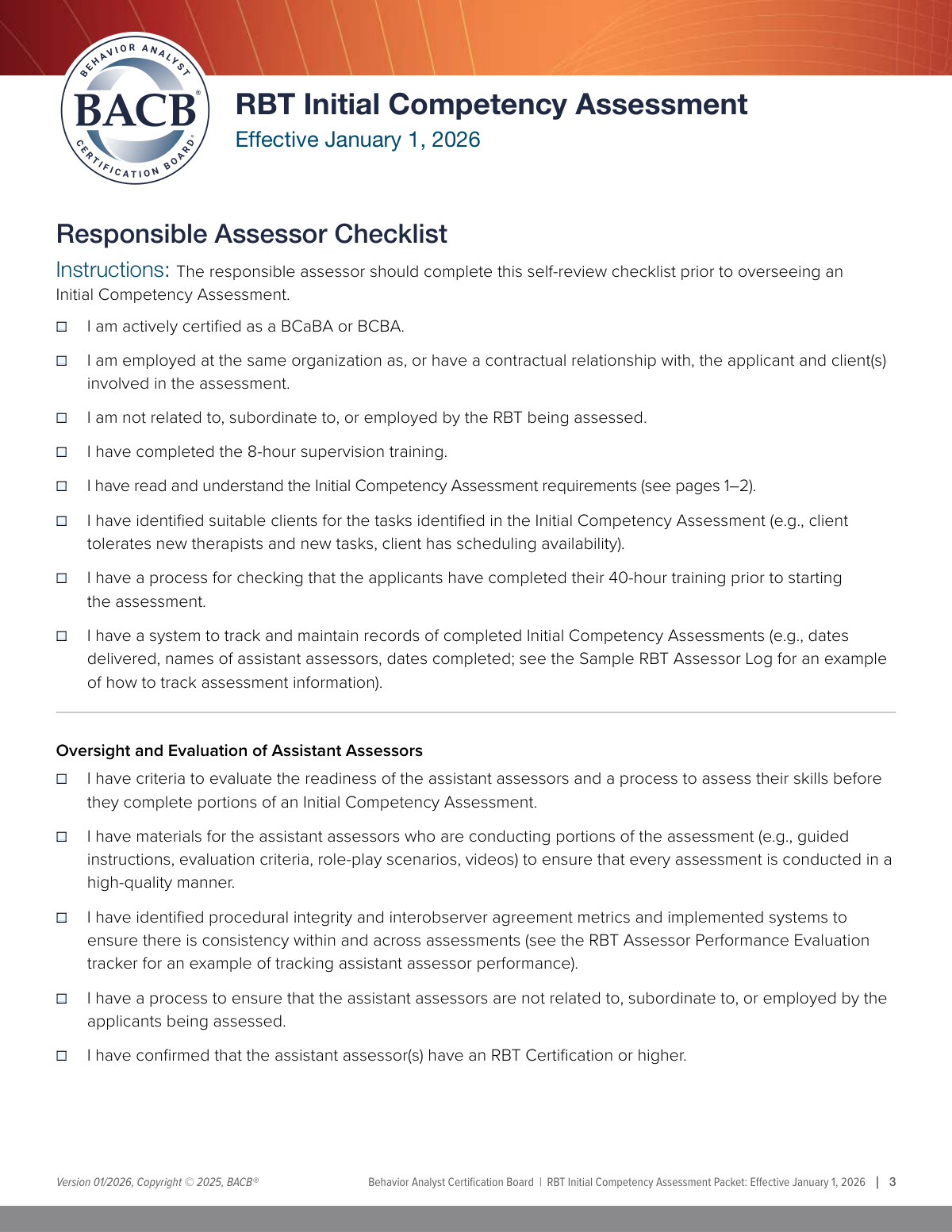
  2. 2 The responsible assessor completes the initial checklist, verifying their certification, training, and relationship to the applicant.
  3. 3 Enter the applicant's information, including their full name, BACB ID, and organization.
  4. 4 As each competency task is demonstrated, check the appropriate box (e.g., 'With a Client' or 'Role-Play') and provide initials to confirm completion.
  5. 5 For tasks assessed via interview or requiring notes, such as 'Client Dignity' or 'Crisis/Emergency Procedures', fill in the corresponding sections.
  6. 6 Once all assessment tasks are completed and documented, the responsible assessor provides their printed name, signature, and the date.
  7. 7 Download, save, or share the completed assessment form for submission to the BACB or for record-keeping.

Our AI-powered system ensures each field is filled out correctly, reducing errors and saving you time.

Why Choose Instafill.ai for Your Fillable RBT Competency Assessment Form?

Speed

Complete your RBT Competency Assessment in as little as 37 seconds.

Up-to-Date

Always use the latest 2026 RBT Competency Assessment form version.

Cost-effective

No need to hire expensive lawyers.

Accuracy

Our AI performs 10 compliance checks to ensure your form is error-free.

Security

Your personal information is protected with bank-level encryption.

Frequently Asked Questions About Form RBT Competency Assessment

This form is an Initial Competency Assessment used to evaluate the skills of an applicant for a Registered Behavior Technician (RBT) role. It is completed by a certified assessor who observes the applicant performing various tasks.

A 'Responsible Assessor' must complete this form. This individual must be an actively certified BCaBA or BCBA who has completed the required 8-hour supervision training.

The BACB ID is a 6-digit number starting with 'BACB' found in the applicant's BACB account. The certification number, which is different, typically starts with a '0' or '1' and is found in the Certification tab of their account.

You will need the applicant's full name, their unique BACB ID number, and the name of the organization where they are employed.

Selecting 'With a Client' means the applicant demonstrated the skill with an actual client. 'Role-Play' indicates the skill was demonstrated in a simulated scenario, not with a real client.

For certain tasks, like 'Client Dignity' or 'Supervision Requirements', the assessment can be conducted through a verbal interview where the applicant describes their knowledge, rather than a physical demonstration.

Yes, but the Responsible Assessor must have a process to evaluate the assistant's readiness and skills. The assistant assessor's name and certification number must be documented on the form.

You must review each statement and check the box to confirm you meet all the requirements before proceeding with the assessment. This includes being actively certified, unrelated to the applicant, and having a system to track assessments.

After evaluating all tasks, the Responsible Assessor must provide their printed name, signature, and the date. You are also required to have a system to maintain records of the completed assessment.

No, but if you are employed at the same organization or have a contractual relationship, you must declare it by checking the appropriate box and providing the organization's name.

Yes, services like Instafill.ai use AI to accurately auto-fill form fields from your saved information, which can save you significant time and reduce errors.

You can use a service like Instafill.ai, which can convert non-fillable PDFs or even scanned paper documents into interactive, fillable forms that you can complete on your computer or mobile device.

Simply upload the form to the Instafill.ai platform. The AI will make the fields fillable, and you can click to enter text, check boxes, and add your signature before downloading the completed document.

Compliance RBT Competency Assessment
Validation Checks by Instafill.ai

1
BACB ID Format Validation
This check verifies that the 'Applicant BACB ID' field follows the specified format. The ID must begin with the prefix 'BACB' followed by a sequence of numbers, as described in the form instructions. This validation is crucial for ensuring data accuracy and successful integration with the BACB's systems. If the format is incorrect, the submission will be rejected, and the user will be prompted to enter a valid ID.
2
Conditional BACB Certification Number Requirement
This validation ensures that if the 'Actively Certified' checkbox is checked, the 'BACB Certification Number' field must be filled out. This creates a logical dependency, preventing assessors from claiming certification without providing proof. If an assessor indicates they are certified but leaves the number blank, a validation error will appear, requiring them to provide the number to proceed.
3
Responsible Assessor Checklist Completeness
This check confirms that all checkboxes within the 'Responsible Assessor Checklist' section are checked before the form can be submitted. These checkboxes represent critical attestations about the assessor's qualifications and readiness. Failing to complete this section indicates the assessor does not meet the minimum requirements, and the system will prevent submission until all attestations are made.
4
Task Completion Logic
For each assessment task (e.g., 'Continuous Measurement', 'Chaining Task'), this validation ensures that if the 'Initials' field is filled, at least one corresponding assessment method ('With a Client', 'Role-Play', or 'Interview') must also be selected. This prevents incomplete records where a task is marked as complete by initials but the method of assessment is not specified. An error will be triggered if initials are present without a selected method.
5
Client-Based Assessment Prerequisite
This validation rule enforces a dependency between fields to ensure logical consistency. The 'With a Client' checkbox for any task can only be selected if the 'Identified Suitable Clients' checkbox in the initial 'Responsible Assessor Checklist' is also checked. This prevents assessors from claiming they performed a task with a client when they have not attested to having suitable clients available. An attempt to check a 'With a Client' box without the prerequisite will result in an error message.
6
Signature Date Validity
This check validates that the 'Signature Date' is a valid date and is not set in the future. It ensures the integrity and legal standing of the signature by confirming it was made on or before the submission day. If a user enters an invalid date format or a future date, the system will display an error and require a valid date to be entered.
7
Conditional Assessor Organization Name
This validation ensures that if the 'Employed or Contractual Relationship' checkbox is checked, the 'Assessor Employment Organization Name' field must be filled out. This rule enforces the disclosure of potential conflicts of interest or relevant employment details. If the checkbox is selected but the organization name is left empty, the form will prompt the user to provide the name before submission is allowed.
8
Assistant Assessor Data Integrity
This check ensures that if the 'Assistant Assessors' Names' field contains data, the 'Assistant Assessors' Certification Numbers' field must also be filled, and vice versa. This maintains data completeness for assistant assessors, ensuring that every listed assistant has a corresponding certification number. If one field is filled without the other, a validation error will prompt the user to complete the associated information.
9
Applicant Full Name Requirement
This validation verifies that the 'Applicant Name' field is not empty and contains at least two words, suggesting a first and last name have been entered. This is a basic completeness check to ensure the primary subject of the assessment is clearly identified. A submission with an empty or single-word applicant name will be flagged, requiring the user to enter a full name.
10
Mutually Exclusive Certification Selection
This check ensures that conflicting certifications are not selected simultaneously. For example, an applicant cannot be both a BCaBA and a BCBA at the same time, so the system should prevent both 'BCaBA' and 'BCBA' checkboxes from being selected together. This prevents data entry errors and ensures the applicant's certification status is recorded accurately. If conflicting options are chosen, an error message will instruct the user to select only one.
11
Initials Field Format
This validation rule applies to all fields that require initials (e.g., 'Continuous Measurement Initials', 'Session Notes Initials'). It checks that the entry consists of 2 to 4 alphabetic characters, ensuring a consistent and clean data format. This standardization is important for record-keeping and auditing. Entries that do not match this format will be rejected, and the user will be asked to correct them.
12
BACB Certification Number Format
This check validates that the 'BACB Certification Number' starts with either a '0' or a '1', as specified in the form's instructions. This rule helps catch common data entry errors, such as entering a BACB ID instead of a certification number. If the number does not begin with the correct digit, the system will display an error, guiding the user to find and enter the correct number from their BACB account.

Common Mistakes in Completing RBT Competency Assessment

Confusing BACB ID and Certification Number

The form requires both the Applicant BACB ID and the BACB Certification Number, explicitly stating they are different. Users frequently confuse these two numbers, entering the certification number (starts with '0' or '1') in the ID field (starts with 'BACB') or vice versa. This error leads to failed identity verification and significant processing delays. To avoid this, carefully check the applicant's BACB account, where both numbers are listed in separate locations as described on the form.

Incomplete Task Assessment Entries

For each of the 20 assessment tasks, the assessor must provide their initials and check the method used (e.g., 'With a Client', 'Role-Play'). A common mistake is to provide initials but forget to check the method, or check the method but forget to initial. This renders the verification for that specific task incomplete. To prevent this, systematically review each task item after completion to ensure both an initial and a method selection are present.

Ignoring Conditional Field Requirements

Several fields, such as 'Assessor Employment Organization Name', are conditional and should only be filled out if a preceding checkbox is marked 'Yes'. People often miss these instructions, either leaving a required field blank or filling in an unnecessary one. This results in an incomplete or confusing submission. AI-powered form filling tools like Instafill.ai can help prevent this by automatically showing or hiding conditional fields based on your answers.

Failure to Complete Attestation Checklists

The form begins with critical checklists for the 'Responsible Assessor' and 'Oversight of Assistant Assessors'. Assessors sometimes rush through this section and fail to check all applicable boxes, which serve as a sworn statement of compliance. Missing even one checkmark can invalidate the entire assessment, as it suggests the assessor may not meet the minimum requirements to conduct it. Always read and confirm each point in the initial checklists before proceeding.

Using Incomplete or Informal Names

Fields for 'Applicant Name' and 'Responsible Assessor's Printed Name' require the full, legal name for official record-keeping. A frequent error is the use of nicknames, initials, or incomplete names (e.g., 'Jen Smith' instead of 'Jennifer Smith'). This can cause mismatches during verification against the BACB registry, leading to rejection. Always use the full legal name as it appears on official certification documents.

Missing or Illegible Signature and Date

The responsible assessor's signature and date are required to finalize the document, but are often forgotten. On paper or flat PDF versions, the signature may be illegible, or the date may be missing or in an incorrect format. An unsigned or undated form is invalid and will be immediately rejected. If the form is a non-fillable PDF, tools like Instafill.ai can convert it into a fillable version, allowing for clean, legible text and digital signature entries.

Forgetting Assistant Assessor Details

If an assistant assessor helps conduct the assessment, their full name and certification number must be documented in the designated section. Responsible assessors often overlook this step, especially if the assistant's involvement was minimal. Failure to document all personnel involved is a compliance issue that can invalidate the portions of the assessment they conducted. If any part of the assessment was delegated, ensure the 'Assistant Assessor Details' section is fully completed.

Violating the 'With a Client' Prerequisite

The option to check 'With a Client' for any task is dependent on the assessor first affirming 'I have identified suitable clients...' in the initial checklist. A procedural error occurs when an assessor checks 'With a Client' for a task without having affirmed this prerequisite. This inconsistency calls the planning and validity of the entire assessment into question. Ensure the prerequisite is met and checked before selecting 'With a Client' as an assessment method.

Inconsistent Organization Name Entry

The form asks for organization names in multiple places (applicant's employer, client's service provider, assessor's employer). Users often use inconsistent names, unofficial abbreviations, or spellings across these fields. This creates confusion and makes it difficult to verify relationships and potential conflicts of interest. To avoid this, use the complete, official legal name of the organization consistently in all relevant fields.

Leaving Task-Specific Notes Blank

Sections like 'Crisis/Emergency Notes' and 'Task 14 Demonstration Notes' are provided for crucial context but are often left blank. While not always mandatory, omitting details about how a crisis procedure was role-played or which specific tasks were demonstrated can lead to ambiguity. This may prompt follow-up questions or a request for clarification, delaying the approval process. Provide concise, relevant details in these note fields to create a clear and complete record.
Saved over 80 hours a year

“I was never sure if my IRS forms like W-9 were filled correctly. Now, I can complete the forms accurately without any external help.”

Kevin Martin Green

Your data stays secure with advanced protection from Instafill and our subprocessors

Robust compliance program

Transparent business model

You’re not the product. You always know where your data is and what it is processed for.

ISO 27001, HIPAA, and GDPR

Our subprocesses adhere to multiple compliance standards, including but not limited to ISO 27001, HIPAA, and GDPR.

Security & privacy by design

We consider security and privacy from the initial design phase of any new service or functionality. It’s not an afterthought, it’s built-in, including support for two-factor authentication (2FA) to further protect your account.

Fill out RBT Competency Assessment with Instafill.ai

Worried about filling PDFs wrong? Instafill securely fills rbt-initial-competency-assessment forms, ensuring each field is accurate.