Yes! You can use AI to fill out Recommendation for Doula Services

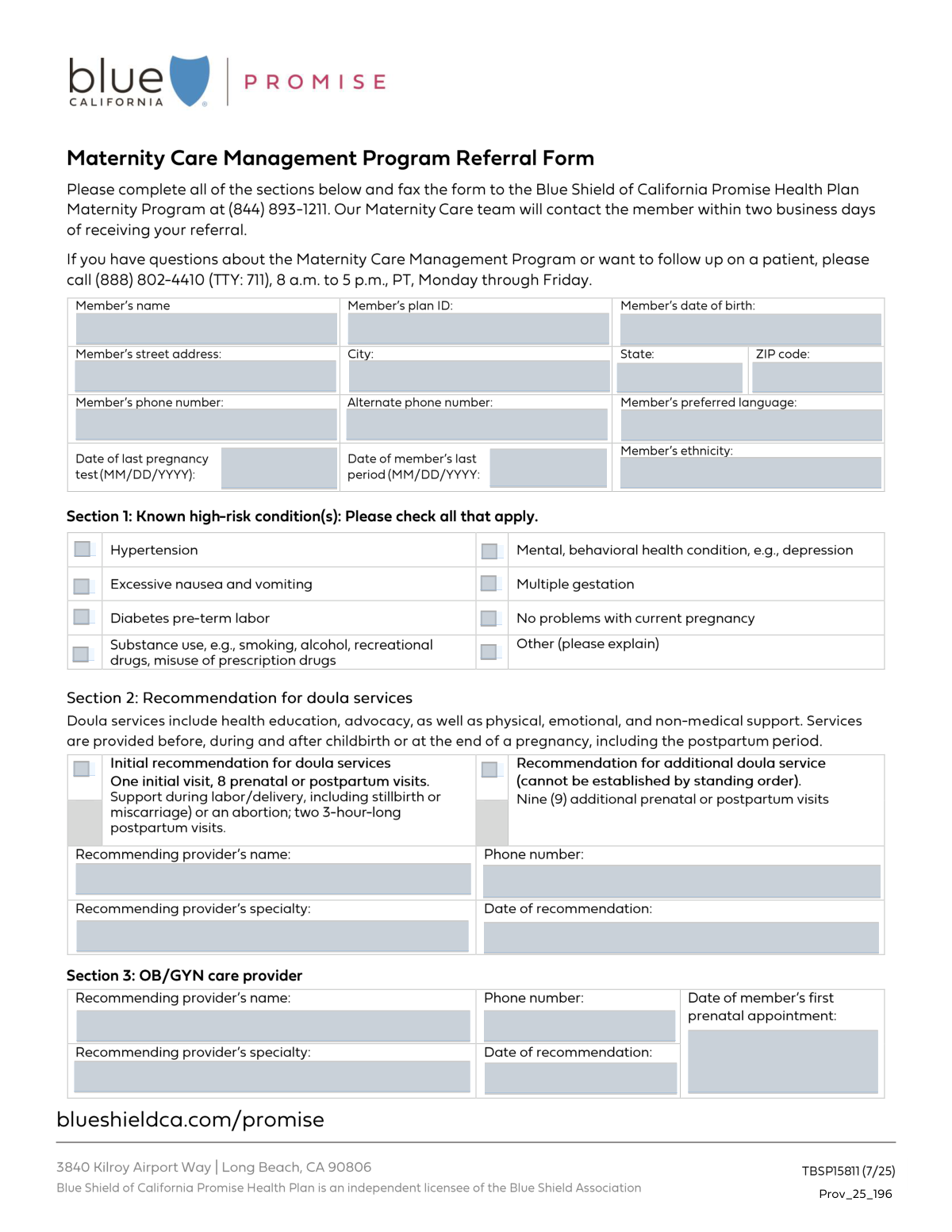
The Recommendation for Doula Services form is a medical document that healthcare providers, such as OB/GYNs, use to refer a pregnant member for doula support. It is important because it officially documents the medical necessity for these services by capturing patient demographics, pregnancy details, and specific high-risk conditions that warrant additional support. Today, this form can be filled out quickly and accurately using AI-powered services like Instafill.ai, which can also convert non-fillable PDF versions into interactive fillable forms.
Our AI automatically handles information lookup, data retrieval, formatting, and form filling.
It takes less than a minute to fill out Doula Services Recommendation using our AI form filling.
Securely upload your data. Information is encrypted in transit and deleted immediately after the form is filled out.

Form specifications

Form name: Recommendation for Doula Services
Number of fields: 32
Number of pages: 1
Language: English
main-image

Instafill Demo: How to fill out PDF forms in seconds with AI

How to Fill Out Doula Services Recommendation Online for Free in 2026

Are you looking to fill out a DOULA SERVICES RECOMMENDATION form online quickly and accurately? Instafill.ai offers the #1 AI-powered PDF filling software of 2026, allowing you to complete your DOULA SERVICES RECOMMENDATION form in just 37 seconds or less.
Follow these steps to fill out your DOULA SERVICES RECOMMENDATION form online using Instafill.ai:
  1. 1 Navigate to Instafill.ai and upload your Recommendation for Doula Services form or select it from the template library.
  2. 2 Use the AI assistant to automatically populate the member's personal information, such as name, plan ID, address, and contact details.
  3. 3 Enter key pregnancy information, including the date of the last period and the first prenatal appointment, allowing the AI to ensure correct formatting.
  4. 4 Check the boxes that correspond to the member's known high-risk conditions, such as hypertension, diabetes, or substance use.
  5. 5 Select the type of doula service being recommended, whether it's an initial package or a request for additional visits.
  6. 6 Input the recommending provider's details, including their name, specialty, and the date of the recommendation.
  7. 7 Review all entered information for accuracy before securely downloading, printing, or sharing the completed form.

Our AI-powered system ensures each field is filled out correctly, reducing errors and saving you time.

Why Choose Instafill.ai for Your Fillable Doula Services Recommendation Form?

Speed

Complete your Doula Services Recommendation in as little as 37 seconds.

Up-to-Date

Always use the latest 2026 Doula Services Recommendation form version.

Cost-effective

No need to hire expensive lawyers.

Accuracy

Our AI performs 10 compliance checks to ensure your form is error-free.

Security

Your personal information is protected with bank-level encryption.

Frequently Asked Questions About Form Doula Services Recommendation

This form is used by a healthcare provider to recommend doula services for a pregnant member, documenting their health information and any known high-risk conditions to support the request.

A healthcare provider, such as an OB/GYN or another qualified medical professional, should complete this form to recommend doula services for their patient.

You will need the member's personal details like name and plan ID, contact information, pregnancy dates (last period, first prenatal appointment), and a list of any known high-risk conditions.

The 'Initial recommendation' covers a standard set of services including prenatal/postpartum visits and labor support. The 'additional doula service' recommendation is for requesting nine extra visits beyond the initial package.

For conditions not explicitly listed, you can check the 'Other' box in the recommendation section and attach supporting documentation or notes to specify the condition.

Yes, the form includes a checkbox for 'No problems current preg,' allowing you to recommend services even for members without identified high-risk conditions.

They can be the same person, but not always. The 'Recommending Provider' is the individual filling out the form, while the 'OB/GYN Provider' is the member's primary obstetrician, so be sure to fill out both sections accurately.

Submission instructions are typically provided by the member's health plan. You should send the completed form to the address or portal specified by the insurance provider.

This package includes one initial visit, eight prenatal or postpartum visits, support during labor/delivery or other outcomes, and two 3-hour-long postpartum visits.

Yes, services like Instafill.ai use AI to accurately auto-fill form fields from your existing records, which can save time and help prevent data entry errors.

Simply upload the form to the Instafill.ai platform. It will become an interactive, fillable document that you can complete online, save, and print.

You can use a service like Instafill.ai to solve this problem. It can convert flat, non-fillable PDFs into interactive forms that you can easily complete on your computer.

This information helps ensure the member receives culturally competent care and that communication, particularly from the doula, is effective and respectful of the member's background.

Compliance Doula Services Recommendation
Validation Checks by Instafill.ai

1
Member's Date of Birth Validity
This check validates that the Member's Date of Birth is a valid date in MM/DD/YYYY format and is in the past. It also ensures the member's age is within a plausible range for pregnancy (e.g., 12 to 60 years old) to catch significant data entry errors. An invalid or implausible date would prevent proper member identification and risk assessment, leading to form rejection.
2
Member Plan ID Format
This validation verifies that the Member's Plan ID is not empty and conforms to the required structure, such as a specific length or alphanumeric pattern. An incorrect Plan ID prevents linking the form to the correct member record in the system, which is critical for billing and continuity of care. The submission will be rejected until a valid ID is provided.
3
Required Member Contact Information
This check ensures that the Member's Name, Street Address, City, State, ZIP code, and primary Phone Number are all filled out as they are marked as required fields. This information is mandatory for communication, service delivery, and record-keeping. Incomplete contact details would result in an inability to follow up with the member, causing the form to be flagged as incomplete.
4
Standard Phone Number Formatting
This rule checks that the 'Member's phone number', 'Alternate phone number', and 'OB/GYN Provider Phone Number' fields, if filled, adhere to a standard 10-digit format. Consistent formatting is crucial for system integration and ensuring successful communication attempts with the member and providers. Invalid formats will trigger an error message requiring the user to correct the entry.
5
Pregnancy Date Chronology
This validation ensures a logical sequence between pregnancy-related dates. It checks that the 'Date of last pregnancy test' is on or after the 'Date of member's last period', and that the 'First Prenatal Appointment Date' is also after the last period date. This chronological consistency is vital for accurately assessing the pregnancy timeline, and a logical error would require correction before processing.
6
Date Field Format and Plausibility
This check applies to all date fields, verifying the MM/DD/YYYY format and ensuring the date is not in the future (with the possible exception of appointment dates). This prevents nonsensical data entry for historical events like date of birth or last period. An invalid format or an impossible date will cause the submission to fail until corrected.
7
Conditional Requirement for Recommendation Details
This rule ensures that if either the 'Initial recommendation for doula services' or 'Recommendation for additional doula service' checkbox is checked, then the 'Recommending Provider's Name', 'Recommending Provider's Specialty', and 'Recommendation Date' fields must be completed. A recommendation is invalid for authorization without identifying the provider who made it. The form will be rejected if these fields are missing when a recommendation is selected.
8
Mutually Exclusive Health Status
This validation checks that the 'No problems current preg' checkbox is not selected at the same time as any of the high-risk condition checkboxes (e.g., Hypertension, Diabetes) or the 'Multiple gestation' checkbox. These selections are logically contradictory and indicate a user error. The system should prompt the user to resolve the conflict before allowing submission.
9
At Least One Health Status Selection
This check verifies that at least one checkbox from the health condition section is selected, whether it's a high-risk condition or the 'No problems current preg' option. This ensures the member's current pregnancy status is explicitly stated for the record. A form with no selection in this area is considered incomplete as it lacks critical clinical information.
10
ZIP Code Format Validation
This check ensures the 'ZIP code' field contains a valid 5-digit or 9-digit (ZIP+4) numerical format. A correct ZIP code is essential for accurate mailings, demographic analysis, and verifying service area eligibility. An invalid format will prevent the form from being saved and prompt the user for correction.
11
State Abbreviation Validity
This validation confirms that the value entered in the 'State' field is a valid two-letter US state or territory abbreviation. Using standardized abbreviations is critical for address verification systems and data integrity. An invalid entry would cause processing errors and require manual correction.
12
Recommendation Date Logic
This check ensures the 'Recommendation Date' is a valid date that is not in the future. A recommendation cannot be made on a future date. This simple check prevents a common data entry error and ensures the integrity of the recommendation's timeline, rejecting any submissions with a future date.
13
Completeness of OB/GYN Provider Information
This validation ensures that both the 'OB/GYN Provider Name' and 'OB/GYN Provider Phone Number' fields are completed. This information is critical for coordinating care and verifying the member is under the supervision of a qualified provider. Missing this information creates a gap in the care record and will cause the form to be rejected as incomplete.

Common Mistakes in Completing Doula Services Recommendation

Using Incorrect Date Formats

Fields like 'Date of last pregnancy test' and 'Recommendation Date' explicitly require the MM/DD/YYYY format. People often use other formats like DD/MM/YYYY or YYYY-MM-DD out of habit, which causes data entry errors and can delay processing. This requires manual correction and slows down the approval of services. To avoid this, always double-check the required format; AI-powered tools like Instafill.ai can also help by automatically formatting dates correctly upon entry.

Confusing Recommending and OB/GYN Provider Details

The form asks for both the 'Recommending Provider's Name' and the 'OB/GYN Provider Name,' which may not be the same person. Users frequently enter the same information in both fields incorrectly or mix up the names and phone numbers. This confusion can lead to communication breakdowns and delays in verifying the recommendation. To prevent this, carefully read each field label and ensure the correct provider's information is entered in the corresponding section.

Incomplete or Contradictory Health Condition Selection

A common error is failing to check all known high-risk conditions or checking contradictory options like 'No problems current preg' alongside a specific high-risk condition like 'Hypertension.' This can happen due to oversight or misunderstanding the form's layout. Inaccurate information can lead to an incorrect assessment of the member's needs and may result in them not receiving appropriate care. Carefully review all health-related checkboxes to ensure they accurately reflect the member's complete health status.

Providing an Incomplete or Incorrect Member Address

Applicants often forget to include the ZIP code or enter an incomplete street address, such as omitting an apartment or suite number. An incomplete address can prevent important documents or communications from being delivered, potentially delaying access to care. Always verify the full address, including the street, city, state, and ZIP code, is complete and accurate. AI-powered form fillers like Instafill.ai can help prevent this by using address auto-completion and validation to ensure the address is deliverable.

Entering an Incorrect or Misformatted Member Plan ID

The 'Member's plan ID' is a critical field for identifying the patient and verifying their eligibility. People often make typos, transpose numbers, or omit characters, leading to an invalid ID that will cause the form to be rejected. This requires a follow-up to correct the information and significantly delays the processing of the recommendation. It's crucial to copy the ID exactly as it appears on the member's insurance card.

Incorrectly Selecting Doula Service Recommendations

The form distinguishes between an 'Initial recommendation' and a recommendation for 'additional' doula visits. A common mistake is to check 'Recommendation for additional doula service' without a prior initial recommendation being on file, or checking both boxes simultaneously. This creates confusion about the services being requested and can lead to billing errors or delays in service authorization. Ensure you are selecting the correct option based on the member's current service status.

Omitting the Recommending Provider's Specialty

The form has two fields for provider specialty, which can be confusing, leading users to leave this critical information blank. The provider's specialty is essential for context and verifying that the recommendation is coming from an appropriate source. Leaving it blank can slow down the approval process as staff may need to contact the provider's office to obtain the missing information. Always ensure all required provider details are filled in completely.

Checking 'Other' Without Providing Details

The form includes an 'Other' checkbox under the high-risk conditions, but users often check it without providing any specific details in an attached note or separate communication. This provides no actionable information for the care team and defeats the purpose of the option. If an 'Other' condition applies, it's essential to communicate the specific details to ensure the member's needs are fully understood and addressed.

Leaving Contact Information Blank

Key contact fields like 'Member's phone number' or 'OB/GYN Provider Phone Number' are sometimes left empty. This occurs when the person filling out the form doesn't have the information readily available and forgets to add it later. Missing contact information is a major roadblock, as it prevents the care team or administrative staff from following up on questions, which can halt the entire recommendation process. If the form is a non-fillable PDF, a tool like Instafill.ai can convert it to a fillable version, making it easier to input and review all required fields.
Saved over 80 hours a year

“I was never sure if my IRS forms like W-9 were filled correctly. Now, I can complete the forms accurately without any external help.”

Kevin Martin Green

Your data stays secure with advanced protection from Instafill and our subprocessors

Robust compliance program

Transparent business model

You’re not the product. You always know where your data is and what it is processed for.

ISO 27001, HIPAA, and GDPR

Our subprocesses adhere to multiple compliance standards, including but not limited to ISO 27001, HIPAA, and GDPR.

Security & privacy by design

We consider security and privacy from the initial design phase of any new service or functionality. It’s not an afterthought, it’s built-in, including support for two-factor authentication (2FA) to further protect your account.

Fill out Doula Services Recommendation with Instafill.ai

Worried about filling PDFs wrong? Instafill securely fills recommendation-for-doula-services forms, ensuring each field is accurate.