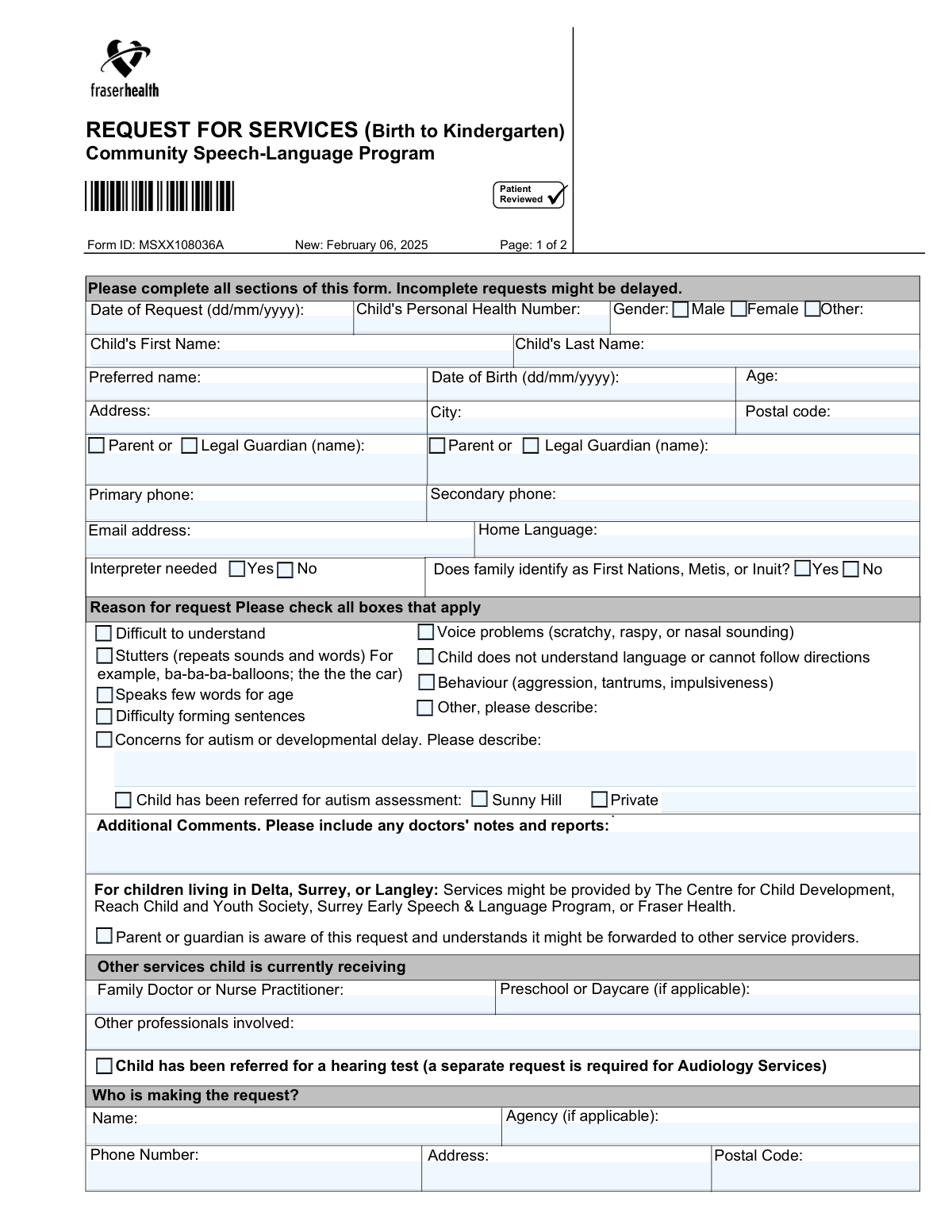
Yes! You can use AI to fill out Request for Services (Birth to Kindergarten) Community Speech-Language Program

The Request for Services (Birth to Kindergarten) form is a crucial document for parents and guardians to initiate a referral for speech-language services for children who have not yet started kindergarten. It gathers essential information about the child's personal details, health history, and specific concerns regarding their communication, behavior, or development, allowing programs to evaluate the child's needs. Today, this form can be filled out quickly and accurately using AI-powered services like Instafill.ai, which can also convert non-fillable PDF versions into interactive fillable forms.
Our AI automatically handles information lookup, data retrieval, formatting, and form filling.
It takes less than a minute to fill out MSXX108036A using our AI form filling.
Securely upload your data. Information is encrypted in transit and deleted immediately after the form is filled out.

Form specifications

Form name: Request for Services (Birth to Kindergarten) Community Speech-Language Program
Number of fields: 52
Number of pages: 2
Language: English
main-image

Instafill Demo: How to fill out PDF forms in seconds with AI

How to Fill Out MSXX108036A Online for Free in 2026

Are you looking to fill out a MSXX108036A form online quickly and accurately? Instafill.ai offers the #1 AI-powered PDF filling software of 2026, allowing you to complete your MSXX108036A form in just 37 seconds or less.
Follow these steps to fill out your MSXX108036A form online using Instafill.ai:
  1. 1 Navigate to Instafill.ai and upload the 'Request for Services (Birth to Kindergarten)' form or select it from the template library.
  2. 2 Use the AI assistant to automatically fill in the child's personal information, including their name, date of birth, personal health number, and address.
  3. 3 Provide the parent or legal guardian's contact details, including name, phone numbers, and email address.
  4. 4 Check the boxes that accurately describe the reason for the request, detailing concerns about the child's speech, language, behavior, or potential developmental delays.
  5. 5 List any other services the child is receiving, such as their family doctor, preschool, or other involved professionals, and indicate if a hearing test has been referred.
  6. 6 Review all the information entered by the AI for accuracy, make any necessary corrections, and acknowledge that the parent/guardian is aware of the request.
  7. 7 Securely download, print, or submit the completed form to the appropriate community health office as indicated on the form's instructions.

Our AI-powered system ensures each field is filled out correctly, reducing errors and saving you time.

Why Choose Instafill.ai for Your Fillable MSXX108036A Form?

Speed

Complete your MSXX108036A in as little as 37 seconds.

Up-to-Date

Always use the latest 2026 MSXX108036A form version.

Cost-effective

No need to hire expensive lawyers.

Accuracy

Our AI performs 10 compliance checks to ensure your form is error-free.

Security

Your personal information is protected with bank-level encryption.

Frequently Asked Questions About Form MSXX108036A

This is a 'Request for Services' form for the Community Speech-Language Program. It should be completed by a parent, guardian, or professional for a child from birth to kindergarten age who may need speech and language support.

You must fax, mail, or drop off the form to the office corresponding to the city where the child lives. The second page of the form lists the correct contact information and addresses for each service area.

You will need your child's Personal Health Number, date of birth, and address. It is also helpful to have contact details for the child's family doctor, daycare or preschool, and any other professionals involved in their care.

The form states that incomplete requests might be delayed. To ensure your request is processed efficiently, please fill out all sections completely and accurately.

For children in these areas, services may be provided by partner agencies. You should still send the form to the Central Referral office in Surrey, and they will forward it to the appropriate service provider.

Yes, the form encourages you to include any relevant doctors' notes and reports. You can list these documents in the 'Additional Comments' section.

No, this form is only for speech and language services. The form notes that a separate request is required for Audiology Services to get a hearing test.

Yes, a professional can make the request, but the parent or guardian must be aware of and consent to it. There is a checkbox on the form to confirm the parent or guardian is aware of the request.

In the 'Reason for request' section, you can check the box for 'Other, please describe' and write a detailed explanation of your concerns in the space provided.

Use the dedicated section to describe concerns for autism or developmental delay. You can also indicate if a referral for an autism assessment has already been made to a private clinic or Sunny Hill.

Yes, services like Instafill.ai use AI to help you accurately auto-fill form fields, which can save you time and reduce errors. This is especially helpful for entering repetitive information.

Simply upload a digital copy of the form to the Instafill.ai platform. Their AI will make the fields interactive, allowing you to type your answers directly and save your progress securely.

You can use a service like Instafill.ai, which can convert flat, non-fillable PDFs into interactive, fillable forms. This allows you to type your answers directly onto the form instead of printing and writing by hand.

Compliance MSXX108036A
Validation Checks by Instafill.ai

1
Date of Birth Precedes Request Date
This validation ensures that the 'Date of Birth' is a date that occurs before the 'Date of Request'. This is a critical logical check to ensure the data is chronologically possible and prevents nonsensical entries. If this validation fails, the user should be prompted to correct one or both of the dates before the form can be submitted.
2
Age and Date of Birth Consistency
This check verifies that the entered 'Age' is consistent with the 'Date of Birth'. The system should calculate the age based on the date of birth and the current date (or date of request) and flag any discrepancy with the user-entered value. This prevents data entry errors and ensures the child's age is accurate for service eligibility, which is crucial for a 'Birth to Kindergarten' program. A failed validation would require the user to correct either the age or the date of birth.
3
Canadian Postal Code Format
This validation ensures that the 'Postal Code' fields for both the child and the requester adhere to the standard Canadian format (e.g., A1A 1A1). Correct postal codes are essential for mail delivery and for routing the request to the correct service center based on geographic location, as indicated by the list of offices. An invalid format would trigger an error message asking the user to enter a valid Canadian postal code.
4
Conditional Requirement for 'Other Reason' Description
This check ensures that if the 'Other, please describe:' checkbox under 'Reason for request' is selected, the corresponding text field is not empty. This prevents submissions where a reason is indicated but not explained, which would require a follow-up call to clarify. If the box is checked and the field is empty, the system should prompt the user to provide a description or uncheck the box.
5
Mandatory Guardian Awareness Acknowledgement
This validation confirms that the checkbox 'Parent or guardian is aware of this request and understands it might be forwarded...' is checked. This is a critical consent and awareness item, confirming that the legal guardian has approved the submission of their child's personal health information. A submission cannot be accepted without this acknowledgement, so the field must be marked as required.
6
At Least One Reason for Request Selected
This validation ensures that at least one checkbox is selected in the 'Reason for request' section. A form submitted without any reason is incomplete and cannot be triaged or processed effectively. This check guarantees that the receiving service provider has a baseline understanding of the child's needs. If no reason is selected, the user should be prompted to select at least one applicable concern.
7
Primary Guardian and Contact Information Completeness
This check verifies that the 'First Guardian Name' and 'Primary Phone' fields are filled out. These fields are essential for identifying the primary caregiver and establishing a reliable point of contact for scheduling and follow-up. Without this information, the service provider cannot process the request or communicate with the family. These fields should be marked as mandatory.
8
Valid Email Address Format
This validation checks that the value entered in the 'Email address' field follows the standard format of an email (e.g., [email protected]). This ensures that email can be used as a valid channel for communication if needed. An invalid format would prevent submission and prompt the user to enter a correctly formatted email address or leave the field blank if it is optional.
9
Exclusive Selection for 'Interpreter Needed'
This check ensures that for the 'Interpreter needed' question, either 'Yes' or 'No' is selected, but not both. This enforces the logic of a radio button group, preventing contradictory data. This information is vital for arranging appropriate support for the family during appointments. If both or neither are selected, the user should be prompted to make a single, valid choice.
10
Personal Health Number Format Validation
This validation verifies that the 'Child's Personal Health Number' conforms to the specific format required by the governing health authority (e.g., 10 digits for British Columbia). A valid PHN is critical for accurately identifying the patient, accessing records, and billing services. An incorrectly formatted number could lead to delays or rejection of the service request, so the system should flag it upon entry.
11
Conditional Requirement for Autism Concern Description
This validation ensures that if the 'Concerns for autism or developmental delay' checkbox is checked, the corresponding description text area is filled in. This context is crucial for the clinical team to understand the specific concerns and triage the request appropriately. If the box is checked but no description is provided, the form submission should be blocked until the user adds the required details.
12
Requester Information Completeness
This check ensures that the 'Name' and 'Phone Number' fields under the 'Who is making the request?' section are completed. Since the requester may be a doctor, teacher, or other professional, their contact information is essential for clarifying details about the referral. Failing to provide this information could create a bottleneck if the guardian is unavailable or if there are questions about the source of the request.

Common Mistakes in Completing MSXX108036A

Submitting the Form to the Incorrect Office

The form's second page lists specific submission offices based on the child's city of residence. A frequent error is sending the form to the wrong location, for example, sending a form for a child in Burnaby to the Surrey central office. This mistake causes significant processing delays, as the request must be manually identified and rerouted to the correct regional team. To avoid this, carefully match the child's city with the corresponding office address in the table on page 2 before mailing or faxing.

Using the Wrong Date Format

The form explicitly requires dates in 'dd/mm/yyyy' format, but many people in North America instinctively use 'mm/dd/yyyy'. This can lead to data entry errors and confusion, especially for dates where the day is 12 or under, potentially misrepresenting the child's birth date or the request date. Always double-check the format instructions; using an AI form-filler like Instafill.ai can help by automatically validating and formatting dates according to the form's specific requirements.

Omitting the Personal Health Number (PHN)

The Child's Personal Health Number is a critical identifier for accessing health records and services. People often forget to include it or make transcription errors due to its length. An absent or incorrect PHN will halt the intake process, as administrative staff must contact the family to obtain the correct number before they can create or locate the child's file, causing unnecessary delays.

Forgetting the Guardian Awareness Acknowledgement

Near the bottom of the first page, there is a mandatory checkbox confirming the parent/guardian is aware of the request and its potential forwarding to other service providers. Overlooking this checkbox is a common mistake that renders the form incomplete. Legally and procedurally, the request cannot be processed or shared without this consent, forcing staff to return the form or contact the family for confirmation.

Providing Vague Descriptions for Concerns

When checking boxes like 'Concerns for autism or developmental delay' or 'Other', the form asks for a description. A common mistake is to leave this description blank or provide a very brief, non-specific note like 'developmental issues'. This lack of detail prevents the clinical team from properly triaging the request and understanding the child's specific needs, which can delay the scheduling of an appropriate assessment.

Failing to List All Other Involved Professionals

The 'Other services child is currently receiving' section is vital for care coordination but is often left incomplete. Parents or requesters may forget to list all professionals involved, such as pediatricians, occupational therapists, or private speech therapists. This omission creates an incomplete picture of the child's support system, potentially leading to duplicated assessments or a lack of integrated care planning between providers.

Confusing 'Requester' with 'Parent/Guardian'

The form has separate fields for the parent/guardian and the person making the request. When a third party like a doctor or teacher fills out the form, they may mistakenly enter their own information in the 'Parent or Legal Guardian' section. This creates confusion regarding legal guardianship and who the primary contact should be. It is crucial to ensure the parent's details are in the guardian section and the submitter's details are in the 'Who is making the request?' section.

Illegible Handwriting on a Printed Form

When this form is printed and filled out by hand, poor handwriting can make critical information like names, phone numbers, and addresses unreadable. This leads to data entry errors, failed contact attempts, and potential rejection of the form, requiring a complete resubmission. To prevent this, it's best to fill out the form digitally. If the original is a non-fillable PDF, a tool like Instafill.ai can convert it into a fillable version to ensure all entries are clear and legible.

Incomplete Address and Postal Code

Users sometimes provide a partial address, forgetting a unit number, or they enter an incorrect postal code. Since service eligibility is determined by the child's home address, any error can lead to the form being routed to the wrong service area, causing delays. An incomplete address also prevents the service provider from sending important documents by mail, hindering communication.
Saved over 80 hours a year

“I was never sure if my IRS forms like W-9 were filled correctly. Now, I can complete the forms accurately without any external help.”

Kevin Martin Green

Your data stays secure with advanced protection from Instafill and our subprocessors

Robust compliance program

Transparent business model

You’re not the product. You always know where your data is and what it is processed for.

ISO 27001, HIPAA, and GDPR

Our subprocesses adhere to multiple compliance standards, including but not limited to ISO 27001, HIPAA, and GDPR.

Security & privacy by design

We consider security and privacy from the initial design phase of any new service or functionality. It’s not an afterthought, it’s built-in, including support for two-factor authentication (2FA) to further protect your account.

Fill out MSXX108036A with Instafill.ai

Worried about filling PDFs wrong? Instafill securely fills request-for-services-birth-to-kindergarten-community-speech-language-program forms, ensuring each field is accurate.