Yes! You can use AI to fill out Request to Extend Deadline

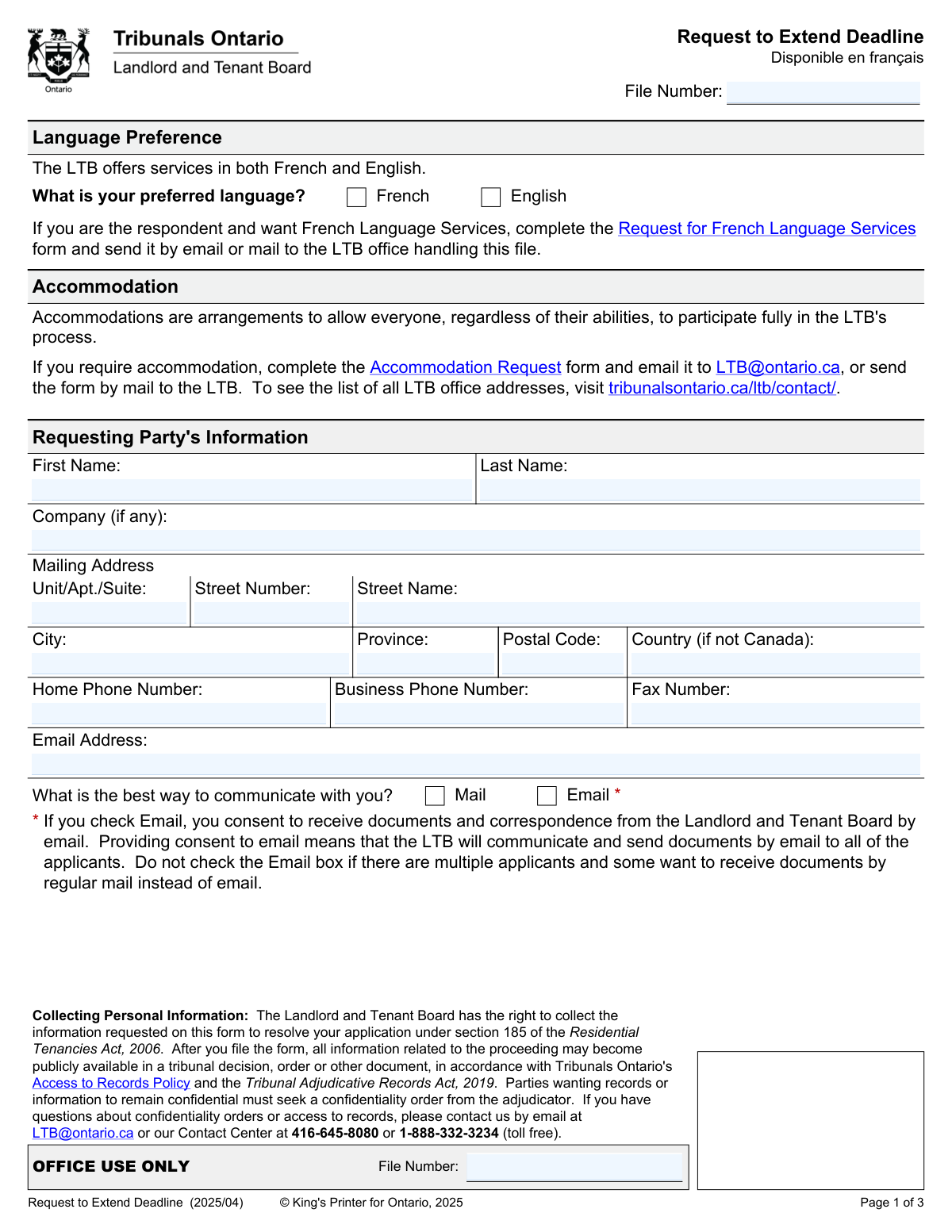
The Request to Extend Deadline is an official form submitted to the Landlord and Tenant Board (LTB) of Ontario by a party involved in a proceeding who needs more time to file a motion, application, or other submission. It is crucial for ensuring procedural fairness, allowing parties to present their case properly even when unforeseen circumstances cause delays. Today, this form can be filled out quickly and accurately using AI-powered services like Instafill.ai, which can also convert non-fillable PDF versions into interactive fillable forms.
Our AI automatically handles information lookup, data retrieval, formatting, and form filling.
It takes less than a minute to fill out LTB Request to Extend Deadline using our AI form filling.
Securely upload your data. Information is encrypted in transit and deleted immediately after the form is filled out.

Form specifications

Form name: Request to Extend Deadline
Number of fields: 60
Number of pages: 4
Language: English
main-image

Instafill Demo: How to fill out PDF forms in seconds with AI

How to Fill Out LTB Request to Extend Deadline Online for Free in 2026

Are you looking to fill out a LTB REQUEST TO EXTEND DEADLINE form online quickly and accurately? Instafill.ai offers the #1 AI-powered PDF filling software of 2026, allowing you to complete your LTB REQUEST TO EXTEND DEADLINE form in just 37 seconds or less.
Follow these steps to fill out your LTB REQUEST TO EXTEND DEADLINE form online using Instafill.ai:
  1. 1 Navigate to Instafill.ai and upload the LTB Request to Extend Deadline form or select it from their library.
  2. 2 Provide your personal information, including your name, contact details, and the LTB file number, allowing the AI to populate the 'Requesting Party's Information' section.
  3. 3 Enter the full address of the rental unit or property covered by the application.
  4. 4 Clearly indicate the type of deadline you are requesting to extend by checking the appropriate box (e.g., Request to Review an Order) or specifying in the 'other' field.
  5. 5 Carefully explain the reasons for your request in the provided text box, detailing why the delay occurred and why the extension is necessary. Upload any supporting documents when prompted.
  6. 6 Review all auto-filled information for accuracy, then provide your digital signature and the date to certify the request.
  7. 7 Download the completed form and submit it to the Landlord and Tenant Board according to their filing procedures.

Our AI-powered system ensures each field is filled out correctly, reducing errors and saving you time.

Why Choose Instafill.ai for Your Fillable LTB Request to Extend Deadline Form?

Speed

Complete your LTB Request to Extend Deadline in as little as 37 seconds.

Up-to-Date

Always use the latest 2026 LTB Request to Extend Deadline form version.

Cost-effective

No need to hire expensive lawyers.

Accuracy

Our AI performs 10 compliance checks to ensure your form is error-free.

Security

Your personal information is protected with bank-level encryption.

Frequently Asked Questions About Form LTB Request to Extend Deadline

This form is used to ask the Landlord and Tenant Board (LTB) for more time to submit a motion, request, application, or other submission after the original deadline has passed. It can be used by landlords, tenants, or other parties involved in an LTB case.

Any landlord, tenant, or other party involved in a Landlord and Tenant Board (LTB) proceeding who needs to file a document past its due date can submit this request.

You must provide a detailed explanation for your request, any supporting documents (like a medical note), and a copy of the motion, application, or submission you want to file late. Failure to include these may result in your request being denied.

Clearly explain why you missed the deadline and why your request for an extension should be granted, ensuring the reasons are directly related to your LTB application. The LTB will consider factors like the length of the delay, the reason for it, and any potential harm to any party.

If your request is denied, the original deadline will apply, and your late submission will not be accepted. You cannot make another request for the same deadline unless there has been a significant change in your circumstances.

The LTB file number is located on official documents you have received from the Landlord and Tenant Board, such as a Notice of Hearing or other correspondence related to your case.

By checking the 'Email' box, you consent to receive all official documents and correspondence from the LTB by email. If there are multiple applicants and not all of them agree to email, you should select 'Mail' instead.

No, the form states that the LTB cannot extend certain types of deadlines. For specific information on which deadlines are not extendable, you should contact the Landlord and Tenant Board directly.

If you require an accommodation to participate in the LTB process, you must complete the separate 'Accommodation Request' form and send it to the LTB. This form is only for extending a deadline, not for requesting accommodations.

You only need to complete this section if you have hired a legal representative, such as a lawyer or paralegal, to act on your behalf. If you are representing yourself, you can leave this section blank.

Yes, you can use AI-powered services like Instafill.ai to help fill out your form. These tools can accurately populate fields based on your information, saving you time and reducing errors.

You can easily fill out this form online by uploading it to Instafill.ai. The platform allows you to fill in all the required fields digitally, add your signature, and then download the completed PDF.

If you have a non-fillable or 'flat' PDF, you can upload it to Instafill.ai. The service can convert it into an interactive, fillable form that you can complete on your computer.

Compliance LTB Request to Extend Deadline
Validation Checks by Instafill.ai

1
Ensures LTB File Number is Provided
This check verifies that the 'File Number' field is not empty. The file number is essential for associating the request with the correct case file at the Landlord and Tenant Board (LTB). A missing file number would prevent the request from being processed, causing significant delays or rejection of the submission.
2
Validates Requesting Party's Full Name
This validation ensures that both the 'First Name' and 'Last Name' fields for the requesting party are completed. A full legal name is required for proper identification and to ensure the request is officially logged against the correct individual in the LTB system. Incomplete name information can lead to processing errors and rejection of the form.
3
Verifies Canadian Postal Code Format
This check confirms that the 'Postal Code' for Canadian addresses is entered in the correct A1A 1A1 format. This formatting is crucial for mail delivery and address validation systems used by the LTB. An incorrectly formatted postal code could result in failed mail delivery of important notices and decisions.
4
Conditional Email Address Requirement
This validation ensures that if the 'Email' checkbox is selected as the preferred method of communication, the 'Email Address' field is populated with a validly formatted email. Consent to email communication is legally binding, and a missing or invalid email address would make it impossible for the LTB to send documents as requested. This failure would halt communication and require manual follow-up.
5
Confirms Language Preference Selection
This check verifies that the user has selected either 'French' or 'English' as their language preference. This information is critical for the LTB to provide services and communications in the party's chosen official language, as is their right. Failure to select a preference could delay the processing of the request while the LTB seeks clarification.
6
Validates Address Jurisdiction Logic
This check enforces consistency for address fields based on location. If the address is in Canada, the 'Province' and 'Postal Code' fields are required, while the 'Country' field should be empty. Conversely, if the address is outside Canada, the 'Country' field is required, and 'Province' and 'Postal Code' should be blank. This prevents ambiguous or incomplete address data, ensuring correspondence is sent to the correct location.
7
Ensures a Reason for Request is Selected
This validation confirms that at least one of the checkboxes indicating the reason for the extension request has been selected. The form requires the party to specify what deadline they are asking to extend (e.g., 'file a Request to Review an Order'). Without this selection, the LTB does not know the purpose of the request, and it cannot be evaluated.
8
Validates 'Other' Reason Explanation
If the 'other' checkbox is selected as the reason for the request, this check ensures the corresponding text field explaining the 'other' reason is not empty. This provides necessary context for the LTB Member to understand and adjudicate the request. An empty explanation for an 'other' reason would render the request incomplete and likely lead to its denial.
9
Verifies Presence of Detailed Reasons
This check ensures that the main text area for 'Explain the reasons for your request' is not left blank. The justification for the extension is the most critical part of the submission, and the LTB Member's decision depends on it. Submitting the form without any reasons would result in an automatic denial of the request.
10
Confirms Signature Party Type Selection
This validation verifies that one of the party type checkboxes (e.g., 'Landlord', 'Tenant', 'Tenant Representative') has been selected in the signature section. This identifies the capacity in which the person is signing the form, which is a legal requirement for official submissions. An un-selected party type makes the signature's authority unclear and could invalidate the request.
11
Validates Signature Date Format and Presence
This check ensures the 'Date' field in the signature section is filled and adheres to the specified dd/mm/yyyy format. The signature date is legally significant as it records when the request was formally made, which is relevant to the length of the delay. An invalid or missing date can call the timeliness and validity of the entire submission into question.
12
Conditional Validation of Legal Representative Information
This check is triggered if the signatory identifies as a 'Landlord Representative' or 'Tenant Representative'. It then validates that the required fields in the 'Information About the Legal Representative' section, such as name and Law Society number, are completed. This is crucial for verifying the representative's credentials and authority to act on behalf of the party.
13
Validates Province Abbreviation
This check ensures that the value entered in the 'Province' field is a valid two-letter Canadian provincial or territorial abbreviation (e.g., ON, QC, AB). Using standardized abbreviations is essential for data integrity and compatibility with address databases. An invalid entry could cause mail to be misdirected or returned as undeliverable.
14
Validates Phone Number Format
This validation checks that any phone numbers entered (Home, Business, Day, Evening) follow a consistent 10-digit format, such as NNN-NNN-NNNN. Standardizing the format ensures the data is clean and can be reliably used by LTB staff for contact purposes. Incorrectly formatted numbers may be unusable, hindering communication if email or mail fails.

Common Mistakes in Completing LTB Request to Extend Deadline

Missing or Incorrect LTB File Number

Applicants often forget to include the LTB file number or enter it with typos, especially if they don't have their Notice of Hearing handy. Without the correct file number, the LTB cannot link the request to the existing case, causing significant processing delays or outright rejection of the form. To avoid this, always locate your file number on previous LTB correspondence and double-check it for accuracy before submitting.

Providing Vague or Unsubstantiated Reasons

A frequent error is providing general or emotional reasons instead of the specific, factual explanations required by the LTB. For example, simply writing 'I need more time' is insufficient and will likely lead to denial because the LTB Member cannot assess the request against criteria like prejudice or good faith. To prevent this, clearly explain the specific circumstances causing the delay, reference the factors in Rule 16.4, and connect your reasons directly to the application.

Failing to Attach Required Supporting Documents

The form explicitly states that failure to include supporting documents may lead to denial, yet many applicants forget this crucial step. This includes evidence like medical notes, travel itineraries, or correspondence that proves the reason for the delay. This mistake critically weakens the request, as the LTB has no evidence to verify the applicant's claims. Always gather all relevant documents before filling out the form and ensure they are attached with your submission.

Forgetting to Include the Late Motion or Application

A very common and critical error is failing to submit a copy of the actual motion, request, or application that the person wants to file late. The instructions clearly state this is required unless there are exceptional reasons for not doing so. Without it, the LTB cannot grant the extension because they don't know what they would be accepting. Always prepare the document you intend to file and submit it along with this request form.

Incorrectly Formatting the Mailing Address

The form requires the street number, street name, and unit number to be entered in separate fields, but people often combine them into one line out of habit. This can cause mail to be returned and critical notices to be missed, potentially causing you to miss your hearing date. To avoid this, carefully enter each address component into its designated field. AI-powered tools like Instafill.ai can prevent this by automatically parsing and placing address components into the correct fields.

Misinterpreting the Email Communication Consent

Applicants often check the 'Email' communication box without realizing it provides consent for all parties listed on the application to receive documents electronically. If one co-applicant prefers paper mail, checking this box overrides their preference and can lead to them missing critical communications. This happens due to not reading the fine print next to the checkbox. Before checking the box, confirm with all co-applicants that they agree to receive all LTB correspondence via email.

Submitting Inadequate Medical Documentation

When a delay is due to a medical issue, applicants often submit a generic doctor's note that lacks the specific details the LTB requires. The form instructions specify that medical documents must include the diagnosis, its effect on participation, and a professional opinion on a timeline for recovery. A note simply stating a person was 'unwell' will likely be deemed insufficient, leading to the request's denial. Ensure your medical professional provides a letter that addresses all the points mentioned in the form's instructions.

Incorrect Signature or Party Type Selection

An applicant may forget to sign the form, or a representative might sign in the applicant's section, which can invalidate the request. Another common error is failing to check the correct box to identify as a 'Landlord,' 'Tenant,' or 'Representative.' This confusion causes processing delays as the LTB seeks clarification. Always review the signature section carefully, ensure the correct person signs in the right place, and check the box that accurately reflects your role.

Confusing Mailing Address with Rental Unit Address

The form asks for the 'Requesting Party's Mailing Address' and the 'Unit...Covered by the Application' in two separate sections. Applicants sometimes enter the same address in both, even if their mailing address is different from the rental property. This can lead to important legal documents being sent to the wrong location. Double-check that you are providing your current, reliable mailing address on page 1 and the specific rental property address on page 2.

Using an Incorrect Date Format

The signature section explicitly requires the date in dd/mm/yyyy format, but many people are accustomed to the mm/dd/yyyy format and enter it incorrectly. This can create ambiguity about when the form was signed, potentially causing administrative issues or challenges to the form's validity. Always double-check the required format and enter the day, month, and year accordingly. Smart form-filling tools like Instafill.ai can help by automatically formatting dates correctly based on the field's requirements, especially if the form is a non-fillable PDF which the tool can convert.
Saved over 80 hours a year

“I was never sure if my IRS forms like W-9 were filled correctly. Now, I can complete the forms accurately without any external help.”

Kevin Martin Green

Your data stays secure with advanced protection from Instafill and our subprocessors

Robust compliance program

Transparent business model

You’re not the product. You always know where your data is and what it is processed for.

ISO 27001, HIPAA, and GDPR

Our subprocesses adhere to multiple compliance standards, including but not limited to ISO 27001, HIPAA, and GDPR.

Security & privacy by design

We consider security and privacy from the initial design phase of any new service or functionality. It’s not an afterthought, it’s built-in, including support for two-factor authentication (2FA) to further protect your account.

Fill out LTB Request to Extend Deadline with Instafill.ai

Worried about filling PDFs wrong? Instafill securely fills request-to-extend-deadline forms, ensuring each field is accurate.