Yes! You can use AI to fill out Request to Reschedule a Hearing

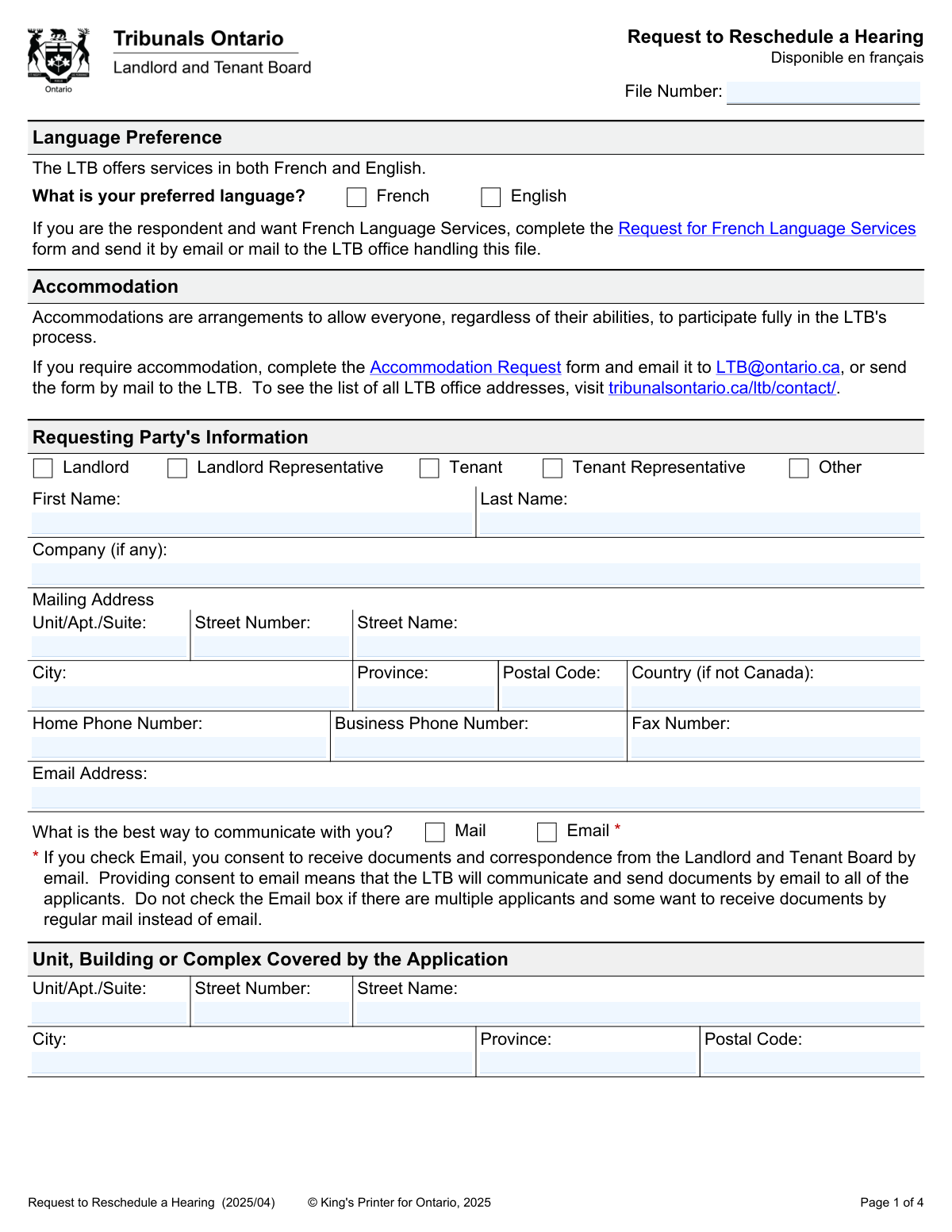
The Request to Reschedule a Hearing form is a legal document used in Ontario by either a landlord or a tenant to ask the Landlord and Tenant Board (LTB) to postpone a scheduled hearing to a later date. It is crucial to obtain consent from the other party and provide valid reasons and scheduling availability to ensure the request is considered. Today, this form can be filled out quickly and accurately using AI-powered services like Instafill.ai, which can also convert non-fillable PDF versions into interactive fillable forms.
Our AI automatically handles information lookup, data retrieval, formatting, and form filling.
It takes less than a minute to fill out Request to Reschedule a Hearing using our AI form filling.
Securely upload your data. Information is encrypted in transit and deleted immediately after the form is filled out.

Form specifications

Form name: Request to Reschedule a Hearing
Number of fields: 68
Number of pages: 4
Language: English
main-image

Instafill Demo: How to fill out PDF forms in seconds with AI

How to Fill Out Request to Reschedule a Hearing Online for Free in 2026

Are you looking to fill out a REQUEST TO RESCHEDULE A HEARING form online quickly and accurately? Instafill.ai offers the #1 AI-powered PDF filling software of 2026, allowing you to complete your REQUEST TO RESCHEDULE A HEARING form in just 37 seconds or less.
Follow these steps to fill out your REQUEST TO RESCHEDULE A HEARING form online using Instafill.ai:
  1. 1 Navigate to Instafill.ai and upload or select the 'Request to Reschedule a Hearing' form.
  2. 2 Provide your information as the requesting party, including your name, contact details, and role (e.g., Landlord, Tenant, Representative).
  3. 3 Enter the LTB file number, the address of the rental unit, and the date of the hearing you need to reschedule.
  4. 4 Confirm whether you have received consent from the other party to reschedule and provide a detailed explanation for your request.
  5. 5 List all dates that each party and their representatives are unavailable for a new hearing for the next three months.
  6. 6 Carefully review all the entered information for accuracy, then digitally sign and date the form in the signature section.
  7. 7 Download the completed form and submit it to the LTB at least five business days before the hearing date as per the instructions.

Our AI-powered system ensures each field is filled out correctly, reducing errors and saving you time.

Why Choose Instafill.ai for Your Fillable Request to Reschedule a Hearing Form?

Speed

Complete your Request to Reschedule a Hearing in as little as 37 seconds.

Up-to-Date

Always use the latest 2026 Request to Reschedule a Hearing form version.

Cost-effective

No need to hire expensive lawyers.

Accuracy

Our AI performs 10 compliance checks to ensure your form is error-free.

Security

Your personal information is protected with bank-level encryption.

Frequently Asked Questions About Form Request to Reschedule a Hearing

This form is used to formally ask the Landlord and Tenant Board (LTB) to move a scheduled hearing to a different date. It can be submitted by either the landlord, the tenant, or their legal representative.

Yes, the LTB must receive your completed request form at least five business days before the scheduled hearing date. Requests submitted after this deadline may be denied.

Yes, you must get consent from all other parties involved in the case before submitting this form. While verbal consent is permitted, obtaining it in writing is strongly recommended.

You must list all dates that each party (landlord, tenant, and their representatives) is unavailable for a new hearing. This list should cover the three-month period following the original hearing date.

You can submit the form by uploading it to the Tribunals Ontario Portal, emailing it to [email protected], faxing it, or sending it via mail or courier to the LTB Regional Office listed on your Notice of Hearing.

The LTB does not automatically notify you of the decision. You are responsible for contacting the LTB to confirm whether your request has been granted or denied.

If your request is denied, the hearing will proceed on the original date. If you are the applicant and fail to attend, your application may be dismissed; if you are the respondent, the hearing may proceed without you.

The File Number is the unique case identifier assigned by the LTB. You can find this number on your Notice of Hearing or any other official correspondence you have received from the Board.

You should provide a clear reason for the request and attach supporting documentation for any scheduling conflicts you claim. This could include things like a doctor's note, travel itineraries, or a notice for another court appearance.

No, this form is only for rescheduling. To request an accommodation, you must complete the separate 'Accommodation Request' form and submit it to the LTB.

Yes, services like Instafill.ai use AI to help you accurately auto-fill form fields, which can save you time and help prevent common errors.

Simply upload the PDF of the 'Request to Reschedule a Hearing' form to the Instafill.ai platform. The tool will make the document interactive, allowing you to type your information directly into the fields and then download the completed form.

If you have a non-fillable or 'flat' PDF, you can use a service like Instafill.ai to convert it into an interactive, fillable form. This allows you to easily complete it online without needing to print and fill it out by hand.

By checking the 'Email' box, you consent to receive all official documents and correspondence from the LTB by email. If there are multiple applicants, be aware that the LTB will use email for all of them if this box is checked.

Compliance Request to Reschedule a Hearing
Validation Checks by Instafill.ai

1
Validates File Number Format and Presence
This check ensures the 'File Number' field is not empty and conforms to the specific format used by the Landlord and Tenant Board (LTB). It verifies that all required letters, numbers, and hyphens are present as they appear on official LTB documents. This is critical for correctly identifying and associating the request with the existing case file, and failure to provide a valid number will prevent the form from being processed.
2
Ensures Hearing Date is in the Future
This validation confirms that the 'Hearing Date' entered by the user is a future date. It is impossible to reschedule a hearing that has already occurred. This check prevents logical errors and ensures the request is relevant. If a past or current date is entered, the system will reject it and prompt the user to enter a valid future hearing date.
3
Verifies Submission is Within Five Business Days of Hearing
This check compares the date of form submission with the provided 'Hearing Date' to ensure the request is being made at least five business days in advance, as required by LTB rules. This rule exists to provide the LTB and other parties adequate time to process the request and adjust schedules. A submission made too close to the hearing date will be flagged, and the user will be informed that the request may be denied for not meeting the deadline.
4
Conditional Requirement for Email Address
This validation is triggered if the user checks the 'Email' box as their preferred method of communication. It ensures that the 'Requesting Party Email Address' field is not empty and contains a syntactically valid email address (e.g., [email protected]). This is crucial for ensuring the user receives important documents and correspondence from the LTB; if the box is checked but the field is empty or invalid, the submission will be blocked until a valid email is provided.
5
Validates Canadian Postal Code Format
This check verifies that any value entered into the 'Postal Code' fields for both the requesting party's mailing address and the rental unit address follows the standard Canadian A1A 1A1 format. Correct formatting is essential for mail delivery and accurate location identification. An incorrectly formatted postal code will trigger an error, requiring the user to correct it before proceeding.
6
Enforces International Address Logic
This validation ensures logical consistency for the requesting party's mailing address. If the 'Country (if not Canada)' field is filled, it verifies that the 'Province' field is empty. Conversely, if the 'Province' field is filled, it ensures the 'Country' field is empty. This prevents contradictory address information and ensures data integrity, avoiding confusion in processing and mail delivery.
7
Requires Representative Information When Applicable
This check activates if the 'Requesting Party's Role' is selected as 'Landlord Representative' or 'Tenant Representative'. It then makes the fields in the 'Information About the Legal Representative' section (such as name, LSO #, and contact details) mandatory. This is important for verifying the representative's authority and ensuring the LTB has the correct contact information for the person legally acting on the party's behalf. Failure to provide this information will halt the submission.
8
Validates Consent Confirmation Logic
This validation ensures that if a user answers 'Yes' to the question 'Have you obtained consent to reschedule...', they must also specify how consent was obtained ('Verbally' or 'In Writing'). The method of consent is required information for the LTB to assess the request. If 'Yes' is selected without specifying the method, the form will prompt the user to complete the follow-up question.
9
Ensures Reason for Rescheduling is Provided
This check verifies that the 'Additional Information' text area, where the user must explain why the hearing should be rescheduled, is not left empty. The LTB requires a justification to evaluate the merit of the request. A submission without a reason is incomplete and will likely be denied, so this validation prevents users from submitting a request that is certain to fail.
10
Verifies Provision of Unavailable Dates
This validation ensures that the requesting party has filled in their unavailable dates in the 'Scheduling Information' section. The form requires a list of dates each party is unavailable for three months to facilitate finding a new hearing date. This check prevents incomplete submissions and avoids back-and-forth communication to gather this essential scheduling information, streamlining the rescheduling process.
11
Validates Signature Date
This check ensures the 'Date' next to the signature is a valid, logical date. It must not be a future date and should be on or before the actual date of submission. This confirms when the document was formally attested to by the signatory. An invalid or future date would call the document's authenticity into question and will result in a validation error.
12
Requires Requesting Party's Full Name
This validation confirms that both the 'First Name' and 'Last Name' fields in the 'Requesting Party's Information' section are completed. This information is fundamental for identifying the individual making the request. Submitting the form without the primary identifier of the requesting party would make the document invalid, so this check is mandatory for processing.
13
Validates Completeness of Rental Unit Address
This check ensures that all required components of the rental unit's address ('Street Number', 'Street Name', 'City', 'Province', and 'Postal Code') are filled out. This address is the subject of the LTB application and must be identified completely and without ambiguity. An incomplete address would make it impossible to confirm which property file the request pertains to, so all fields are mandatory.

Common Mistakes in Completing Request to Reschedule a Hearing

Entering an Incorrect or Incomplete File Number

People often mis-type the file number or omit required hyphens and letters, assuming the exact format is not critical. The LTB uses this unique number to identify your case, so an incorrect number will prevent them from linking your request to the correct file, causing significant delays or outright rejection. To avoid this, carefully copy the file number exactly as it appears on your Notice of Hearing. AI-powered tools like Instafill.ai can help by validating the format and ensuring all characters are correctly transcribed.

Submitting the Request Less Than Five Business Days Before the Hearing

Parties often underestimate the processing time required and submit their request too close to the hearing date. The form explicitly states it must be received by the LTB at least five business days prior to the hearing. Submitting it late will almost certainly result in the request being denied, and the hearing will proceed as scheduled, potentially leading to a decision made in your absence. Always check the calendar and count only the business days to ensure your submission is timely.

Failing to Obtain and Confirm Consent from Other Parties

A requester may file this form hoping the LTB will grant the rescheduling without first consulting the other party, or they may forget to indicate that consent was given. The LTB prioritizes agreements between parties, and a key requirement is obtaining consent before filing. Failing to get consent from the landlord, tenant, and any representatives will likely lead to the LTB denying the request. Always contact the other parties first and get their agreement, preferably in writing, before you check 'Yes' on the form.

Providing Only Your Own Unavailable Dates

When asked for scheduling information, people often only list the dates they are unavailable, forgetting that the LTB needs this information for everyone involved to find a new date. The form requires you to list unavailable dates for the landlord, tenant, and their representatives for the next three months. Submitting an incomplete list makes it impossible for the LTB to reschedule effectively and may result in your request being denied. You must coordinate with all parties to gather their unavailable dates before filling out this section.

Providing a Vague or Incomplete Reason for the Request

A user might write a simple reason like 'I am busy' or 'I have a conflict' without providing necessary details or supporting documents. The LTB requires a compelling reason why you cannot attend and, importantly, why you cannot send a representative in your place. A weak justification will be denied. You must provide a detailed explanation and attach supporting evidence, such as a doctor's note or travel itinerary, to prove your scheduling conflict is unavoidable.

Confusing the 'Mailing Address' with the 'Rental Unit Address'

The form has two separate address sections: one for the person making the request and one for the property in dispute. A landlord who lives elsewhere might accidentally enter their home address in the 'Unit, Building or Complex Covered by the Application' section. This error can cause confusion and processing delays. Double-check that your personal mailing address is in the 'Requesting Party's Information' section and the address of the rental property is in its dedicated section.

Incorrect Address and Postal Code Formatting

People are accustomed to writing their address on a single line, but this form breaks it down into separate fields for Unit, Street Number, and Street Name. Entering the full address into one field or using the wrong postal code format (e.g., without a space) can lead to data entry errors and mail delivery issues. To avoid this, carefully enter each part of the address into its corresponding field and use the A1A 1A1 format for the postal code. AI form-filling tools like Instafill.ai can automatically parse and format addresses correctly.

Misunderstanding the Email Consent Implications

A person might check the 'Email' communication preference box for convenience without reading the fine print. The form clearly states that consenting to email means all applicants on the file will receive documents this way, and regular mail will no longer be used. If one of multiple applicants lacks reliable email access, this can cause them to miss crucial notices. Before checking this box, confirm that all parties on your side agree to and can reliably receive communications via email.

Forgetting to Sign and Date the Form

In the rush to complete and submit the form, it is easy to overlook the signature and date fields. An unsigned or undated form is legally incomplete and will be rejected by the LTB, invalidating your request and likely causing you to miss the submission deadline. Always perform a final review of the entire form before submitting, paying special attention to the signature block. If the form is a non-fillable PDF, a tool like Instafill.ai can make it fillable, allowing for a digital signature to be easily applied.

Using Incorrect Date Format (MM/DD/YYYY)

The form specifies the `dd/mm/yyyy` date format, but many applicants, especially from the U.S., are accustomed to `mm/dd/yyyy`. Entering a date like 04/10/2025 to mean April 10th will be interpreted by the LTB as October 4th. This critical error can lead to profound confusion about which hearing date you are trying to reschedule. Always double-check the format instructions and enter the day, month, and year in the correct order.
Saved over 80 hours a year

“I was never sure if my IRS forms like W-9 were filled correctly. Now, I can complete the forms accurately without any external help.”

Kevin Martin Green

Your data stays secure with advanced protection from Instafill and our subprocessors

Robust compliance program

Transparent business model

You’re not the product. You always know where your data is and what it is processed for.

ISO 27001, HIPAA, and GDPR

Our subprocesses adhere to multiple compliance standards, including but not limited to ISO 27001, HIPAA, and GDPR.

Security & privacy by design

We consider security and privacy from the initial design phase of any new service or functionality. It’s not an afterthought, it’s built-in, including support for two-factor authentication (2FA) to further protect your account.

Fill out Request to Reschedule a Hearing with Instafill.ai

Worried about filling PDFs wrong? Instafill securely fills request-to-reschedule-a-hearing forms, ensuring each field is accurate.