Yes! You can use AI to fill out Residential Data Input Form (MLS1000 A029)

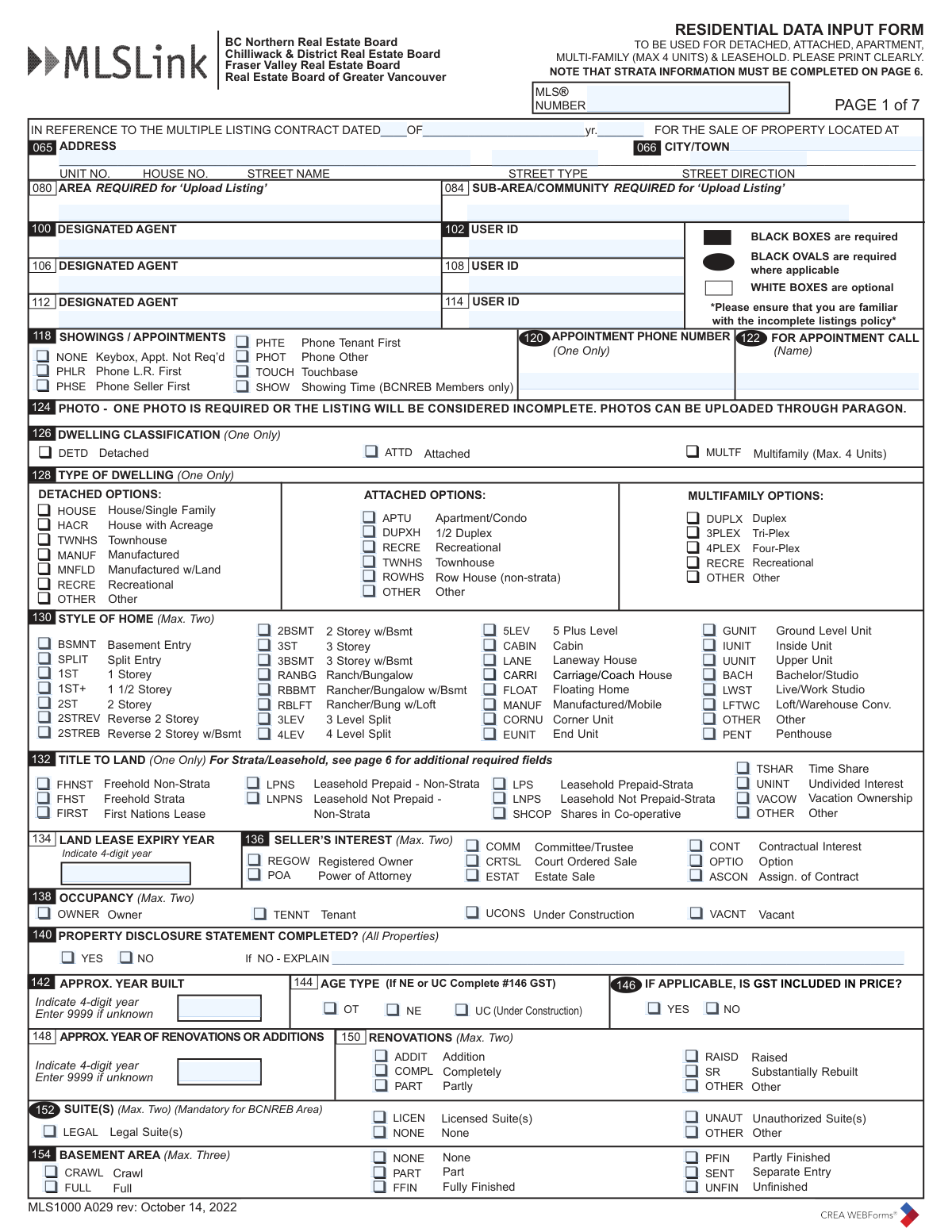
The Residential Data Input Form, also known as MLS1000 A029, is a comprehensive document for real estate agents to enter detailed property information into the Multiple Listing Service (MLS). It covers everything from basic address and legal descriptions to specific features like construction materials, amenities, room dimensions, and showing instructions. Accurate completion is vital for marketing a property effectively to potential buyers and other agents. Today, this form can be filled out quickly and accurately using AI-powered services like Instafill.ai, which can also convert non-fillable PDF versions into interactive fillable forms.
MLS1000 A029 has a very complex Form Complexity Index of 84/100 — 765 fillable fields across 7 pages. Instafill’s AI completes it accurately in under a minute.

Form specifications

Form name: Residential Data Input Form (MLS1000 A029)
Number of fields: 765
Number of pages: 7
FCI: Very Complex (84/100)
Language: English
Our AI automatically handles information lookup, data retrieval, formatting, and form filling.
It takes less than a minute to fill out MLS1000 A029 using our AI form filling.
Securely upload your data. Information is encrypted in transit and deleted immediately after the form is filled out.
Preview of Residential Data Input Form (MLS1000 A029)

Instafill Demo: How to fill out PDF forms in seconds with AI

How to Fill Out MLS1000 A029 Online for Free in 2026

Are you looking to fill out a MLS1000 A029 form online quickly and accurately? Instafill.ai offers the #1 AI-powered PDF filling software of 2026, allowing you to complete your MLS1000 A029 form in just 37 seconds or less.
Follow these steps to fill out your MLS1000 A029 form online using Instafill.ai:
  1. 1 Navigate to Instafill.ai and upload your MLS1000 A029 form or select it from the template library.
  2. 2 Use the AI assistant to automatically populate initial fields such as property address, legal description, and PID from public records.
  3. 3 Systematically complete each section, including Dwelling Classification, Style of Home, Title to Land, and property dimensions, using the guided interactive fields.
  4. 4 Input detailed information about the property's features, such as construction materials, services connected, amenities, and room-by-room specifications.
  5. 5 Fill out the marketing and remarks sections, including public descriptions, REALTOR® remarks, and virtual tour URLs.
  6. 6 Review all 7 pages of the form, ensuring all mandatory fields (indicated by black boxes/ovals) are accurately completed.
  7. 7 Securely save, download, or share the completed data input form with your real estate board or brokerage for official MLS submission.

Our AI-powered system ensures each field is filled out correctly, reducing errors and saving you time.

Why Choose Instafill.ai for Your Fillable MLS1000 A029 Form?

Speed

Complete your MLS1000 A029 in as little as 37 seconds.

Up-to-Date

Always use the latest 2026 MLS1000 A029 form version.

Cost-effective

No need to hire expensive lawyers.

Accuracy

Our AI performs 10 compliance checks to ensure your form is error-free.

Security

Your personal information is protected with bank-level encryption.

Frequently Asked Questions About MLS1000 A029

MLS1000 A029 has a Form Complexity Index of 84 out of 100, placing it in the very complex complexity tier. This score is calculated deterministically from the form’s own structure using Instafill’s published Form Complexity Index methodology, so it can be reproduced and independently verified — it is not a subjective estimate.

For MLS1000 A029 specifically, the score reflects 765 fillable fields across 7 pages, grouped into 146 sections, and 120 conditional fields that only apply depending on earlier answers, 6 tables or repeating lists. The number of fields is the largest factor in the base score (weighted 36%), followed by how difficult those fields are to complete based on their type, where free-text and signature fields count for more than simple checkboxes (26%). The number of pages that actually contain fields (15%), the amount of conditional “fill-only-if” logic (16%), and how many sections the form is divided into (7%) account for the rest of the base. On top of that base, the index adds points for tables and repeating lists, bundled instruction pages, and dense page layouts — capturing difficulty the base alone can miss.

In practical terms, a very complex score means the form is exceptionally demanding — a very large number of fields, often combined with tables, dense pages or extensive conditional logic. Instafill removes that effort entirely: our AI reads your information, maps each value to the correct field — including the conditional ones — and completes MLS1000 A029 accurately in under a minute, with every field available for you to review before you download. See exactly how the Form Complexity Index is calculated.

This form is used by real estate agents to input detailed information about a residential property into the Multiple Listing Service (MLSĀ®) for various British Columbia real estate boards. It covers detached, attached, multi-family, and leasehold properties.

A licensed real estate agent or their authorized administrative staff is responsible for accurately completing and submitting this form to list a property on the MLSĀ®.

Black boxes indicate fields that are required for all listings. Black ovals indicate fields that are required only where applicable to the property. White boxes are for optional information.

Yes, the form states on page 1 that at least one photo is required for the listing to be considered complete. Photos can be uploaded through the Paragon system.

On page 1, in section 152 'SUITE(S)', you can select whether the property has a Legal Suite, Licensed Suite, Unauthorized Suite, or Other. This section is mandatory for the BCNREB Area.

Public Remarks (section 400) are visible to the general public on websites like realtor.ca. RealtorĀ® Remarks (section 412) are for other real estate professionals and may contain confidential information like showing instructions or offer details.

Page 6 of the form is dedicated to Strata/Leasehold Properties. Here you can input the maintenance fee, bylaw restrictions, number of units, and what the fee includes.

For manufactured homes, you must complete the specific section on page 6. This includes the manufactured home type, pad rental fee, and CSA/BC Electrical and MHR numbers if applicable.

In section 144, you should enter the approximate 4-digit year of renovations or additions. If the exact year is unknown, the form instructs to enter '9999' for the 'Approx. Year Built' field, which suggests providing the best estimate is acceptable.

The form notes on page 1 to be familiar with the 'incomplete listings policy'. Submitting an incomplete form may result in the listing being rejected or delayed until all required information, such as a photo or mandatory fields, is provided.

The Cooperating Brokerage Commission is entered on the final page (Page 7). This section is used for upload purposes and captures key details from the listing contract.

Yes, services like Instafill.ai use AI to auto-fill form fields accurately and save time. This can help reduce manual data entry and minimize errors when completing the extensive details required.

Simply upload the MLS1000 PDF to the Instafill.ai platform. The service will make the form interactive, allowing you to easily type information into the fields, save your progress, and download the completed document.

If you have a non-fillable or 'flat' PDF, you can use a service like Instafill.ai. It can convert the static PDF into an interactive, fillable form that you can complete directly on your computer.

Compliance MLS1000 A029
Validation Checks by Instafill.ai

1
Ensures Mandatory Location Fields are Completed
This check verifies that the 'Area' and 'Sub-Area/Community' fields (080, 084) are filled out, as they are marked 'REQUIRED for Upload Listing'. These fields are critical for geographic searching, sorting, and statistical analysis within the MLS system. A failure to provide this information would result in an incomplete and unsearchable listing, so the system will prevent submission until they are populated.
2
Validates Consistency of Floor Area Calculations
This validation ensures that the sum of the individual finished floor areas (Main, Above Main, Below Main, Basement) equals the 'Floor Area Finished Total' (174). This is important for maintaining accurate and trustworthy property data for buyers, agents, and appraisers. If the numbers do not add up, the user will be prompted to review and correct the individual and total square footage values to prevent data discrepancies.
3
Verifies Logical Timeline for Construction and Renovation Years
This check confirms that the 'Approx. Year of Renovations or Additions' (152) is not earlier than the 'Approx. Year Built' (144). A property cannot be renovated before it is constructed, so this check prevents logical impossibilities in the listing data. If the renovation year precedes the build year, an error will be displayed, requiring the user to correct one or both dates to ensure data accuracy.
4
Requires View Specification When a View is Indicated
This validation rule ensures that if the 'View' checkbox (258) is marked 'Yes', the corresponding 'VIEW SPECIFY' text field must be filled out. This prevents listings from claiming a view without providing any details, which can be misleading to potential buyers and devalues the data field. If 'Yes' is selected without a description, the form will prompt the user to specify the type of view.
5
Ensures Total Parking Count is Not Less Than Covered Parking
This check validates that the value in 'Parking Places Total' (244) is greater than or equal to the value in 'Parking Places Covered' (242). It is logically impossible to have more covered parking spots than the total number of spots available. This check maintains data integrity and prevents confusion, flagging an error if the covered count exceeds the total.
6
Validates Listing Contract Expiry Date is After Listing Date
This check ensures that the 'Expiry Date' on page 7 is on or after the 'Listing Date'. A listing contract cannot expire before it begins, so this validation is crucial for the legal and systemic validity of the listing. If the expiry date is before the listing date, the system will reject the entry and require the user to input a valid date range.
7
Enforces Single Selection for 'Type of Dwelling'
This validation enforces the 'One Only' rule for the 'Type of Dwelling' section (128). A property can only have one primary dwelling type classification for accurate categorization. This check prevents the submission of ambiguous data, ensuring clarity in the MLS database. If more than one option is selected, the user will be notified to select only one.
8
Validates Format of Appointment Phone Number
This check verifies that the 'Appointment Phone Number' field (118) contains a valid 10-digit phone number format. Proper formatting is essential to ensure that other agents and automated systems can successfully contact the designated person for showings. An invalid entry will trigger an error message requesting the user to re-enter the number in a recognized format.
9
Requires Specification for Rented/Leased Fixtures
This rule checks that if 'Fixtures Rented/Leased?' (318) is answered 'Yes', the 'FIXTURES RENTED/LEASED SPECIFY' field (320) is not empty. This is a critical disclosure for potential buyers, as it informs them about items that are not included in the sale and may require assuming a lease. Failure to specify will block submission and prompt the user for details to ensure full transparency.
10
Validates 'Approx. Year Built' is a Valid 4-Digit Year
This check ensures the 'Approx. Year Built' (144) is a valid 4-digit year that is not in the future, or the special value '9999' if unknown. This prevents data entry errors like typos or nonsensical years, which would compromise the integrity of the listing data and affect property searches and valuations. An invalid year will result in a validation error, requiring the user to correct the entry.
11
Requires Strata Information for Strata-Titled Properties
This validation checks if a strata-related 'Title to Land' (100) is selected (e.g., Freehold Strata, Leasehold Prepaid-Strata). If so, it mandates that key fields on the 'STRATA/LEASEHOLD PROPERTIES' section on Page 6, such as 'Maintenance Fee' (504), are completed. This ensures that crucial financial and administrative information for strata properties is captured, which is vital for buyers.
12
Ensures at Least One Photo is Associated with the Listing
Based on the note 'ONE PHOTO IS REQUIRED OR THE LISTING WILL BE CONSIDERED INCOMPLETE' (132), this check verifies that at least one photo has been uploaded or is flagged for upload. Photos are one of the most important parts of a listing for attracting buyers. A listing without a photo is considered incomplete and provides a poor user experience, so this check would prevent the listing from going live without a visual.
13
Validates Conditional Requirement for PDS Explanation
This check ensures that if 'Property Disclosure Statement Completed?' (120) is marked as 'NO', the adjacent explanation field ('If NO - EXPLAIN') must be filled in. Providing a reason for an absent PDS is important for transparency and managing expectations for all parties involved in the transaction. If 'NO' is selected and the explanation is blank, the system will prompt the user to provide a reason.
14
Enforces Maximum Selection for 'Style of Home'
This validation enforces the 'Max. Two' rule for the 'Style of Home' section (136). A property can be described by up to two styles to provide a comprehensive picture, but more than two can create confusing or conflicting data. This check ensures the data remains concise and properly categorized. If more than two options are selected, the user will be notified to narrow their selection.

Common Mistakes in Completing MLS1000 A029

Inaccurate or Misleading Floor Area Reporting

A frequent and serious error is incorrectly calculating or allocating square footage across the various fields (Main, Above, Below, Unfinished). This often happens by including non-living spaces like garages or balconies in the "Total Finished Floor Area," which constitutes misrepresentation. These inaccuracies can affect the appraised value, lead to buyer disputes, and result in legal liability. Always use professional measurements or official plans and ensure the numbers in each box add up correctly as indicated on the form.

Incorrectly Reporting Suite Status (Legal vs. Unauthorized)

Agents may check "Legal Suite(s)" based on the seller's word, without verifying the information with the municipality. This is a critical error, as an "Unauthorized Suite(s)" has significant implications for zoning, insurance, and financing. Misrepresenting a suite's legal status can cause deals to collapse and lead to potential lawsuits. Always obtain official documentation from the local governing body to confirm the status before filling out this section.

Placing Confidential Information in Public Remarks

A common but serious mistake is entering information intended for other agents—such as showing instructions, bonus commissions, or personal seller details—into the "Public Remarks" field (Box 400). This information is displayed publicly on websites like realtor.ca, compromising privacy and security, and can result in board fines. Always double-check that confidential details are placed exclusively in the "REALTORĀ® Remarks" field (Box 412).

Inaccurate Strata Fee and Bylaw Restriction Disclosures

On page 6, agents frequently make errors regarding the monthly maintenance fee, what it includes, and bylaw restrictions (pets, rentals, age). This information is often taken verbally from the seller and may be outdated or incorrect. Misrepresenting rental allowances or pet policies can cause a deal to collapse during due diligence and may lead to legal claims. Always obtain and review the most recent strata documents (e.g., Form B, bylaws) to ensure 100% accuracy.

Selecting the Incorrect Title to Land

The "Title to Land" section (Box 132) is legally critical, with distinct options like "Freehold Strata" vs. "Leasehold Prepaid-Strata". Selecting the wrong title type is a major error that can jeopardize the entire transaction, as it fundamentally changes the nature of ownership and financing. This mistake often happens when an agent guesses or relies on incomplete information. The only way to avoid this is to verify the title by reviewing the official title search document for the property.

Omitting Rented or Leased Fixtures

Agents often overlook the "Fixtures Rented/Leased" section (Box 320), failing to disclose items like hot water tanks, furnaces, or security systems that are under a rental contract. This omission can lead to unexpected costs for the buyer after closing and become a point of serious contention. It is the listing agent's responsibility to ask the seller specifically about any such agreements and clearly list them on the form to ensure a smooth transaction.

Entering an Incomplete or Incorrect Property Address

Errors in the address fields, such as omitting a "Unit No.", using the wrong "Street Type", or forgetting a "Street Direction", are very common. These small mistakes can prevent the property from being correctly located on maps and create significant data matching issues in the MLS system. This can be avoided by carefully transcribing the address from an official source. AI-powered form filling tools like Instafill.ai can help prevent these errors by automatically validating and formatting address components correctly.

Misclassifying Dwelling Type or Style

Agents often select an incorrect "Type of Dwelling" or "Style of Home" due to misunderstanding the specific definitions (e.g., "Townhouse" vs. "Row House"). This can also happen when selecting more than the maximum number of options allowed. Misclassification misleads potential buyers, can cause the property to be missed in targeted searches, and may lead to listing compliance issues. To avoid this, carefully review the definitions for each category and adhere to the "One Only" or "Max. Two" constraints.

Incorrect Formatting of Room Details

The "ROOMS" section on page 4 has a very specific format: Floor Level Abbreviation, Room Type Abbreviation, and Dimensions. Common mistakes include using non-standard abbreviations, forgetting the floor level (e.g., MAIN, ABOVE), or entering dimensions inconsistently. This makes the room data confusing and difficult to interpret. Following the provided examples and list of abbreviations is essential for clarity and professionalism.

Submitting a Scanned, Non-Fillable Form

Agents sometimes receive a flat, non-fillable PDF and attempt to fill it by hand, leading to illegible entries and data processing errors. This slows down the listing process and increases the chance of transcription mistakes when the data is manually entered into the MLS system. If only a flat PDF is available, AI tools like Instafill.ai can convert it into a fully fillable version, ensuring clean, accurate, and machine-readable data entry.
Saved over 80 hours a year

ā€œI was never sure if my IRS forms like W-9 were filled correctly. Now, I can complete the forms accurately without any external help.ā€

Kevin Martin Green

Your data stays secure with advanced protection from Instafill and our subprocessors

Robust compliance program

Transparent business model

You’re not the product. You always know where your data is and what it is processed for.

ISO 27001, HIPAA, and GDPR

Our subprocesses adhere to multiple compliance standards, including but not limited to ISO 27001, HIPAA, and GDPR.

Security & privacy by design

We consider security and privacy from the initial design phase of any new service or functionality. It’s not an afterthought, it’s built-in, including support for two-factor authentication (2FA) to further protect your account.

Fill out MLS1000 A029 with Instafill.ai

Worried about filling PDFs wrong? Instafill securely fills residential-data-input-form-mls1000-a029 forms, ensuring each field is accurate.