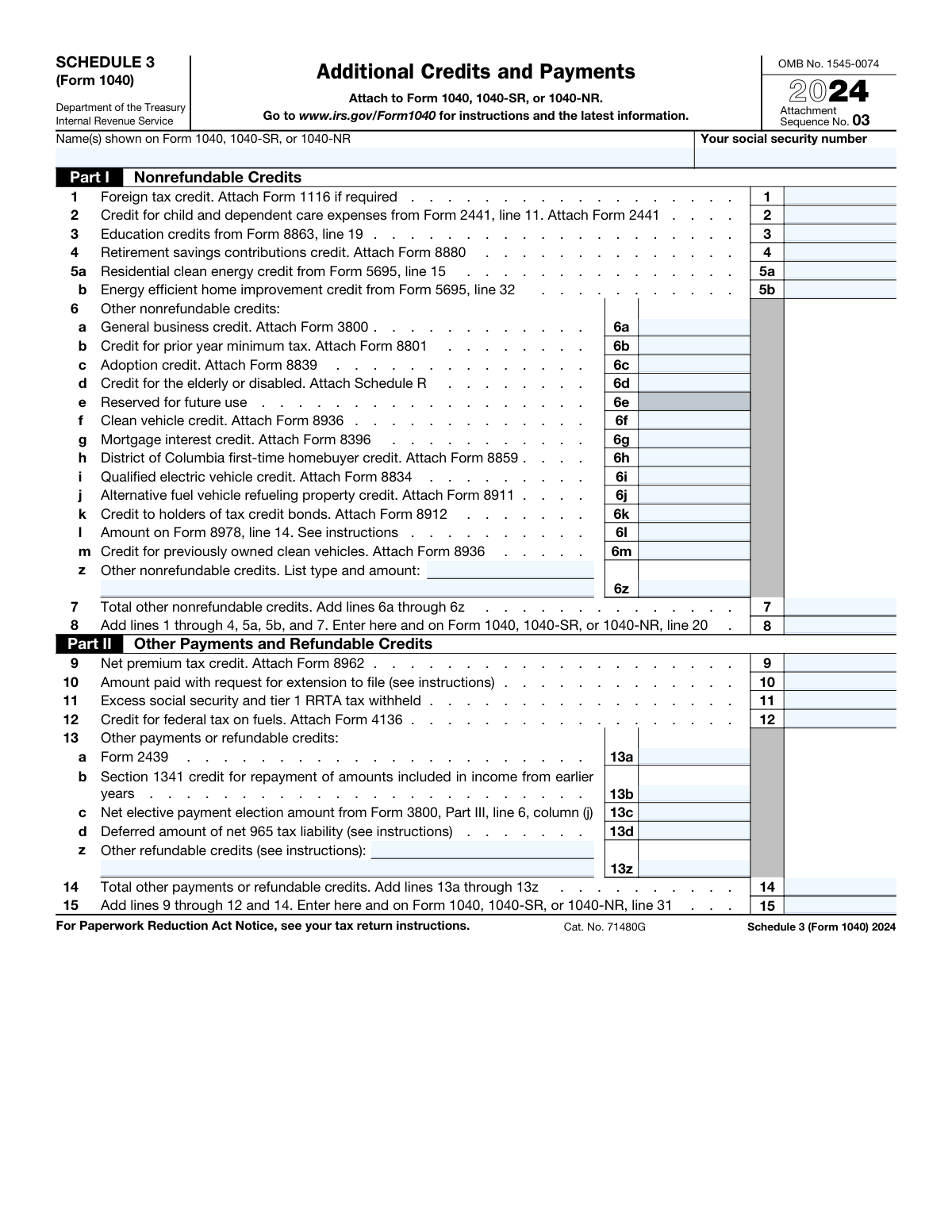
Yes! You can use AI to fill out Schedule 3 (Form 1040), Additional Credits and Payments
IRS Schedule 3 (Form 1040) is a supplemental form attached to Form 1040, 1040-SR, or 1040-NR to report additional tax credits and payments. It is divided into two parts: Part I for nonrefundable credits like the foreign tax credit and education credits, and Part II for other payments and refundable credits, such as the premium tax credit. This form is essential for taxpayers who qualify for these specific credits and payments to accurately calculate their total tax liability or refund. Today, this form can be filled out quickly and accurately using AI-powered services like Instafill.ai, which can also convert non-fillable PDF versions into interactive fillable forms.
Form specifications
| Form name: | Schedule 3 (Form 1040), Additional Credits and Payments |
| Number of fields: | 39 |
| Number of pages: | 1 |
| Language: | English |
Our AI automatically handles information lookup, data retrieval, formatting, and form filling.
It takes less than a minute to fill out Schedule 3 (Form 1040) using our AI form filling.
Securely upload your data. Information is encrypted in transit and deleted immediately after the form is filled out.
Instafill Demo: How to fill out PDF forms in seconds with AI
How to Fill Out Schedule 3 (Form 1040) Online for Free in 2026
Are you looking to fill out a SCHEDULE 3 (FORM 1040) form online quickly and accurately? Instafill.ai offers the #1 AI-powered PDF filling software of 2026, allowing you to complete your SCHEDULE 3 (FORM 1040) form in just 37 seconds or less.
Follow these steps to fill out your SCHEDULE 3 (FORM 1040) form online using Instafill.ai:
- 1 Navigate to Instafill.ai and upload or select the Schedule 3 (Form 1040).
- 2 Provide your name and Social Security number as they appear on your Form 1040.
- 3 In Part I, enter the amounts for any nonrefundable credits you are claiming, such as the foreign tax credit, education credits, or residential clean energy credits. The AI can help pull data from related forms like Form 1116 or 8863.
- 4 In Part II, input any other payments or refundable credits, including the net premium tax credit, excess social security tax withheld, or amounts paid with an extension request.
- 5 Allow the AI to automatically calculate the total nonrefundable credits on line 8 and the total other payments and refundable credits on line 15.
- 6 Review the entire completed Schedule 3 to ensure all figures are accurate and all applicable credits have been claimed.
- 7 Download, print, or e-file the completed Schedule 3, attaching it to your main Form 1040, 1040-SR, or 1040-NR as required.
Our AI-powered system ensures each field is filled out correctly, reducing errors and saving you time.
Why Choose Instafill.ai for Your Fillable Schedule 3 (Form 1040) Form?
Speed
Complete your Schedule 3 (Form 1040) in as little as 37 seconds.
Up-to-Date
Always use the latest 2026 Schedule 3 (Form 1040) form version.
Cost-effective
No need to hire expensive lawyers.
Accuracy
Our AI performs 10 compliance checks to ensure your form is error-free.
Security
Your personal information is protected with bank-level encryption.
Frequently Asked Questions About Schedule 3 (Form 1040)
Schedule 3 is used to claim various nonrefundable credits, such as education or clean vehicle credits, and to report other payments and certain refundable credits that are not listed directly on Form 1040.
You must file Schedule 3 if you are eligible to claim specific tax credits like the foreign tax credit or education credits, or if you need to report other payments, such as an amount paid with an extension request.
A nonrefundable credit can reduce your tax liability to zero, but you don't get any of it back as a refund. A refundable credit is treated like a payment and can result in a tax refund even if you don't owe any tax.
Yes, most of the credits and payments listed on Schedule 3 require you to complete and attach a separate, specific form. For example, you must attach Form 2441 for the child and dependent care credit.
The total from Part I (Nonrefundable Credits) is entered on line 20 of Form 1040. The total from Part II (Other Payments and Refundable Credits) is entered on line 31 of Form 1040.
You claim the new clean vehicle credit on line 6f of Schedule 3. You must first complete Form 8936 to calculate the credit amount and then attach it to your return.
You should report the amount you paid with your request for an extension to file on line 10 in Part II of Schedule 3.
The residential clean energy credit (line 5a) is for larger projects like solar panels or wind turbines. The energy efficient home improvement credit (line 5b) is for smaller upgrades like new windows, doors, or insulation.
If you had more than one employer and your total wages exceeded the annual limit, you can claim a credit for the excess Social Security tax withheld on line 11 in Part II of Schedule 3.
If you have a flat, non-fillable PDF, you can use a service like Instafill.ai to instantly convert it into an interactive, fillable form. This allows you to easily type your information directly into the fields online.
Yes, services like Instafill.ai use AI to help you accurately auto-fill form fields, which can save you time and reduce errors. This is especially helpful for complex tax forms that require information from other documents.
Simply upload the Schedule 3 PDF to the Instafill.ai platform. The AI will make the form fillable and can help auto-fill your information, after which you can download or print the completed form.
The credit for child and dependent care expenses is claimed on line 2 of Schedule 3. You must first calculate the amount on Form 2441 and attach that form to your tax return.
Compliance Schedule 3 (Form 1040)
Validation Checks by Instafill.ai
1
Validates Social Security Number Format
This check ensures that the 'Your social security number' field is entered in a valid format, either as a 9-digit number (XXXXXXXXX) or with hyphens (XXX-XX-XXXX). An invalid SSN format can lead to processing delays or rejection of the entire tax return. If the format is incorrect, the system should flag the field for user correction before submission.
2
Ensures Taxpayer Name is Present
This validation verifies that the 'Name(s) shown on Form 1040...' field is not empty. This name is crucial for associating this schedule with the correct primary tax form (1040, 1040-SR, or 1040-NR). Failure to provide the name would make the schedule an orphan document, preventing the credits and payments from being applied to the taxpayer's account.
3
Verifies Calculation of Total Other Nonrefundable Credits (Line 7)
This check confirms that the value entered on Line 7 is the correct sum of the amounts on lines 6a through 6z. This is a critical arithmetic validation to ensure the subtotal of 'other' credits is accurate before it's included in the final total. An incorrect sum will lead to an incorrect total tax liability or refund calculation.
4
Verifies Calculation of Total Nonrefundable Credits (Line 8)
This check validates that the amount on Line 8 is the correct sum of lines 1 through 4, 5a, 5b, and 7. This is the final total for Part I and is transferred to the main Form 1040. An error here directly impacts the taxpayer's calculated tax and must be accurate to avoid IRS notices and corrections.
5
Verifies Calculation of Total Other Payments (Line 14)
This check ensures that the value on Line 14 correctly equals the sum of the amounts on lines 13a through 13z. This calculation subtotals various miscellaneous payments and refundable credits. An incorrect sum would cause the final total of payments on Line 15 to be wrong, affecting the overall refund or amount owed.
6
Verifies Calculation of Total Payments and Refundable Credits (Line 15)
This validation confirms that the amount on Line 15 is the correct sum of lines 9 through 12 and 14. This is the final total for Part II and is transferred to the main Form 1040. An error on this line will result in an incorrect total payment amount, leading to a miscalculated refund or balance due.
7
Checks for Required Supporting Form 2441
If an amount greater than zero is entered on Line 2 for the 'Credit for child and dependent care expenses', this check verifies that Form 2441 is also included in the submission. The IRS requires the detailed calculations from Form 2441 to substantiate the credit claimed. Missing the form will likely result in the disallowance of the credit and a notice from the IRS.
8
Checks for Required Supporting Form 8863
If a value is entered on Line 3 for 'Education credits', this validation ensures that Form 8863 is attached. The specific details and eligibility calculations for the American Opportunity and Lifetime Learning credits are on Form 8863. Without this supporting form, the credit cannot be verified and will be rejected by the IRS.
9
Validates Completeness of 'Other Nonrefundable Credits' (Line 6z)
This check ensures that if an amount is entered on Line 6z, the corresponding description field is also filled out, and vice versa. A taxpayer cannot claim a miscellaneous credit without specifying what it is for. This prevents ambiguous or unsubstantiated claims and ensures the return is complete and reviewable.
10
Validates Completeness of 'Other Refundable Credits' (Line 13z)
This check verifies that if an amount is entered on Line 13z, the corresponding description field is also completed. Similar to line 6z, the IRS requires an explanation for any 'other' credits being claimed. An incomplete entry will cause processing delays while the IRS requests clarification.
11
Ensures Reserved Field (Line 6e) is Blank
This validation confirms that Line 6e, which is 'Reserved for future use', is left empty or has a value of zero. The IRS explicitly reserves this line and entering data here could cause automated processing systems to fail or misinterpret the form data. This check prevents accidental entries that could disrupt the processing of the return.
12
Cross-references Total Nonrefundable Credits with Form 1040
This check verifies that the total from Schedule 3, Line 8, matches the amount entered on Line 20 of the associated Form 1040, 1040-SR, or 1040-NR. This ensures consistency across forms and that the total credits are correctly applied to the main tax calculation. A mismatch would cause a calculation error on the primary form, leading to an incorrect tax assessment.
13
Cross-references Total Payments with Form 1040
This validation ensures that the total from Schedule 3, Line 15, is identical to the amount entered on Line 31 of the associated Form 1040, 1040-SR, or 1040-NR. This is a critical consistency check to ensure all additional payments and refundable credits are correctly tallied on the main return. A discrepancy will result in an incorrect final refund or balance due.
14
Validates All Monetary Fields are Numeric
This check iterates through all fields representing dollar amounts (e.g., lines 1-5, 6a-m, 7, 8, etc.) and ensures they contain only valid numeric characters and currency formatting. Non-numeric data in these fields would cause all calculations to fail and make the form impossible to process. This is a fundamental data integrity check for any financial form.
Common Mistakes in Completing Schedule 3 (Form 1040)
Nearly every line on Schedule 3 requires an associated form to be attached, such as Form 2441 for child care expenses or Form 8863 for education credits. A very common error is entering the credit amount on Schedule 3 but forgetting to include the corresponding form with the tax return. The IRS will automatically disallow any credit that is not substantiated by the required form, leading to a reduced refund, an unexpected tax bill, and processing delays. To avoid this, create a checklist of all required forms as you complete your return.
Taxpayers often forget to fill in their name and Social Security Number at the top of Schedule 3. Since this is an attachment, it can get separated from the main Form 1040 during processing if it's not properly identified. This can lead to significant delays, IRS notices, and the disallowance of claimed credits until the taxpayer's identity is verified for the schedule. Always double-check that the name(s) and SSN on Schedule 3 exactly match what is on your Form 1040.
Schedule 3 has several lines that require adding multiple other lines together, such as lines 7, 8, 14, and 15. Simple arithmetic mistakes are frequent when done by hand and can cause a mismatch with the amounts transferred to the main Form 1040. An incorrect total can trigger an IRS notice for a math error, which automatically adjusts your tax liability. To avoid this, use tax software or an AI-powered form filler like Instafill.ai, which performs calculations automatically, or carefully double-check your math with a calculator if filing manually.
Taxpayers must pull specific figures from other forms (like Form 5695, line 15 or Form 8880) and enter them onto Schedule 3. It's easy to accidentally copy the wrong number, transpose digits, or pull from the wrong line on the source form. This error guarantees the claimed credit amount is incorrect and will be caught by the IRS, resulting in an adjustment to your return. To prevent this, use tools like Instafill.ai that can auto-populate data across related forms, ensuring consistency and accuracy.
The purpose of Schedule 3 is to calculate totals that are then entered on the main Form 1040. The total from line 8 goes to Form 1040, line 20, and the total from line 15 goes to Form 1040, line 31. Forgetting to transfer these final amounts means your main tax return will be incomplete and incorrect. This will cause major processing delays and may require you to file an amended return. Tax preparation software and AI-powered form fillers handle these transfers automatically, but manual filers must be extremely diligent.
Lines 6z ('Other nonrefundable credits') and 13z ('Other refundable credits') require the taxpayer to both list the type of credit and enter the amount. A frequent mistake is entering a dollar amount but leaving the description field blank. Without a description, the IRS cannot verify the credit's legitimacy and will likely disallow it, sending a notice requesting more information and delaying any refund. Always provide a clear, specific description for any amount entered on these 'Other' lines.
Schedule 3 lists multiple vehicle-related credits, such as the Clean Vehicle Credit (line 6f), Previously Owned Clean Vehicle Credit (line 6m), and the old Qualified Electric Vehicle Credit (line 6i). Each has distinct eligibility rules, vehicle requirements, and uses a specific form. Taxpayers often get confused and claim the wrong credit or use the wrong form, leading to an incorrect tax calculation and likely rejection of the credit. It is crucial to read the instructions for Form 8936 carefully to determine which, if any, credit you qualify for.
Part I of Schedule 3 is for nonrefundable credits, which can only reduce your tax liability to zero; they cannot generate a refund on their own. Some taxpayers mistakenly believe these credits will be added to their refund, leading to disappointment when their refund is smaller than anticipated. Refundable credits, listed in Part II, are treated like payments and can result in a refund even if you have no tax liability. Understanding this distinction is key to accurately forecasting your tax outcome.
Line 10 is specifically for payments made with Form 4868, an application for an extension to file. Taxpayers sometimes confuse this with their quarterly estimated tax payments, which are reported elsewhere on Form 1040. Entering estimated tax payments on this line will cause a discrepancy with IRS records, leading to processing delays and notices. Only enter the exact amount you paid when you filed for the extension on this line.
Many taxpayers download a non-fillable PDF form from the IRS website and complete it by hand. Poor or illegible handwriting, especially with numbers, can lead to data entry errors by IRS personnel, causing calculation errors, rejected credits, and significant processing delays. To prevent this, it's best to use tax software or a tool that can make the form fillable. AI-powered tools like Instafill.ai can convert non-fillable PDFs into easily fillable versions, eliminating this issue entirely.
Saved over 80 hours a year
“I was never sure if my IRS forms like W-9 were filled correctly. Now, I can complete the forms accurately without any external help.”
Kevin Martin Green
Your data stays secure with advanced protection from Instafill and our subprocessors
Robust compliance program
Transparent business model
You’re not the product. You always know where your data is and what it is processed for.
ISO 27001, HIPAA, and GDPR
Our subprocesses adhere to multiple compliance standards, including but not limited to ISO 27001, HIPAA, and GDPR.
Security & privacy by design
We consider security and privacy from the initial design phase of any new service or functionality. It’s not an afterthought, it’s built-in, including support for two-factor authentication (2FA) to further protect your account.
Fill out Schedule 3 (Form 1040) with Instafill.ai
Worried about filling PDFs wrong? Instafill securely fills schedule-3-form-1040-additional-credits-and-payments forms, ensuring each field is accurate.