
Yes! You can use AI to fill out Schedule D (Form 1040), Capital Gains and Losses (2025)
Don't type 55 fields by hand. Tell our AI about yourself, or upload your W-2 or last year's return, and it fills every field in seconds. You check it, then download, print or sign.
The AI does the filling. You just check it.
No typing into boxes, nothing to install.
What this form asks for
The AI fills all of it, from your answers or your documents.
The AI checks your answers before you download
14 checks built for this form, so a wrong date or a missing answer is caught before anyone else sees it.
This check ensures the 'Social Security number' field contains a valid nine-digit number, which can be formatted as XXX-XX-XXXX or XXXXXXXXX. The SSN is critical for correctly identifying the taxpayer with the IRS and linking the form to the main tax return. A failure in this validation will lead to rejection of the form, as the taxpayer cannot be uniquely identified.
This validation verifies that the 'Name(s) on tax return' field is not empty. The taxpayer's name is a fundamental requirement for processing any tax form and associating it with the correct individual's tax account. If the name is missing, the form is considered incomplete and cannot be processed by the IRS.
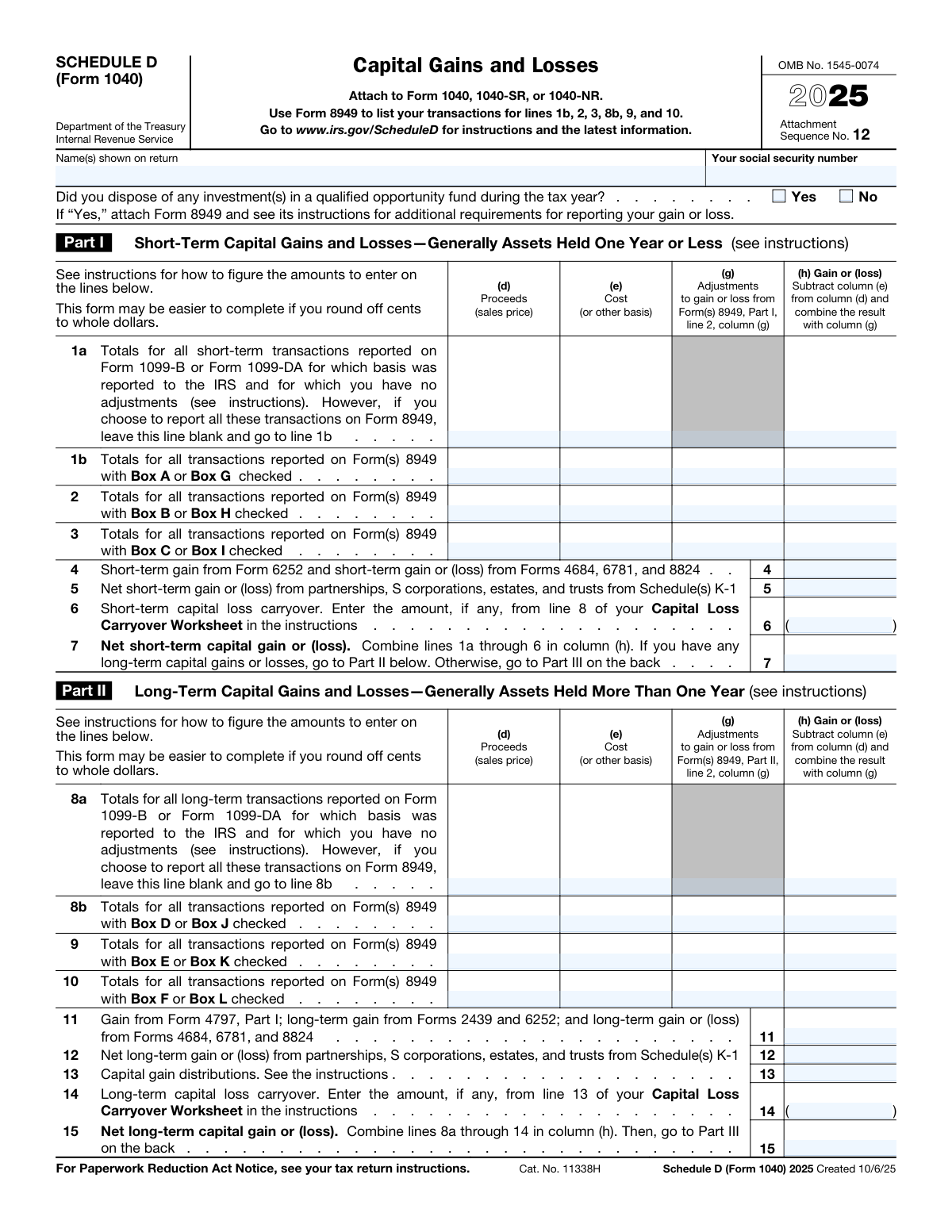
This check confirms that the value in 'Net short-term capital gain or (loss) — line 7' is the correct sum of the gain/loss amounts from lines 1a, 1b, 2, 3, 4, 5, and 6. Accurate calculation is essential for determining the correct total tax liability. An incorrect sum will result in an erroneous tax assessment and may trigger an audit or require an amended return.
This validation ensures the value in 'Net long-term capital gain or (loss) - line 15' correctly sums the gain/loss amounts from lines 8a, 8b, 9, 10, 11, 12, 13, and 14. This total is a key component of the overall capital gain or loss calculation. A miscalculation here will lead to an incorrect value on line 16 and an inaccurate tax computation.
This check validates that the amount on 'Line 16 — Combined total' is the precise sum of 'Net short-term capital gain or (loss) — line 7' and 'Net long-term capital gain or (loss) - line 15'. This line represents the taxpayer's total capital gain or loss for the year and is a critical figure for the main tax return. An error here directly impacts the final tax due or refund amount.
This check performs two functions: it ensures 'Line 21' is only filled if 'Line 16' shows a loss, and it verifies the amount entered is the smaller of the absolute loss on line 16 or the statutory limit ($3,000, or $1,500 if married filing separately). This rule is crucial for correctly applying the annual limit on deductible capital losses. Failure to apply this logic correctly can lead to an improper deduction and an underpayment of tax.
And 8 more checks
- Ensures Mutual Exclusivity of Lines 1a and 1b
- Ensures Mutual Exclusivity of Lines 8a and 8b
- Validates Logical Condition for Line 17
- Verifies Gain/Loss Calculation for Transaction Lines
- Validates Format of Capital Loss Carryover Amounts
- Ensures Qualified Opportunity Fund Question is Answered
- Validates Conditional Logic for Line 20
- Checks for Inconsistent Part III Navigation
Let AI fill out your Schedule D (Form 1040)
No typing. Every field filled in seconds, checked, ready to sign.
How to Fill Out Schedule D (Form 1040) Online for Free in 2026
What the AI walks you through.
- Navigate to Instafill.ai and upload or select the Schedule D (Form 1040).
- Provide your personal information, such as your name and Social Security Number, as shown on your tax return.
- Use the AI assistant to input details for your short-term capital gains and losses in Part I, referencing your Form 8949 and 1099-B.
- Enter all long-term capital gains and losses in Part II, including information from partnerships, S corporations, and capital gain distributions.
- Allow the system to automatically calculate the net short-term (Line 7) and long-term (Line 15) capital gains or losses based on your entries.
- Complete Part III, the summary section, where the AI will help combine totals and guide you through the subsequent worksheets or calculations based on your results.
- Review the completed form for accuracy, then download, print, or e-file it as an attachment to your Form 1040.
Common Mistakes in Completing Schedule D (Form 1040)
The ones the AI is built to catch.
Misclassifying Short-Term vs. Long-Term Assets
Incorrectly Calculating Cost Basis
Improper Use of Summary Lines 1a and 8a
Failing to Attach Form 8949
Forgetting or Miscalculating Capital Loss Carryovers
Exceeding the Annual Capital Loss Deduction Limit
Making Navigational Errors in Part III
Mismatching Name or SSN with Form 1040
Incorrectly Reporting Flow-Through Gains/Losses
Mathematical Errors in Totals
Frequently Asked Questions About Schedule D (Form 1040)
Is it really free for 7 days?
Can I fill other forms too?
How do I cancel?
How does the AI fill out Schedule D (Form 1040)?
What happens to my information?
How complex is Schedule D (Form 1040) to fill out?
What is IRS Schedule D (Form 1040) used for?
Who needs to file Schedule D?
What is the difference between Part I (short-term) and Part II (long-term) gains and losses?
Do I have to fill out Form 8949 if I'm filing Schedule D?
What documents do I need to complete Schedule D?
What is a capital loss carryover?
How much capital loss can I deduct in one year?
Where do I report capital gain distributions on this form?
How do I submit Schedule D?
What should I do if I disposed of an investment in a qualified opportunity fund?
Can AI tools help me fill out my Schedule D?
How can I fill out Schedule D online using Instafill.ai?
The Schedule D PDF I downloaded is not fillable. What can I do?
Get your Schedule D (Form 1040) filled out by AI
$0 today. Cancel before Nov 2 and you pay nothing.
Let AI fill out your Schedule D (Form 1040)
Your trial starts once a card is added. You pay nothing before Nov 2.
Our AI already knows this form, all 55 fields of it. Skip the typing: tell it about yourself, or upload what you have, and it fills the whole form in seconds.
- AI fills every field on both pages, tables and checkboxes included
- No typing into boxes: answer a few questions, or upload your W-2 or last year's return, an old copy of this form, a photo of a document
- The AI checks the answers; you review and change anything before you download
- Download the finished PDF, print it, or sign it online
- Encrypted, and never used to train AI
Cancel before Nov 2 and you pay nothing.
A card is needed to start the trial. Cancel in two clicks from your account.
Terms · Privacy