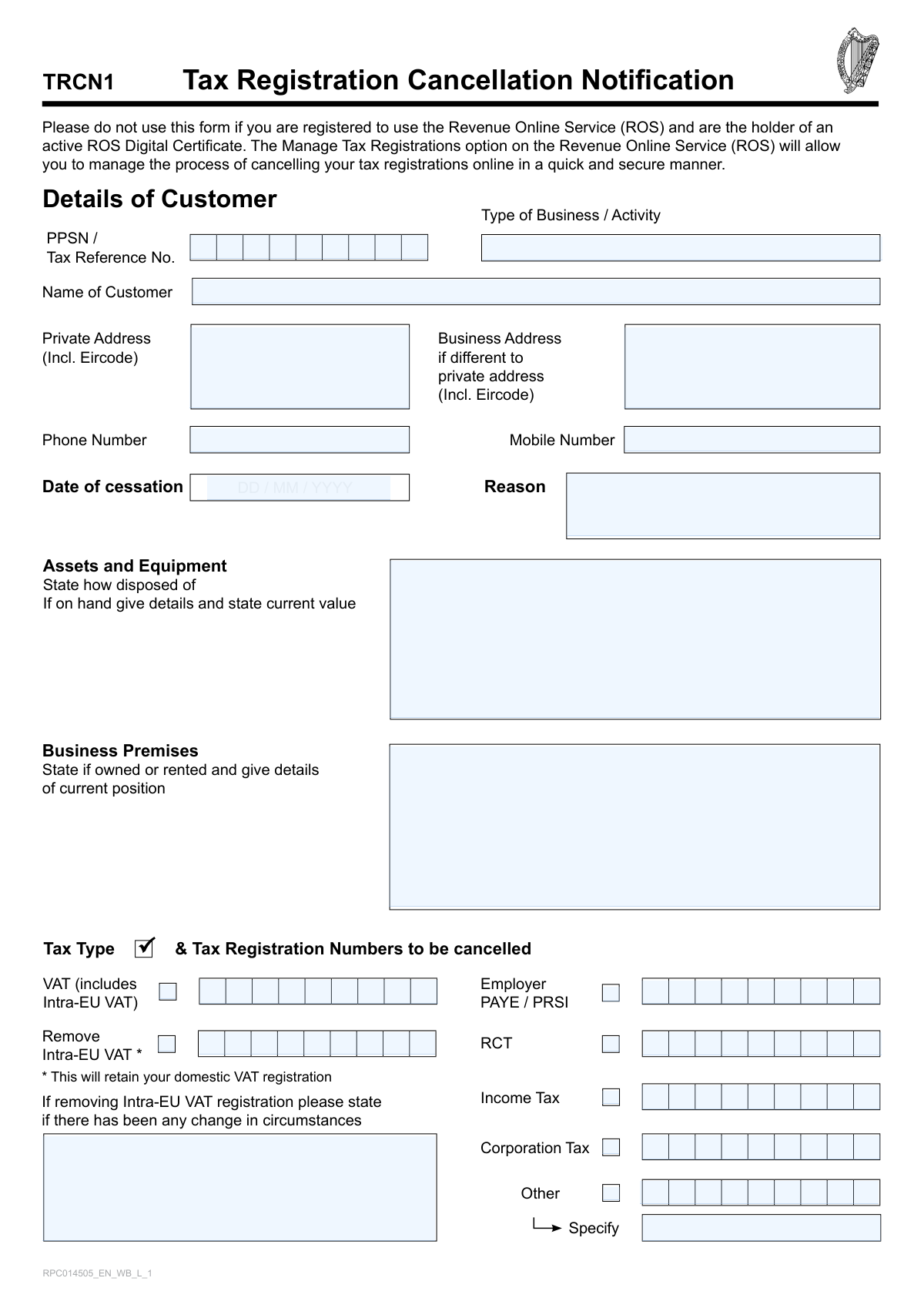
Yes! You can use AI to fill out Tax Registration Cancellation Notification

Form TRCN1, the Tax Registration Cancellation Notification, is an official document used in Ireland to formally request the cancellation of various tax registrations with the Revenue Commissioners. It is essential for individuals, sole traders, and companies that have ceased trading or no longer meet the requirements for a specific tax registration, such as VAT, PAYE/PRSI, or Corporation Tax, to ensure their records are up-to-date and avoid future compliance issues. Today, this form can be filled out quickly and accurately using AI-powered services like Instafill.ai, which can also convert non-fillable PDF versions into interactive fillable forms.
Our AI automatically handles information lookup, data retrieval, formatting, and form filling.
It takes less than a minute to fill out TRCN1 using our AI form filling.
Securely upload your data. Information is encrypted in transit and deleted immediately after the form is filled out.

Form specifications

Form name: Tax Registration Cancellation Notification
Number of fields: 41
Number of pages: 2
Language: English
main-image

Instafill Demo: How to fill out PDF forms in seconds with AI

How to Fill Out TRCN1 Online for Free in 2026

Are you looking to fill out a TRCN1 form online quickly and accurately? Instafill.ai offers the #1 AI-powered PDF filling software of 2026, allowing you to complete your TRCN1 form in just 37 seconds or less.
Follow these steps to fill out your TRCN1 form online using Instafill.ai:
  1. 1 Navigate to Instafill.ai and upload or select the Tax Registration Cancellation Notification (TRCN1) form.
  2. 2 Provide your personal and business details, including your name, address, and PPSN or Tax Reference Number.
  3. 3 Enter the date of cessation and the reason for cancelling your tax registration(s).
  4. 4 Select the specific tax types you wish to cancel (e.g., Income Tax, VAT, PAYE/PRSI) and provide the corresponding registration numbers.
  5. 5 Complete the sections regarding business assets, equipment, and premises, detailing their current status or disposal.
  6. 6 If the cancellation is for a limited company, provide the required details for each director.
  7. 7 Review all the information auto-filled by the AI for accuracy, then sign and submit the completed form to the designated Revenue office.

Our AI-powered system ensures each field is filled out correctly, reducing errors and saving you time.

Why Choose Instafill.ai for Your Fillable TRCN1 Form?

Speed

Complete your TRCN1 in as little as 37 seconds.

Up-to-Date

Always use the latest 2026 TRCN1 form version.

Cost-effective

No need to hire expensive lawyers.

Accuracy

Our AI performs 10 compliance checks to ensure your form is error-free.

Security

Your personal information is protected with bank-level encryption.

Frequently Asked Questions About Form TRCN1

This form is used to notify the Irish Revenue Commissioners that you have ceased a business or activity and need to cancel one or more of your tax registrations, such as Income Tax, VAT, or PAYE/PRSI.

No, if you are registered for ROS and hold an active digital certificate, you should not use this paper form. You must use the 'Manage Tax Registrations' option on the ROS website to cancel your registrations online.

Individuals, sole traders, partnerships, and companies who are ceasing their business activities and are not active ROS users should use this form to cancel their tax registrations.

You must provide your PPSN or Tax Reference Number, the date your business activity ceased, and the specific tax registration numbers you wish to cancel. You also need to state your reason for cessation.

Yes, you can use a single TRCN1 form to cancel multiple tax types. Simply tick the box for each tax you wish to cancel (e.g., Income Tax, VAT) and provide the corresponding registration number for each.

Cancelling your main VAT registration ends your registration for both domestic and EU transactions. Selecting 'Remove Intra-EU VAT' only cancels your registration for cross-border EU trade, allowing you to remain registered for domestic Irish VAT.

For a limited company, you must provide the full name, PPSN, and current business involvement or occupation for each of the company's directors in the designated section.

Most customers should send the form to the Business Registrations office in Wexford. However, large corporations and certain financial institutions must send it to the Large Cases Division in Dublin, as detailed on the form.

Yes, an agent, accountant, or family member can complete the form on your behalf. They must fill in the 'Information provided by' section with their name, relationship to you, and contact details.

Revenue requires this information to understand how the business was wound down and to ensure all final tax liabilities related to the disposal or current value of assets and property are correctly handled.

Yes, services like Instafill.ai use AI to help you accurately auto-fill form fields from your saved profile. This can save you significant time and help prevent common errors.

You can upload the form to a service like Instafill.ai, which makes any PDF fillable online. You can then type directly into the fields, use AI-powered completion, and download the finished document for submission.

If you have a non-fillable or 'flat' PDF, you can use a tool like Instafill.ai. It automatically converts non-interactive PDFs into fillable forms that you can easily complete on your computer.

Compliance TRCN1
Validation Checks by Instafill.ai

1
PPSN or Tax Reference Number Format Validation
This check ensures that the Personal Public Service Number (PPSN) or Tax Reference Number is entered in the correct format as specified by the Irish Revenue Commissioners. A valid format is crucial for accurately identifying the customer's record in the system. If the format is incorrect, the system will be unable to locate the customer, and the cancellation request will be rejected.
2
Date of Cessation is a Valid Past or Present Date
This validation verifies that the 'Date of cessation' is a real date provided in DD/MM/YYYY format and is not a date in the future. A business or tax registration cannot be cancelled effective from a future date through this form. An invalid or future date will prevent the form from being processed, as the cessation must have already occurred.
3
At Least One Tax Registration Selected for Cancellation
This check ensures that the user has selected at least one tax type (e.g., VAT, Income Tax, PAYE/PRSI) to cancel. The primary purpose of the form is to notify Revenue of a cancellation, so a submission with no selected tax types is incomplete and serves no purpose. If no tax type is selected, the form submission should be blocked with an error message prompting the user to make a selection.
4
Conditional Requirement for Tax Registration Number
This validation rule checks that if a tax type checkbox is selected for cancellation, the corresponding registration number field is filled out. For example, if the 'VAT' box is checked, the 'VAT Registration Number to Cancel' field must not be empty. This is critical for Revenue to identify and cancel the correct registration; otherwise, the request is ambiguous and cannot be processed.
5
Conditional Requirement for 'Other' Tax Type Specification
This check ensures that if the 'Other' tax type checkbox is selected, the 'Specify' text field is also filled in. Without this specification, the processing agent will not know which non-standard tax registration the customer wishes to cancel. A failure in this validation would render the 'Other' selection meaningless and halt the processing of that specific request.
6
Eircode Format Validation
This validation verifies that any Eircode entered in the 'Private Address' or 'Business Address' fields follows the correct AXX XXXX or AXX-XXXX format. A valid Eircode is essential for accurate mail delivery and location verification. An invalid Eircode could lead to important correspondence being lost and delays in processing the cancellation.
7
Conditional Requirement for Director Details for Limited Companies
This check triggers if the 'Type of Business' is a 'Limited Company' and 'Corporation Tax' is being cancelled, ensuring that the details for at least one director are provided. This information is legally required for the dissolution process and to understand the ongoing roles of the company's directors. Submitting without this information would result in an incomplete and non-compliant filing for a limited company.
8
Mandatory 'Information Provided By' Name
This validation ensures that the 'Name' field in the 'Information Provided by' section is not left blank, as it is marked as a mandatory field. This information is crucial for accountability, allowing Revenue to know who submitted the form, which is especially important if it was an agent or family member. A missing name would lead to form rejection due to incomplete mandatory information.
9
Mutually Exclusive VAT Cancellation Logic
This check ensures that a user cannot select both the main 'VAT (includes Intra-EU VAT)' checkbox for full cancellation and the 'Remove Intra-EU VAT' checkbox simultaneously. These are conflicting actions, as one cancels the entire VAT registration while the other only modifies it. The form should force the user to choose only one of these options to avoid ambiguity and processing errors.
10
Conditional Requirement for Intra-EU VAT Circumstances
This validation ensures that if the 'Remove Intra-EU VAT' checkbox is selected, the 'change in circumstances' text field is filled out. This explanation is a regulatory requirement to justify why the cross-border registration is being cancelled while the domestic one is retained. Failure to provide this reason will result in the rejection of the request to modify the VAT registration.
11
Completeness of 'Reason for Cessation' Field
This check verifies that the 'Reason for cessation' field contains an explanation for the cancellation. This information is vital for Revenue to understand the context of the business closure or change in activity, which can impact other tax affairs. An empty reason field may lead to processing delays as Revenue may need to contact the customer for clarification.
12
Valid Phone Number Format
This validation checks that the 'Phone Number', 'Mobile Number', and 'Information Provided By Telephone Number' fields adhere to a standard phone number format. Correctly formatted numbers are essential for Revenue to be able to contact the customer or their representative if any clarification is needed regarding the cancellation. An invalid number could hinder communication and delay the entire process.
13
Information Provider Date Validation
This check ensures the 'Date' in the 'Information Provided By' section is a valid date in DD/MM/YYYY format and is not in the future. This date serves as the official record of when the form was signed and submitted. An invalid or future date would compromise the legal standing of the document and cause it to be rejected.

Common Mistakes in Completing TRCN1

Incorrectly Identifying the Customer

Users often enter a trading name instead of the full legal name or provide an incorrect PPSN/Tax Reference Number. Since this is the primary identifier for Revenue, any error will lead to the form being rejected or applied to the wrong entity, causing significant processing delays. To avoid this, double-check that the name and number on the form exactly match official Revenue documents.

Forgetting to Include the Eircode

Both the private and business address fields specifically require an Eircode. Omitting this information is a frequent oversight that can delay mail and processing, as the Eircode is a standard and essential part of a modern Irish address. Always use an online Eircode finder if you are unsure of the correct code for an address to ensure accurate delivery and data entry.

Using the Wrong Cessation Date Format

The form requires the date of cessation in DD/MM/YYYY format, but applicants often use other formats like MM/DD/YYYY out of habit. This can lead to data entry errors and an incorrect recording of the cessation date, potentially affecting final tax calculations. AI-powered form filling tools like Instafill.ai can help prevent this by automatically validating and formatting dates correctly.

Incomplete Tax Registration Cancellation Details

A very common error is ticking a box to cancel a tax type (e.g., VAT, PAYE/PRSI) but failing to enter the corresponding tax registration number in the adjacent field. This incomplete information leaves Revenue unable to process the cancellation for that specific tax, rendering that part of the submission invalid. Always ensure that for every tax type you select, you also provide the exact registration number to be cancelled.

Confusing Full VAT vs. Intra-EU VAT Cancellation

Applicants often misunderstand the difference between cancelling their entire VAT registration and only removing their Intra-EU VAT status. Ticking the main 'VAT' box cancels all VAT obligations, while the 'Remove Intra-EU VAT' option is for businesses ceasing cross-border EU trade but continuing domestic trade. Choosing the wrong option can unintentionally halt domestic business or fail to cease EU reporting obligations.

Providing Vague Asset Disposal Information

When asked how business assets were disposed of, many people write vague answers like 'sold' or 'scrapped'. This is insufficient and will likely trigger a query from Revenue, delaying the cancellation process. You must provide specific details, such as to whom assets were sold, for how much, and the date of disposal, as this is needed to finalise any tax liabilities.

Using the Paper Form When Registered for ROS

The form explicitly warns users with an active ROS Digital Certificate to cancel registrations online instead of using this paper form. Many people miss this prominent instruction, leading to unnecessary paperwork and much slower processing times compared to the instant online method. Always check your Revenue Online Service (ROS) status before opting for a paper submission.

Submitting the Form to the Wrong Revenue Office

The form provides two distinct submission addresses based on the customer type (Large Cases Division vs. all other customers). Sending the form to the incorrect office is a frequent mistake that causes significant delays, as it must be manually identified and rerouted internally. Carefully read the criteria on the form to determine the correct submission office for your business.

Incomplete Director Information for Limited Companies

When a limited company ceases trading, the form requires details for each director, including their PPSN and current business involvement. A common mistake is omitting a director or providing vague information about their current occupation. This information is crucial for Revenue to understand the post-cessation status of the company's principals and can lead to follow-up queries if incomplete.

Missing 'Information Provided By' Details

This section is often left blank, especially if the customer is filling out the form themselves, but the 'Name' field is mandatory. If an agent or family member is submitting on the customer's behalf, it is critical to complete this section fully. Failing to provide these details can lead to queries about the authority of the person submitting the form, causing processing delays.
Saved over 80 hours a year

“I was never sure if my IRS forms like W-9 were filled correctly. Now, I can complete the forms accurately without any external help.”

Kevin Martin Green

Your data stays secure with advanced protection from Instafill and our subprocessors

Robust compliance program

Transparent business model

You’re not the product. You always know where your data is and what it is processed for.

ISO 27001, HIPAA, and GDPR

Our subprocesses adhere to multiple compliance standards, including but not limited to ISO 27001, HIPAA, and GDPR.

Security & privacy by design

We consider security and privacy from the initial design phase of any new service or functionality. It’s not an afterthought, it’s built-in, including support for two-factor authentication (2FA) to further protect your account.

Fill out TRCN1 with Instafill.ai

Worried about filling PDFs wrong? Instafill securely fills tax-registration-cancellation-notification forms, ensuring each field is accurate.