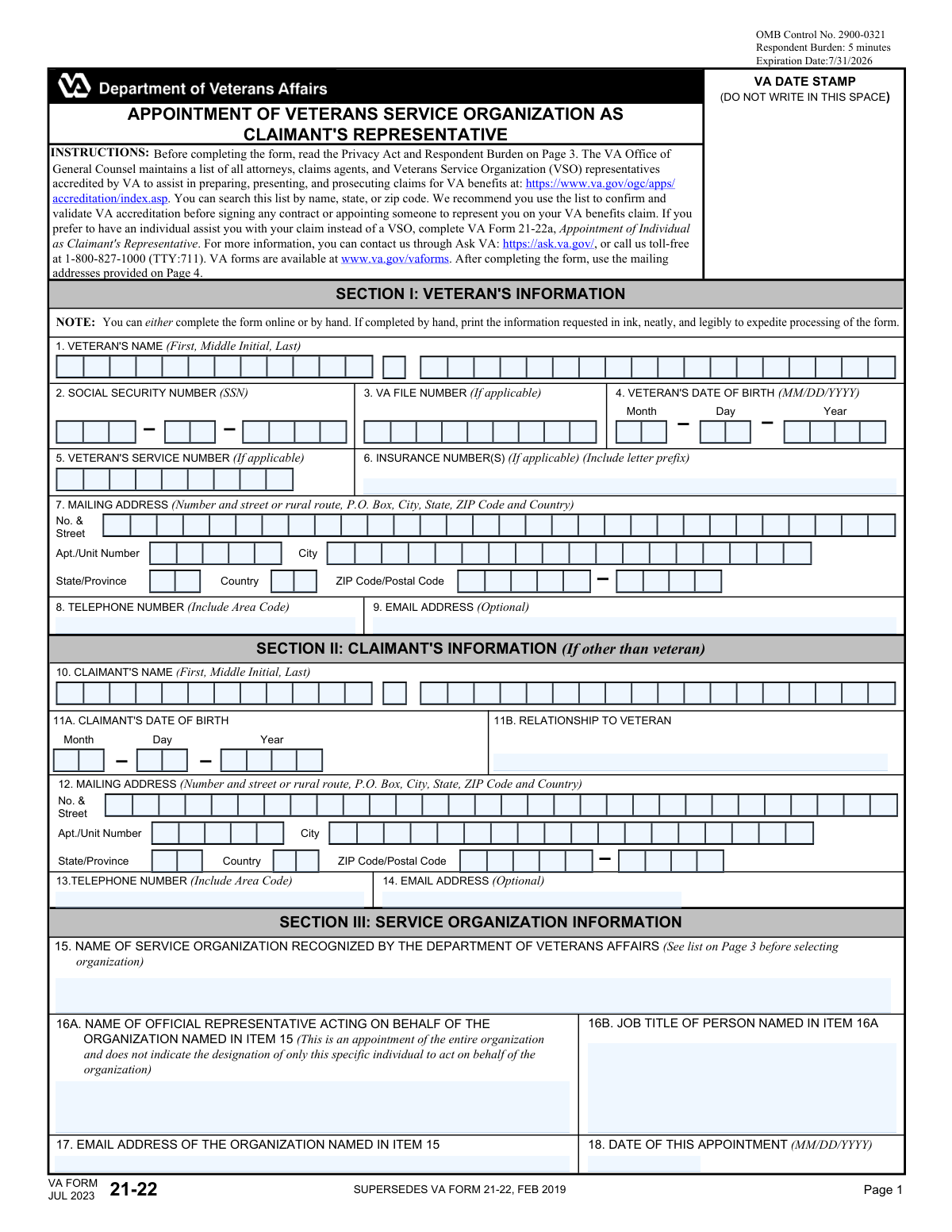
Yes! You can use AI to fill out VA Form 21-22, Appointment of Veterans Service Organization as Claimant's Representative
VA Form 21-22, Appointment of Veterans Service Organization as Claimant's Representative, is a Department of Veterans Affairs document that formally grants a VSO the authority to act on a claimant's behalf. This power of attorney allows the chosen organization to prepare, present, and prosecute claims for VA benefits and access the claimant's records. Today, this form can be filled out quickly and accurately using AI-powered services like Instafill.ai, which can also convert non-fillable PDF versions into interactive fillable forms.
Our AI automatically handles information lookup, data retrieval, formatting, and form filling.
It takes less than a minute to fill out VA Form 21-22 using our AI form filling.
Securely upload your data. Information is encrypted in transit and deleted immediately after the form is filled out.
Form specifications
| Form name: | VA Form 21-22, Appointment of Veterans Service Organization as Claimant's Representative |
| Number of fields: | 63 |
| Number of pages: | 4 |
| Language: | English |
Instafill Demo: How to fill out PDF forms in seconds with AI
How to Fill Out VA Form 21-22 Online for Free in 2026
Are you looking to fill out a VA FORM 21-22 form online quickly and accurately? Instafill.ai offers the #1 AI-powered PDF filling software of 2026, allowing you to complete your VA FORM 21-22 form in just 37 seconds or less.
Follow these steps to fill out your VA FORM 21-22 form online using Instafill.ai:
- 1 Navigate to Instafill.ai and upload or select VA Form 21-22 from their library of official documents.
- 2 Use the AI assistant to accurately fill in the Veteran's Information in Section I, including name, Social Security Number, and contact details.
- 3 If you are filing on behalf of the veteran, complete Section II with your information as the claimant.
- 4 In Section III, enter the details of the Veterans Service Organization (VSO) you are appointing, including the organization's name and the name of their representative.
- 5 Carefully review Section IV to authorize the representative's access to your records and decide whether to allow them to change your address. Specify any limitations on consent for sensitive records.
- 6 Electronically sign and date the form in Section V. The form will then need to be signed by the VSO representative.
- 7 Download the completed, signed form and submit it to the appropriate VA office electronically or by mail as per the instructions on Page 4.
Our AI-powered system ensures each field is filled out correctly, reducing errors and saving you time.
Why Choose Instafill.ai for Your Fillable VA Form 21-22 Form?
Speed
Complete your VA Form 21-22 in as little as 37 seconds.
Up-to-Date
Always use the latest 2026 VA Form 21-22 form version.
Cost-effective
No need to hire expensive lawyers.
Accuracy
Our AI performs 10 compliance checks to ensure your form is error-free.
Security
Your personal information is protected with bank-level encryption.
Frequently Asked Questions About Form VA Form 21-22
This form is used to officially appoint a recognized Veterans Service Organization (VSO) to represent you in preparing, presenting, and prosecuting your claims for VA benefits.
A veteran, or a claimant acting on behalf of a veteran, should fill out this form if they want a VSO to act as their official representative with the Department of Veterans Affairs.
Use Form 21-22 to appoint a Veterans Service Organization (e.g., American Legion, VFW). Use Form 21-22a if you wish to appoint a specific accredited individual, like an attorney or claims agent, to represent you.
No, the form states that the appointed service organization will not charge any fee or compensation for the services they provide under this appointment.
The VA maintains a list of all accredited organizations on its website at va.gov/ogc. You can search this list to find and confirm a VSO before appointing them.
This section allows you to authorize the VA to release sensitive health records (related to drug/alcohol abuse, HIV, or sickle cell anemia) to your VSO. This access can help them better represent you, but granting it is your choice.
No, it is optional. However, if these records are relevant to your claim, not authorizing access may limit your representative's ability to fully assist you.
The VA recommends submitting the form electronically through its website for the fastest processing. Alternatively, you can mail it to the appropriate address listed on Page 4 of the form, which varies by claim type.
You will need the veteran's full name, Social Security Number, date of birth, and contact information. If you are a claimant other than the veteran, you will also need to provide your own personal details.
No, a notary is not required. You just need to provide your signature and the date in Section V.
Yes, services like Instafill.ai use AI to help you accurately auto-fill form fields from your saved profile, which saves time and helps prevent errors.
You can use a service like Instafill.ai to upload the PDF, which will make it an interactive, fillable document. You can then type your information, sign electronically, and download the completed form for submission.
If you have a non-fillable or 'flat' PDF, tools like Instafill.ai can convert it into an interactive form. This allows you to easily type your information directly onto the form from your computer.
By checking this box, you grant your appointed VSO permission to update your mailing address in the VA's records on your behalf. This is useful if you move while your claim is being processed.
Compliance VA Form 21-22
Validation Checks by Instafill.ai
1
Validates Veteran's Social Security Number Format
Ensures the Social Security Number entered in Item 2 consists of exactly nine digits. This is a primary identifier crucial for correctly locating the veteran's records within the VA system. An invalid SSN format will prevent record matching and lead to processing delays or rejection of the form.
2
Validates Veteran's Date of Birth Format and Plausibility
This check verifies that the Veteran's Date of Birth in Item 4 is a valid date in MM/DD/YYYY format and is logically sound (e.g., not a future date or more than 120 years in the past). An incorrect or impossible date can cause identification errors and may impact eligibility calculations for certain benefits. Failure will require the user to correct the date before submission.
3
Ensures Completeness of Claimant Information When Applicable
This validation confirms that if a claimant's name is entered in Item 10 (indicating the claimant is not the veteran), then the claimant's date of birth (Item 11A) and relationship to the veteran (Item 11B) are also completed. These fields are essential for establishing the claimant's identity and eligibility to act on the veteran's behalf. Incomplete claimant information will halt the processing of the appointment.
4
Verifies Service Organization is on the VA-Recognized List
This validation cross-references the organization name entered in Item 15 against the official list of VA-recognized service organizations provided on Page 3 of the form. Appointing a non-recognized organization is not permitted and would invalidate the entire form's purpose. If the name does not match a recognized entity, the submission will be blocked, and the user will be prompted to select a valid organization.
5
Ensures All Required Signatures are Present
This validation confirms that both the claimant's signature (Item 22A) and the service organization representative's signature (Item 23A) have been provided. Both signatures are legally required to execute the power of attorney and make the appointment valid. A missing signature will render the form incomplete and legally non-binding, causing it to be rejected.
6
Requires Signature Dates for All Signatures
This check verifies that for every signature provided (Items 22A and 23A), a corresponding signature date (Items 22B and 23B) is also entered. The date establishes when the legal agreement was executed. A signature without a date is considered incomplete and can be challenged, so the form will be returned for completion if a date is missing.
7
Validates Logical Consistency of Appointment and Signature Dates
This check ensures the 'Date of this Appointment' (Item 18) is not a future date and is on or before the claimant's signature date (Item 22B). The appointment cannot be effective before it is signed by the claimant. This logical check prevents data entry errors and ensures the legal validity of the appointment timeline.
8
Validates Logical Dependency of Record Authorization and Limitations
This check enforces the rule that limitations on consent (Item 20) can only be specified if the general authorization for sensitive records access (Item 19) is granted. If the user does not check the box in Item 19, they cannot check any boxes in Item 20 to limit a non-existent authorization. This prevents contradictory inputs and ensures the user's intent regarding record privacy is clear and unambiguous.
9
Ensures Veteran's Full Name is Provided
This validation confirms that the Veteran's First Name and Last Name fields in Item 1 are not left blank. The veteran's full name is a primary identifier and is absolutely essential for locating the correct VA records. The form cannot be processed without this fundamental information.
10
Validates Plausibility of Signature Dates
This check ensures that the signature dates in Items 22B and 23B are not set to a future date and are not prior to the form's publication date (July 2023). A signature date must reflect the actual time of signing to be legally valid. This prevents typographical errors and ensures the form's temporal integrity.
11
Validates Format of All Email Address Fields
This validation ensures that any email address entered in the form (Items 9, 14, and 17) conforms to a standard format, such as including an '@' symbol and a domain. While some emails are optional, providing a valid email is crucial for timely electronic communication. An invalid format could lead to missed notifications, so the system should flag it for user correction.
12
Ensures VSO Representative Information is Complete
This check ensures that if a service organization is appointed in Item 15, the name of the official representative (Item 16A) and their job title (Item 16B) are also entered. This is required for accountability and to identify the individual who signed the form. The appointment is not complete without identifying the specific agent of the organization.
Common Mistakes in Completing VA Form 21-22
A frequent error occurs when the veteran is the claimant but fills out both Section I (Veteran's Information) and Section II (Claimant's Information). Section II should only be completed if the person filing the claim is someone other than the veteran, such as a spouse or parent. This mistake creates confusion and can delay processing as the VA must clarify who the actual claimant is. To avoid this, the veteran should only fill out Section I and leave Section II blank if they are filing for themselves.
Applicants often enter an abbreviated, misspelled, or non-recognized name for the Veterans Service Organization (VSO) in Item 15. The VA can only process appointments for officially accredited organizations listed on Page 3 of the form. Submitting an incorrect name will lead to the form's rejection and require resubmission. Always cross-reference the VSO's full, official name with the list provided on the form or on the VA's accreditation search website.
Failing to check the authorization box in Item 19 is a critical oversight. This box grants the VSO permission to access records related to drug/alcohol abuse, HIV, or sickle cell anemia, which may be essential for substantiating a claim. Without this authorization, the VSO cannot access this protected information, potentially weakening the claim or causing significant delays. Carefully review Section IV and check the box in Item 19 if you want your representative to have full access to all relevant medical records.
A form submitted without the required signature in Item 22A (Veteran/Claimant) is invalid and will be immediately rejected. Another common issue is submitting the form before the VSO representative has signed in Item 23A. Both signatures are mandatory to execute the power of attorney. Always ensure you have signed and dated the form, and that you have coordinated with your VSO to obtain their representative's signature before submission.
The form explicitly requires the MM/DD/YYYY format for all dates, including birth dates (Item 4, 11A) and signature dates (Item 18, 22B, 23B). Applicants frequently use other formats like DD/MM/YYYY or use a two-digit year, which can cause data entry errors and processing delays. To prevent this, double-check that all dates are entered in the correct eight-digit format. AI-powered tools like Instafill.ai can automatically format dates correctly, eliminating this common error.
When filling out the form by hand, messy or illegible handwriting is a primary source of processing errors. If VA staff cannot decipher names, numbers, or addresses, it can lead to misidentification, returned mail, or outright rejection of the form. To avoid this, print clearly and legibly in ink as instructed. Alternatively, use a tool like Instafill.ai, which can convert the non-fillable PDF into a fillable version, allowing you to type your responses for perfect clarity.
Page 4 of the form lists several different mailing addresses based on the type of claim (e.g., Compensation, Pension, Fiduciary). Sending the form to the wrong address does not mean it will be discarded, but it will cause significant delays as it must be rerouted internally. Before mailing, carefully review Page 4 and identify the correct Evidence Intake Center for your specific situation. The form also recommends faster electronic submission methods.
Leaving the Social Security Number (Item 2) or VA File Number (Item 3, if applicable) blank is a serious error. These numbers are the primary way the VA identifies the veteran and connects the form to the correct case file. Without this information, the VA may be unable to locate the veteran's records, leading to rejection of the appointment form. Always provide the full SSN and the VA File Number if one has been assigned.
Forgetting to include an apartment, unit, or suite number (Item 7 or 12) is a very common mistake that leads to failed mail delivery. An incorrect or incomplete address means you will not receive important correspondence from the VA regarding your claim status. Double-check that your full address, including any secondary designators and the correct ZIP code, is entered accurately. Form-filling tools can help by validating address components to ensure they are complete.
Government forms are updated periodically, and using an old version can lead to rejection. This form is dated JUL 2023 and supersedes the FEB 2019 version. An outdated form may be missing new fields or contain obsolete information, causing it to be returned. Always ensure you are using the most current version by downloading it directly from the official va.gov/vaforms website before you begin.
Saved over 80 hours a year
“I was never sure if my IRS forms like W-9 were filled correctly. Now, I can complete the forms accurately without any external help.”
Kevin Martin Green
Your data stays secure with advanced protection from Instafill and our subprocessors

Robust compliance program
Transparent business model
You’re not the product. You always know where your data is and what it is processed for.
ISO 27001, HIPAA, and GDPR
Our subprocesses adhere to multiple compliance standards, including but not limited to ISO 27001, HIPAA, and GDPR.
Security & privacy by design
We consider security and privacy from the initial design phase of any new service or functionality. It’s not an afterthought, it’s built-in, including support for two-factor authentication (2FA) to further protect your account.
Fill out VA Form 21-22 with Instafill.ai
Worried about filling PDFs wrong? Instafill securely fills va-form-21-22-appointment-of-veterans-service-organization-as-claimants-representative forms, ensuring each field is accurate.