Yes! You can use AI to fill out VA Form 28-1902w, Information for Veteran Readiness and Employment Entitlement Determination

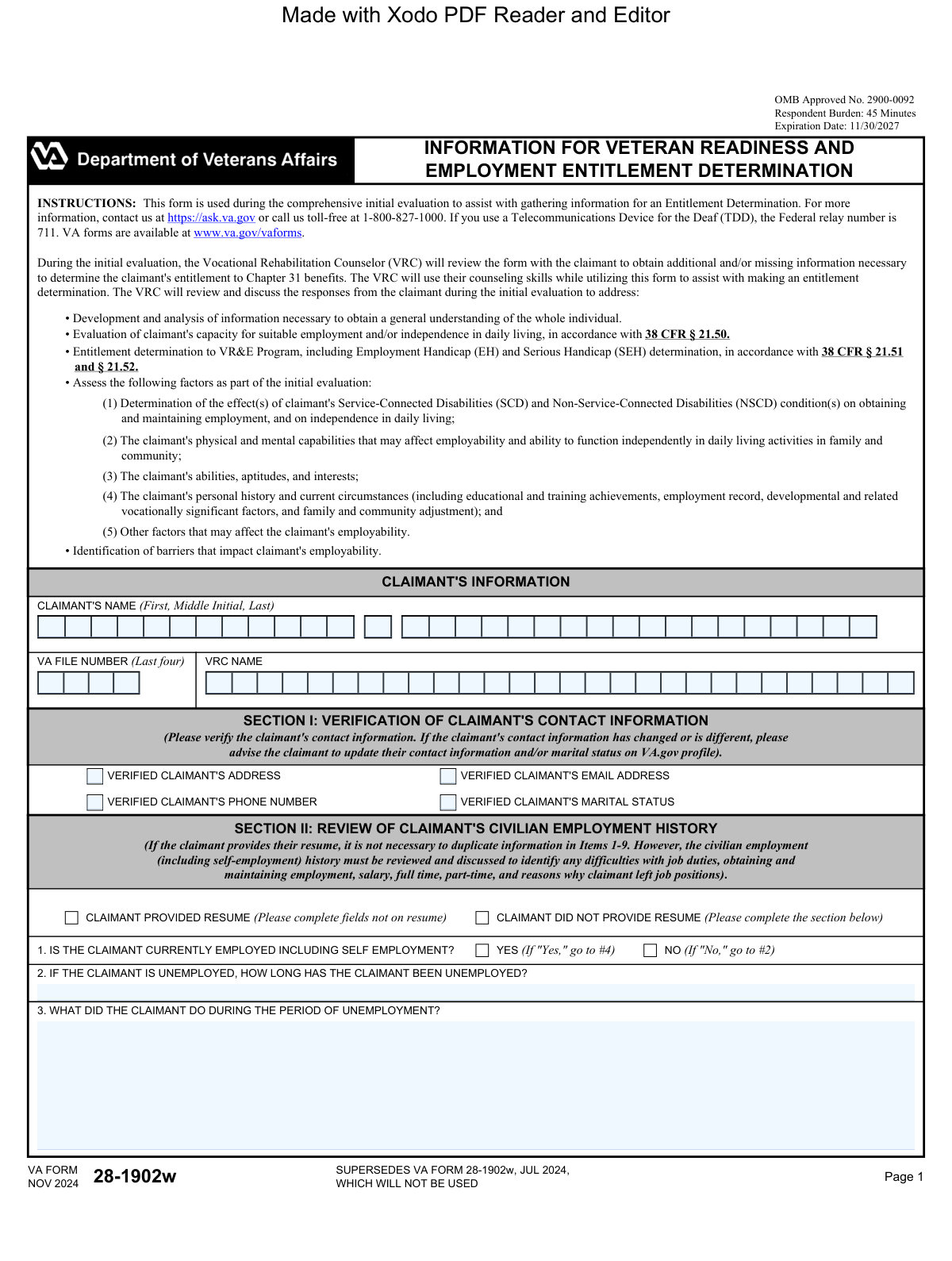
VA Form 28-1902w, Information for Veteran Readiness and Employment Entitlement Determination, is a Department of Veterans Affairs document used by Vocational Rehabilitation Counselors (VRCs) during an initial evaluation. It collects comprehensive data on a veteran's employment, military, medical, and personal history to determine their entitlement to Chapter 31 benefits. This assessment helps identify employment handicaps and the support needed for suitable employment or independent living. Today, this form can be filled out quickly and accurately using AI-powered services like Instafill.ai, which can also convert non-fillable PDF versions into interactive fillable forms.
VA Form 28-1902w has a complex Form Complexity Index of 71/100 — 166 fillable fields across 8 pages. Instafill’s AI completes it accurately in under a minute.

Form specifications

Form name: VA Form 28-1902w, Information for Veteran Readiness and Employment Entitlement Determination
Number of fields: 166
Number of pages: 8
FCI: Complex (71/100)
Language: English
Our AI automatically handles information lookup, data retrieval, formatting, and form filling.
It takes less than a minute to fill out VA Form 28-1902w using our AI form filling.
Securely upload your data. Information is encrypted in transit and deleted immediately after the form is filled out.
Preview of VA Form 28-1902w, Information for Veteran Readiness and Employment Entitlement Determination

Instafill Demo: How to fill out PDF forms in seconds with AI

How to Fill Out VA Form 28-1902w Online for Free in 2026

Are you looking to fill out a VA FORM 28-1902W form online quickly and accurately? Instafill.ai offers the #1 AI-powered PDF filling software of 2026, allowing you to complete your VA FORM 28-1902W form in just 37 seconds or less.
Follow these steps to fill out your VA FORM 28-1902W form online using Instafill.ai:
  1. 1 Navigate to Instafill.ai and upload or select VA Form 28-1902w.
  2. 2 Provide your personal details and contact information for the VRC to verify in Section I.
  3. 3 Complete Sections II and III by detailing your civilian and military employment history, including any difficulties faced due to service-connected disabilities.
  4. 4 Answer the questions regarding your legal, substance abuse, and education history in Sections IV, V, and VI.
  5. 5 In Section VII, list your service-connected and non-service-connected disabilities and describe their impact on your ability to work.
  6. 6 Fill out the miscellaneous information in Section VIII regarding other VA services and benefits you may have applied for or are receiving.
  7. 7 Review the entire form with your VRC to ensure all information is accurate and complete, then sign and date the form as required.

Our AI-powered system ensures each field is filled out correctly, reducing errors and saving you time.

Why Choose Instafill.ai for Your Fillable VA Form 28-1902w Form?

Speed

Complete your VA Form 28-1902w in as little as 37 seconds.

Up-to-Date

Always use the latest 2026 VA Form 28-1902w form version.

Cost-effective

No need to hire expensive lawyers.

Accuracy

Our AI performs 10 compliance checks to ensure your form is error-free.

Security

Your personal information is protected with bank-level encryption.

Frequently Asked Questions About VA Form 28-1902w

VA Form 28-1902w has a Form Complexity Index of 71 out of 100, placing it in the complex complexity tier. This score is calculated deterministically from the form’s own structure using Instafill’s published Form Complexity Index methodology, so it can be reproduced and independently verified — it is not a subjective estimate.

For VA Form 28-1902w specifically, the score reflects 166 fillable fields across 8 pages, grouped into 45 sections, and 38 conditional fields that only apply depending on earlier answers, 2 tables or repeating lists. The number of fields is the largest factor in the base score (weighted 36%), followed by how difficult those fields are to complete based on their type, where free-text and signature fields count for more than simple checkboxes (26%). The number of pages that actually contain fields (15%), the amount of conditional “fill-only-if” logic (16%), and how many sections the form is divided into (7%) account for the rest of the base. On top of that base, the index adds points for tables and repeating lists, bundled instruction pages, and dense page layouts — capturing difficulty the base alone can miss.

In practical terms, a complex score means the form is demanding, with many fields, multiple pages and branching rules that are easy to get wrong. Instafill removes that effort entirely: our AI reads your information, maps each value to the correct field — including the conditional ones — and completes VA Form 28-1902w accurately in under a minute, with every field available for you to review before you download. See exactly how the Form Complexity Index is calculated.

This form is used to gather information for your Veteran Readiness and Employment (VR&E) entitlement determination. It helps your Vocational Rehabilitation Counselor (VRC) understand how your disabilities affect your employment and daily living as part of your initial evaluation.

No, this form is designed to be completed with your Vocational Rehabilitation Counselor (VRC) during your initial evaluation. The VRC will use it as a guide to discuss your history and needs with you.

It is helpful to bring your resume, DD-214 or military records, and any academic transcripts or certifications. Providing these documents can save time, as your VRC can review them instead of having you fill out every detail on the form.

Your employment history helps the VRC understand your skills and experience, and more importantly, how your service-connected disabilities may have impacted your ability to find and keep a job. This is essential for determining your eligibility for VR&E services.

No, you will not need to duplicate the information if you provide a resume. However, your VRC will still discuss your work history with you to identify any challenges you faced that might be related to your disabilities.

This sensitive information helps the VRC understand the whole picture of potential barriers to employment and identify if you need additional support or resources. Your responses are kept confidential as protected by the Privacy Act.

The information gathered on this form is a critical part of your initial evaluation. Your VRC will use it to make an entitlement determination for the VR&E program (Chapter 31 benefits).

Yes, responding is required to obtain VR&E benefits, as the information is necessary to determine your eligibility. Your VRC will guide you through the form and can address any concerns you have about specific questions.

The estimated time to review the instructions and complete the form is about 45 minutes. This will be part of your comprehensive initial evaluation session with your VRC.

Yes, services like Instafill.ai can help you organize your information beforehand. You can use AI to auto-fill a digital copy of the form, which can help you gather your thoughts and documents to save time during your appointment.

You can upload the VA Form 28-1902w PDF to the Instafill.ai platform. The service will make the form interactive, allowing you to type your information directly into the fields, which you can then save or print for your meeting.

If you have a non-fillable or 'flat' PDF, you can use a service like Instafill.ai. It can convert the document into an interactive, fillable form so you can easily type and save your information.

You can download the latest version of this and other VA forms directly from the official VA website at www.va.gov/vaforms.

Compliance VA Form 28-1902w
Validation Checks by Instafill.ai

1
Validate VA File Number Format
This check ensures that the 'VA File Number (Last four)' field contains exactly four numeric digits. It prevents the submission of incomplete or incorrectly formatted identifiers, which are critical for linking the form to the correct claimant's record. If the input is not four digits, an error message should prompt the user to correct the entry.
2
Enforce Conditional Unemployment Details
This validation checks the response to 'IS THE CLAIMANT CURRENTLY EMPLOYED?'. If the answer is 'NO', it then requires that the 'HOW LONG HAS THE CLAIMANT BEEN UNEMPLOYED?' field be populated. This ensures that periods of unemployment, which are critical for the entitlement determination, are properly documented. A failure would prevent submission until the duration of unemployment is provided.
3
Validate Employment Dates Chronology
For each employment entry in Section II, this check verifies that the 'DATES OF EMPLOYMENT' end date is not before the start date. This maintains the logical integrity of the claimant's work history and prevents data entry errors. If an end date precedes a start date, the system should flag the entry for correction.
4
Require Conditional Disability Aggravation Explanation
In the employment history section, if the user answers 'Yes' to 'DO THE JOB DUTIES AGGRAVATE THE CLAIMANT'S SERVICE-CONNECTED DISABILITIES?', this validation makes the subsequent explanation field mandatory. This is crucial for understanding the impact of work on the claimant's health and for the Employment Handicap (EH) determination. The form cannot be processed without this detail if 'Yes' is selected.
5
Enforce Mutually Exclusive Resume Status
This check ensures that the user can only select one of 'CLAIMANT PROVIDED RESUME' or 'CLAIMANT DID NOT PROVIDE RESUME'. This prevents contradictory information regarding the source of employment data. If one is checked, the other should be disabled or un-checked automatically.
6
Require Conditional Difficulty Description in Section II
In Item 9, if any checkbox indicating a difficulty (e.g., 'CO-WORKER RELATIONS', 'JOB PERFORMANCE') is checked, the corresponding text field for a detailed description becomes mandatory. This ensures that a simple checkmark is supported by a qualitative explanation, which is necessary for the VRC's evaluation. The form should not proceed if a box is checked but the description is empty.
7
Validate Mutually Exclusive Legal History Status
In Section IV, this check ensures that if 'NOT APPLICABLE' is selected, no other options in the legal history section (e.g., 'FELONY', 'MISDEMEANOR') can be selected. This prevents contradictory data entry and ensures clarity. If 'NOT APPLICABLE' is checked, other checkboxes in the section should be cleared and disabled.
8
Enforce Conditional Legal Issue Details
This validation rule applies to Section IV (Legal History). If any checkbox other than 'NOT APPLICABLE' is selected (e.g., 'BANKRUPTCY', 'PROBATION'), the corresponding description field must be filled out. This ensures that any declared legal issue is accompanied by a necessary explanation for the VRC's review. Submission is blocked until the required details are provided.
9
Validate Mutually Exclusive Substance Abuse History
In Section V, this check ensures that if 'NOT APPLICABLE' is selected, no other options in the substance abuse history section (e.g., 'ALCOHOL', 'ILLEGAL DRUGS') can be selected. This maintains data integrity by preventing conflicting responses. If 'NOT APPLICABLE' is checked, the system should clear any other selections in this section.
10
Require Conditional Substance Abuse Treatment Details
If any substance abuse history item ('ALCOHOL', 'ILLEGAL DRUGS', etc.) is checked in Section V, this validation requires the 'DESCRIBE TREATMENT PROGRESS' field to be populated. This information is vital for assessing the claimant's current stability and support needs. The form would be considered incomplete without this information if a history is indicated.
11
Enforce Conditional Field of Study Requirement
In Section VI, this check verifies that if the 'HIGHEST LEVEL OF EDUCATION' selected is 'ASSOCIATE'S DEGREE' or higher, the 'FIELD OF STUDY' text field must be completed. This ensures that the claimant's specialized knowledge is documented, which is relevant to determining suitable employment goals. An error should be displayed if the education level is high but the major is missing.
12
Require Conditional Driver's License Explanation
This validation applies to Section VII, Item 21. If the claimant answers 'No' to 'DOES THE CLAIMANT HAVE A VALID DRIVER'S LICENSE?', the associated explanation field becomes mandatory. Lack of a driver's license can be a significant barrier to employment, and understanding the reason is essential for the VRC. The form cannot be submitted without this explanation if the answer is 'No'.
13
Validate 'Other' Field Specification
This check applies to multiple sections where an 'OTHER' option is available (e.g., Branch of Service, Legal History, Benefits). If the 'OTHER' checkbox or radio button is selected, the corresponding text field to specify the 'Other' information must be filled in. This prevents ambiguous data and ensures complete information is captured. The form should prompt the user to provide details if 'OTHER' is selected but the text field is empty.
14
Validate Final Date Format and Logic
This check ensures the 'DATE' field in Section IX (Item 30) is entered in a valid MM/DD/YYYY format and is not a future date. This is critical for establishing an accurate and legally sound record of when the form was completed. The system should reject invalid formats or future dates and prompt the VRC for correction.

Common Mistakes in Completing VA Form 28-1902w

Providing Vague Disability Impact Descriptions

In Section VII, claimants often list their service-connected disabilities without explaining their functional limitations. For example, writing "PTSD" instead of "Due to PTSD, I have difficulty concentrating in noisy environments and interacting with the public, which has led to performance issues." This lack of detail makes it impossible for the Vocational Rehabilitation Counselor (VRC) to determine an Employment Handicap (EH). To avoid this, clearly describe how each disability specifically affects your ability to perform job tasks, maintain a schedule, and interact with colleagues. AI-powered tools like Instafill.ai can help structure these narratives by prompting for specific details about functional impacts.

Failing to Explain How Job Duties Aggravate Disabilities

In the employment history section (Section II), claimants may check 'Yes' that a job aggravated their disabilities but leave the explanation box empty. This explanation is critical evidence for establishing a connection between a disability and work-related challenges. An incomplete answer misses a key opportunity to justify the need for vocational rehabilitation services. Always provide a specific, detailed example, such as 'Sitting at a desk for 8 hours a day aggravated my service-connected back condition, causing severe pain and requiring me to miss work for medical appointments.'

Omitting or Minimizing Sensitive History

Claimants may be hesitant to disclose information in Section IV (Legal History) and Section V (Substance Abuse History) due to embarrassment or fear of judgment. However, omitting this information can lead to delays or denial of benefits if discovered later, as it pertains to potential barriers to employment. It is crucial to be honest and thorough, as the VRC's role is to help address these barriers, not to pass judgment. Providing this information allows the counselor to identify needs and make appropriate referrals for support services.

Using Generic Job Duty Descriptions

When describing past jobs in Section II, many applicants use vague titles or one-word descriptions like 'Manager' or 'Logistics.' This prevents the VRC from understanding the claimant's transferable skills, experience, and the specific tasks that were challenging. A better approach is to use bullet points or short sentences to detail key responsibilities, such as 'Managed a team of 5, scheduled shifts, and handled inventory control.' This detail is essential for assessing skills and identifying suitable future employment goals.

Forgetting to List Non-Degree Credentials

In Section VI (Education/Training), claimants often focus only on formal degrees and forget to list valuable certifications, licenses, or apprenticeships. Credentials like a Commercial Driver's License (CDL), IT certifications (e.g., CompTIA A+), or a Journeyman license are highly relevant for vocational planning. Forgetting these can result in the VRC overlooking viable career paths or underestimating your qualifications. Always list all professional credentials, no matter how minor they may seem.

Leaving the 'Additional Comments' Section Blank

Section IX ('Other Relevant Information or Additional Comments') is often left empty, which is a significant missed opportunity. This free-text field allows you to provide context for complex situations, explain gaps in your employment history, or summarize your vocational goals in your own words. Use this space to tie all the information together and present a clear narrative to the VRC. Failing to do so means you are relying solely on the VRC's interpretation of the checked boxes.

Using an Outdated Version of the Form

Government forms are updated periodically, and using an old version is a common reason for automatic rejection or processing delays. The bottom of this form clearly states it 'SUPERSEDES VA FORM 28-1902w, JUL 2024, WHICH WILL NOT BE USED.' Always download the form directly from the official VA website (va.gov/vaforms) before filling it out to ensure you have the current, valid version.

Inaccurate Employment Dates and Salary

In Section II, claimants often guess their employment start/end dates and salary, leading to inconsistencies, especially when compared against a resume or background check. These inaccuracies can undermine credibility and complicate the assessment of work history. To avoid this, gather documents like old pay stubs, tax records, or performance reviews before filling out the form. Using a tool like Instafill.ai can help by storing this information securely for reuse across multiple forms, ensuring consistency and accuracy.

Misunderstanding Conditional Instructions

The form contains conditional logic, such as 'If the claimant provides their resume, it is not necessary to duplicate information.' This can cause confusion, leading claimants to either skip the entire section or fill it out redundantly. The best practice is to provide the resume and still review the section to ensure critical details, like the disability aggravation explanations, are explicitly filled in on the form itself, as a resume typically would not contain this specific information.

Illegible Handwriting on a Non-Fillable PDF

Many VA forms are only available as non-fillable PDFs, forcing claimants to print and fill them out by hand. Poor handwriting can lead to data entry errors, misinterpretation of critical information, and processing delays. If a name, number, or key detail is unreadable, it can bring the entire process to a halt. To prevent this, use a service like Instafill.ai, which can convert any flat PDF into an interactive, fillable form, allowing you to type your answers clearly and professionally.
Saved over 80 hours a year

“I was never sure if my IRS forms like W-9 were filled correctly. Now, I can complete the forms accurately without any external help.”

Kevin Martin Green

Your data stays secure with advanced protection from Instafill and our subprocessors

Robust compliance program

Transparent business model

You’re not the product. You always know where your data is and what it is processed for.

ISO 27001, HIPAA, and GDPR

Our subprocesses adhere to multiple compliance standards, including but not limited to ISO 27001, HIPAA, and GDPR.

Security & privacy by design

We consider security and privacy from the initial design phase of any new service or functionality. It’s not an afterthought, it’s built-in, including support for two-factor authentication (2FA) to further protect your account.

Fill out VA Form 28-1902w with Instafill.ai

Worried about filling PDFs wrong? Instafill securely fills va-form-28-1902w-information-for-veteran-readiness-and-employment-entitlement-determination forms, ensuring each field is accurate.