Yes! You can use AI to fill out Vehicle Bill of Lading
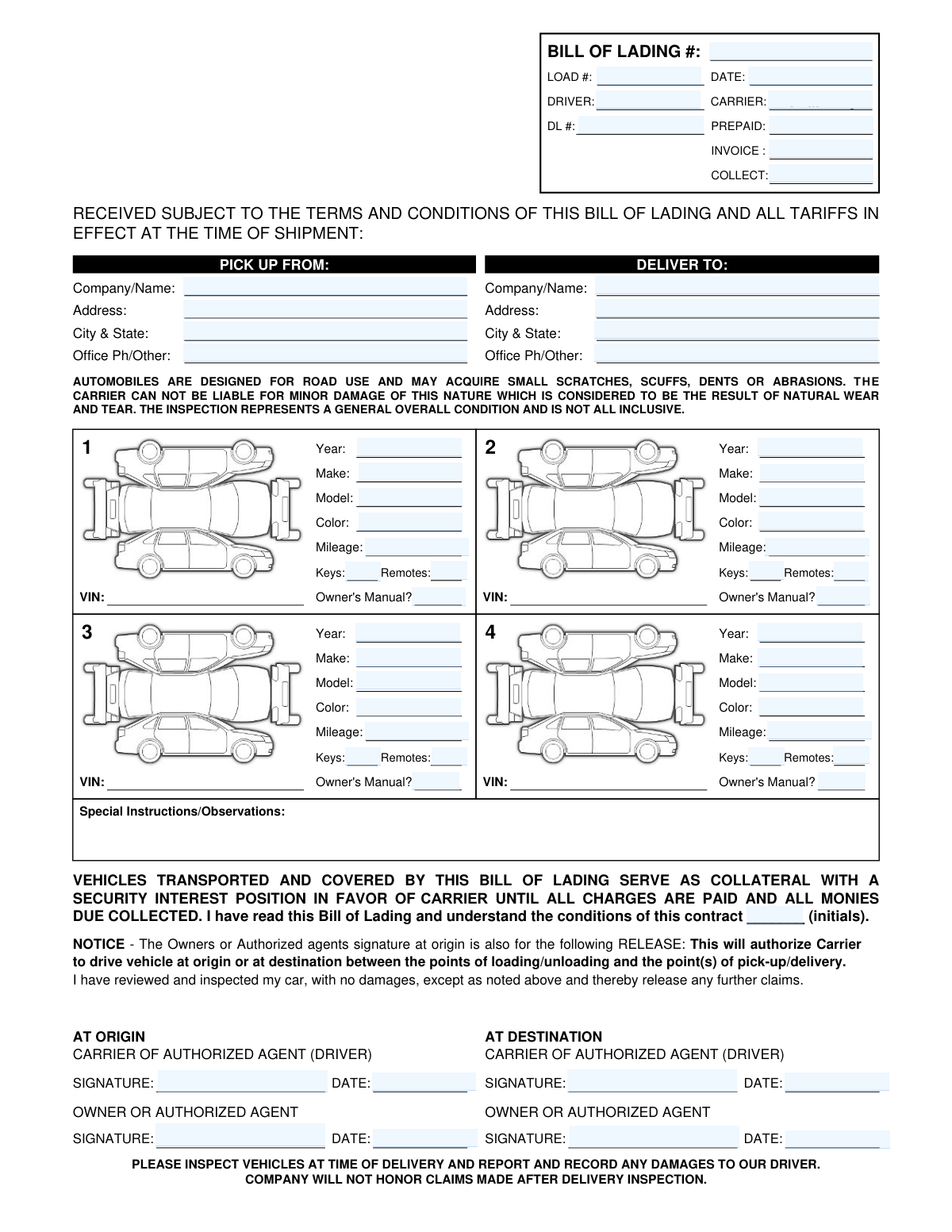
A Vehicle Bill of Lading is a legally binding document used in the auto transport industry that acts as a contract between the shipper and the carrier, a receipt for the goods shipped, and a document of title. It is critically important as it records the vehicle's condition at pickup and delivery, protecting all parties involved in case of damage or disputes. Today, this form can be filled out quickly and accurately using AI-powered services like Instafill.ai, which can also convert non-fillable PDF versions into interactive fillable forms.
Our AI automatically handles information lookup, data retrieval, formatting, and form filling.
It takes less than a minute to fill out Vehicle Bill of Lading using our AI form filling.
Securely upload your data. Information is encrypted in transit and deleted immediately after the form is filled out.
Form specifications
| Form name: | Vehicle Bill of Lading |
| Number of fields: | 58 |
| Number of pages: | 1 |
| Filled form examples: | Form Vehicle Bill of Lading Examples |
| Language: | English |
Instafill Demo: How to fill out PDF forms in seconds with AI
How to Fill Out Vehicle Bill of Lading Online for Free in 2026
Are you looking to fill out a VEHICLE BILL OF LADING form online quickly and accurately? Instafill.ai offers the #1 AI-powered PDF filling software of 2026, allowing you to complete your VEHICLE BILL OF LADING form in just 37 seconds or less.
Follow these steps to fill out your VEHICLE BILL OF LADING form online using Instafill.ai:
- 1 Navigate to Instafill.ai and upload or select the Vehicle Bill of Lading form.
- 2 Use the AI assistant to automatically fill in the 'Pick Up From' (shipper) and 'Deliver To' (receiver) sections with complete names, addresses, and contact information.
- 3 Enter the primary Bill of Lading details, including the BOL number, date, carrier name, and any financial information like prepaid or collect amounts.
- 4 Carefully document the details for each vehicle being transported, including its year, make, model, color, and mileage. This section serves as the vehicle condition report.
- 5 Provide information on accompanying items for each vehicle, such as the number of keys, remotes, and whether the owner's manual is present.
- 6 At the origin, review all information for accuracy, then have the owner/agent and the carrier's representative sign and date the 'at Origin' signature sections.
- 7 Upon arrival at the destination, inspect the vehicle(s) again, and have both the owner/agent and carrier representative sign and date the 'at Destination' sections to finalize the delivery.
Our AI-powered system ensures each field is filled out correctly, reducing errors and saving you time.
Why Choose Instafill.ai for Your Fillable Vehicle Bill of Lading Form?
Speed
Complete your Vehicle Bill of Lading in as little as 37 seconds.
Up-to-Date
Always use the latest 2026 Vehicle Bill of Lading form version.
Cost-effective
No need to hire expensive lawyers.
Accuracy
Our AI performs 10 compliance checks to ensure your form is error-free.
Security
Your personal information is protected with bank-level encryption.
Frequently Asked Questions About Form Vehicle Bill of Lading
This is a Bill of Lading for vehicle transport. It acts as a contract between the vehicle owner and the carrier, a receipt for the shipment, and a record of the vehicle's condition at pickup and delivery.
Both the carrier (shipping company) and the vehicle owner (or their authorized agent) must provide information. Both parties are also required to sign the document at the origin and destination.
You will need the complete pickup and delivery addresses, contact phone numbers, and details for each vehicle, including its year, make, model, color, and mileage. You should also have any relevant invoice or load numbers.
No, if you are only shipping one vehicle, you only need to complete the 'First Vehicle Details' section. The sections for the second, third, and fourth vehicles can be left blank.
The 'Prepaid Amount' is the portion of the shipping cost that has already been paid. The 'Collect Amount' is the remaining balance due to the carrier upon delivery of the vehicle.
Signatures at the origin confirm the vehicle's condition and the shipping terms at the time of pickup. Signatures at the destination confirm that the vehicle has been received and acknowledge its condition upon arrival.
This form is designed for up to four vehicles. If your shipment includes more than four, you will need to complete an additional Bill of Lading form for the other vehicles.
Documenting the exact number of keys and remotes provided at pickup ensures all items are accounted for and returned to the owner upon delivery. It helps prevent disputes over lost items.
By providing your initials in this field, you are formally acknowledging that you have read, understood, and agree to the terms and conditions of the shipping contract detailed on the form.
Yes, you can use services like Instafill.ai, which leverage AI to accurately auto-fill form fields. This can help you save time and reduce the chance of making errors.
Simply upload the form to the Instafill.ai platform. The service will make the document interactive, allowing you to type your information directly into the fields, add digital signatures, and then download or share the completed form.
If you have a non-fillable or 'flat' PDF, you can use a tool like Instafill.ai. It can convert the document into an interactive, fillable form online so you can easily complete it on your computer.
Compliance Vehicle Bill of Lading
Validation Checks by Instafill.ai
1
Ensures Bill of Lading Number is Present and Unique
This check verifies that the 'Bill of Lading Number' field is not empty and is unique within the system. This number is the primary identifier for the entire shipment, crucial for tracking, billing, and legal record-keeping. If this field is missing or a duplicate, the form submission should be rejected as it cannot be uniquely processed or tracked.
2
Verifies Chronological Order of Signature Dates
This validation compares the 'Signature Date at Origin' with the 'Signature Date at Destination'. The origin date must be on or before the destination date to reflect a logical shipment timeline. This check prevents data entry errors that could create legal and logistical inconsistencies. A failure would indicate a data entry error that needs correction before submission.
3
Validates Vehicle Manufacturing Year Format and Range
This check ensures that the 'Year' field for each vehicle is a 4-digit number. It also validates that the year falls within a logical range, such as not being in the future and not preceding a plausible manufacturing year (e.g., 1900). This prevents typos and ensures the vehicle data is plausible for identification and valuation purposes. An invalid year would be flagged for user correction.
4
Ensures Completeness of Conditional Vehicle Details
This rule checks that if any field for an optional vehicle (e.g., 'Second Vehicle Year') is filled out, then the other core identifying fields for that same vehicle ('Second Vehicle Make', 'Second Vehicle Model') are also completed. This ensures that partial, unusable vehicle records are not submitted. A failure would prompt the user to either complete the vehicle's details or clear the partial entry.
5
Validates Format of Monetary Amounts
This validation ensures that the 'Collect Amount' and 'Prepaid Amount' fields contain valid numerical currency values (e.g., 123.45). It should reject non-numeric characters, except for a single decimal point, to maintain data integrity for all financial calculations and billing processes. Correct financial data is critical for accounting, and a failure would require the user to re-enter the amount in the proper format.
6
Verifies Completeness of Pick Up and Delivery Addresses
This check confirms that the essential address components ('Pick Up Address', 'Pick Up City and State', 'Delivery Address', 'Delivery City and State') are all filled out. A complete address is non-negotiable for a logistics operation, as it is required for routing, dispatch, and successful delivery. If any part of an address is missing, the submission should be blocked until the information is provided.
7
Validates Phone Number Format
This check examines the 'Pick Up Office Phone/Other' and 'Delivery Phone or Other Contact' fields to ensure they contain a value that conforms to a standard phone number pattern. While the field allows for 'Other' contact info, if a number is entered, it must be valid to ensure a reliable point of contact exists for coordination. A malformed number could prevent critical communication, so the system should flag it for review or correction.
8
Ensures Vehicle Mileage is a Non-Negative Number
This validation confirms that the 'Mileage' field for each vehicle is a valid, non-negative number. Mileage is a key factor in a vehicle's condition and value, and negative or non-numeric entries are invalid data. This check prevents data entry errors and ensures the accuracy of the vehicle's recorded state at the time of shipment. An invalid entry would require user correction.
9
Confirms Presence of All Required Signatures
This check verifies that all four signature fields ('Carrier Signature at Origin', 'Owner/Agent Signature at Origin', 'Carrier Agent Signature at Destination', 'Owner/Agent Signature at Destination') have been signed. Signatures are legally binding and signify agreement on the vehicle's condition at pickup and delivery. Missing signatures can invalidate the contract and complicate dispute resolution, so the form should not be considered complete without them.
10
Validates Quantity of Keys and Remotes as Integers
This rule ensures that all fields for key and remote quantities ('Keys Quantity', 'Remotes Quantity', etc.) contain a non-negative integer (e.g., 0, 1, 2). This information is important for verifying that all accessories are accounted for at delivery. Entering text or decimal values would be invalid, so the system should enforce a numeric integer format for these fields.
11
Checks for Distinct Pick-up and Delivery Locations
This validation compares the full pick-up address against the full delivery address to ensure they are not identical. A shipment must have two different locations for origin and destination to be valid. This logical check prevents a common type of data entry error that would make the shipping order nonsensical and impossible to execute. If the addresses match, the user should be prompted to correct one of them.
12
Validates Format of Contract Acknowledgement Initials
This check ensures the 'Contract Acknowledgment Initials' field contains a short string of 2-3 alphabetic characters. This serves as a confirmation of acknowledgement of the contract terms. Enforcing a specific format prevents users from entering long text or irrelevant characters, keeping the data clean and consistent with its intended purpose. A failed validation would prompt the user to enter valid initials.
13
Ensures Driver Information Completeness
This validation verifies that both the 'Driver Name' and 'Driver's License Number' fields are filled in. This information is critical for carrier accountability, security, and regulatory compliance. Submitting a bill of lading without identifying the responsible driver would be a significant operational and legal risk, so these fields should be mandatory for form completion.
14
Validates Consistency of Bill of Lading Date
This check ensures the main 'Date' of the bill of lading is on or before the 'Signature Date at Origin'. The document cannot be signed at origin before it is officially created. This maintains the logical and legal sequence of events. An inconsistent date could be a sign of a backdating error or typo and should be flagged for correction.
Common Mistakes in Completing Vehicle Bill of Lading
People often provide incomplete addresses, omitting suite numbers, apartment numbers, or specific building names for either the pick-up or delivery location. This happens when filling the form from memory or in a hurry, leading to delivery delays, failed pick-up attempts, and re-delivery fees. To avoid this, always verify the full, official address, including all secondary details, before filling out the form. AI-powered form filling tools like Instafill.ai can help by using address validation to check for completeness and accuracy.
A common error is confusing the 'Prepaid Amount' and 'Collect Amount' fields, sometimes entering the same value in both or swapping them. This mistake stems from misunderstanding billing terms and results in significant payment disputes and delays in releasing the vehicle. Always clarify the payment structure and double-check that the amount to be paid upon delivery is entered only in the 'Collect Amount' field.
When listing multiple vehicles, it is very easy to accidentally enter the details for the 'Second Vehicle' into the fields for the 'Third Vehicle', or mix up the make, model, and mileage. This data entry error can lead to major issues with insurance, registration, and condition reporting. To prevent this, complete the details for one vehicle entirely before moving to the next, and carefully review all vehicle sections before signing.
Users frequently enter a rounded or estimated mileage instead of the exact odometer reading, often because they don't have direct access to the vehicle. Inaccurate mileage is a critical error as the odometer reading is used to verify that the vehicle was not used for unauthorized purposes during transit. A discrepancy can lead to disputes and claims, so always record the exact mileage from the vehicle's odometer at the time of pick-up.
Signatures are often provided without the corresponding date, or the dates are illogical, such as a destination date that is earlier than the origin date. This happens when people rush through the signature sections and can invalidate the legal standing of the Bill of Lading. Ensure that every signature is accompanied by the correct date reflecting the actual timeline. If the form is a non-fillable PDF, tools like Instafill.ai can convert it into a fillable version with date-picker fields to enforce a valid format.
The form asks for the specific 'quantity' of keys and remotes, but people often just put a checkmark or write 'Yes' instead of a number. This ambiguity occurs when the user misreads the field label and can lead to disputes at the destination if an item is missing. To avoid this, physically count the keys and remotes for each vehicle and enter the precise number in the corresponding fields.
Fields like 'Bill of Lading Number', 'Invoice Number', or 'Load Number' are sometimes left blank. These numbers are the primary identifiers for tracking the shipment, payment, and documentation, and their absence makes resolving issues extremely difficult. Always ensure these unique identifiers are obtained and entered accurately. Using a tool like Instafill.ai can help by saving and auto-populating recurring numbers for frequent shipments, reducing manual entry errors.
The 'Contract Acknowledgment Initials' field is small and easily missed, yet it is a crucial legal step confirming that the shipper has read the carrier's terms. Skipping the initials can be interpreted as the shipper not agreeing to the contract conditions, which complicates potential claims or disputes. Carefully scan the entire document for all required initials and signatures before considering it complete.
For the 'Pick Up Company/Name' or 'Delivery Company Name' fields, users may enter a nickname or an abbreviation instead of the full legal name. This happens for convenience but creates ambiguity that can confuse the driver and create legal issues if the Bill of Lading is used in a claim. Always use the complete and official names for all parties and companies involved in the shipment.
The form has separate fields for 'Driver Name', 'Carrier Signature', and 'Owner/Agent Signature'. Users can get confused and sign or enter names in the wrong boxes, especially if the owner is also the driver. This mistake can invalidate the chain of custody documentation by blurring the lines of responsibility. It is essential to carefully read each label and ensure the correct person's name and signature are placed in the designated field.
Saved over 80 hours a year
“I was never sure if my IRS forms like W-9 were filled correctly. Now, I can complete the forms accurately without any external help.”
Kevin Martin Green
Your data stays secure with advanced protection from Instafill and our subprocessors

Robust compliance program
Transparent business model
You’re not the product. You always know where your data is and what it is processed for.
ISO 27001, HIPAA, and GDPR
Our subprocesses adhere to multiple compliance standards, including but not limited to ISO 27001, HIPAA, and GDPR.
Security & privacy by design
We consider security and privacy from the initial design phase of any new service or functionality. It’s not an afterthought, it’s built-in, including support for two-factor authentication (2FA) to further protect your account.
Fill out Vehicle Bill of Lading with Instafill.ai
Worried about filling PDFs wrong? Instafill securely fills vehicle-bill-of-lading forms, ensuring each field is accurate.



