Yes! You can use AI to fill out Wniosek o wydanie dowodu osobistego (DO/W/1)
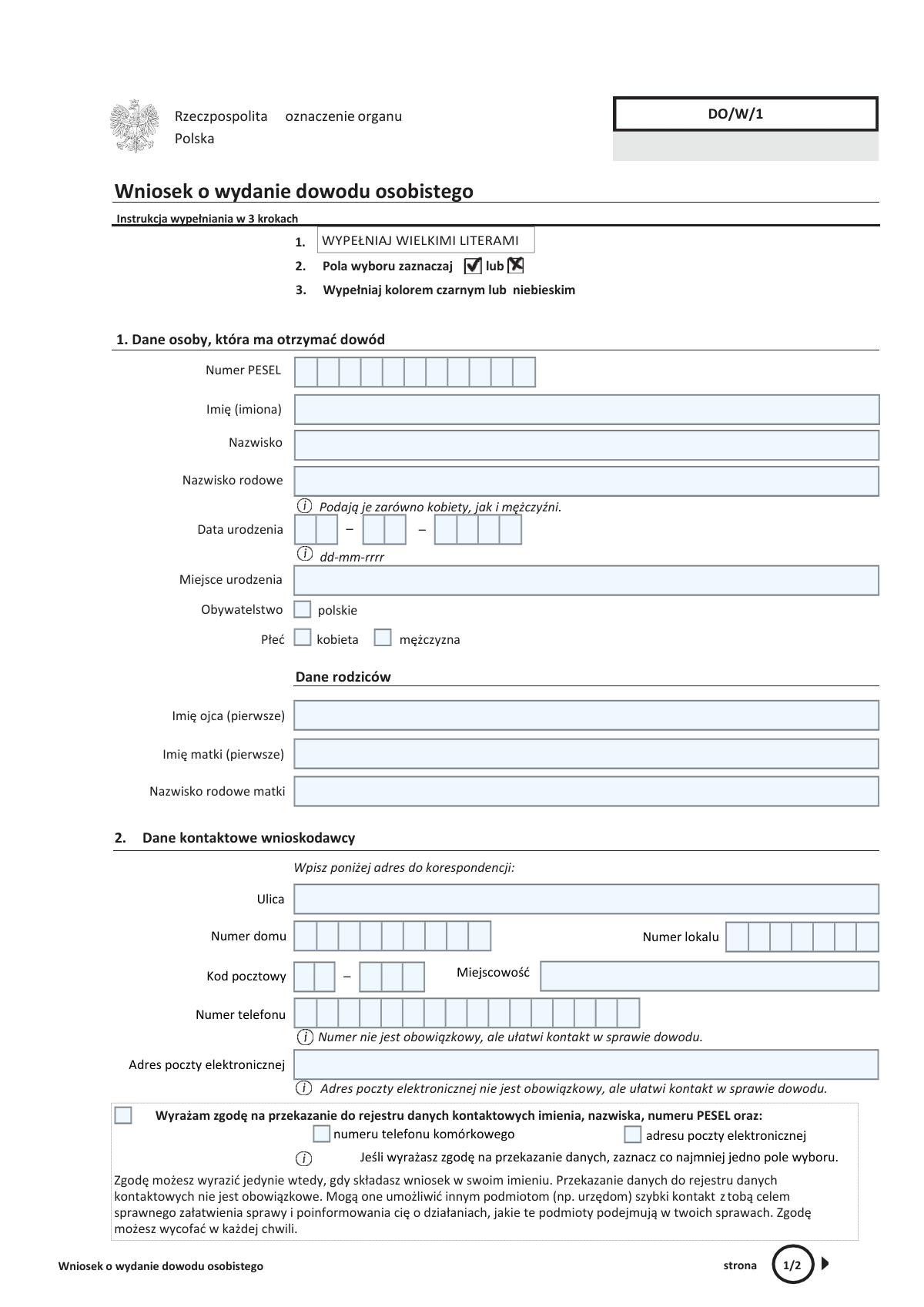
The 'Wniosek o wydanie dowodu osobistego' (Form DO/W/1) is the official application submitted to Polish authorities to request a new national identity card (dowód osobisty). It is used for first-time applications, renewals due to expiration, or replacements because of loss, damage, or changes in personal data, serving as the primary proof of identity for Polish citizens. Today, this form can be filled out quickly and accurately using AI-powered services like Instafill.ai, which can also convert non-fillable PDF versions into interactive fillable forms.
Our AI automatically handles information lookup, data retrieval, formatting, and form filling.
It takes less than a minute to fill out DO/W/1 using our AI form filling.
Securely upload your data. Information is encrypted in transit and deleted immediately after the form is filled out.
Form specifications
| Form name: | Wniosek o wydanie dowodu osobistego (DO/W/1) |
| Number of pages: | 2 |
| Language: | English |
Instafill Demo: How to fill out PDF forms in seconds with AI
How to Fill Out DO/W/1 Online for Free in 2026
Are you looking to fill out a DO/W/1 form online quickly and accurately? Instafill.ai offers the #1 AI-powered PDF filling software of 2026, allowing you to complete your DO/W/1 form in just 37 seconds or less.
Follow these steps to fill out your DO/W/1 form online using Instafill.ai:
- 1 Navigate to Instafill.ai and upload or select the 'Wniosek o wydanie dowodu osobistego' form.
- 2 Use the AI assistant to accurately fill in the applicant's personal data, including PESEL number, full name, birth details, and parents' information.
- 3 Provide your correspondence address and optional contact details like phone number and email, indicating your consent for their use.
- 4 Select the reason for applying for the ID card, such as a first-time application, expiration, loss, or change of data.
- 5 Indicate whether you want to include a personal signature certificate for electronic use.
- 6 Review all the information entered with the help of Instafill.ai's validation checks to ensure accuracy and completeness.
- 7 Electronically sign or print the completed form for manual signature, attach a compliant photograph, and submit it to the appropriate government office.
Our AI-powered system ensures each field is filled out correctly, reducing errors and saving you time.
Why Choose Instafill.ai for Your Fillable DO/W/1 Form?
Speed
Complete your DO/W/1 in as little as 37 seconds.
Up-to-Date
Always use the latest 2026 DO/W/1 form version.
Cost-effective
No need to hire expensive lawyers.
Accuracy
Our AI performs 10 compliance checks to ensure your form is error-free.
Security
Your personal information is protected with bank-level encryption.
Frequently Asked Questions About Form DO/W/1
This form is an application for a Polish national ID card ('dowód osobisty'). It is used when you are applying for your first ID, replacing an expiring or lost one, or need a new one due to a change in your personal data.
Any Polish citizen who needs to obtain their first ID card or replace an existing one must complete this application. This includes adults applying for themselves and parents or legal guardians applying on behalf of a child or ward.
You must submit the completed application form and one recent, compliant photograph. When you submit the form in person, you will also need to present your current ID card or a valid passport for identity verification.
No, providing your phone number and email address in Section 2 is optional. However, it is recommended as it allows the office to contact you quickly if there are any issues with your application.
The birth surname is required for official identity verification for both men and women. It is the family name you were given at birth, which may be different from your current surname, and helps confirm your identity against official records.
A personal signature certificate is an electronic feature on your ID card that allows you to digitally sign documents with the same legal force as a handwritten signature. You can request it in Section 5 if you plan to handle official matters online.
The person submitting the application (the applicant) must sign it. Additionally, the person for whom the ID is being issued must provide a signature if they are over 5 years old.
You must submit the completed application in person at any municipal office ('urząd gminy') in Poland, regardless of your registered address. An official will verify your identity and collect your fingerprints during your visit.
You must attach one recent, color photograph measuring 35x45 mm that meets official standards. The photo must be clear, taken against a plain background, and show your full face from the front.
If you have a non-fillable or 'flat' PDF, you can use a service like Instafill.ai. It can instantly convert the static PDF into an interactive, fillable form that you can complete on your computer.
Yes, AI-powered services like Instafill.ai can help you complete this form accurately and quickly. These tools can auto-fill your personal information, saving time and helping to prevent common errors.
You can use Instafill.ai to easily complete the form online. Simply upload the PDF, and the AI will make it fillable, allowing you to type your information directly into the fields or auto-fill them from your saved profile.
You should fill in your ePUAP address if you have an ePUAP trusted profile and want to receive an official electronic confirmation that your application has been submitted.
If your ID card was stolen, you should select the 'utrata dowodu' (loss of ID) or 'kradzież tożsamości' (identity theft) option in Section 3, depending on the circumstances. You should also report the theft to the police.
Compliance DO/W/1
Validation Checks by Instafill.ai
1
Validates PESEL Number Format and Checksum
This check ensures the 'Numer PESEL' field contains exactly 11 digits and that the number is valid according to its checksum algorithm. The PESEL is a unique national identifier, and its correctness is paramount for linking the application to the correct citizen in government databases. An invalid or malformed PESEL will result in immediate application rejection.
2
Ensures Consistency Between PESEL and Date of Birth
This validation cross-references the first six digits of the 'Numer PESEL' with the 'Data urodzenia' (Date of Birth) field. The PESEL number encodes the birth date, and a mismatch indicates a critical data entry error. This check is vital for identity verification and preventing fraud, and a failure would require the applicant to correct the conflicting information.
3
Verifies Gender Information Against PESEL Number
This check confirms that the selected 'Płeć' (Gender) corresponds to the 10th digit of the 'Numer PESEL', where an even digit indicates female and an odd digit indicates male. This serves as an important data integrity and consistency check between related fields. A discrepancy would halt the process until the applicant clarifies and corrects the information.
4
Requires Completion of All Mandatory Personal Data
This validation ensures that all required fields in Section 1, such as 'Imię (imiona)', 'Nazwisko', 'Nazwisko rodowe', 'Data urodzenia', and 'Miejsce urodzenia', are filled out. These details are legally required to issue an official identity document. An application with missing mandatory data is considered incomplete and will be returned for correction.
5
Validates Polish Postal Code Format
This check verifies that the 'Kod pocztowy' is entered in the standard Polish XX-XXX format, where X is a digit. A correctly formatted postal code is essential for ensuring any physical correspondence regarding the ID card application is deliverable. An incorrect format could lead to communication failures and significant delays in processing.
6
Ensures Exclusive Gender Selection
This validation confirms that only one of the gender checkboxes ('kobieta' or 'mężczyzna') is selected. An official document must have a single, unambiguous gender designation. If both or neither are selected, the form is considered invalid and must be corrected by the applicant.
7
Requires at Least One Reason for Application
This check ensures that the applicant has selected at least one reason from the list in Section 3 ('Powód ubiegania się o wydanie dowodu'). This information is mandatory for administrative purposes and helps determine the context of the application (e.g., first-time issue, renewal, replacement). The application cannot be processed without a specified reason.
8
Validates Contact Data Consent Logic
This validation checks that if an applicant provides consent to share contact data, they must also specify which data by selecting at least one of the sub-options ('numeru telefonu komórkowego' or 'adresu poczty elektronicznej'). A general consent without specifying the data type is ambiguous and invalid. This ensures the consent is explicit and legally sound.
9
Ensures Contact Details are Provided When Consent is Given
This check verifies that if the checkbox for sharing a phone number is selected, the 'Numer telefonu' field is actually filled in, and likewise for the email address. Consent to share data is meaningless if the corresponding data is not provided. Failure to provide the data after giving consent will result in a validation error prompting the user to either enter the data or withdraw consent.
10
Validates Email Address Format
This check ensures that any entry in the 'Adres poczty elektronicznej' field conforms to the standard email address format (e.g., [email protected]). This is crucial for ensuring the applicant can receive electronic notifications about their application status. An invalid email format would prevent communication and will be flagged as an error.
11
Validates Date Format for Birth and Declaration
This check ensures that both the 'Data urodzenia' and the declaration 'Data' are entered in the specified 'dd-mm-rrrr' format and represent a valid calendar date. Correct and consistent date formatting is essential for system parsing and record-keeping. An invalid format or non-existent date (e.g., 32-01-2023) will cause a processing failure.
12
Ensures Declaration Date is Not in the Future
This validation verifies that the date provided in the declaration section (Section 6) is not a future date. A legal declaration must be dated for the day it is signed or a past date, but never a future one. A future date would invalidate the sworn statement and require immediate correction.
13
Requires Completeness of Parents' Data
This check verifies that the fields for the father's first name ('Imię ojca'), mother's first name ('Imię matki'), and mother's birth surname ('Nazwisko rodowe matki') are all completed. This information is a standard requirement for establishing lineage and identity verification in official records. Missing parental data will render the application incomplete.
Common Mistakes in Completing DO/W/1
The form explicitly states that the birth surname must be provided by both men and women. Many male applicants mistakenly assume this field is equivalent to a maiden name and leave it blank. This omission results in an incomplete application that will be rejected by the clerk, causing delays until the form is corrected. To avoid this, all applicants must enter the surname they were given at birth, even if it is identical to their current surname.
The form requires a signature within a specific box, noting that it 'must not touch or cross the frame' ('nie może dotykać ani przecinać ramki'). This signature is digitally scanned for the e-ID. Applicants often sign too large, causing the signature to touch the border, which can lead to scanning errors and rejection of the application, forcing a resubmission. It is crucial to sign carefully, keeping the entire signature contained within the provided box.
The PESEL number is the primary identifier, and any error will lead to immediate rejection. Common mistakes include typographical errors, entering fewer or more than 11 digits, or adding spaces and hyphens. Such errors cause a data mismatch with the central registry, halting the process. Always double-check the PESEL number against an official document for accuracy. AI-powered tools like Instafill.ai can help prevent this by validating the number's length and format as you type.
The form contains instructions like 'WYPEŁNIAJ WIELKIMI LITERAMI' (FILL IN USING CAPITAL LETTERS) to ensure legibility and accurate data entry. Applicants frequently overlook this and use standard lowercase or mixed-case handwriting. This can lead to misinterpretation by the processing clerk and may require the applicant to fill out the form again on-site. Using an intelligent form filler like Instafill.ai can automatically format text to uppercase where required, ensuring compliance.
Applicants often enter a phone number or email address but forget to check the corresponding consent boxes in the section below, or vice-versa. For the data to be added to the official contact registry, both the information and the explicit consent checkbox for that specific information must be selected. This inconsistency leads to the data not being registered, defeating the purpose of providing it. Ensure that for every piece of contact information you wish to register, the corresponding consent box is also ticked.
The address section provides two separate fields for the Polish postal code, which follows a 'XX-XXX' structure. A frequent error is entering all five digits into the first box or dividing them incorrectly. This mistake can cause processing errors or future issues with correspondence. The first two digits must be entered in the first field, and the last three digits in the second. Since this form is often a non-fillable PDF, tools like Instafill.ai can convert it into an interactive version with correctly structured fields to guide proper entry.
Section 3 requires the applicant to select the reason for getting a new ID. People sometimes select multiple options when only one primary reason is needed (e.g., both 'expiration' and 'change of data'), or they choose an inaccurate reason. This ambiguity can slow down the submission process as the clerk may need to ask for clarification. Carefully review all options and select the single, most accurate reason for your application.
The form includes a section clearly marked 'Adnotacje urzędowe (wypełnia urzędnik),' which is exclusively for the clerk's use. Some applicants, in an attempt to be thorough, mistakenly write in this area. This can invalidate the form and require the entire application to be filled out again on a new, clean copy. Always leave any sections marked for official use completely blank.
The form specifies the date format as 'dd-mm-rrrr' for both the date of birth and the signature date. Applicants, especially those familiar with other conventions (like the American mm-dd-yyyy), often enter the date in the wrong order. This formatting error can cause data entry failures and requires correction. Always use two digits for the day, two for the month, and four for the year as indicated. AI form fillers can automatically enforce the correct format, preventing such errors.
The final declaration in Section 6 requires the applicant to write the location (Miejscowość) and date of signing. These small but mandatory fields are easily overlooked, rendering the legal declaration incomplete. An application missing this information cannot be processed and will be returned for completion, delaying the issuance of the new ID. Always perform a final review of the entire form before submission, paying close attention to the signature area.
Saved over 80 hours a year
“I was never sure if my IRS forms like W-9 were filled correctly. Now, I can complete the forms accurately without any external help.”
Kevin Martin Green
Your data stays secure with advanced protection from Instafill and our subprocessors

Robust compliance program
Transparent business model
You’re not the product. You always know where your data is and what it is processed for.
ISO 27001, HIPAA, and GDPR
Our subprocesses adhere to multiple compliance standards, including but not limited to ISO 27001, HIPAA, and GDPR.
Security & privacy by design
We consider security and privacy from the initial design phase of any new service or functionality. It’s not an afterthought, it’s built-in, including support for two-factor authentication (2FA) to further protect your account.
Fill out DO/W/1 with Instafill.ai
Worried about filling PDFs wrong? Instafill securely fills wniosek-o-wydanie-dowodu-osobistego-dow1 forms, ensuring each field is accurate.