
Yes! You can use AI to fill out Form SBA 1919, SBA 7(a) Borrower Info
Don't type 236 fields by hand. Tell our AI about yourself, or upload a document you already have, and it fills every field in seconds. You check it, then download, print or sign.
The AI does the filling. You just check it.
No typing into boxes, nothing to install.
What this form asks for
The AI fills all of it, from your answers or your documents.
The AI checks your answers before you download
15 checks built for this form, so a wrong date or a missing answer is caught before anyone else sees it.
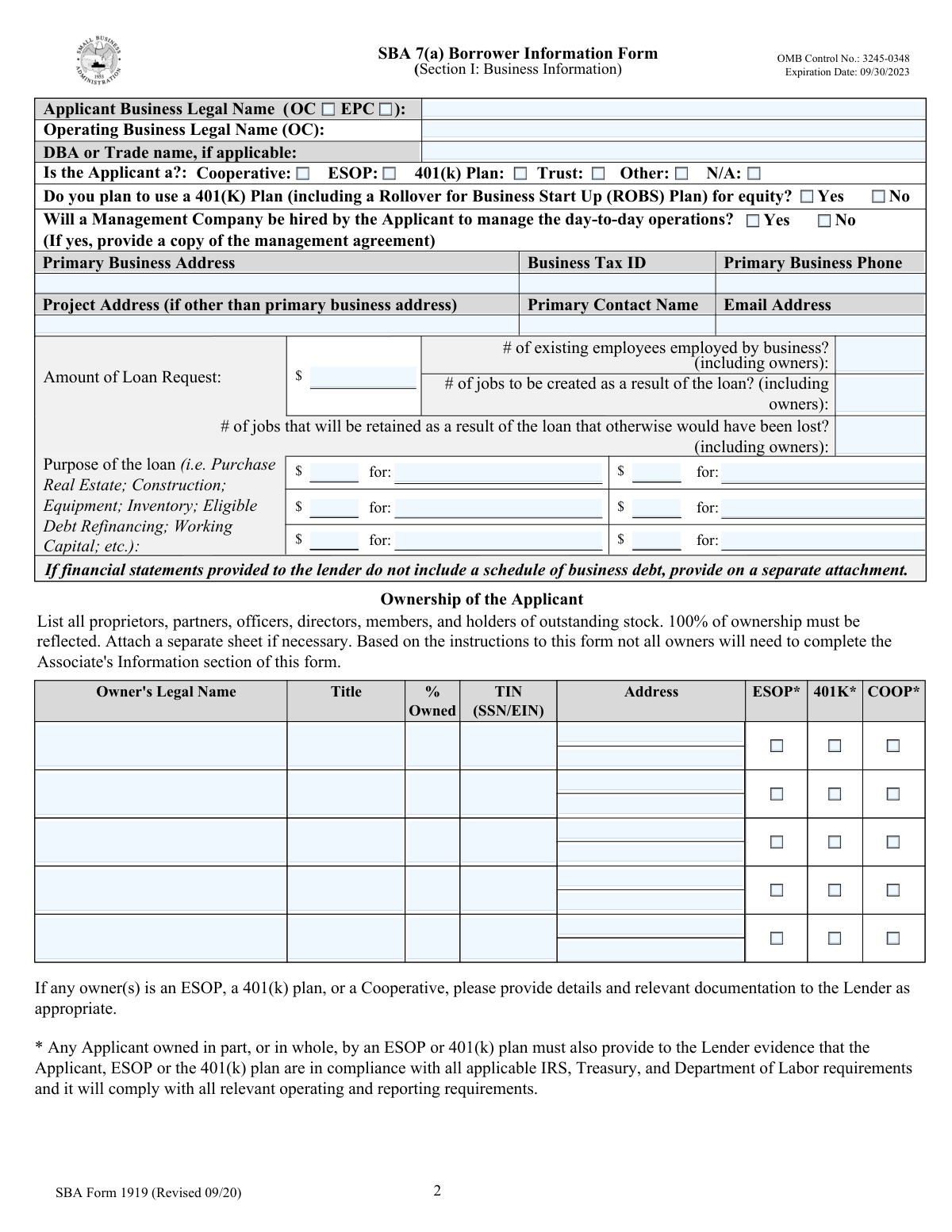
The AI ensures that Section I of the SBA 7(a) Borrower Information Form is meticulously reviewed for accuracy. It checks for the correct input of the legal names, doing business as (DBA) names, type of business, primary contact information, loan request details, number of employees, and the specific purpose of the loan. The AI cross-references this information with official documents to confirm its validity and completeness. Any discrepancies or omissions are flagged for correction to ensure compliance with SBA requirements.
The AI confirms that the ownership information provided in Section I of the form is comprehensive and accounts for 100% of the business's ownership. It checks that each owner's details are listed and that the combined ownership percentages equal 100%. The AI is programmed to detect any missing information or mathematical inconsistencies in the ownership distribution and prompts for necessary adjustments to meet the full disclosure requirement.
The AI verifies that all questions numbered 1 through 16 in Section I, which pertain to previous government financing, legal actions, affiliations, and potential conflicts of interest, are fully answered. For any 'Yes' responses, the AI ensures that additional details are provided on a separate attachment as required. It is designed to recognize incomplete responses and prompts the user to provide the necessary information, ensuring that all regulatory and due diligence aspects are addressed.
The AI checks that Section II of the form is properly filled out with the full legal name, Social Security/Tax ID No., date and place of birth, home address, and contact information for each individual owner. It validates the accuracy of this personal information against reliable databases and ensures that it matches the details provided in other sections of the form. The AI is capable of detecting missing or inconsistent data and will request clarification or additional documentation as needed.
The AI validates that for each individual owner listed in Section II, the percentage of ownership is clearly stated, and the demographic information, including Veteran status, Gender, Race, and Ethnicity, is provided. It ensures that these fields are not left blank and that the data entered is consistent with the legal documentation provided. The AI is equipped to identify any missing percentages or demographic details and will prompt for the complete information to ensure full compliance with SBA reporting standards.
The AI ensures that questions 17 through 26 in Section II of the SBA 7(a) Borrower Information Form are fully answered. These questions pertain to the applicant's criminal history, citizenship status, child support delinquency, and other affiliations that could impact their eligibility. The AI verifies that no question is left unanswered and prompts for additional details on a separate sheet if any response is 'Yes'. This ensures compliance with the form's requirements and aids in the accurate assessment of the applicant's background.
And 9 more checks
- Confirms that Section III contains the legal name, Tax ID, contact information, and address of the Entity Owner
- Verifies that the capacity in which the person is completing Section III is indicated
- Checks that all questions (27-31) in Section III regarding suspension, debarment, legal actions, and previous government financing are answered
- Ensures that the Statements Required by Law and Executive Order are read, understood, and the certification is signed and dated
- Signature and Date Verification
- Attachment Formatting and Referencing
- Documentation Completeness and Accuracy
- Applicant's Records Copy
- Submission to SBA Participating Lender
Let AI fill out your SBA Form 1919
No typing. Every field filled in seconds, checked, ready to sign.
How to Fill Out SBA Form 1919 Online for Free in 2026
What the AI walks you through.
- Visit instafill.ai site and select SBA Form 1919.
- Enter applicant business and owner information.
- Complete all required sections accurately.
- Sign and date the form electronically.
- Check for accuracy and submit the form.
Common Mistakes in Completing SBA Form 1919
The ones the AI is built to catch.
Incomplete or inaccurate business name
Failure to disclose all ownership information
Incorrect Social Security or Tax ID numbers for individual owners
Omission of percentage of ownership for individual owners
Failure to answer all questions in Section I, II, or III
Omitting required details for 'Yes' responses
Incorrect loan request details
Failure to sign and date the form by authorized representative or individual providing the information
Failure to attach additional sheets if necessary
Use of typed signatures instead of original or acceptable electronic signatures
Neglecting to read and understand notices regarding the use of federal financial assistance programs
Forgetting to sign and date the certification acknowledging compliance with laws, regulations, and Executive Orders
Frequently Asked Questions About SBA Form 1919
Is it really free for 7 days?
Can I fill other forms too?
How do I cancel?
How does the AI fill out SBA Form 1919?
What happens to my information?
How complex is SBA Form 1919 to fill out?
What is the purpose of the SBA 7(a) Borrower Information Form?
Who is required to complete and sign Section I of the form?
What information is required in Section II and III of the form?
What is the definition of 'affiliation' as per the form?
What is the difference between an Operating Company (OC) and an Eligible Passive Company (EPC)?
What happens if an applicant fails to submit the requested information?
What is the definition of a 'household member' as per the form?
What is the difference between a sole proprietorship, partnership, corporation, and limited liability company?
What is the difference between an ESOP, 401(k) plan, and a cooperative?
What is the difference between a franchise, license, distributor, membership, dealer, or jobber agreement?
What is the difference between a delinquent and a defaulted loan in the context of the SBA 7(a) Borrower Information Form?
What are the differences between suspension, debarment, proposed for debarment, and voluntary exclusion in the context of the SBA 7(a) Borrower Information Form?
Get your SBA Form 1919 filled out by AI
$0 today. Cancel before Nov 1 and you pay nothing.
Let AI fill out your SBA Form 1919
Your trial starts once a card is added. You pay nothing before Nov 1.
Our AI already knows this form, all 236 fields of it. Skip the typing: tell it about yourself, or upload what you have, and it fills the whole form in seconds.
- AI fills every field on all 10 pages, tables and checkboxes included
- No typing into boxes: answer a few questions, or upload a document you already have, an old copy of this form, a photo of a document
- The AI checks the answers; you review and change anything before you download
- Download the finished PDF, print it, or sign it online
- Encrypted, and never used to train AI
Cancel before Nov 1 and you pay nothing.
A card is needed to start the trial. Cancel in two clicks from your account.
Terms · Privacy