Yes! You can use AI to fill out Application for Electricity (New South Wales / Victoria / South Australia / Queensland)

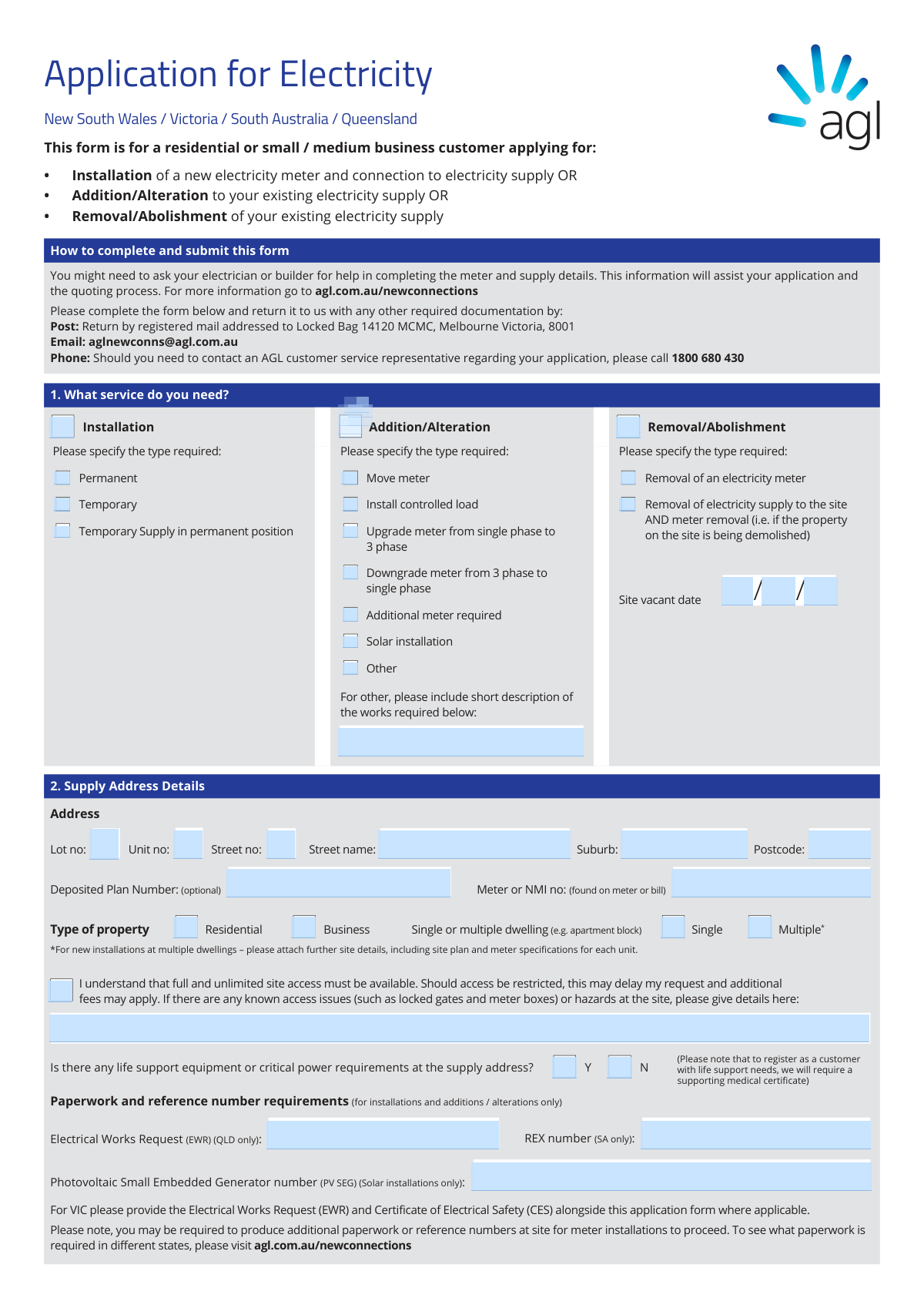
This is an Application for Electricity from AGL, used by customers in New South Wales, Victoria, South Australia, and Queensland. It is essential for managing electricity services, whether you are installing a new meter, altering your supply (e.g., upgrading to 3-phase or adding solar), or abolishing the service entirely for a demolition. Today, this form can be filled out quickly and accurately using AI-powered services like Instafill.ai, which can also convert non-fillable PDF versions into interactive fillable forms.
Our AI automatically handles information lookup, data retrieval, formatting, and form filling.
It takes less than a minute to fill out AGLPF15563 using our AI form filling.
Securely upload your data. Information is encrypted in transit and deleted immediately after the form is filled out.

Form specifications

Form name: Application for Electricity (New South Wales / Victoria / South Australia / Queensland)
Number of pages: 4
Language: English
main-image

Instafill Demo: How to fill out PDF forms in seconds with AI

How to Fill Out AGLPF15563 Online for Free in 2026

Are you looking to fill out a AGLPF15563 form online quickly and accurately? Instafill.ai offers the #1 AI-powered PDF filling software of 2026, allowing you to complete your AGLPF15563 form in just 37 seconds or less.
Follow these steps to fill out your AGLPF15563 form online using Instafill.ai:
  1. 1 Navigate to Instafill.ai and upload the AGL Application for Electricity form or select it from the template library.
  2. 2 In Section 1, use the AI assistant to select the service you need: Installation, Addition/Alteration, or Removal/Abolishment, and specify the type of work required.
  3. 3 Complete Section 2 with the full supply address details, property type, and any site access information or hazards.
  4. 4 Fill in your personal details as the account holder in Section 3, and provide information for an authorized contact person if applicable.
  5. 5 Provide the details of your Registered Electrical Contractor in Section 4 and the technical meter and supply details for new installations in Section 5.
  6. 6 Carefully review the acceptance terms in Section 6, then use the digital signature tool to sign and date the application.
  7. 7 Download the completed, signed form and submit it to AGL along with any required documentation via email or post as per the form's instructions.

Our AI-powered system ensures each field is filled out correctly, reducing errors and saving you time.

Why Choose Instafill.ai for Your Fillable AGLPF15563 Form?

Speed

Complete your AGLPF15563 in as little as 37 seconds.

Up-to-Date

Always use the latest 2026 AGLPF15563 form version.

Cost-effective

No need to hire expensive lawyers.

Accuracy

Our AI performs 10 compliance checks to ensure your form is error-free.

Security

Your personal information is protected with bank-level encryption.

Frequently Asked Questions About Form AGLPF15563

This form is for residential or small/medium business customers in NSW, VIC, SA, or QLD to apply for a new electricity meter installation, alter an existing supply, or remove an electricity supply.

While you can fill out most of the form, you may need to ask your electrician or builder for help completing the technical 'Meter and Supply Details' in Section 5 to ensure accuracy.

You can submit the completed form and any required documents by emailing it to [email protected] or by sending it via registered mail to the address provided in Melbourne.

Your National Meter Identifier (NMI) or meter number can be found directly on your electricity meter or on a previous electricity bill.

You must tick 'Yes' in Section 2 and also call AGL on 131 245 to register the equipment for your new supply address. A supporting medical certificate will be required.

You must ensure full and unlimited site access is available. If access is restricted due to locked gates or other hazards, it may delay your request and result in additional fees.

In NSW, SA, or QLD, installation is typically within 6 business days of supply work completion. In Victoria, the installation will be on a date that is agreed upon with you.

The third party, such as your builder, must complete and sign Section 7, 'Third party payment,' to formally accept all charges for the work.

Yes, for installations in Queensland, you are required to provide an Electrical Works Request (EWR) number. Other states have different paperwork requirements as noted on the form.

Yes, services like Instafill.ai use AI to accurately auto-fill form fields from your documents, which can save you time and help reduce errors.

You can use a service like Instafill.ai to upload the PDF. It will convert the document into an interactive form that you can easily fill out and sign online.

Services like Instafill.ai can convert flat, non-fillable PDFs into interactive, fillable forms. Simply upload the document to their platform to get started.

Choose 'Installation' for a brand new electricity meter and connection. Select 'Addition/Alteration' if you are making changes to an existing supply, such as upgrading to 3-phase or installing solar.

Compliance AGLPF15563
Validation Checks by Instafill.ai

1
Mandatory Service Type Selection
Ensures that the applicant has selected at least one of the primary service types in Section 1: 'Installation', 'Addition/Alteration', or 'Removal/Abolishment'. This is the most fundamental piece of information, as it defines the entire purpose of the application. If no service type is selected, the form cannot be processed as the core request is unknown.
2
Conditional Sub-Service Requirement
Verifies that for each primary service type selected in Section 1, a corresponding sub-type has also been chosen. For example, if 'Installation' is checked, the user must also select 'Permanent', 'Temporary', or 'Temporary Supply in permanent position'. This validation prevents ambiguity and ensures the service provider has the specific details needed to plan the work. Failure to provide this detail would require manual follow-up and delay the application.
3
Supply Address Completeness
Checks that essential supply address fields in Section 2 (Street no, Street name, Suburb, Postcode) are not empty. This information is critical for identifying the physical location where the work needs to be performed. An incomplete address would make it impossible to locate the site, leading to application rejection or significant delays.
4
Postcode and State Consistency
Validates that the postcode entered in Section 2 is a valid 4-digit Australian postcode and is geographically consistent with the state of application (NSW, VIC, SA, QLD). This is important for routing the application to the correct internal teams and ensuring the right regulations and charges are applied. An invalid or mismatched postcode could lead to incorrect quoting and compliance issues.
5
ABN Format and Conditional Requirement
If the 'Type of property' is 'Business' or a 'Business name' is provided in Section 3, this check ensures the ABN field is filled and contains a valid 11-digit Australian Business Number. A valid ABN is required for correct legal entity identification, billing, and tax purposes for business accounts. An invalid or missing ABN for a business application will result in processing failure.
6
State-Specific Paperwork Number Validation
Conditionally requires state-specific reference numbers based on the supply address for 'Installation' or 'Addition/Alteration' requests. For example, if the address is in Queensland, the 'Electrical Works Request (EWR)' number must be provided. This ensures compliance with local regulations and that prerequisite paperwork is complete before a technician is dispatched, preventing wasted site visits.
7
Solar Installation Detail Requirement
If 'Solar installation' is checked in Section 1 or 'Yes' is selected for solar panels in Section 5, this validation makes the 'PV SEG number' and 'size of the solar system (kW)' fields mandatory. This information is essential for network planning, safety assessments, and configuring the meter for solar feed-in tariffs. Missing this data would halt the solar connection process.
8
Date Format and Logical Validity
Verifies that all date fields (Date of Birth, ID Expiry Date, Site Vacant Date, Signature Date) are in a valid DD/MM/YYYY format and represent a plausible date. It also checks that ID expiry dates are in the future and that the applicant's date of birth indicates they are over 18. This prevents data entry errors and ensures the provided identification and dates are legally valid.
9
Electrical Contractor Details for Installations
Ensures that if 'Installation' is selected as the service type in Section 1, then the details for the 'Registered Electrical Contractor' in Section 4 are fully completed. This information is mandatory for new installations to coordinate works and verify licensing. An application for a new installation without contractor details is incomplete and cannot proceed.
10
Meter and Supply Details for New Installations
Checks that if 'Installation' is selected in Section 1, then the critical fields in Section 5 ('Meter and Supply Details') are completed. This includes 'Number of meter supply phases required' and 'Metering required'. This technical information is vital for the technician to bring the correct equipment and provision the right type of service, and its absence would prevent the creation of a work order.
11
Signature and Acceptance Date Requirement
Validates that the signature and date fields in Section 6 ('Your acceptance') have been completed. The signature signifies legal acceptance of the terms, conditions, and charges associated with the request. An unsigned application is not legally binding and will be rejected.
12
Third Party Payment Section Completeness
If the checkbox in Section 7 indicating a third party will pay is ticked, this validation ensures all fields in that section (name, contact details, signature, etc.) are completed. This is crucial for ensuring the correct party is billed for the work. If this section is incomplete, the application may be put on hold or the charges may default back to the primary account holder, causing billing disputes.
13
Requirement for 'Other' Description
If an 'Other' checkbox is selected in any section (e.g., Section 1 'Addition/Alteration' or Section 5 'Off-peak requirements'), this check ensures the corresponding description text field is not empty. This prevents vague requests that cannot be actioned. The description is necessary for the service provider to understand the scope of work, provide an accurate quote, and complete the job correctly.
14
Life Support Equipment Flag
Checks if the 'Yes' box for life support equipment is ticked. While not a failure validation in the traditional sense, it must trigger a high-priority flag in the system for immediate and mandatory follow-up action. This is a critical safety and compliance issue, ensuring that special procedures are initiated to protect vulnerable customers, as noted by the requirement for a medical certificate.

Common Mistakes in Completing AGLPF15563

Incomplete Service Request Selection

Applicants often select a main service type in Section 1, such as 'Installation' or 'Addition/Alteration', but fail to specify the required sub-type (e.g., 'Permanent', 'Move meter'). This ambiguity forces the provider to follow up for clarification, delaying the entire application process. To avoid this, carefully review your selection and ensure you have checked one box in each relevant sub-category for your chosen service.

Missing or Incorrect NMI/Meter Number

For any work on an existing connection, the National Meter Identifier (NMI) is critical for identifying the correct supply point. Applicants often leave this blank because they don't know where to find it (on a bill or the meter itself) or they transcribe the long number incorrectly. An incorrect NMI can lead to work being quoted or performed on the wrong property, causing significant delays and potential legal issues.

Omitting State-Specific Reference Numbers

The form requires different reference numbers depending on the state (EWR for QLD, REX for SA, etc.), which are typically provided by the electrician. Applicants frequently overlook this requirement or are unsure which number applies to them, leading to an incomplete submission that cannot be processed. This information is mandatory for scheduling and approval, so always confirm with your electrician which paperwork is required for your state and enter the number correctly.

Incorrect Technical Metering Specifications

Section 5 asks for highly technical details like supply phases, metering type, and maximum demand. Many applicants guess these details, which can result in the wrong equipment being ordered and a technician arriving on-site unable to complete the job, leading to wasted visit fees and major delays. It is essential to consult your electrician or builder to get this information right before submitting the form.

Failure to Disclose Site Access Issues or Hazards

Applicants sometimes forget to check the site access acknowledgment box or fail to detail known access problems like locked gates, dogs, or hard-to-find meter boxes. This omission can lead to technicians being unable to access the property, resulting in a failed visit, additional fees, and rescheduling delays. Always provide clear, detailed instructions for any potential access restrictions or hazards to ensure the work can be completed safely and efficiently on the first visit.

Missing Required Attachments for Multi-Dwelling Sites

The form states that for new installations at 'Multiple' dwellings, a site plan and meter specifications must be attached. Applicants often overlook these instructions in the fine print and submit the form without the necessary documents. This immediately halts the application process until the required paperwork is received, delaying the connection for all units.

Confusing Account Holder and Authorised Contact Details

The form has separate sections for the legal account holder (Section 3a) and an optional authorised contact (3b). People sometimes fill in their own details in the 'Authorised contact' section when they are the account holder, or they list a contact without proper authority. This creates confusion about who is financially responsible and legally bound by the contract. Ensure the person or business legally responsible for the bills is listed as the 'Account holder'.

Incomplete Third-Party Payer Information

If a third party, like a builder or landlord, is paying for the work, Section 7 must be fully completed and signed by that third party. A common mistake is for the applicant to fill out this section themselves or to submit it without the third party's signature. An incomplete or unsigned Section 7 is invalid, making the applicant liable for all charges and delaying the job until payment responsibility is clarified.

Missing Signature or Date of Acceptance

A missing signature in Section 6 is one of the most common and easily avoidable reasons for a form to be rejected outright. Applicants may complete the entire form but forget the final step of signing and dating it, rendering the application legally invalid. This simple oversight means the entire submission process must be restarted. AI-powered form filling tools like Instafill.ai can prevent this by highlighting mandatory signature fields before submission.

Not Declaring Life Support Equipment

Failing to declare the presence of life support equipment at the supply address is a critical and dangerous mistake. This information is vital for the electricity provider to correctly prioritize the property during outages and maintenance. Applicants may forget or not realize the importance, putting vulnerable individuals at risk. Always check 'Yes' if any such equipment is present and follow up to complete the official registration process.
Saved over 80 hours a year

“I was never sure if my IRS forms like W-9 were filled correctly. Now, I can complete the forms accurately without any external help.”

Kevin Martin Green

Your data stays secure with advanced protection from Instafill and our subprocessors

Robust compliance program

Transparent business model

You’re not the product. You always know where your data is and what it is processed for.

ISO 27001, HIPAA, and GDPR

Our subprocesses adhere to multiple compliance standards, including but not limited to ISO 27001, HIPAA, and GDPR.

Security & privacy by design

We consider security and privacy from the initial design phase of any new service or functionality. It’s not an afterthought, it’s built-in, including support for two-factor authentication (2FA) to further protect your account.

Fill out AGLPF15563 with Instafill.ai

Worried about filling PDFs wrong? Instafill securely fills application-for-electricity-new-south-wales-victoria-south-australia-queensland forms, ensuring each field is accurate.