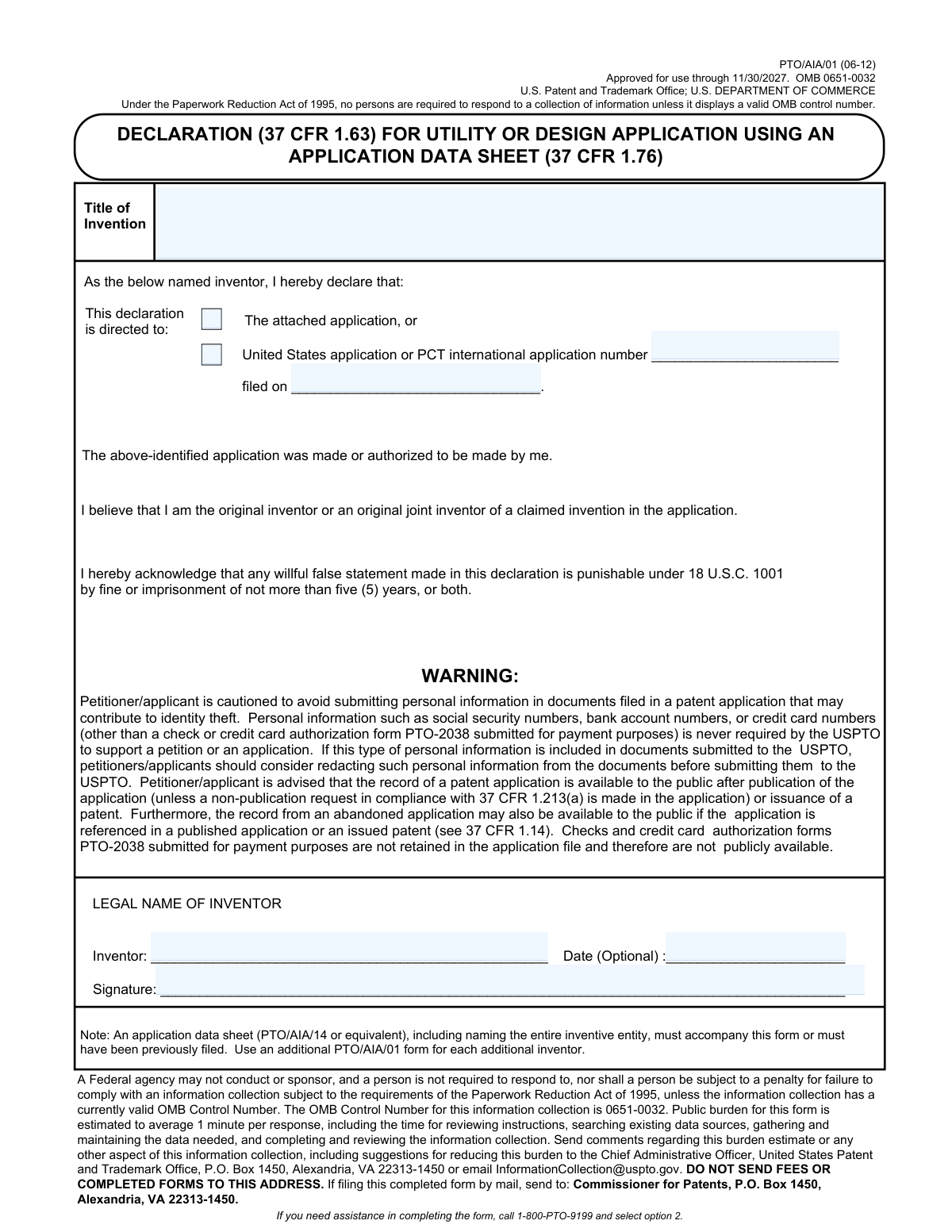
Yes! You can use AI to fill out Form PTO/AIA/01, Declaration (37 CFR 1.63) for Utility or Design Application Using an Application Data Sheet (37 CFR 1.76)

Form PTO/AIA/01 is a legal document submitted to the U.S. Patent and Trademark Office (USPTO) in which an inventor formally declares their inventorship for a utility or design patent application. It serves as a sworn statement confirming the inventor believes they are the original creator of the claimed invention, as required by U.S. patent law. Today, this form can be filled out quickly and accurately using AI-powered services like Instafill.ai, which can also convert non-fillable PDF versions into interactive fillable forms.
PTO/AIA/01 is part of the PTO forms, utility application forms and utility forms categories on Instafill.
Our AI automatically handles information lookup, data retrieval, formatting, and form filling.
It takes less than a minute to fill out PTO/AIA/01 using our AI form filling.
Securely upload your data. Information is encrypted in transit and deleted immediately after the form is filled out.

Form specifications

Form name: Form PTO/AIA/01, Declaration (37 CFR 1.63) for Utility or Design Application Using an Application Data Sheet (37 CFR 1.76)
Number of fields: 8
Number of pages: 1
Filled form examples: Form PTO/AIA/01 Examples
Language: English
main-image

Instafill Demo: How to fill out PDF forms in seconds with AI

How to Fill Out PTO/AIA/01 Online for Free in 2026

Are you looking to fill out a PTO/AIA/01 form online quickly and accurately? Instafill.ai offers the #1 AI-powered PDF filling software of 2026, allowing you to complete your PTO/AIA/01 form in just 37 seconds or less.
Follow these steps to fill out your PTO/AIA/01 form online using Instafill.ai:
  1. 1 Navigate to Instafill.ai and upload or select Form PTO/AIA/01.
  2. 2 Provide the exact title of the invention as it appears in your patent application.
  3. 3 Indicate if the declaration is for a new, attached application or a previously filed application by providing its number and filing date.
  4. 4 Enter the full legal name of the inventor making the declaration.
  5. 5 Review the declaration statements and legal warnings presented by the AI assistant.
  6. 6 Electronically sign and date the form to certify the declaration.
  7. 7 Download the completed form for submission with your patent application to the USPTO.

Our AI-powered system ensures each field is filled out correctly, reducing errors and saving you time.

Why Choose Instafill.ai for Your Fillable PTO/AIA/01 Form?

Speed

Complete your PTO/AIA/01 in as little as 37 seconds.

Up-to-Date

Always use the latest 2026 PTO/AIA/01 form version.

Cost-effective

No need to hire expensive lawyers.

Accuracy

Our AI performs 10 compliance checks to ensure your form is error-free.

Security

Your personal information is protected with bank-level encryption.

Frequently Asked Questions About Form PTO/AIA/01

This form is a legal declaration required by the USPTO where an inventor states they are the original inventor or an original joint inventor of a claimed invention in a utility or design patent application.

Each inventor named in the patent application must complete and sign their own separate PTO/AIA/01 form. If there are multiple inventors, you will submit multiple declaration forms.

Yes, this form must be filed with an Application Data Sheet (form PTO/AIA/14 or equivalent). The Application Data Sheet must have been previously filed or be submitted at the same time as this declaration.

Check 'The attached application' if you are submitting this declaration with your new patent application. If you are submitting this for an application that has already been filed, you must provide its application number and filing date.

You must provide your full legal name. This name should be consistent with the inventor name listed on the Application Data Sheet (ADS) and other official application documents.

Failure to provide the required inventor's declaration can prevent the USPTO from processing your submission. This may lead to the abandonment of your patent application.

You should never include sensitive personal information like Social Security numbers, bank account numbers, or credit card numbers on this form or in your application documents. This information is not required by the USPTO.

If filing by mail, send the completed form to: Commissioner for Patents, P.O. Box 1450, Alexandria, VA 22313-1450. Do not send it to the address listed for burden estimate comments.

The form indicates that the date field next to the inventor's signature is optional. However, the inventor's legal name and signature are mandatory.

Making a willful false statement on this declaration is a federal offense. It is punishable under 18 U.S.C. 1001 by fine or imprisonment of not more than five years, or both.

Yes, services like Instafill.ai use AI to auto-fill form fields accurately, which can save time and help reduce errors. This is particularly helpful for ensuring consistency across multiple patent documents.

You can use a service like Instafill.ai to fill out the form online. Simply upload the PDF, and the platform will make it interactive so you can type your information, save, and download the completed document.

Services like Instafill.ai can convert flat, non-fillable PDFs into interactive forms. This allows you to easily type your information directly into the fields before printing for signature.

Compliance PTO/AIA/01
Validation Checks by Instafill.ai

1
Title of Invention Completeness
This check ensures that the 'Title of Invention' field is not empty. Every patent application must have a title to identify the subject matter of the invention. If this field is left blank, the submission is considered incomplete and cannot be processed correctly by the USPTO.
2
Exclusive Declaration Direction Selection
This validation verifies that exactly one of the two 'Declaration is directed to' options is selected. The inventor must specify whether the declaration is for the concurrently attached application or a previously filed one. Selecting both or neither option creates ambiguity, and the form will be rejected until a single, clear choice is made.
3
Conditional Application Number Requirement
This check ensures that the 'Application Number' field is filled if the declaration is directed to a previously filed application. This number is the primary identifier for the USPTO to locate the existing application file to which this declaration belongs. Failure to provide it when required will result in the declaration being rejected as it cannot be associated with the correct file.
4
Application Number Format Validation
This validation verifies that the provided 'Application Number' conforms to the standard formats for U.S. or PCT applications (e.g., XX/XXX,XXX or PCT/CCYYYY/NNNNNN). An incorrectly formatted number can lead to processing delays or failure to locate the correct application. The system should check the pattern to minimize data entry errors.
5
Conditional Filing Date Requirement
This check ensures that the 'Filing Date' field is populated when the declaration is for a previously filed application. This date, along with the application number, is crucial for uniquely identifying the prior application. Without this date, the USPTO may not be able to correctly associate the declaration, leading to processing errors.
6
Filing Date Chronological Validity
This validation confirms that the provided 'Filing Date' is a valid date that is not in the future. An application's filing date must be in the past or the present day. A future date is logically impossible and indicates a data entry error that must be corrected before submission.
7
Inventor Legal Name Completeness
This check ensures the 'LEGAL NAME OF INVENTOR' field is not left blank. The identity of the inventor is a fundamental legal requirement for a patent application. Submissions without an inventor's name are legally deficient and will be rejected.
8
Inventor Signature Requirement
This validation verifies that the 'Signature' field has been signed by the inventor. The inventor's signature legally confirms the declarations made on the form, including the claim to originality and the acknowledgment of penalties for false statements. An unsigned declaration is invalid and has no legal effect.
9
Signature Date Requirement
This check ensures that the 'Date' field next to the signature is filled if a signature is present. While the form marks it as optional, a dated signature is a standard legal practice to establish when the declaration was executed. A system should enforce this to ensure the legal robustness of the document.
10
Signature Date Chronological Validity
This validation ensures the 'Date' of signature is not a future date. The date must be the day the inventor actually signed the document, which cannot be in the future. This check prevents typographical errors and ensures the integrity of the legal declaration.
11
Filing Date vs. Signature Date Consistency
This logical check verifies that if a prior 'Filing Date' is provided, the 'Date' of signature is on or after that filing date. An inventor cannot legally sign a declaration for an application before it was officially filed. This validation prevents logical inconsistencies that would invalidate the declaration.
12
Prohibited Personal Information Scan
This check scans text fields for patterns matching sensitive personal information that is not required, such as Social Security Numbers or bank account numbers. The form explicitly warns against including such data to prevent identity theft. If such information is detected, the system should warn the user to redact it before submission.

Common Mistakes in Completing PTO/AIA/01

Inconsistent Title of Invention

Inventors often enter a title on this declaration that does not exactly match the title used in the Application Data Sheet (ADS) and the specification. This discrepancy can occur due to last-minute changes or simple oversight. Such inconsistencies create ambiguity in the application record and may lead to an office action or require filing corrective paperwork, causing delays.

Using an Incorrect or Incomplete Inventor Name

The form explicitly requires the 'LEGAL NAME OF INVENTOR', but applicants frequently use nicknames, initials, or incomplete names. This name must precisely match the legal name provided on the Application Data Sheet (ADS). Any mismatch can lead to a requirement for a new declaration, delaying prosecution and potentially incurring additional fees.

Forgetting the Mandatory Application Data Sheet (ADS)

A common error is submitting this declaration without the accompanying Application Data Sheet (PTO/AIA/14), as required by the note on the form. Applicants may overlook this fine print, assuming the declaration is a standalone document. This results in an incomplete application, triggering a notice from the USPTO and halting the examination process until the ADS is filed.

Improperly Handling Multiple Inventors

For an invention with multiple inventors, a frequent mistake is to list all inventors on one form or to submit a declaration for only one inventor. The form instructions clearly state to use a separate PTO/AIA/01 form for each additional inventor. Failing to provide a signed declaration from every named inventor will render the application incomplete and stop its progress.

Incorrectly Referencing a Prior Application

When this declaration is for a previously filed application, applicants often make typos in the application number or enter the wrong filing date. This prevents the USPTO from correctly associating the declaration with the intended application file, causing significant processing delays. To avoid this, carefully copy the information from the official filing receipt. AI-powered tools like Instafill.ai can help by auto-populating this data accurately from a master record.

Missing or Invalid Signature

An unsigned declaration is a critical and common error that invalidates the submission. Another mistake is providing a signature that does not comply with USPTO rules, such as typing a name in a cursive font instead of using a proper S-signature (e.g., /John Doe/) for electronic filings. An invalid signature will result in a Notice of Missing Parts and requires a corrected submission.

Submitting Unnecessary Personal Information

Despite a prominent warning on the form, some applicants include sensitive personal information like social security or bank account numbers out of habit. Since patent application records become public, this creates a serious risk of identity theft. Always read warnings and only provide information explicitly requested in the form fields. AI tools can also be used to scan documents and flag or redact such personal information before submission.

Using an Outdated Version of the Form

Applicants sometimes find and use an old version of the PTO/AIA/01 form from a saved file or an unofficial website. The USPTO periodically updates its forms, and submitting an expired version (the current one is approved through 11/30/2027) can lead to rejection. To prevent this, always download the latest version of the form directly from the official USPTO website before you begin filling it out.

Mailing the Form to the Wrong USPTO Address

The form lists multiple addresses, and a common mistake is mailing the completed application to the address for 'comments regarding this burden estimate' instead of the correct 'Commissioner for Patents' P.O. Box. This error ensures the filing will not be received by the proper office, potentially leading to a total loss of the filing date. Carefully read all instructions to find the correct mailing address for submissions.

Filing on a Non-Fillable PDF

Applicants often find this form as a 'flat' non-fillable PDF, leading them to print it and fill it out by hand. This can result in illegible handwriting, data entry errors, and an unprofessional submission. To avoid this, use a tool like Instafill.ai, which can convert any non-fillable PDF into an interactive, fillable form, ensuring the final document is clean, legible, and professional.
Saved over 80 hours a year

“I was never sure if my IRS forms like W-9 were filled correctly. Now, I can complete the forms accurately without any external help.”

Kevin Martin Green

Your data stays secure with advanced protection from Instafill and our subprocessors

Robust compliance program

Transparent business model

You’re not the product. You always know where your data is and what it is processed for.

ISO 27001, HIPAA, and GDPR

Our subprocesses adhere to multiple compliance standards, including but not limited to ISO 27001, HIPAA, and GDPR.

Security & privacy by design

We consider security and privacy from the initial design phase of any new service or functionality. It’s not an afterthought, it’s built-in, including support for two-factor authentication (2FA) to further protect your account.

Fill out PTO/AIA/01 with Instafill.ai

Worried about filling PDFs wrong? Instafill securely fills form-ptoaia01-declaration-37-cfr-163-for-utility-or-design-application-using-an-application-data-sheet-37-cfr-176 forms, ensuring each field is accurate.