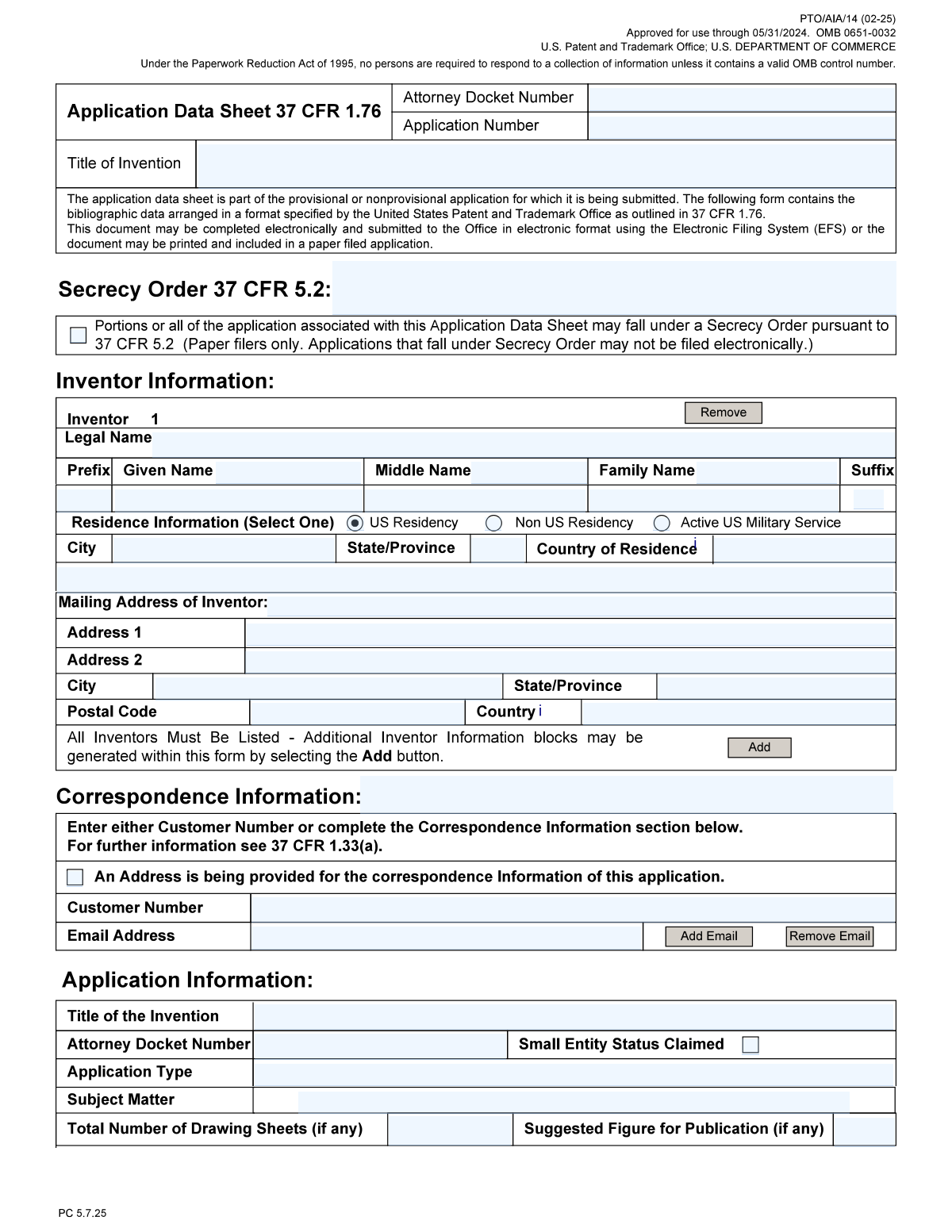
Yes! You can use AI to fill out Form PTO/AIA/14, Application Data Sheet (ADS)

Form PTO/AIA/14, the Application Data Sheet (ADS), is a crucial document submitted to the U.S. Patent and Trademark Office (USPTO) when filing a patent application. It provides a clear, structured summary of bibliographic data, such as inventor details, applicant information, correspondence address, and any domestic or foreign priority claims, ensuring the USPTO has accurate information for processing and publication. The ADS is the primary source for this data, superseding any conflicting information in other application documents. Today, this detailed form can be filled out quickly and accurately using AI-powered services like Instafill.ai, which can also convert non-fillable PDF versions into interactive fillable forms.
Our AI automatically handles information lookup, data retrieval, formatting, and form filling.
It takes less than a minute to fill out PTO/AIA/14 using our AI form filling.
Securely upload your data. Information is encrypted in transit and deleted immediately after the form is filled out.

Form specifications

Form name: Form PTO/AIA/14, Application Data Sheet (ADS)
Number of pages: 7
Language: English
main-image

Instafill Demo: How to fill out PDF forms in seconds with AI

How to Fill Out PTO/AIA/14 Online for Free in 2026

Are you looking to fill out a PTO/AIA/14 form online quickly and accurately? Instafill.ai offers the #1 AI-powered PDF filling software of 2026, allowing you to complete your PTO/AIA/14 form in just 37 seconds or less.
Follow these steps to fill out your PTO/AIA/14 form online using Instafill.ai:
  1. 1 Navigate to Instafill.ai and upload your PTO/AIA/14 form, or select it from the platform's template library.
  2. 2 Use the AI assistant to automatically populate basic application details like the Title of Invention and Attorney Docket Number.
  3. 3 Provide complete information for each inventor and applicant, including names, residence, and mailing addresses, letting the AI guide you through the required fields.
  4. 4 Enter correspondence information, either by providing a USPTO Customer Number or by filling in the full address and email details.
  5. 5 Accurately input any benefit or priority claims, such as domestic benefit from prior U.S. applications or foreign priority from applications filed in other countries.
  6. 6 Complete the assignee information and any publication requests or opt-out authorizations as needed for your application.
  7. 7 Review all extracted and entered data for accuracy, provide the necessary signature information, and then download the completed Application Data Sheet for filing.

Our AI-powered system ensures each field is filled out correctly, reducing errors and saving you time.

Why Choose Instafill.ai for Your Fillable PTO/AIA/14 Form?

Speed

Complete your PTO/AIA/14 in as little as 37 seconds.

Up-to-Date

Always use the latest 2026 PTO/AIA/14 form version.

Cost-effective

No need to hire expensive lawyers.

Accuracy

Our AI performs 10 compliance checks to ensure your form is error-free.

Security

Your personal information is protected with bank-level encryption.

Frequently Asked Questions About Form PTO/AIA/14

This form is used to provide essential bibliographic data for a U.S. patent application to the USPTO. It consolidates information about the invention, inventors, applicants, and priority claims in a single, required document for new applications.

The applicant is the party filing the application, which can be the inventor(s), a company to whom the invention is assigned, or another party with a sufficient proprietary interest. If a company owns the invention, it is typically listed as the applicant.

The 'Applicant' is the legal entity filing the patent application, while the 'Assignee' is the entity that owns the rights to the invention. Often they are the same, in which case you would list the company as the applicant and check the 'Assignee' box to indicate its capacity.

A Customer Number is a unique USPTO identifier linked to a specific correspondence address and/or list of patent practitioners. Using a Customer Number is highly recommended as it simplifies filling out correspondence and representative details and reduces data entry errors.

Use the 'Domestic Benefit/National Stage' section to claim priority from a prior U.S. application by providing its application number and filing date. For non-U.S. applications, use the 'Foreign Priority' section and enter the foreign application number, country, and filing date.

This requests that your application not be made public 18 months after filing. You can only select this if you certify that the invention has not been and will not be the subject of an application in another country that requires 18-month publication.

A legal representative can file on behalf of the inventor by checking the 'Legal Representative under 35 U.S.C. 117' box. You must provide the name of the deceased or incapacitated inventor and a statement explaining the representative's authority to act.

You must check this box if your application claims priority to an application filed before March 16, 2013, but also contains a claim with an effective filing date on or after that date. This is a required declaration under the America Invents Act (AIA).

Yes, services like Instafill.ai use AI to accurately auto-fill form fields from your existing data, which saves significant time and reduces errors. This is especially helpful for repetitive information like the Attorney Docket Number and inventor details.

Simply upload your Application Data Sheet PDF to the Instafill.ai platform. The AI will identify all the fields, allowing you to enter information once and have it automatically and accurately populated throughout the document.

If you have a non-fillable or 'flat' PDF, you can use a service like Instafill.ai. Its technology can convert the non-fillable PDF into an interactive, fillable form that you can easily complete and save online.

The Attorney Docket Number is an internal reference number used by your attorney or law firm to track the application. It is repeated in the header of each section to ensure all pages are correctly associated with your case file.

If an inventor's legal name includes non-Latin characters (e.g., in Chinese, Japanese, or Arabic), you should provide it in the designated fields. This ensures the inventor's name is recorded accurately on the patent.

Residence is the city, state, and country where the inventor legally resides, which is required for the public record. The mailing address is where the inventor wishes to receive physical mail and can be different, such as a P.O. Box or an office address.

You should only claim 'Small Entity Status' if you are certain you meet the USPTO's criteria, such as being an individual, a non-profit, or a small business with fewer than 500 employees. Claiming this status allows you to pay significantly reduced government fees.

Compliance PTO/AIA/14
Validation Checks by Instafill.ai

1
Title of Invention Consistency
This check verifies that the 'Title of Invention' is identical across all sections where it is entered (e.g., Header, Application Information, Application Identification). Consistency is crucial for legal and administrative purposes, as discrepancies can lead to processing delays or incorrect patent records. If the titles do not match, the user will be prompted to correct the entries to ensure a single, consistent title is used throughout the submission.
2
USPTO Application Number Format
This validation ensures that the 'Application Number' field, where entered, conforms to the standard USPTO format (e.g., a two-digit series code followed by a six-digit serial number, like 17/123,456). Correct formatting is essential for the system to accurately identify and link to existing application records. A failed validation will prevent submission and require the user to enter the number in the correct format.
3
Secrecy Order Conditional Requirement
This check enforces a logical rule between two related fields. If the 'Secrecy Order (37 CFR 5.2)' checkbox is selected, this validation ensures that the 'Secrecy Order (37 CFR 5.2) Number' field is not empty. This is important because indicating a secrecy order exists without providing its identifier makes the submission incomplete and ambiguous. Failure will result in an error message prompting the user to provide the required order number.
4
Inventor Residence Status Exclusivity
This validation ensures that only one of the residence status checkboxes ('US Residency', 'Non US Residency', 'Active US Military Service') is selected for an inventor. These statuses are mutually exclusive, and selecting more than one would create a logical contradiction in the inventor's legal status. If more than one box is checked, the system will display an error and require the user to select only the single, most appropriate status.
5
Conflicting Publication Requests
This check prevents the user from selecting both 'Request Early Publication' and 'Request Not to Publish' simultaneously. These two requests are logically contradictory and cannot both be honored. This validation is critical to avoid submitting an application with impossible instructions for the patent office. If both are checked, an error will be displayed, forcing the user to choose one or neither.
6
Filing by Reference Completeness
If the 'Filing By Reference Indicator' field contains data, this validation confirms that the associated 'Previously Filed Application' details (Number, Filing Date, and Country/Authority) are all completed. Filing by reference requires a complete and accurate reference to a prior application to be legally valid. An incomplete reference would invalidate the claim, so the system will block submission until all required reference details are provided.
7
Applicant Type Completeness
This validation ensures the correct applicant name fields are completed based on the applicant's entity type. If the 'If the Applicant is an Organization' checkbox is selected, the 'Applicant Organization Name' field must be filled. Conversely, if the box is not checked, the 'Applicant Given Name' and 'Applicant Family Name' fields must be filled. This prevents ambiguity and ensures the applicant is correctly identified as either a legal entity or an individual.
8
Legal Representative Conditional Fields
This check is triggered if the 'Legal Representative under 35 U.S.C. 117' checkbox is selected. It verifies that the 'Deceased or Legally Incapacitated Inventor Name' field is filled out, as this status is only applicable in such cases. This ensures that the basis for the legal representative's authority is clearly established on the form. If the checkbox is ticked but the inventor's name is missing, the form will be considered incomplete.
9
Correspondence Information Selection
This validation enforces that either a 'Customer Number' is provided or the 'Address is being provided for correspondence information' checkbox is checked and the corresponding address fields are filled. The USPTO requires a clear point of contact, and this check ensures one of the two valid methods is fully completed. If neither or both are partially filled, an error will prompt the user to complete one of the two options for correspondence.
10
Representative Information Selection
This check validates the logic for identifying a representative. The user must either provide a 'Customer Number' for the representative or select a practitioner type (e.g., 'US Patent Practitioner') and provide the representative's name. This ensures that a representative is identified using one of the valid, mutually exclusive methods. The system will flag an error if both or neither method is used, or if a method is chosen but its required fields are left blank.
11
Foreign Priority Claim Completeness
When a 'First Foreign Priority Application Number' is entered, this validation ensures that the corresponding 'First Foreign Priority Country' and 'First Foreign Priority Filing Date' fields are also filled. A priority claim is legally insufficient without all three pieces of information. This check prevents the submission of an incomplete and thus invalid priority claim, prompting the user to provide all necessary details.
12
Domestic Benefit Claim Completeness
This validation ensures that if a 'First Entry Prior Application Number' is provided to claim domestic benefit, the 'First Entry Continuity Type' (e.g., continuation, divisional) and 'First Entry Filing or 371(c) Date' are also supplied. All three fields are required to properly establish the relationship to the prior domestic application. A failure will block submission and require the user to complete the benefit claim information.
13
Email Address Format Validation
This check verifies that any entered email address, such as the 'Correspondence Email Address' or 'Applicant Email Address', follows the standard '[email protected]' format. An invalid email address will prevent the USPTO and other parties from sending critical electronic communications. If the format is incorrect, the system will show an error and require the user to fix the entry before proceeding.
14
Date Field Format and Validity
This validation applies to all date fields, such as 'Previously Filed Application Filing Date' and 'First Foreign Priority Filing Date'. It checks that the input is in a valid date format (e.g., MM/DD/YYYY) and represents a real, non-future date. This is crucial for establishing legally significant timelines and priority dates. An invalid or improperly formatted date will trigger an error, requiring correction.

Common Mistakes in Completing PTO/AIA/14

Inconsistent Title of Invention Across Sections

The 'Title of Invention' field appears in multiple sections of the form, and applicants often introduce minor variations when re-typing it. This can happen due to typos or last-minute changes not being applied everywhere. Such inconsistencies create ambiguity in the official record and will likely trigger a notice from the USPTO requiring correction, delaying the examination process.

Incorrect or Incomplete Inventor Legal Name

Applicants frequently use nicknames, initials, or omit middle names instead of providing the inventor's full legal name. This mistake can lead to a significant legal defect in the granted patent, as incorrect inventorship can affect the patent's validity and enforceability. To avoid this, always verify the inventor's full legal name from an official source and ensure it is entered precisely as required.

Errors in Domestic or Foreign Priority Claims

Mistakes in the 'Domestic Benefit' or 'Foreign Priority' sections, such as typos in a prior application number or an incorrect filing date, are common and extremely serious. This often happens due to the complexity of the data and simple data entry errors. The consequence can be a complete loss of the earlier filing date, which could make an invention unpatentable due to intervening prior art, a catastrophic outcome for the application.

Confusing Applicant, Inventor, and Assignee Roles

The form requires clear distinction between the inventor (creator), applicant (filer, often a company), and assignee (owner). Users often confuse these roles, for example, by listing the company as the inventor. This creates chain-of-title problems and can lead to the USPTO rejecting the Application Data Sheet, delaying the filing and potentially jeopardizing ownership rights.

Improperly Claiming Small Entity Status

Checking the 'Small Entity Status Claimed' box to reduce fees without strictly meeting the legal definition is a frequent error. This often stems from a misunderstanding of the complex requirements. The consequence is severe; paying incorrect fees can lead to the application being held abandoned or, if discovered later, a finding of fraud on the USPTO that renders the patent unenforceable.

Contradictory or Invalid Publication Requests

Applicants sometimes check both 'Request Early Publication' and 'Request Not to Publish,' or they request non-publication without understanding the binding certification that no foreign applications will be filed. This confusion leads to processing delays as the USPTO must seek clarification. An improper non-publication request can forfeit the ability to seek patent protection in other countries.

Using a Manual Address Instead of a Customer Number

When a law firm or representative uses a USPTO Customer Number for correspondence, applicants may mistakenly fill out the manual correspondence address fields as well. This creates a conflict in the USPTO's systems. Official communications may be sent to the wrong place or not be properly routed through the representative's docketing system, leading to missed deadlines and potential abandonment of the application.

Omitting or Incorrectly Entering the Attorney Docket Number

The 'Attorney Docket Number' is a critical internal tracking ID for law firms, but it is often forgotten or entered inconsistently across the form's multiple sections. This failure prevents the representative's docketing system from tracking the application, creating a high risk of missed deadlines and administrative chaos. Using a tool like Instafill.ai can prevent this by auto-populating the number consistently across all required fields.

Failing to List All Joint Inventors

Omitting a person who legally qualifies as a joint inventor is a serious error, often happening due to a misunderstanding of who contributed to the invention's conception. Incorrect inventorship is a basis for invalidating a patent and, while correctable, the process is complex and costly. To prevent this, a formal inventorship determination should be conducted with legal counsel before filing.

Incorrect Formatting of Foreign Application Numbers

Foreign priority application numbers come in many different formats, and entering them incorrectly is a common pitfall. An improperly formatted number can prevent the USPTO from electronically retrieving the priority document, forcing the applicant to file a certified copy at extra cost and effort. This can be avoided by carefully copying the number from the foreign filing receipt; AI-powered tools like Instafill.ai can also help by validating against known international formats.

Missing Information in the Signature Block

Applicants or their representatives sometimes overlook the final step of entering the signer's typed name and, for practitioners, their USPTO registration number. An Application Data Sheet with an incomplete signature block is considered defective and will be rejected by the USPTO. This can result in a failure to secure a filing date if not corrected immediately, jeopardizing the entire application.
Saved over 80 hours a year

“I was never sure if my IRS forms like W-9 were filled correctly. Now, I can complete the forms accurately without any external help.”

Kevin Martin Green

Your data stays secure with advanced protection from Instafill and our subprocessors

Robust compliance program

Transparent business model

You’re not the product. You always know where your data is and what it is processed for.

ISO 27001, HIPAA, and GDPR

Our subprocesses adhere to multiple compliance standards, including but not limited to ISO 27001, HIPAA, and GDPR.

Security & privacy by design

We consider security and privacy from the initial design phase of any new service or functionality. It’s not an afterthought, it’s built-in, including support for two-factor authentication (2FA) to further protect your account.

Fill out PTO/AIA/14 with Instafill.ai

Worried about filling PDFs wrong? Instafill securely fills form-ptoaia14-application-data-sheet-ads forms, ensuring each field is accurate.