RESTful API
Automate form filling end-to-end: upload forms, attach source documents, trigger AI fill, and download completed PDFs - all via API
Overview
The Instafill.ai API lets you integrate AI form filling into any system that can make HTTP requests. Every action available in the web interface is accessible via API: uploading forms, creating fill sessions, attaching source documents, downloading filled PDFs, managing profiles, and converting flat PDFs to fillable.
The API is organized around REST. All endpoints are at https://api.instafill.ai, accept JSON or multipart/form-data where noted, and return JSON responses with standard HTTP status codes.
Full interactive reference with live testing is available at docs.instafill.ai and the Swagger UI.
Note: The API processes one object per request. Bulk create/update operations are not supported.
Authentication
All API requests require a Bearer token in the Authorization header:
Authorization: Bearer YOUR_API_KEY
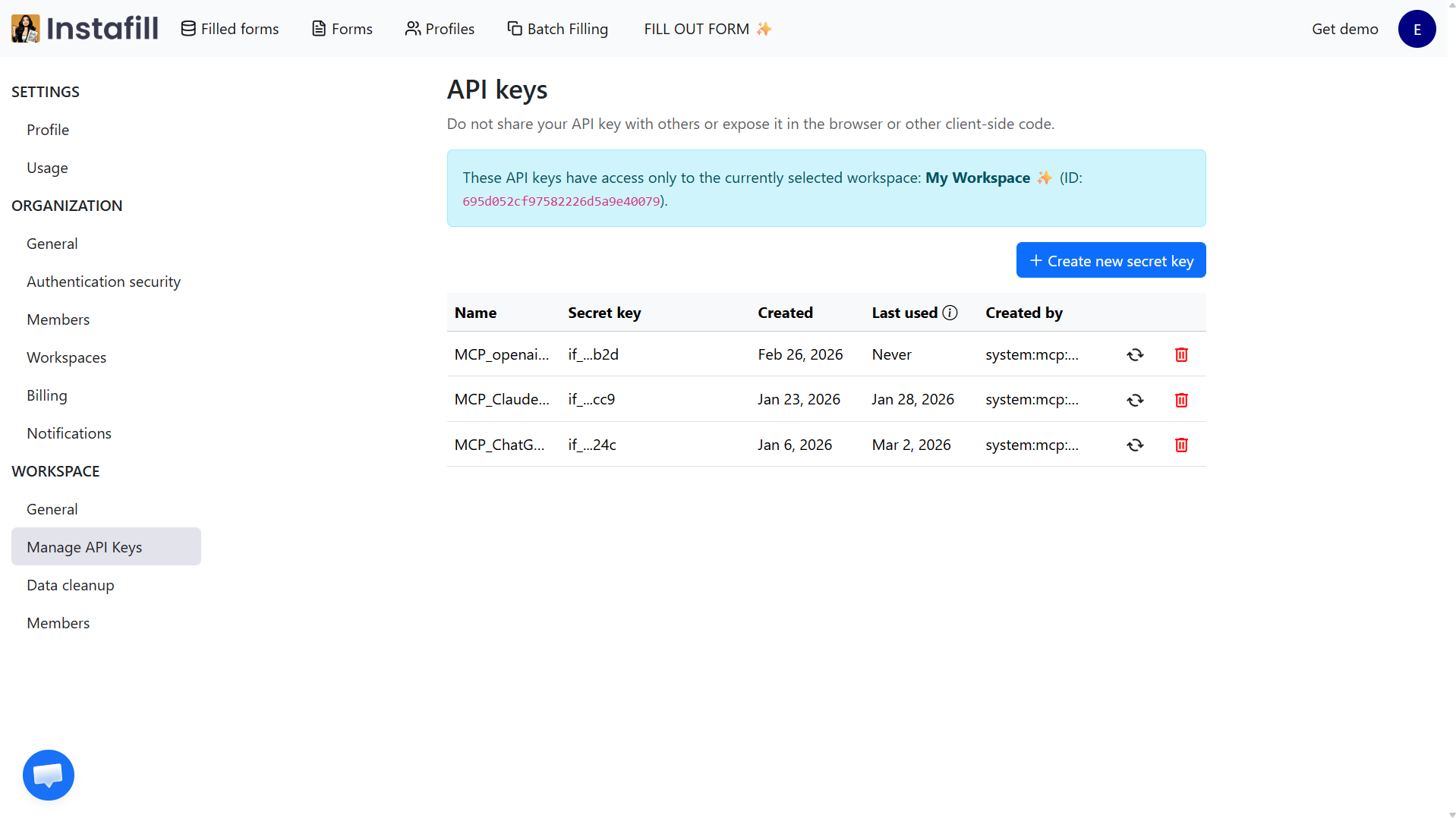
Get your API key from Settings → Organization → API keys in the dashboard, or at instafill.ai/settings/organization/api. You can create, rotate, and revoke keys there at any time.
All requests must use HTTPS. Plain HTTP calls will fail. Requests without a valid token return 401 Unauthorized.
Endpoints
Forms
Upload a form
POST /v1/forms/upload
Uploads a PDF and triggers Instafill's processing pipeline to extract the form's field list. Returns immediately with a form ID. The form is processed asynchronously - check the processed field on a Retrieve Form call to confirm it is ready for use.
Accepted content types: application/pdf or application/octet-stream.
curl -X POST https://api.instafill.ai/v1/forms/upload \
  -H "x-api-key: YOUR_API_KEY" \
  -H "Content-Type: application/pdf" \
  --data-binary "@form.pdf"
Success response (200):
{
  "id": "...",
  "object": "upload_form",
  "form_id": "6866495ea5c8a5bac52a1c7f",
  "file_name": "form.pdf"
}
Retrieve a form
GET /v1/forms/{id}
Returns details and processing status for a specific form.
curl https://api.instafill.ai/v1/forms/{id} \
  -H "Authorization: Bearer YOUR_API_KEY" \
  -H "Content-Type: application/json"
Success response (200):
{
  "id": "...",
  "object": "form",
  "form_id": "686290f318f665f2b91c4412",
  "file_name": "f9465.pdf",
  "form_url": "https://stinstafill.blob.core.windows.net/...",
  "uploading": false,
  "processed": true,
  "uploading_completed_at": "2025-06-30T13:28:19.327Z"
}
List forms
GET /v1/forms
Returns all forms associated with your workspace API key.
Sessions
A session is one AI fill run: a form plus source data, producing a filled PDF. See Form Filling Sessions for the full workflow.
Create a session
POST /v1/sessions
Accepts JSON or multipart/form-data.
JSON body:
{
  "form_id": "68840582d3745268a298e0283",
  "profile_ids": ["p1", "p2"],
  "file_urls": ["https://example.com/data.pdf"],
  "text_info": "name: John Doe"
}
Multipart fields: formId (required), files (optional file array).
form_id- the form to fillprofile_ids- saved profiles to use as source datafile_urls- URLs of source documents to pull intext_info- free-text data or instructions pasted directly
Success response (202 Accepted):
{
  "id": "...",
  "object": "session",
  "session_id": "68d19e587fa512779570328f"
}
Retrieve a session / download filled PDF
GET /v1/sessions/{id}
When the session is still processing, returns a JSON status response.
When complete, the response depends on your Accept header:
Accept: application/pdf- returns raw PDF bytes as an attachmentAccept: application/json(or no Accept header) - returns JSON including a base64-encoded PDF and the download URL
{
  "status": "completed",
  "filled_form_url": "https://instafill.ai/upload-sources?sessionId=...",
  "filled_form_base64": "JVBERi0xLjQK...",
  "statusCode": 200
}
List sessions
GET /v1/sessions
Returns all sessions in your workspace.
Profiles
Profiles store reusable source data - client records, employee files, patient information - that can be attached to any session without re-uploading. See Profile Management.
| Method | Endpoint | Description |
|---|---|---|
GET |
/v1/profiles |
List all profiles |
POST |
/v1/profiles |
Create a profile |
GET |
/v1/profiles/{profileId} |
Get profile details |
PUT |
/v1/profiles/{profileId} |
Update a profile |
PATCH |
/v1/profiles/{profileId}/name |
Rename a profile |
POST |
/v1/profiles/{profileId}/files |
Add files to a profile |
Utils
Utility endpoints for working with PDFs before creating fill sessions.
Check if a PDF is flat
POST /v1/utils/check-flat
Checks whether a PDF is flat (non-interactive) or fillable (contains AcroForm/XFA fields). Does not modify the PDF.
Accepts raw PDF bytes only (application/pdf or application/octet-stream).
curl -X POST "https://api.instafill.ai/v1/utils/check-flat" \
  -H "x-api-key: YOUR_API_KEY" \
  -H "Content-Type: application/pdf" \
  --data-binary "@document.pdf"
Response:
{
  "is_flat": false,
  "field_count": 59
}
Convert flat PDF to fillable
POST /v1/utils/convert
Starts an asynchronous conversion of a flat or scanned PDF into a fillable one. Returns a job_id - the converted PDF is not returned immediately.
Optional query parameters:
pages- convert only specific pages, e.g."1,3-5"confidence- detection confidence threshold, default 0.1resolution- image resolution for inference, default 1600
curl -X POST "https://api.instafill.ai/v1/utils/convert?pages=1,3-5&confidence=0.25&resolution=1900" \
  -H "x-api-key: YOUR_API_KEY" \
  -H "Content-Type: application/pdf" \
  --data-binary "@flat-form.pdf"
Response:
{
  "job_id": "675f5d197d9800b68b5c4c44"
}
Check conversion status
GET /v1/utils/convert/{job_id}/status
Polls a previously submitted conversion job. While processing:
{ "status": "processing" }
When complete:
{
  "status": "completed",
  "form_id": "675f5d197d9800b68b5c4c44",
  "base64": "JVBERi0xLjQK..."
}
base64 is the converted fillable PDF. form_id is the ID of the new form created in your workspace.
Integrations
Webhook subscriptions for n8n and Zapier automation workflows.
| Method | Endpoint | Description |
|---|---|---|
POST |
/v1/integrations/n8n/hooks/subscribe |
Subscribe an n8n webhook |
DELETE |
/v1/integrations/n8n/hooks/{id} |
Unsubscribe an n8n webhook |
POST |
/v1/integrations/zapier/hooks/subscribe |
Subscribe a Zapier webhook |
DELETE |
/v1/integrations/zapier/hooks/{id} |
Unsubscribe a Zapier webhook |
GET |
/v1/integrations/zapier/hooks/sample |
Sample payload for Zapier setup |
Error Format
All error responses share the same structure:
{
  "id": "error_2bf27dd219384d6e803ff5c429811c6d",
  "created": "2024-06-20T13:44:33.4378455Z",
  "object": "error",
  "error_message": "No API key provided."
}
| Status | Meaning |
|---|---|
| 200 | OK - everything worked |
| 401 | Unauthorized - no valid API key |
| 403 | Forbidden - API key doesn't have permission for this resource |
| 404 | Not Found - the requested resource doesn't exist |
| 415 | Unsupported Content Type - use application/pdf or application/octet-stream where required |
| 500, 503 | Server error - something went wrong on Instafill's end (rare) |
End-to-End Workflow Example
Here is a complete API workflow: upload a form once, then fill it from source documents programmatically.
Step 1: Upload the form (one-time)
curl -X POST https://api.instafill.ai/v1/forms/upload \
  -H "x-api-key: YOUR_API_KEY" \
  -H "Content-Type: application/pdf" \
  --data-binary "@application.pdf"
Save the form_id from the response. You will reuse it for every future session on this form.
Step 2: Create a fill session
curl -X POST https://api.instafill.ai/v1/sessions \
  -H "Authorization: Bearer YOUR_API_KEY" \
  -H "Content-Type: application/json" \
  -d '{
    "form_id": "6884058...",
    "file_urls": ["https://yourstorage.com/resume.pdf"],
    "text_info": "Applicant email: [email protected]"
  }'
Save the session_id from the response.
Step 3: Poll until complete, then download
curl https://api.instafill.ai/v1/sessions/{session_id} \
  -H "Authorization: Bearer YOUR_API_KEY" \
  -H "Accept: application/pdf" \
  -o filled-application.pdf
If the session is still processing, the response body will be JSON with "status": "processing". Poll again after a few seconds. When the session is complete and Accept: application/pdf is set, the response is the raw PDF file.
Use Cases
The API fits naturally into any system that generates or receives documents.
An immigration practice automates USCIS packet generation: each time a new client intake form is submitted via their web form, a webhook triggers the API to create a session, attach the intake PDF as a source, and route the filled I-485 and I-765 back into the case management system. What previously took a paralegal an afternoon now completes while the attorney is still on the intake call.
A mortgage platform pre-fills loan applications the moment a borrower completes a pre-qualification form online. The API creates a session using the borrower's data as text_info, attaches any uploaded pay stubs via file_urls, and returns a base64-encoded PDF that goes directly into the LOS.
An HR software vendor embeds Instafill.ai in their onboarding module: new hire profile data is passed via profile_ids, and W-4, I-9, and direct deposit forms are filled in separate sessions - all within the same onboarding flow.
Integration guides: See the n8n automation tutorial and the Cognito Forms webhook integration for step-by-step setup examples.
Benefits
- Everything in the web UI is available via API Forms, sessions, profiles, conversion - the API and the web interface share the same capabilities
- Simple authentication One Bearer token, no OAuth flow, no token refresh logic
- Async where it matters Flat-to-fillable conversion runs asynchronously with a job_id to poll - no blocking on long operations
- Flexible session input Pass source data as file URLs, multipart uploads, profile IDs, or inline text - or combine all four in one session
- Native integration hooks Built-in Zapier and n8n endpoints for no-code workflow connections
Security
All API traffic runs over HTTPS. API keys are workspace-scoped - a key for one workspace cannot access forms, sessions, or profiles in another. Keys can be rotated or revoked at any time from instafill.ai/settings/organization/api.
Full details at instafill.ai/security.
Common Questions
Where do I get an API key?
Go to Settings → Organization → API keys in the dashboard, or directly to instafill.ai/settings/organization/api. Keys are workspace-scoped. Create separate keys for development and production environments so you can rotate or revoke them independently.
How do I know when a session is finished?
Poll GET /v1/sessions/{id}. While processing, the response is JSON. When complete, if you send Accept: application/pdf, the response is the raw PDF. If you send Accept: application/json, you get a JSON body with "status": "completed" and a base64-encoded PDF.
For event-driven workflows, set up a Zapier or n8n integration to receive a webhook when a session completes.
Can I fill a flat or scanned PDF via API?
Yes. Use POST /v1/utils/convert to convert the flat PDF to fillable first - this runs asynchronously and returns a job_id. Poll GET /v1/utils/convert/{job_id}/status until you get "status": "completed", at which point you receive the form_id of the newly created fillable form. Then create a session against that form_id as normal.
If you want to check whether a PDF needs conversion before submitting it, use POST /v1/utils/check-flat first.
How do I pass source data to a session?
The Create Session endpoint accepts source data four ways, and you can combine them in one request:
file_urls- URLs of source documents to pull in (PDFs, images, Word files)files- direct multipart file uploadsprofile_ids- IDs of saved profiles containing stored client or employee datatext_info- free text or instructions typed or pasted directly into the request body
The AI reads all sources together before filling the form.
Is there a no-code option if I don't want to write API calls directly?
Yes. The Zapier integration and n8n integration let you connect Instafill.ai to hundreds of other tools without writing code. See the n8n tutorial for a full walkthrough. For form submission triggers specifically, the Cognito Forms integration guide shows how to auto-fill a PDF every time a web form is submitted.