Field Fill Explanation
Click "Explain" next to any filled field and get a plain-English account of exactly where the value came from and why the AI chose it — in seconds, without leaving the review screen
Overview
When AI fills a form automatically, reviewers face a fundamental verification problem: the field is populated, but there's no immediate way to know whether the value came from the right document, whether the AI made an inferential leap, or whether it collapsed two conflicting sources into a single answer. For routine fields — a patient's date of birth, a standard address — this is rarely a concern. For fields where precision carries legal or financial weight — a diagnosis code, an employment gap date, a loan-to-value ratio — reviewers need to be able to inspect the reasoning, not just the result.
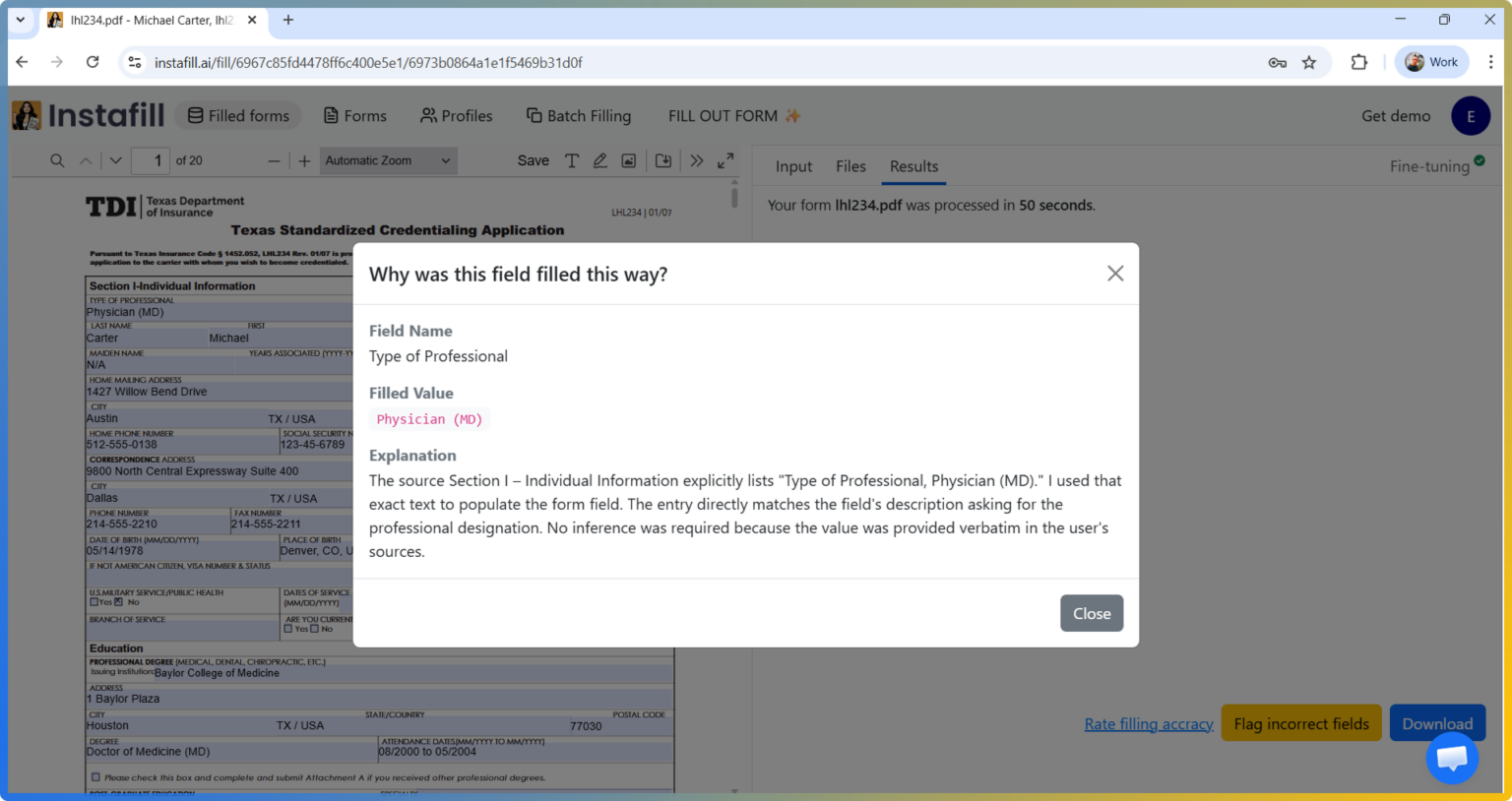
Field Fill Explanation solves this by making the AI's decision process available on demand. After a form filling session completes, you can request an explanation for any individual field directly from the visual editor. The system reconstructs the exact context the AI used when it filled that field — including the source documents, the field definitions, and any dependency rules — and then generates a plain-English account of which passage drove the value and what reasoning connected that passage to the field. The explanation is displayed in a modal overlay without disrupting the review flow.
This feature is particularly valuable in regulated environments where audit readiness isn't optional. A compliance officer reviewing a HIPAA authorization form, a loan officer spot-checking an income field on a mortgage application, or a paralegal verifying a beneficiary designation all benefit from being able to answer "why is this value here?" without having to trace back through source documents manually.
Key Capabilities
- Per-field, on-demand explanations: Request an explanation for any filled field individually — you're not forced to review all fields at once or generate a bulk report
- Source attribution: The explanation identifies which source document and which specific passage or data point the AI used when it chose the value
- Reasoning trace: Beyond identifying the source, the explanation describes the inference the AI made — why that passage maps to that field, how ambiguous inputs were resolved, and what rules or conditions influenced the final value
- Cached results: Once generated, an explanation is stored for the duration of the session. Re-opening the explanation for the same field is instant — no second API call, no additional cost
- Consistent with the fill context: Explanations are generated using the same source documents and rules that were active during the original fill — not a generic summary, but a reconstruction of the specific reasoning chain used for that field
- Direct API access: The explanation endpoint is available via the REST API, enabling integrations that surface explanations inside your own document review tools or compliance dashboards
- Scoped limitations: Explanations are available for text, date, checkbox, and dropdown fields. Table and list fields (which use a different extraction mechanism) and sessions run in stateless mode (where source files are deleted immediately after fill) do not support per-field explanations
How Field Fill Explanation Works
1. Trigger from the Visual Editor
After a session's fill completes and you are in the review screen, an "Explain" control appears alongside each filled field. Clicking it sends a request identifying the specific field to the explanation engine. Blank or unfilled fields do not have an explanation available — explanations are only generated for fields that received a value.
2. Fill Context Reconstruction
The explanation engine reconstructs the exact context that was used during the original fill for that field's group: the source document content, the form's field definitions, any conditional dependency rules, and the value the AI produced. This reconstructed context is assembled as a complete conversation — source material in, AI answer out — so the explanation model has full visibility into what actually happened during filling, not just the final value in isolation.
3. AI Explanation Generation
A dedicated explanation model receives the reconstructed fill context and a prompt asking it to explain the field decision in plain English. The model identifies the passage or data point in the source material that drove the value, describes the mapping logic, and flags any ambiguity it encountered. The output is a concise, human-readable explanation — typically two to four sentences — that a non-technical reviewer can act on directly.
4. Display and Caching
The explanation appears in a modal overlay showing the field name, the filled value, and the explanation text. A "Cached" indicator appears on subsequent opens of the same field within the same session. Explanations persist for the lifetime of the session and are accessible to anyone with session access — useful when a reviewer wants to share an explanation with a supervisor or include it in an audit record.
Use Cases
Healthcare: HIPAA Authorization and Credentialing Forms
A credentialing coordinator filling provider enrollment applications often needs to justify specific field values to compliance officers. With field explanations, the coordinator can click through questioned fields — specialty codes, NPI numbers, graduation dates — and retrieve the exact passage from the provider's CV or prior application that sourced each value. This replaces the manual process of cross-referencing source documents page by page.
Mortgage and Lending: Income and Asset Verification
Loan officers reviewing AI-filled mortgage applications frequently need to verify that income figures, employment dates, and asset values trace back to the correct supporting documents (W-2s, bank statements, tax returns). Field explanations surface the specific line items and document sections the AI used, so the officer can confirm the mapping is correct before underwriting sign-off rather than discovering discrepancies in post-close QC.
Legal: Estate Planning and Beneficiary Designations
Paralegals completing beneficiary designation forms and estate planning documents need to confirm that names, percentages, and relationship designations match client intake documents exactly. Field explanations identify whether a beneficiary's name came from an intake form, a prior policy document, or an email — and flag cases where the AI had to infer from context — giving attorneys a clear basis for approving or correcting the filled value.
HR and Compliance: Onboarding Packet Review
HR teams processing new-hire onboarding packets across multiple forms (I-9, W-4, direct deposit authorizations, benefits elections) use field explanations to train reviewers on what source documents each field type draws from. New staff can open explanations for unfamiliar field types to understand the mapping logic — reducing the onboarding time for reviewers and standardizing how the team interprets AI-filled values.
Benefits
Auditable AI decisions: Every filled field can produce a documented explanation of its source and reasoning, which satisfies audit requirements in regulated industries without requiring manual source tracing.
Reduced reviewer hesitation: Reviewers who can inspect the reasoning behind a value are more likely to approve correct fills quickly and more precisely identify actual errors — reducing both over-correction and missed mistakes.
Faster staff training: New reviewers can use field explanations to build intuition about which source documents map to which field types, shortening the time it takes to reach confident, independent review.
Reduced back-and-forth with submitters: When a field value looks unexpected, the explanation often shows it came from a specific clause in a source document — giving the reviewer enough context to either confirm it's correct or request a corrected source, without a second conversation with the submitter.
Accountability for AI-assisted workflows: In compliance-sensitive contexts, the ability to produce a per-field explanation log demonstrates that the AI filling process is supervised, inspectable, and correctable — not a black box.
Security & Privacy
Field fill explanations are scoped to the session that generated them. They are stored with the same encryption and access controls as the session's other data, and they are accessible only to users with session-level access rights.
Explanations are not available in sessions configured to delete source files immediately after fill (stateless mode). In those sessions, the source material required to reconstruct the fill context is no longer present, so explanations cannot be generated. If explanation availability is a requirement for your workflow, do not enable stateless mode for those sessions.
No additional data leaves the platform to generate an explanation. The system uses the source documents and field content already present in the session — there is no separate upload step and no data sent to a third party beyond what was already used for the original fill.
Explanation data is retained and deleted according to your workspace's session retention policy. If a session is deleted, its explanations are deleted with it.
Common Questions
Does requesting an explanation cost extra credits?
Generating an explanation for the first time for a given field consumes a small number of credits, comparable to filling a short single field. Once generated, the explanation is cached for the session lifetime and can be re-accessed at no additional cost. Bulk explanation generation across all fields in a session is not supported — explanations are triggered per field, on demand, so you only pay for explanations you actually request.
Does an explanation confirm that the filled value is correct?
No. An explanation tells you where the value came from and why the AI chose it — it does not independently verify that the source document is accurate or that the field value is correct. If the source document contained an error, the AI may have faithfully mapped that error to the form field, and the explanation will describe that mapping without flagging the underlying inaccuracy. The explanation is a tool for human review, not a substitute for it.
Can I get explanations for table or list fields?
Not currently. Table and list fields are filled using a separate extraction mechanism that processes structured rows rather than mapping individual source passages to individual fields. Because the fill context is structured differently, the per-field explanation model cannot reconstruct a meaningful reasoning chain for table cells. For these field types, review the extracted table data directly in the visual editor and compare against your source spreadsheet or document.
Can I share an explanation with someone outside the session?
Explanation content is available to anyone with access to the session. You can share the session with a teammate using session sharing, and they will be able to open field explanations in the same way. Explanations cannot be exported as a standalone document directly from the UI, but the explanation data is available via the REST API, so integrations can retrieve and store it in external compliance systems or document management platforms.
What if the explanation references the wrong source or seems incorrect?
If the explanation points to a source passage that does not obviously connect to the filled value, the most likely cause is ambiguity in the source material — multiple documents containing similar data, or a field definition broad enough to match multiple passages. In these cases, correct the field value manually in the visual editor and, if the error pattern repeats, consider using AI Training to add a few-shot example that demonstrates the correct mapping for that field type. Repeated explanation requests for the same field after a correction will reflect the updated value.