
Yes! You can use AI to fill out Form 5695, Residential Energy Credits
Don't type 102 fields by hand. Tell our AI about yourself, or upload a document you already have, and it fills every field in seconds. You check it, then download, print or sign.
The AI does the filling. You just check it.
No typing into boxes, nothing to install.
What this form asks for
The AI fills all of it, from your answers or your documents.
The AI checks your answers before you download
15 checks built for this form, so a wrong date or a missing answer is caught before anyone else sees it.
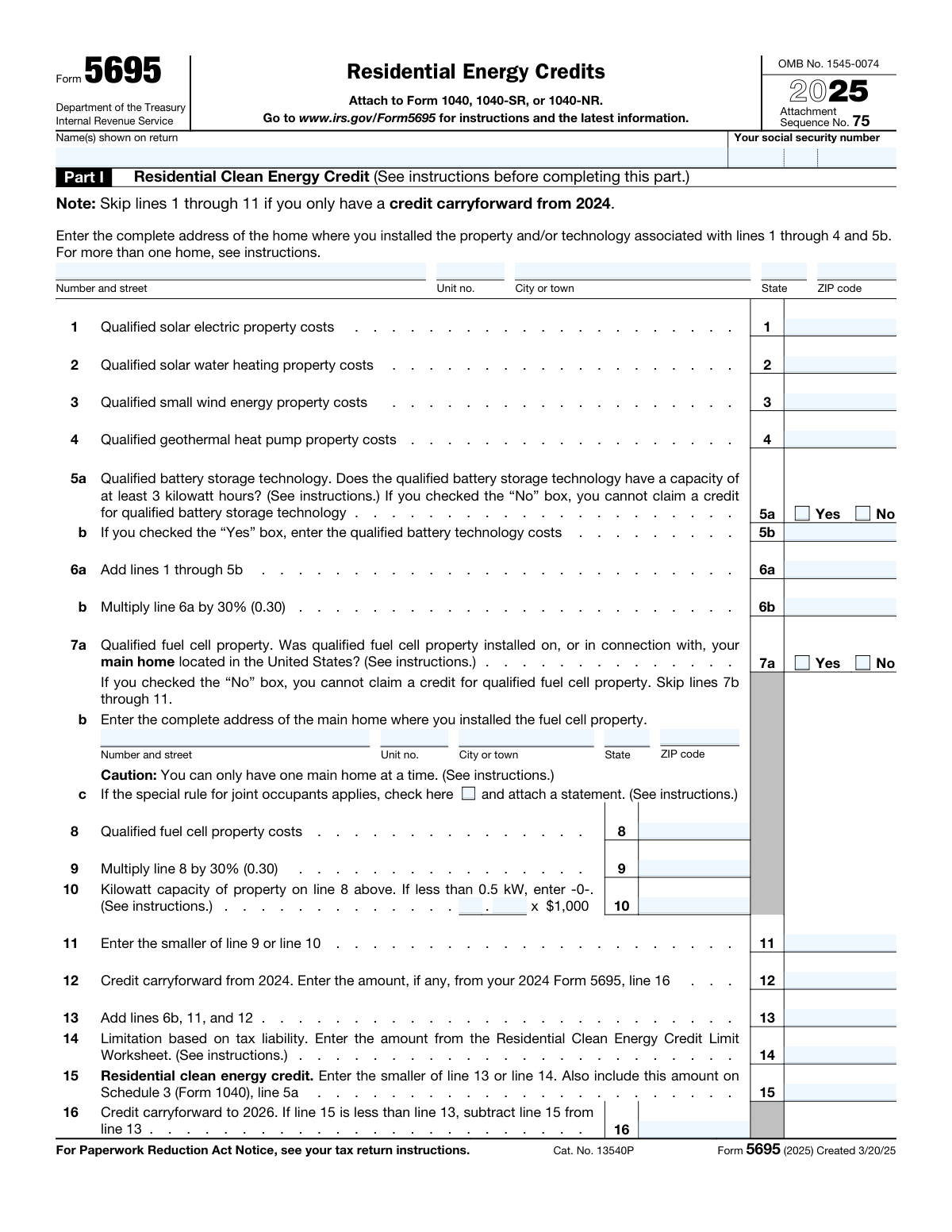
The AI ensures that the address field for the home with installed qualified residential clean energy property is accurately filled in Part I of the form. It checks for completeness and proper formatting of the address, including street name, city, state, and ZIP code. The AI also verifies that the address corresponds to a residential property and not a commercial establishment. Additionally, it cross-references the provided address with installation records to confirm the presence of qualified energy property.
The AI verifies that the costs entered for qualified solar electric, solar water heating, small wind energy, geothermal heat pump property, and battery storage technology are accurate and reflect the actual expenses incurred. It checks lines 1 through 4, and 5b in Part I for correct figures and includes labor costs associated with the installation. The AI also ensures that the costs are within the typical range for such installations and flags any outliers for review. It may also validate that the expenses are supported by appropriate documentation such as invoices or receipts.
The AI confirms that the costs entered for the qualified fuel cell property are associated with the main home of the filer. It ensures that the credit claimed does not exceed the limit of $500 per each half kilowatt of capacity, as stipulated by the tax regulations. The AI checks the capacity of the installed fuel cell property against the claimed credit and alerts the user if the credit limit is surpassed. It also reviews the documentation to ensure that the installation qualifies for the credit.
The AI completes the Residential Clean Energy Credit Limit Worksheet to accurately determine the allowable credit amount that can be claimed in Part I of the form. It performs the necessary calculations based on the costs entered for the qualified energy property and applies the relevant limits and thresholds. The AI ensures that the final credit amount is correctly computed and entered into the form. It also checks for any updates to the tax code that might affect the credit calculation.
The AI confirms that the energy efficiency improvements listed in Section A of Part II were made to the filer's main home. It verifies that the filer is the original user of the components, meaning that the components were new when installed and not previously used. The AI checks the installation dates and the purchase records to ensure compliance with the tax credit requirements. It also reviews the specifications of the installed components to confirm that they meet the energy efficiency criteria for the credit.
The AI ensures that the expenses related to insulation, exterior doors, windows, and skylights, which meet specific energy efficiency standards, are accurately recorded in Section A of Part II of the Residential Energy Credits Form. It cross-references the entered costs against the actual invoices or receipts provided by the taxpayer to confirm their validity. The AI also checks that these improvements qualify under the current energy standards set by the IRS for the tax year in question. Additionally, it ensures that the costs are itemized and calculated correctly to prevent any discrepancies that may arise during the tax filing process.
And 9 more checks
- Ensures that the costs for energy-efficient improvements such as central air conditioners, water heaters, furnaces, boilers, and biomass stoves are correctly entered in Section B of Part II, including labor costs.
- Completes the Energy Efficient Home Improvement Credit Limit Worksheet to determine the allowable credit amount in Part II.
- Checks that all manufacturer certifications for qualifying products are retained for records but not attached to the return.
- Verifies that the credit is correctly adjusted if there is a tax liability limit and calculates the carryover of the unused portion of the credit to the next year if applicable.
- Ensures that the specified limits for each type of qualifying property are not exceeded when claiming credits.
- Confirms that for joint occupancy, each occupant has completed their own Form 5695 and calculated their portion of the credit based on the amount they paid.
- Verifies that any subsidy received from a public utility for the purchase or installation of an energy conservation product is subtracted from the product cost before calculating the credit.
- Ensures that the form is correctly attached to the tax return before submission to the IRS.
- Confirms compliance with standard filing procedures when submitting Form 5695 to the IRS.
Let AI fill out your Form 5695
No typing. Every field filled in seconds, checked, ready to sign.
How to Fill Out Form 5695 Online for Free in 2026
What the AI walks you through.
- Visit instafill.ai site and select Form 5695.
- Enter your name and social security number.
- Fill in the address of the property.
- Complete the sections for energy credits.
- Sign and date the form electronically.
- Check for accuracy and submit the form.
Common Mistakes in Completing Form 5695
The ones the AI is built to catch.
Failure to provide complete address for home where energy improvements were made
Entering incorrect costs for qualified energy improvements or labor
Neglecting to complete Residential Clean Energy Credit Limit Worksheet
Failing to keep manufacturer certifications for qualifying products
Exceeding the specified limits for each type of qualifying property
Failure to Calculate Individual Credits in Joint Occupancy
Overlooking Subsidy Reductions from Public Utilities
Neglecting to Confirm Improvements Were Made to the Main Home
Misunderstanding Original User Status for Energy Efficiency Components
Incomplete or Incorrect Information on Energy Efficient Home Improvement Credit Limit Worksheet
Frequently Asked Questions About Form 5695
Is it really free for 7 days?
Can I fill other forms too?
How do I cancel?
How does the AI fill out Form 5695?
What happens to my information?
How complex is Form 5695 to fill out?
What is the Residential Energy Credits Form used for?
Which tax form should I attach Form 5695 to?
What is the OMB No. for Form 5695?
Which lines should I complete in Part I of Form 5695?
What is the Residential Clean Energy Credit?
What is the Energy Efficient Home Improvement Credit?
What is the deadline to file Form 5695?
What is the maximum credit amount for the Residential Clean Energy Credit?
What is the maximum credit amount for the Energy Efficient Home Improvement Credit?
What documentation is required to support Form 5695?
Which home improvements qualify for the Energy Efficient Home Improvement Credit?
What are the eligibility requirements for the Residential Clean Energy Credit?
How do I claim the Energy Efficient Home Improvement Credit and Residential Clean Energy Credit?
Get your Form 5695 filled out by AI
$0 today. Cancel before Nov 7 and you pay nothing.
Other forms like this one
credit forms: Form 5405, Repayment of First-Time Homebuyer Credit, Form 8862, Information To Claim Certain Credits, Form 8880, Credit for Qualified Retirement Savings Contributions, Form 3468, Investment Credit, Form 8801, Credit for Prior Year Minimum Tax, Form FTB 3514, California Earned Income Tax Credit, Form 8910, Alternative Motor Vehicle Credit, Form 8885, Health Coverage Tax Credit, Form 5884-A, Employee Retention Credit, Form 5884, Work Opportunity Credit, Form 5884-C, Work Opportunity Credit, Form 8994, Employer Credit for Paid Family and Medical Leave, Form 8962, Premium Tax Credit (PTC), Form 8812, Credits for Qualifying Children, Form 104, List of Creditors 20 Largest Unsecured Claims, WestRock Credit Application and Uniform Sales & Use Tax Exemption/Resale Certificate — Multijurisdiction, Personal Financial Statement (REV 06/2018) – Northwest Federal Credit Union, Form G-1450, Authorization for Credit Card Transactions, 2023 Schedule IL-E/EIC, Illinois Exemption and Earned Income Tax Credit (Illinois Department of Revenue), Form 5695 (2025), Residential Energy Credits
Let AI fill out your Form 5695
Your trial starts once a card is added. You pay nothing before Nov 7.
Our AI already knows this form, all 102 fields of it. Skip the typing: tell it about yourself, or upload what you have, and it fills the whole form in seconds.
- AI fills every field on all 3 pages, tables and checkboxes included
- No typing into boxes: answer a few questions, or upload a document you already have, an old copy of this form, a photo of a document
- The AI checks the answers; you review and change anything before you download
- Download the finished PDF, print it, or sign it online
- Encrypted, and never used to train AI
Cancel before Nov 7 and you pay nothing.
A card is needed to start the trial. Cancel in two clicks from your account.
Terms · Privacy