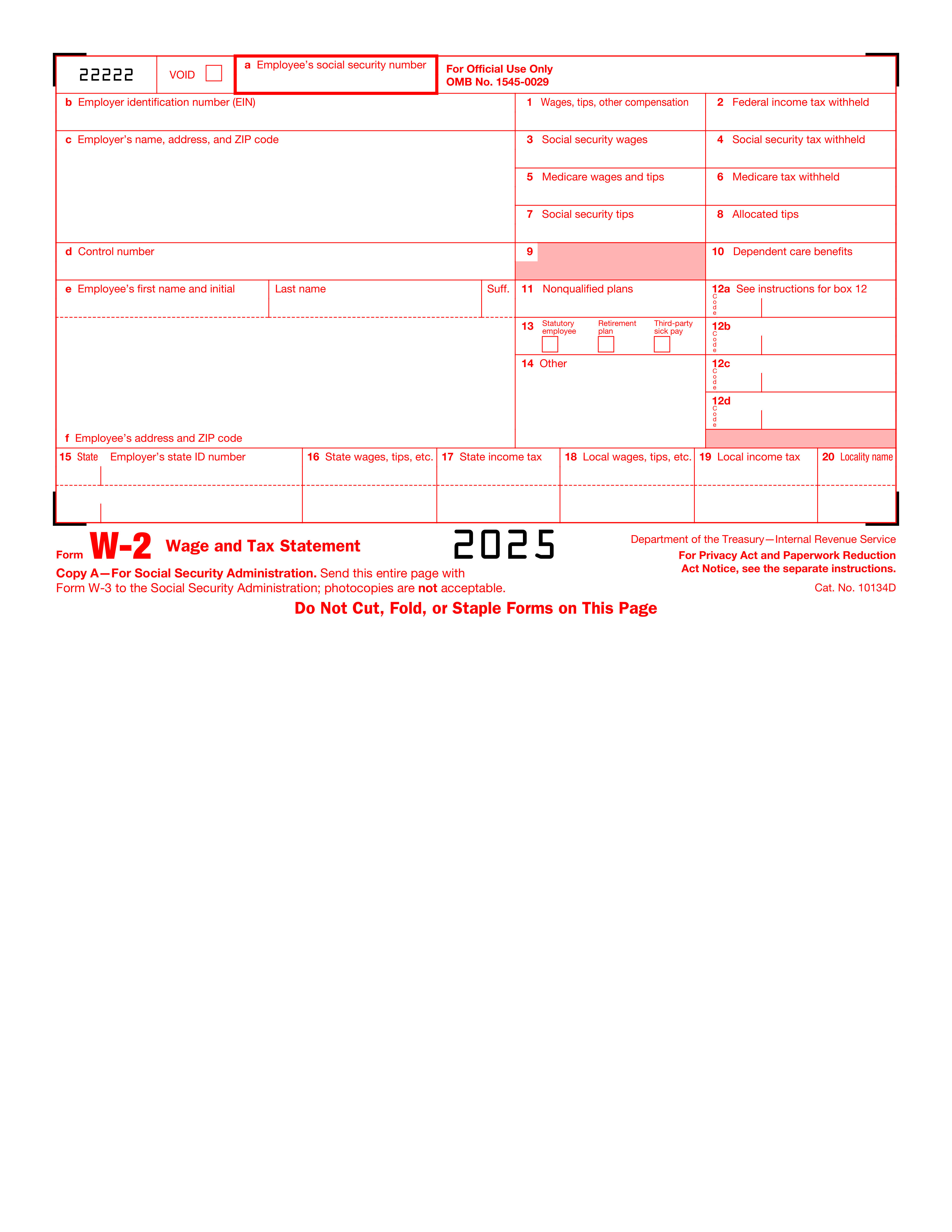
Submitting non-scannable copies of the Wage and Tax Statement to the Social Security Administration (SSA) can lead to processing delays and errors. It is crucial to use the official IRS-provided forms or copies that are IRS-approved for scanning to ensure accurate and timely processing. Employers should verify that they are using the correct version of the form and that it is compatible with SSA scanning technology. If unsure, employers can contact the IRS for confirmation or access the forms directly from the IRS website.
Entering an incorrect Social Security Number (SSN) for an employee in Section a can result in incorrect earnings records and potential tax issues for both the employee and employer. To avoid this, double-check the SSN against employee records before submitting the form. Employers should also encourage employees to verify their SSN when they are first hired and on their annual W-2 forms. If a discrepancy is found, it should be corrected promptly.
Providing an incorrect Employer Identification Number (EIN) in Section b can lead to misfiled taxes and complications with the IRS. Employers must ensure that the EIN is accurate and matches the number registered with the IRS. This can be done by cross-referencing the EIN with official documents, such as prior year tax filings or the EIN confirmation letter received from the IRS. Regularly reviewing and updating business information with the IRS can prevent such errors.
Failing to provide or incorrectly writing the employer's name, address, or ZIP code in Section c can hinder the IRS's ability to contact the employer for any clarifications or issues. It is important to enter this information accurately and legibly. Employers should use the legal business name and address as registered with the IRS. Before submitting the form, a review of the employer's details against official documents or IRS records is recommended to ensure all information is current and correct.
Neglecting to enter a control number in Section d, when applicable, can cause confusion and delay the processing of the form. The control number is a unique identifier used by employers to track individual Wage and Tax Statements. If an employer uses control numbers, it should be included on the form. Employers should establish a consistent system for assigning and recording control numbers to ensure they are accurately reflected on each employee's W-2 form.
Ensuring the accuracy of an employee's name in Section e is crucial as it must match the name on their Social Security card. Misspellings or omissions of suffixes can lead to issues with tax processing and record matching with the Social Security Administration. To avoid this mistake, double-check the spelling against the employee's Social Security card and include any suffixes such as Jr., Sr., or III if they are part of the official name on the card.
The employee's address in Section f must be complete and accurate to ensure they receive their Wage and Tax Statement and other important correspondence. An incorrect or incomplete address can result in undelivered tax documents and potential penalties for the employee. To prevent this error, verify the address with the employee, confirm that all necessary components such as street number, street name, apartment or suite number, city, state, and ZIP code are included, and update any recent changes before filing.
Box 1 requires the accurate reporting of all taxable wages, tips, and other compensation paid to the employee. Errors in this box can affect the employee's tax liability and lead to discrepancies with the IRS. To avoid inaccuracies, reconcile the total wages reported with payroll records, ensure that all taxable income is included, and cross-verify the amounts with other relevant boxes such as social security and Medicare wages.
The amount of federal income tax withheld, entered in Box 2, must reflect the total tax withheld from the employee's wages for the year. Incorrect entries can result in the employee owing additional tax or receiving an incorrect refund. To prevent this mistake, tally all federal income tax amounts withheld from the employee's paychecks throughout the year, cross-check the total with payroll records, and correct any discrepancies before filing.
Social security wages in Box 3 should equal the total wages subject to social security tax up to the annual wage limit. Miscalculating this figure can lead to incorrect social security benefits and tax obligations. To ensure accuracy, verify that the amount does not exceed the social security wage base for the year, include all wages subject to social security tax, and adjust for any tips or other compensation that may affect the calculation.
Accurate calculation of social security tax withheld is crucial as it affects the employee's social security benefits. Employers must ensure that they apply the correct social security tax rate to the wages subject to social security tax. To avoid this mistake, double-check the current year's tax rate and the wage base limit for social security. Use payroll software or tax tables to ensure the correct amount is withheld and reported in Box 4.
Medicare wages and tips must reflect all compensation subject to Medicare tax. Errors can occur if not all taxable wages and tips are included, or if exempt payments are mistakenly included. Employers should verify that they are using the correct definition of Medicare wages and tips, and cross-reference the total with payroll records. Regular audits and reconciliations can help prevent discrepancies in the amounts reported in Box 5.
The Medicare tax withheld must correspond to the Medicare wages and tips reported in Box 5. Employers should apply the correct Medicare tax rate, including any additional Medicare tax withholding for high earners. To avoid errors, use updated payroll systems that automatically calculate the appropriate taxes. Additionally, employers should review any manual adjustments or overrides that could lead to incorrect withholding amounts in Box 6.
Social security tips are income subject to social security tax and must be reported in Box 7. Employers often overlook or incorrectly calculate this figure. To prevent this mistake, ensure that all reported tips from employees are accurately recorded and included in the social security tips total. Educate employees on the importance of reporting their tip income and regularly reconcile tip reports with payroll data to ensure accurate reporting in Box 7.
Allocated tips are those that the employer assigns to an employee in addition to the tips the employee reported. This amount is subject to income tax but not social security or Medicare taxes. Errors can occur if allocated tips are not calculated based on IRS guidelines or are reported in the wrong box. Employers should familiarize themselves with the IRS rules for tip allocation and ensure accurate calculations. Regular training for staff handling payroll can help maintain compliance and accuracy in reporting allocated tips in Box 8.
Box 9 should be left blank, as it is no longer in use and is reserved for future use by the IRS. Filling in this box can cause confusion and may lead to processing delays. To avoid this mistake, always review the latest IRS instructions for the form to ensure that you are not providing unnecessary or outdated information. Double-check each box before submission to ensure that only the required information is included.
Dependent care benefits should be accurately reported in Box 10. It is essential to distinguish between employer-provided benefits and amounts that the employee paid out of pocket. To prevent errors, verify the amounts with your employer's records or your payroll department. Ensure that you understand the definition of dependent care benefits as per IRS guidelines and report only the applicable amounts in this box.
Box 11 is designated for reporting distributions from nonqualified plans. Neglecting to report this information can lead to incorrect tax calculations. To avoid this error, confirm whether you have received any distributions from nonqualified plans during the tax year. If so, accurately report the distribution amount in Box 11. Consult with a tax professional or your plan administrator if you are unsure about what constitutes a nonqualified plan distribution.
Box 12 requires specific codes to indicate various types of compensation and benefits. Using incorrect codes or amounts can result in inaccurate tax reporting. To prevent this mistake, refer to the IRS instructions for the correct codes to use for each type of compensation or benefit. Double-check the amounts associated with each code to ensure they match your records. If you are uncertain about which code to use, seek clarification from your employer or a tax professional.
Box 13 contains checkboxes for statutory employee, retirement plan, and third-party sick pay. Incorrectly checking or failing to check the appropriate boxes can affect tax obligations. To avoid errors, understand the criteria for each category. If you are a statutory employee, participate in a retirement plan, or received third-party sick pay, ensure the corresponding box is checked. If none of these situations apply to you, leave Box 13 unchecked. Consult with your employer or a tax advisor if you are unsure of your status regarding these categories.
Failing to provide additional information in Box 14 can lead to confusion and inaccuracies in tax reporting. This box is intended for employers to report any additional tax information that doesn't fit elsewhere on the form, such as union dues or health insurance premiums. To avoid this mistake, employers should carefully review all employee deductions and benefits that require reporting and ensure they are included in Box 14. It's important to consult with a tax professional or refer to IRS guidelines to understand what specific information needs to be reported in this box.
Entering an incorrect state employer's state ID number in Box 15 can lead to processing delays and potential issues with state tax authorities. This number is crucial for state tax reporting and must match the number assigned by the state. Employers should double-check their state tax ID number for accuracy before submitting the form. It is recommended to keep this information readily available and to verify it against official documents or previous tax filings to ensure correctness. If there is any uncertainty about the state ID number, contacting the state's department of revenue or similar agency for confirmation is advisable.
Misreporting state wages, tips, and other compensation in Box 16 can result in incorrect state tax calculations and filings. It is essential that the amounts reported in this box accurately reflect the income subject to state taxes. Employers should reconcile these figures with their payroll records and correct any discrepancies before filing. To prevent errors, use payroll software that automatically calculates state wages based on the latest tax laws, or manually review the calculations to ensure they comply with state-specific regulations.
Inputting an incorrect state income tax amount in Box 17 can cause employees to pay the wrong amount of taxes or receive an incorrect refund. This box should reflect the total state income tax withheld from the employee's wages for the year. To avoid this error, employers must ensure that the withholding amounts are accurately recorded throughout the year and that the total in Box 17 matches the sum of these records. Regular audits of payroll records and withholding amounts can help identify any inconsistencies before the form is finalized and submitted.
Miscalculating local wages, tips, and other earnings in Box 18 can lead to incorrect local tax liabilities for employees. This box is used to report earnings subject to local, city, or other municipal taxes. Employers should verify the accuracy of these figures against their payroll data and ensure that they are in line with local tax ordinances. Utilizing updated payroll systems that account for local tax rates and regulations can help prevent miscalculations. Additionally, employers should review local tax requirements annually as rates and regulations can change.
Incorrectly entering local income tax in Box 19 can lead to discrepancies in an employee's tax records and potential issues with local tax authorities. To avoid this mistake, double-check the local income tax rates and ensure they are current before filling out the form. Cross-reference the amount with the employee's pay records to confirm accuracy. If unsure about the applicable tax rate, consult with the local tax office or a tax professional for guidance.
Failing to provide the correct locality name in Box 20, or writing it incorrectly, can result in confusion and processing delays. To prevent this error, verify the official locality name before completing the form. Use a reliable source, such as local government websites or official tax documentation, to confirm the correct spelling and format. Ensure that the name is legible and matches the official designation to facilitate accurate tax reporting.
Distributing incorrect copies of the form to the wrong recipients can lead to privacy breaches and non-compliance with tax reporting requirements. To avoid this, familiarize yourself with the purpose of each copy of the form and who is entitled to receive it. Carefully label and organize the copies to ensure they are sent to the appropriate parties. Always double-check the recipient's information before distribution to maintain confidentiality and compliance.
Neglecting to provide employees with Copies B, C, and 2 by the required deadline can result in penalties and employee dissatisfaction. To prevent this, mark the deadline on your calendar and set reminders to ensure timely distribution. Prepare the forms well in advance of the deadline to account for any unforeseen delays. Communicate with employees about the upcoming distribution to ensure they are aware and can alert you if they do not receive their copies on time.
Failing to file Copy A with the Social Security Administration (SSA) by the deadline can lead to penalties and may affect employees' social security records. To circumvent this issue, be aware of the filing deadline and plan to submit the forms ahead of time. Use the SSA's Business Services Online (BSO) to file electronically, which can be faster and more reliable than paper filing. Keep a record of the submission confirmation as proof of timely filing in case of any disputes.
Employers sometimes mistakenly use Form W-2 to make corrections to previously filed wage and tax statements. However, the correct form for making such amendments is Form W-2c, Corrected Wage and Tax Statement. To avoid this error, employers should familiarize themselves with the IRS guidelines regarding amendments to tax documents. When a mistake is discovered on a filed Form W-2, the employer must complete Form W-2c as soon as possible to correct the information and submit it to the Social Security Administration (SSA).
Employers are required to retain Copy D of each Form W-2 for their records. Failure to do so can lead to complications if the IRS requests documentation for verification or if there are disputes with employees about the information reported. Employers should establish a reliable filing system that ensures all necessary tax documents, including Copy D of Form W-2, are securely stored for at least four years after the due date of the tax or the date the tax was paid, whichever is later. Regular audits of the filing system can help ensure compliance with record retention requirements.
It is crucial for employers to adhere to the IRS guidelines for the retention of tax records. Not following these guidelines can result in penalties and difficulties in the event of an audit. Employers should keep all tax records, including W-2 forms, for at least four years after the tax due date or the date the tax was paid. It is recommended to have a documented retention policy and to periodically review it to ensure ongoing compliance with IRS requirements. Digital storage solutions can also be used to maintain records securely and to facilitate easy retrieval when needed.