
Yes! You can use AI to fill out Form W-8BEN-E, Certificate of Status of Beneficial Owner for United States Tax Withholding and Reporting (Entities)
Don't type 56 fields by hand. Tell our AI about yourself, or upload a document you already have, and it fills every field in seconds. You check it, then download, print or sign.
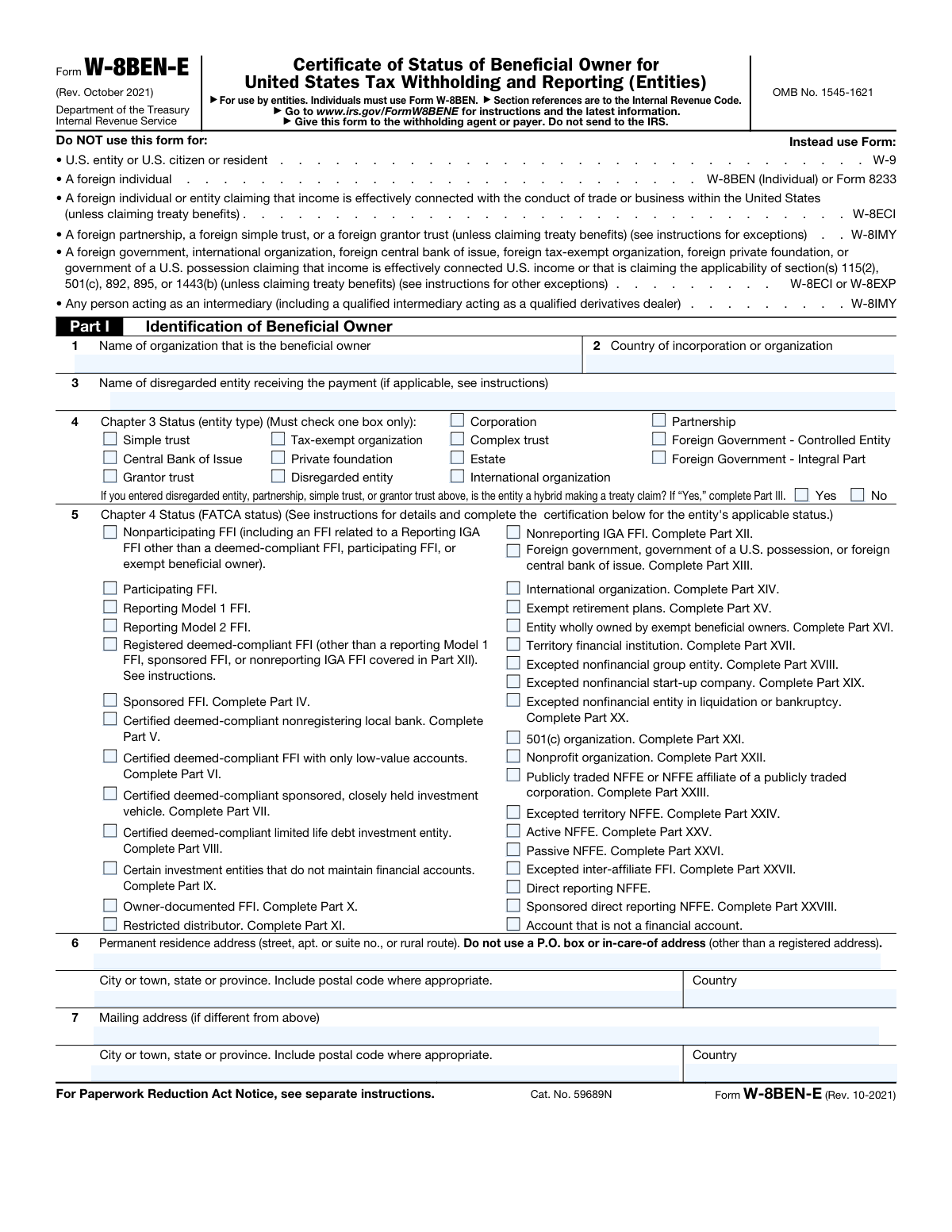
The AI does the filling. You just check it.
No typing into boxes, nothing to install.
What this form asks for
The AI fills all of it, from your answers or your documents.
The AI checks your answers before you download
16 checks built for this form, so a wrong date or a missing answer is caught before anyone else sees it.
Validates that the Beneficial Owner Organization Name field (Line 1) is not blank and contains a full legal entity name rather than an abbreviated, informal, or individual person's name. This field is critical because the W-8BEN-E is exclusively for entities, and the name must match the entity's official registration documents. If this field is empty or contains an individual's name, the form is invalid and the withholding agent cannot properly identify the beneficial owner for tax withholding and reporting purposes.
Validates that the Country of Incorporation or Organization field (Line 2) is populated with a recognized, non-U.S. country name or standard country code. Since the W-8BEN-E is specifically for foreign entities, a U.S. entry in this field would indicate the submitter should instead be using Form W-9. If a U.S. territory or the United States itself is entered, the form must be flagged as incorrect and the submitter redirected to the appropriate form.
Validates that one and only one checkbox is selected among all Chapter 3 Status options in Line 4, as the form explicitly instructs 'Must check one box only.' Selecting multiple entity types creates an ambiguous legal classification that could result in incorrect withholding rates being applied. If no box is checked or more than one box is checked, the form is incomplete or contradictory and must be returned to the submitter for correction.
Validates that one and only one checkbox is selected among all Chapter 4 FATCA Status options in Line 5. The FATCA status determines the entity's compliance obligations and the applicable withholding treatment under Chapter 4 of the Internal Revenue Code. Selecting multiple statuses or leaving this field blank renders the form non-compliant with FATCA requirements, potentially subjecting payments to the default 30% FATCA withholding rate.
Validates that either 'Yes' or 'No' is selected for the hybrid entity treaty claim question whenever the Chapter 3 Status is Partnership, Simple Trust, Grantor Trust, or Disregarded Entity. This question is conditionally required because these entity types may qualify as hybrid entities under a tax treaty, which triggers additional certification requirements in Part III. If one of these entity types is selected but neither Yes nor No is answered, the form is incomplete and the withholding agent cannot determine whether Part III must also be completed.
Validates that the hybrid entity treaty claim question (Yes/No) is left blank when the selected Chapter 3 Status is not Partnership, Simple Trust, Grantor Trust, or Disregarded Entity. Answering this question for entity types such as Corporation, Estate, or International Organization is not applicable per the form instructions and could create confusion or inconsistency in the form's legal certifications. If an inapplicable entity type is selected alongside a hybrid treaty claim answer, the form should be flagged for review.
And 10 more checks
- Hybrid Entity 'Yes' Selection Requires Part III Completion Indicator
- Chapter 4 FATCA Status Requiring Supplemental Part Completion is Flagged
- Permanent Residence Address Street Field Does Not Contain a P.O. Box
- Permanent Residence Address Country is a Valid Non-U.S. Country
- Permanent Residence Address City/State/Province/Postal Code Field is Populated
- Mailing Address is Only Provided When It Differs from Permanent Residence Address
- Mailing Address is Complete When Provided
- Disregarded Entity Name is Only Provided When Applicable Chapter 3 Status is Selected
- Chapter 3 Status and Chapter 4 FATCA Status are Logically Consistent
- Form is Not Used by a U.S. Entity, U.S. Citizen, or Foreign Individual
Let AI fill out your W-8BEN-E
No typing. Every field filled in seconds, checked, ready to sign.
How to Fill Out W-8BEN-E Online for Free in 2026
What the AI walks you through.
- Navigate to Instafill.ai and upload or select Form W-8BEN-E from the available form library to begin the guided filling process.
- Complete Part I (Identification of Beneficial Owner) by entering the organization's legal name, country of incorporation or organization, and the name of any disregarded entity receiving the payment, if applicable.
- Select the appropriate Chapter 3 Status (entity type) by checking exactly one box that describes the organization's legal structure, and if a disregarded entity, partnership, simple trust, or grantor trust is selected, indicate whether the entity is a hybrid making a treaty claim.
- Select the appropriate Chapter 4 Status (FATCA status) by checking the single box that best describes the entity's FATCA classification, and note which additional Parts of the form must be completed based on the selected status.
- Enter the entity's permanent residence address (street, city/town, state/province, postal code, and country), and provide a separate mailing address if it differs from the permanent residence address.
- Complete any additional Parts of the form required by the selected Chapter 3 or Chapter 4 status (e.g., treaty claims in Part III, sponsored FFI details in Part IV, or Active/Passive NFFE certifications in Parts XXV–XXVI).
- Review all entries for accuracy and completeness, then have an authorized representative sign and date the certification before submitting the completed form to the withholding agent or payer—do not send it to the IRS.
Common Mistakes in Completing W-8BEN-E
The ones the AI is built to catch.
Using Form W-8BEN-E for individuals instead of entities
Entering a trade name or DBA instead of the legal organization name
Providing a P.O. box or in-care-of address as the permanent residence address
Selecting more than one Chapter 3 entity type
Failing to complete the required supplemental Part for the selected Chapter 4 FATCA status
Selecting an incorrect or misunderstood FATCA Chapter 4 status
Omitting the hybrid entity treaty claim answer for eligible entity types
Entering a U.S. address as the permanent residence address
Leaving the Country of Incorporation or Organization blank or entering an incorrect country
Confusing the disregarded entity field and incorrectly completing Line 3
Selecting multiple Chapter 4 FATCA status boxes
Failing to update or re-certify the form when entity status changes
Frequently Asked Questions About W-8BEN-E
Is it really free for 7 days?
Can I fill other forms too?
How do I cancel?
How does the AI fill out W-8BEN-E?
What happens to my information?
How complex is W-8BEN-E to fill out?
What is Form W-8BEN-E and what is it used for?
Who should use Form W-8BEN-E?
Where do I submit the completed Form W-8BEN-E?
What information is required in Part I (Identification of Beneficial Owner)?
What is Chapter 3 Status and how do I determine which box to check?
What is Chapter 4 (FATCA) Status and why does it matter?
What does 'hybrid entity making a treaty claim' mean, and when do I need to answer this question?
Can I use a P.O. box for the permanent residence address on Form W-8BEN-E?
When should I fill in the mailing address section?
What is the difference between an FFI and an NFFE on this form?
How long is a completed Form W-8BEN-E valid?
Can AI tools help me fill out Form W-8BEN-E?
How can I fill out Form W-8BEN-E online using Instafill.ai?
What if I have a non-fillable (flat) PDF version of Form W-8BEN-E?
Which form should my entity use if it is claiming that income is effectively connected with a U.S. trade or business?
Get your W-8BEN-E filled out by AI
$0 today. Cancel before Oct 30 and you pay nothing.
Other forms like this one
state tax forms: Form W-2, Wage and Tax Statement, Form W-8IMY (Rev. October 2021), Certificate of Foreign Intermediary, Foreign Flow-Through Entity, or Certain U.S. Branches for United States Tax Withholding and Reporting, Form W-2, Wage and Tax Statement (2025), Dealer’s Heavy Equipment Inventory Tax Statement (Form 50-266), Colorado Form DR 0026, Tax Statement for Leased Motor Vehicle, Form W-2, Wage and Tax Statement, Form 706-NA, United States Estate (and Generation-Skipping Transfer) Tax Return Estate of Nonresident Not a Citizen of the United States, Form W-2, Wage and Tax Statement, Form 1310, Statement of Person Claiming Refund Due a Deceased Taxpayer, Form ST-120, New York State and Local Sales and Use Tax Resale Certificate, Form 1120-REIT, U.S. Income Tax Return for Real Estate Investment Trusts, State of Michigan, Form MC 52, Request and Writ for Garnishment (Income Tax Refund/Credit), Tax Court of New Jersey, State Tax Complaint, State Tax Case Information Statement (CIS-State), Form CN 10328, State Tax Complaint Packet, Tax Court of New Jersey Case Information Statement - Correction of Error in Assessment, Form 1041, U.S. Income Tax Return for Estates and Trusts (2023), Form 1041, U.S. Income Tax Return for Estates and Trusts (2025), Form 3911, Taxpayer Statement Regarding Refund (Rev. 10-2022), Form 3911, Taxpayer Statement Regarding Refund (Rev. 1-2018)
tax withholding forms: Form 8288, U.S. Withholding Tax Return, Form W-8IMY (Rev. October 2021), Certificate of Foreign Intermediary, Foreign Flow-Through Entity, or Certain U.S. Branches for United States Tax Withholding and Reporting, Form W-4P (2026), Withholding Certificate for Periodic Pension or Annuity Payments, Form 8288, U.S. Withholding Tax Return for Certain Dispositions by Foreign Persons, Arizona Form A1-QRT, Arizona Quarterly Withholding Tax Return, Form SS-8, Determination of Worker Status, Form W-8BEN-E, Certificate of Status of Beneficial Owner, Form 4506-W, Request for Copy of Withholding Tax Forms
withholding forms: Excess Withdrawal Request and Form W-4R, Withholding Certificate for Nonperiodic Payments and Eligible Rollover Distributions, Form W-4, Employee's Withholding Certificate, Form 593, Real Estate Withholding, Form 8288, U.S. Withholding Tax Return, Form I-589, Application for Asylum and for Withholding of Removal, Form W-4P, Withholding Certificate, Form W-8IMY (Rev. October 2021), Certificate of Foreign Intermediary, Foreign Flow-Through Entity, or Certain U.S. Branches for United States Tax Withholding and Reporting, Form W-4P (2026), Withholding Certificate for Periodic Pension or Annuity Payments, Form 8288, U.S. Withholding Tax Return for Certain Dispositions by Foreign Persons, Form W-4V, Voluntary Withholding Request, Arizona Form A1-QRT, Arizona Quarterly Withholding Tax Return, Form DE 4, Employee's Withholding Allowance Certificate, Form DE 4, Employee’s Withholding Allowance Certificate (Rev. 53), Form DE 4, Employee’s Withholding Allowance Certificate (Rev. 56), Form SS-8, Determination of Worker Status, Form W-8BEN-E, Certificate of Status of Beneficial Owner
reporting forms: Central Registry Reporting Form, Form W-8IMY (Rev. October 2021), Certificate of Foreign Intermediary, Foreign Flow-Through Entity, or Certain U.S. Branches for United States Tax Withholding and Reporting, Fidelity NetBenefits Auditor's Guide: An Overview of Fidelity's 2024 Plan Year Reporting Package, Selbstauskunft für Unternehmen und Organisationen U.S. Foreign Account Tax Compliance Act (FATCA) und Common Reporting Standard (CRS) der OECD, DHCS 7107, Provider Preventable Conditions (PPC) Reporting Form, Toronto Hydro Data Request Form: Reporting Energy Consumption, Form W-8BEN-E, Certificate of Status of Beneficial Owner
Let AI fill out your W-8BEN-E
Your trial starts once a card is added. You pay nothing before Oct 30.
Our AI already knows this form, all 56 fields of it. Skip the typing: tell it about yourself, or upload what you have, and it fills the whole form in seconds.
- AI fills every field on the form, checkboxes included
- No typing into boxes: answer a few questions, or upload a document you already have, an old copy of this form, a photo of a document
- The AI checks the answers; you review and change anything before you download
- Download the finished PDF, print it, or sign it online
- Encrypted, and never used to train AI
Cancel before Oct 30 and you pay nothing.
A card is needed to start the trial. Cancel in two clicks from your account.
Terms · Privacy