
Instafill.ai
7 days free
AI form filling · 105 fields · 6 pages · done in seconds

Yes! You can use AI to fill out Form DS-11, APPLICATION FOR A U.S. PASSPORT

Don't type 105 fields by hand. Tell our AI about yourself, or upload a document you already have, and it fills every field in seconds. You check it, then download, print or sign.
7 days free, then $19.99/month · Cancel anytime
AI fills it, no typingEncrypted, never used to train AICancel in two clicks
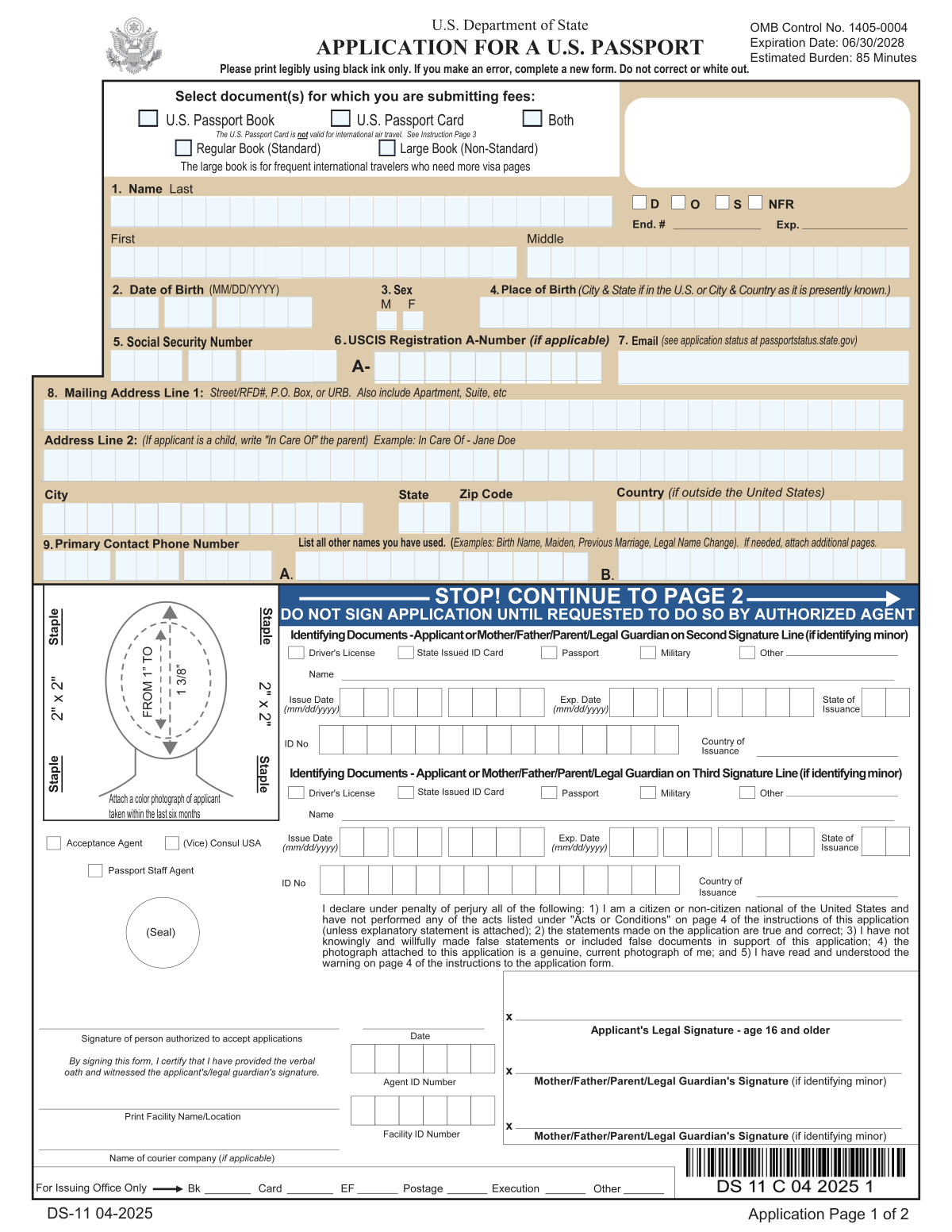
Form DS-11, APPLICATION FOR A U.S. PASSPORT, page 1
Moderate · 58/100Form Complexity Index

The AI does the filling. You just check it.

No typing into boxes, nothing to install.

Tell the AI about youAnswer a few questions in plain words, or upload a document you already have. That is all the typing there is.
AI fills every field in secondsIt puts each answer in the right box on every page, tables and checkboxes included.
Check it and downloadReview every field, change anything, then download, print or sign the PDF.

What this form asks for

The AI fills all of it, from your answers or your documents.

Form DS-11 is the application for a U.S. passport. It is used by U.S. citizens and non-citizen nationals to apply for a passport in person. Filling out this form is crucial for obtaining a passport, which serves as a travel document and proof of identity.
Fillable fields105
Pages6
Sections22
Tables and lists1
Form Complexity IndexModerate, 58/100

The AI checks your answers before you download

15 checks built for this form, so a wrong date or a missing answer is caught before anyone else sees it.

Eligibility Confirmation

Ensures that the applicant meets one of the eligibility criteria to use form DS-11, such as applying for the first time, being under age 16, or having a previous passport issued under certain conditions. This check is crucial to prevent ineligible applications from being processed.

Unsigned Form Check

Verifies that the applicant has completed form DS-11 but has not signed it prior to the authorization by an agent. This is important as premature signing may invalidate the form, requiring the applicant to complete a new form.

Photograph Attachment Verification

Confirms that a color photograph of the specified size (2x2 inches) is attached to the application. This check ensures compliance with the photograph requirements for a U.S. passport application.

Supporting Documents Attachment

Checks for the inclusion of required supporting documents such as proof of U.S. citizenship and proof of identity. This is essential as missing documents can lead to delays or rejection of the application.

Appointment Scheduling Confirmation

Ensures that the applicant has scheduled an appointment to apply in person at an authorized facility. This check is necessary because DS-11 forms must be submitted in person.

Personal Information Accuracy

Verifies the accuracy of personal information entered in the form, such as name, date of birth, gender marker, place of birth, and Social Security Number. Accurate information is vital for the issuance of a valid passport.

And 9 more checks
  • Parental Relationship and Consent for Minors
  • Fee Payment Verification
  • Application Submission Method
  • Passport Book and Card Differences Awareness
  • False Information Warning Acknowledgment
  • Privacy Act Statement Understanding
  • Paperwork Reduction Act Statement Comprehension
  • Application Status Tracking Information
  • Receipt of Passport and Documents

Let AI fill out your Form DS-11

No typing. Every field filled in seconds, checked, ready to sign.

7 days free, then $19.99/month · Cancel anytime

How to Fill Out Form DS-11 Online for Free in 2026

What the AI walks you through.

  1. Visit instafill.ai site and select DS-11.
  2. Complete the form with accurate information.
  3. Attach required documents and a passport photo.
  4. Schedule an appointment for in-person submission.
  5. Sign the form in front of an authorized agent.
  6. Check for accuracy and submit the form.

Common Mistakes in Completing Form DS-11

The ones the AI is built to catch.

Signing Form DS-11 Before Appointment
Applicants often mistakenly sign the DS-11 form before their appointment. The form should only be signed in the presence of an authorized agent to ensure the oath is taken correctly. To avoid this, read the instructions carefully and remember that the signature must be done at the time of the appointment, not beforehand.
Incorrect Photo Size or Quality
A common error is attaching a photograph that does not meet the specified 2x2 inches requirement or is of poor quality. Ensure the photo is recent, in color, and adheres to the guidelines provided. Use a professional passport photo service to avoid issues with photo quality and size.
Incomplete Supporting Documents
Applicants sometimes forget to include all required supporting documents, such as proof of U.S. citizenship or identity. Double-check the list of necessary documents and gather them before your appointment. Make sure they are originals or certified copies, as photocopies are not accepted.
Incorrect Personal Information
Filling in personal details incorrectly, such as name, date of birth, or Social Security Number, can lead to processing delays. Review each item carefully, and ensure the information matches your supporting documents. Pay special attention to the date format MM/DD/YYYY.
Applying with Expired Eligibility
Some applicants use form DS-11 when they are not eligible, such as those with a recently expired passport. Confirm your eligibility for using DS-11 by reviewing the criteria before starting the application process. If you do not meet the requirements, use the appropriate renewal form.
Missing Parental Consent for Minors
For applicants under 16, or those aged 16 and 17, failing to provide parental consent or awareness can result in application rejection. Ensure that all necessary consent forms are completed and accompany the application. Check the specific requirements for minors on the State Department's website.
Incorrect Fee Payment
Paying the wrong fee amount or using an unacceptable payment method can cause delays. Verify the current fees for the service you require and follow the instructions for payment. Remember that fees may vary based on the processing speed and the type of passport service you need.
Choosing Wrong Passport Type
Applicants sometimes do not understand the difference between a passport book and card. Decide which type is appropriate for your travel needs, as the passport card is limited to land and sea travel between the U.S. and certain locations. If in doubt, the passport book is the more versatile option.
Not Tracking Application Status
Failing to track the application status can lead to uncertainty about the processing time. Use the provided website, Passportstatus.state.gov, to monitor your application's progress. This can help manage your expectations and plan accordingly for your travel.
Providing False Information
Knowingly providing false information on a passport application is a serious offense. Read the warnings carefully and ensure all information is accurate and truthful. False statements can lead to fines, imprisonment, or denial of passport privileges.

Frequently Asked Questions About Form DS-11


Is it really free for 7 days?
Yes. You pay $0 today. Cancel before Nov 11 and you are never charged. Keep it, and it is $19.99 a month for 5 fills of your Form DS-11.
Can I fill other forms too?
This plan is for your Form DS-11: your own AI agent fills it as often as 5 times a month. To fill other forms and upload your own, choose a Professional plan from your account.
How do I cancel?
From your account, in two clicks, any time. No email, no call.
How does the AI fill out Form DS-11?
You answer a few questions in plain words, or upload a document you already have. The AI reads what you give it and puts each answer into the right field of Form DS-11, on every page, in seconds. It checks the answers against the form's own rules, and you review and change anything before you download, print or sign.
What happens to my information?
It is encrypted in transit and at rest, and it is never used to train AI.
How complex is Form DS-11 to fill out?
Form DS-11 has a Form Complexity Index of 58 out of 100, in the moderate tier: 105 fillable fields across 6 pages. Instafill.ai's AI fills it in under a minute, with every field there for you to review before you download.
What is the DS-11 form used for?
The DS-11 form is used to apply for a U.S. passport book and/or card in person at an acceptance facility, a passport agency (by appointment only), or a U.S. embassy, consulate, or consular agency (if abroad).
Who is eligible to use the DS-11 form?
You are eligible to use the DS-11 form if you are applying for your first U.S. passport, are under age 16, or if your previous U.S. passport was issued when you were under age 16, issued more than 15 years ago, or if it was lost, stolen, or damaged.
What are the steps to apply for a U.S. passport using the DS-11 form?
To apply for a U.S. passport using the DS-11 form, complete the form without signing it, attach one color photograph and supporting documents, schedule an appointment to apply in person, present the completed form and attachments to the authorized agent, track the application status online, and receive the new passport and original supporting documents.
What documents are required as proof of U.S. citizenship when applying with the DS-11 form?
Proof of U.S. citizenship can include a U.S. birth certificate, a fully valid, undamaged U.S. passport (may be expired), Consular Report of Birth Abroad or Certification of Birth Abroad, Certificate of Naturalization, or Citizenship. Secondary documents may be required if the primary documents are not available.
What identification is needed when submitting the DS-11 form?
You need to present original identification and submit a photocopy of it with the DS-11 form. Acceptable identification includes a driver's license, previous or current U.S. passport book/card, military identification, or Certificate of Naturalization or Citizenship.
What are the photo requirements for the DS-11 passport application?
The photo must be a recent color photograph, 2x2 inches in size, taken less than six months ago, with the head measuring 1-1 3/8 inches from the bottom of the chin to the top of the head, facing the camera directly with full face in view, printed on matte or glossy photo quality paper, and using a plain white or off-white background.
How can I check the status of my passport application after submitting the DS-11 form?
You can track the application status online at Passportstatus.state.gov.
What are the fees associated with the DS-11 passport application?
Passport service fees are established by law and regulation and are collected at the time you apply for the passport service. The fees are non-refundable. Payment methods and specific fees can be found at travel.state.gov/passportfees.
What should applicants under age 16 provide when applying with the DS-11 form?
Applicants under age 16 must appear in person with their parent(s) or legal guardian(s) and provide evidence of the child's relationship to the parent(s)/guardian(s), such as a birth certificate or Consular Report of Birth Abroad, and the parent(s)/guardian(s) government-issued photo identification.
What should applicants ages 16 and 17 be aware of when applying with the DS-11 form?
Applicants ages 16 and 17 should be aware that at least one of their parent(s) or legal guardian(s) must know that they are applying for a U.S. passport. The passport authorizing officer may request the consent of a legal parent/legal guardian to issue a U.S. passport.
Encrypted in transit and at restNever used to train AIDelete your forms any time

Get your Form DS-11 filled out by AI

$0 today. Cancel before Nov 11 and you pay nothing.

7 days free, then $19.99/month · Cancel anytime