
Instafill.ai
7 days free
AI form filling · 23 fields · 1 page · done in seconds

Yes! You can use AI to fill out W-9, Request for Taxpayer Identification Number and Certification

Don't type 23 fields by hand. Tell our AI about yourself, or upload your W-2 or last year's return, and it fills every field in seconds. You check it, then download, print or sign.
7 days free, then $19.99/month · Cancel anytime
AI fills it, no typingEncrypted, never used to train AICancel in two clicks
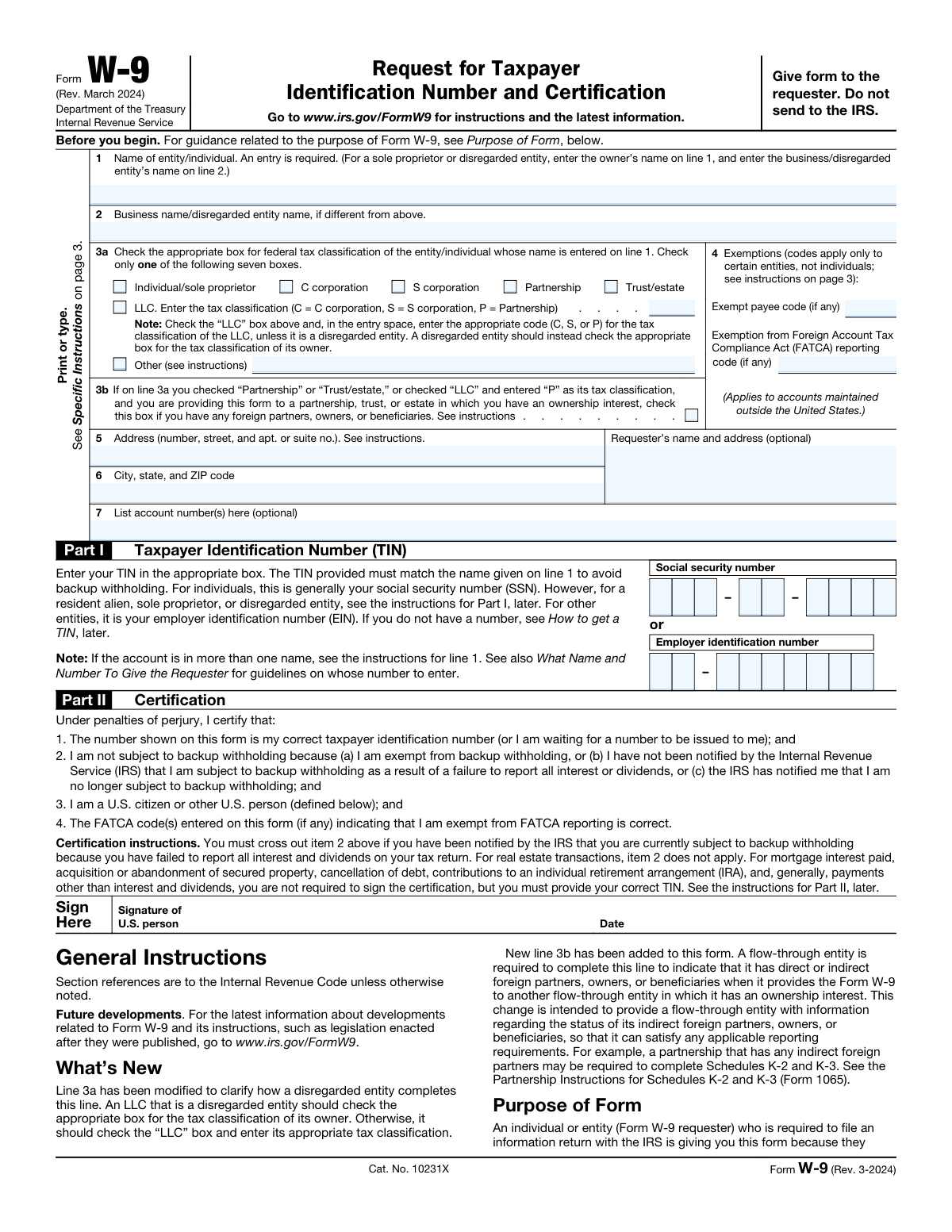
W-9, Request for Taxpayer Identification Number and Certification, page 1
Basic · 39/100Form Complexity Index

The AI does the filling. You just check it.

No typing into boxes, nothing to install.

Tell the AI about youAnswer a few questions in plain words, or upload your W-2 or last year's return. That is all the typing there is.
AI fills every field in secondsIt puts each answer in the right box on every page, checkboxes included.
Check it and downloadReview every field, change anything, then download, print or sign the PDF.

What this form asks for

The AI fills all of it, from your answers or your documents.

Form W-9, also known as the Request for Taxpayer Identification Number and Certification, is an IRS document used to collect information from individuals and businesses for tax reporting purposes. Whether you're an independent contractor, freelancer, or business owner, knowing how to fill out a W-9 correctly is crucial for your tax compliance.
Fillable fields23
Pages1
Sections8
Questions that depend on earlier answers4
Form Complexity IndexBasic, 39/100

The AI checks your answers before you download

10 checks built for this form, so a wrong date or a missing answer is caught before anyone else sees it.

Form Version Accuracy

Ensures the most recent version of Form W-9 is used, incorporating the latest IRS updates and guidelines.

Complete Field Verification

Automatically detects and alerts if any required fields are left blank, ensuring no critical information is missing from the form.

Taxpayer Identification Number (TIN) Validation

Confirms the correct format and accuracy of the TIN against IRS records, crucial for preventing mismatches and potential penalties.<br>Validates the structure and issuance status of SSNs, EINs, ITINs, or ATINs, enhancing accuracy in taxpayer identification.

Name and TIN Consistency

Ensures that the name on the form matches the name associated with the provided TIN in IRS records, a critical step for accurate tax reporting.

Federal Tax Classification Checks

Verifies that the tax classification selected aligns with the entity’s legal structure as per IRS documentation, avoiding common classification errors.<br>Ensures only one appropriate tax classification is selected, enhancing form accuracy.

Exemption Claims Verification

Confirms valid claims for exemptions from backup withholding and FATCA reporting by cross-referencing with IRS exemption criteria.<br>Checks for compliance in backup withholding status and FATCA reporting, essential for entities engaged in international financial activities.

And 4 more checks
  • Foreign Status Disclosure
  • Signature and Date Validation
  • Cross-Field Consistency Analysis
  • Change Detection and Update Prompting

Let AI fill out your IRS Form W-9

No typing. Every field filled in seconds, checked, ready to sign.

7 days free, then $19.99/month · Cancel anytime

How to Fill Out IRS Form W-9 Online for Free in 2026

What the AI walks you through.

  1. Visit Instafill.ai and select the W-9 form for 2024.
  2. Enter your personal or business information accurately.
  3. Choose the correct federal tax classification.
  4. Provide your Taxpayer Identification Number (TIN).
  5. Sign and date the form electronically.
  6. Review for accuracy and submit.

Common Mistakes in Completing IRS Form W-9

The ones the AI is built to catch.

Incorrectly Filling the Name
Providing a TIN that is incorrectly formatted (e.g., wrong number of digits or structure).<br>Using a TIN that does not match the IRS records for the name listed on the form, leading to mismatches and processing delays.
Name Discrepancies
Failing to use the legal name as it appears in IRS records, especially for entities or individuals with name changes that have not been updated with the IRS.<br>For joint accounts, not listing the name of the individual or entity whose TIN is provided.
Improper Federal Tax Classification
Selecting more than one classification or the wrong classification for the entity’s legal structure.<br>Misunderstanding the classification of LLCs, leading to incorrect tax treatment.
Inaccurate Exemption Codes
Claiming exemption from backup withholding without meeting the criteria, often due to a lack of understanding of the exemption rules.<br>Incorrectly entering FATCA codes, or failing to enter any when required, which can lead to compliance issues.
Failure to Indicate Foreign Status
Neglecting to check the box on Line 3b when applicable, which is crucial for entities with foreign partners, owners, or beneficiaries.<br>Overlooking required additional documentation for foreign entities, leading to incomplete or non-compliant submissions.
Omission of Signature and Date
Submitting the form without the necessary signature, which certifies the accuracy of the information and compliance with IRS requirements.<br>Forgetting to date the signature, which is important for validating the timeliness and relevance of the form’s information.
Address and Contact Information Errors
Providing outdated or incorrect address details, which can cause issues with correspondence and information returns.<br>Not updating the form when there are significant changes to contact information or business status.
Misunderstanding Entity Types
Misclassifying the nature of the entity (e.g., disregarded entity vs. separate entity) which affects how income and taxes are reported.<br>Sole proprietors not properly identifying their business name along with their personal name.
Incomplete Updates for Changes
Not resubmitting the form when there are changes in tax status, such as a corporation changing to an S corporation.<br>Failing to notify requesters of changes in exemption status, which can lead to incorrect withholding and reporting.

Frequently Asked Questions About IRS Form W-9


Is it really free for 7 days?
Yes. You pay $0 today. Cancel before Nov 22 and you are never charged. Keep it, and it is $19.99 a month for 5 fills of your IRS Form W-9.
Can I fill other forms too?
This plan is for your IRS Form W-9: your own AI agent fills it as often as 5 times a month. To fill other forms and upload your own, choose a Professional plan from your account.
How do I cancel?
From your account, in two clicks, any time. No email, no call.
How does the AI fill out IRS Form W-9?
You answer a few questions in plain words, or upload your W-2 or last year's return. The AI reads what you give it and puts each answer into the right field of IRS Form W-9, on every page, in seconds. It checks the answers against the form's own rules, and you review and change anything before you download, print or sign.
What happens to my information?
It is encrypted in transit and at rest, and it is never used to train AI.
How complex is IRS Form W-9 to fill out?
IRS Form W-9 has a Form Complexity Index of 39 out of 100, in the basic tier: 23 fillable fields across 1 page. Instafill.ai's AI fills it in under a minute, with every field there for you to review before you download.
What is a W-9 form and why do I need to fill it out?
A W-9 form, officially known as the "Request for Taxpayer Identification Number and Certification," is an IRS document used to gather information from individuals and entities for tax reporting purposes. You may need to fill out a W-9 if you're an independent contractor, freelancer, or vendor providing services to a business. The form helps the paying entity report payments made to you to the IRS.
How do I fill out a W-9 form online for free?
You can fill out a W-9 form online for free using Instafill.ai. Our platform provides a user-friendly interface that guides you through each field, ensuring accuracy and compliance. Simply visit our website, select the W-9 form, and follow the prompts to complete your form in minutes.
Is there a fillable W-9 form available for 2024?
Yes, Instafill.ai offers a free fillable W-9 form for 2024. Our system always uses the most up-to-date version of the form, incorporating any changes made by the IRS. This ensures that you're always using the correct and most recent version of the W-9.
How do I fill out a W-9 for my LLC?
When filling out a W-9 for an LLC, pay special attention to the federal tax classification section. Here's a quick guide:
  • Enter the LLC's name on the "Name" line.
  • On the "Business name/disregarded entity name" line, enter the LLC's name if it's different from the name on the "Name" line.
  • For the tax classification, check the appropriate box:
    • If your LLC is a single-member LLC, check "Individual/sole proprietor or single-member LLC."
    • If your LLC is treated as a partnership for tax purposes, check "Limited Liability Company" and enter "P" for partnership.
    • If your LLC has elected to be taxed as a corporation, check "Limited Liability Company" and enter "C" for C corporation or "S" for S corporation.
Instafill.ai's smart form-filling system can guide you through this process to ensure you select the correct classification for your LLC.
Can I fill out a W-9 form as an employee?
Generally, employees don't need to fill out W-9 forms. Employees typically complete a W-4 form instead. However, if you're an independent contractor, freelancer, or providing services to a company outside of a traditional employment relationship, you'll need to complete a W-9. If you're unsure about your status, consult with the company requesting the form or a tax professional.
What information do I need to fill out a W-9?
To fill out a W-9, you'll need the following information:
  • Your full name (as shown on your tax return)
  • Business name/disregarded entity name (if applicable)
  • Federal tax classification
  • Address (including city, state, and ZIP code)
  • Taxpayer Identification Number (TIN) - either your Social Security Number (SSN) or Employer Identification Number (EIN)
Instafill.ai's system will prompt you for all necessary information, ensuring you don't miss any crucial details.
How often do I need to update my W-9?
You should submit a new W-9 form whenever your information changes. This includes changes to your:
  • Name
  • Business name
  • Address
  • Tax identification number
  • Federal tax classification
Additionally, some companies may request an updated W-9 annually to ensure they have the most current information on file.
Is it safe to fill out a W-9 online?
When using a reputable service like Instafill.ai, filling out a W-9 online is safe and secure. We use bank-level encryption to protect your personal information. However, be cautious about sharing your W-9 information through unsecured channels like email or unfamiliar websites.
What's the difference between a W-9 and a 1099 form?
A W-9 is a form you fill out to provide your information to a company that's paying you. A 1099 form is what that company sends to you (and the IRS) at the end of the year to report how much they paid you. The W-9 helps the company prepare the 1099 accurately.
Can I use a fillable W-9 PDF instead of an online form?
Yes, the IRS provides a fillable W-9 PDF. However, using an online system like Instafill.ai offers several advantages:
  • Automatic updates to the latest form version
  • Built-in error checking and validation
  • Faster completion time
  • Secure electronic storage of your information for future use
What if I make a mistake on my W-9 form?
If you realize you've made a mistake on your W-9 after submitting it, you should fill out a new form with the correct information as soon as possible. With Instafill.ai, you can easily create a new, accurate W-9 and submit it to replace the incorrect one.
Do I need to sign the W-9 form?
Yes, you must sign the W-9 form to certify that the information you've provided is correct. When using Instafill.ai, you can sign the form electronically, making the process quick and convenient.
How long does it take to fill out a W-9 form?
With Instafill.ai, most users complete their W-9 form in 37 seconds or less. Our intuitive interface and AI-powered assistance streamline the process, saving you time and ensuring accuracy.
Encrypted in transit and at restNever used to train AIDelete your forms any time

Get your IRS Form W-9 filled out by AI

$0 today. Cancel before Nov 22 and you pay nothing.

7 days free, then $19.99/month · Cancel anytime